다음 옵션을 사용하여 MongoDB Shell의 다양한 측면을 보고 제어합니다.
일반 옵션
--build-infoJSON 형식의 문서와
mongosh빌드 및 드라이버 종속성에 대한 정보를 반환합니다.예시: 빌드 정보 보기
터미널에서 다음 명령을 실행하여
mongosh바이너리의 빌드 정보 및 드라이버 종속성을 확인할 수 있습니다:mongosh --build-info 이 명령은 다음과 같은 JSON 형식의 문서를 반환합니다.
{ version: '1.10.1', distributionKind: 'packaged', buildArch: 'x64', buildPlatform: 'linux', buildTarget: 'unknown', buildTime: '2023-06-21T09:49:37.225Z', gitVersion: '05ad91b4dd40382a13f27abe1ae8c3f9f52a38f7', nodeVersion: 'v16.20.1', opensslVersion: '3.1.1', sharedOpenssl: true, runtimeArch: 'x64', runtimePlatform: 'darwin', deps: { nodeDriverVersion: '5.6.0' } }
--eval <javascript>JavaScript 표현식을 평가합니다. 단일
--eval인수를 사용하거나 여러 개의--eval인수를 함께 사용할 수 있습니다.mongosh는 인수를 평가한 후--eval결과를 명령줄에 인쇄합니다.--eval성명서를 여러 개 사용하는 경우mongosh는 마지막--eval결과만 인쇄합니다.--eval과 함께--json플래그를 사용하여 확장 JSON 형식으로mongosh결과를 반환할 수 있습니다.mongosh는--json=canonical및--json=relaxed모드를 모두 지원합니다. 모드를 생략하면mongosh기본값은canonical모드입니다.--json플래그는--shell과 상호 배타적입니다.예시: 형식 출력
자동 구문 분석에 적합한 출력을 얻으려면
EJSON.stringify()를 사용합니다.mongosh --quiet --host rs0/centos1104 --port 27500 \ --eval "EJSON.stringify(rs.status().members.map( \ m => ({'id':m._id, 'name':m.name, 'stateStr':m.stateStr})));" \ | jq jq로 구문 분석을 수행하면 다음과 같은 결과가 표시됩니다.[ { "id": 0, "name": "centos1104:27500", "stateStr": "PRIMARY" }, { "id": 1, "name": "centos1104:27502", "stateStr": "SECONDARY" }, { "id": 2, "name": "centos1104:27503", "stateStr": "SECONDARY" } ] 참고
EJSON에는 서식 지정 옵션이 내장되어jq와 같은 구문 분석기가 필요하지 않을 수 있습니다. 예를 들어, 다음 코드는 위와 동일한 형식의 결과를 생성합니다.mongosh --quiet --host rs0/centos1104 --port 27500 \ --eval "EJSON.stringify( rs.status().members.map( \ ({ _id, name, stateStr }) => ({ _id, name, stateStr })), null, 2);" 예: 다중 --eval 인수
moviesDatabase에서 컬렉션 목록을 확보하려면 여러--eval성명서를 사용합니다.mongosh --quiet \ --eval 'use moviesDatabase' \ --eval 'show collections' \ mongodb://localhost/ 예: --json 옵션
여러
--eval문을 사용하여 확장 JSON 형식으로 컬렉션의 통계를 반환하려면 다음을 수행합니다.mongosh --quiet --json=relaxed \ --eval 'use <database-name>' \ --eval 'db.<collection>.stats()' \ mongodb://localhost/
--file, -f <javascript>MongoDB Shell 콘솔에 들어가지 않고 명령줄에서 스크립트를 실행합니다.
자세한 내용과 예제는 명령줄에서 스크립트 실행을 참조합니다.
--no-quiet비대화 셸 세션에 대해 기본값 옵션 모드 를 비활성화합니다. 이
--quietmongosh옵션을 지정하면 가 스타트업 시 모든 메시지를 표시합니다.
--norc시작 시 셸의
~/.mongoshrc.js소싱 및 평가를 방지합니다.--norc또한snippet install명령으로 설치한 스니펫이 shell에 로드되지 않도록 합니다. 대신snippet load-all명령을 사용하여 스니펫을 로드할 수 있습니다. 자세한 내용은 스니펫 명령을 참조하세요.
--quiet시작할 때 모든 메시지(예: 환영 메시지 및 시작 경고)를 건너뛰고 프롬프트로 바로 이동합니다.
비대화 셸 세션의 경우 MongoDB 기본값 으로 를
--quiet활성화합니다.--no-quiet을(를) 사용하여 이 동작을 비활성화할 수 있습니다.
--skipStartupWarnings세션을
mongosh생성할 때 가 서버 스타트업 경고를 표시하지 않도록 합니다. 모든 스타트업 메시지를 표시하지 않으려면 옵션을--quiet사용합니다.
Stable API 옵션
--apiVersion <version number>apiVersion을
"1"지정합니다. 현재로서는 가 유일하게 지원되는 값입니다.
--apiStrict애플리케이션이 Stable API 외부의 명령이나 동작을 사용하는 경우 서버가 APIStrictError 로 응답하도록 지정합니다.
--apiVersion를--apiStrict지정하는 경우 도 지정해야 합니다.
--apiDeprecationErrors애플리케이션 지정된 에서 더 이상 사용되지 않는 명령이나 동작을 사용하는 경우 서버 APIDeprecationError로 응답하도록 지정합니다.
apiVersion--apiVersion를--apiDeprecationErrors지정하는 경우 도 지정해야 합니다.
연결 옵션
--host <hostname>mongod또는mongos가 실행 중인 호스트 머신의 이름을 지정합니다. 지정하지 않으면 MongoDB Shell은 localhost에서 실행 중인 MongoDB 프로세스에 연결을 시도합니다.- 다음을 수행하여 복제본 세트에 연결합니다.
및 설정하다 멤버의 시드 목록 지정합니다. 다음 양식을 사용합니다.
replica set name<replSetName>/<hostname1><:port>,<hostname2><:port>,<...> - TLS/SSL 연결의 경우(
--tls), - MongoDB Shell은 호스트 이름(
--host옵션 또는 연결 문자열에서 지정)이mongod또는mongos에서 제시하는 인증서의SAN(SAN이 없는 경우CN)과 일치하는지 확인합니다.SAN이 있는 경우 MongoDB Shell은CN와 일치하지 않습니다. 호스트 이름이SAN(또는CN)과 일치하지 않으면 MongoDB Shell 연결에 실패합니다.
- DNS 시드 목록 연결의 경우,
연결 프로토콜
mongodb+srv(으)로 지정하고 그 뒤에 DNS SRV 호스트 이름 기록 과 옵션을 지정합니다.authSource및replicaSet옵션이 연결 문자열 에 포함된 경우, TXT 기록 에 설정하다 해당 DNS 구성 옵션을 재정의합니다.mongodb+srv:연결 문자열 사용하면 클라이언트 연결에 TLS(일반적으로tls=true로 설정하다 )가 암시적으로 활성화됩니다. 쿼리 문자열에서tls=false을 설정하여 TLS 옵션을 해제할 수 있습니다.예시
mongodb+srv://server.example.com/?connectionTimeoutMS=3000
--port <port>또는 인스턴스 수신 대기 중인 포트를
mongodmongos지정합니다. 를--port지정하지 않으면 MongoDB Shell 포트27017에 연결을 시도합니다.
TLS 옵션
--tlsCertificateKeyFile <filename>Specifies the
.pemfile that contains both the TLS certificate and key formongosh. Specify the file name of the.pemfile using relative or absolute paths.이 옵션은
--tls옵션을 사용하여 클라이언트mongod인증서가mongos필요한 또는 인스턴스 에 연결할 때 필요합니다. 즉, MongoDB Shell 이 인증서를 서버 에 제공합니다.참고
버전 부터 4.4
mongod/ 는mongos제시된 X.509 인증서가30mongod/mongos호스팅하다 시스템 시간으로부터 일 이내에 만료되는 경우 연결 시 경고를 기록합니다.TLS/SSL 및 MongoDB에 대해 자세히 알아보려면 다음을 참조하세요.
--tlsCertificateKeyFilePassword <value>인증서-키 파일 해독을 위한 비밀번호를 지정합니다(예:
--tlsCertificateKeyFile).인증서 키 파일이 암호화된 경우에만
--tlsCertificateKeyFilePassword옵션을 사용합니다. MongoDB Shell은 언제나 모든 기록 및 보고 결과에서 암호를 삭제합니다.PEM 파일 의 개인 키가 암호화됨 있고 옵션을 지정하지 않은
--tlsCertificateKeyFilePassword경우, MongoDB Shell 암호를 입력하라는 메시지가 표시됩니다.TLS/SSL 인증서 암호를 참조하세요.
TLS/SSL 및 MongoDB에 대해 자세히 알아보려면 다음을 참조하세요.
--tlsCAFile <filename>인증 기관의 루트 인증서 체인이 포함된
.pem파일을 지정합니다. 이 파일은mongod/mongos인스턴스에서 제공한 인증서의 유효성을 검사하는 데 사용됩니다.상대 경로 또는 절대 경로를 사용해
.pem파일의 이름을 지정합니다.TLS/SSL 및 MongoDB에 대해 자세히 알아보려면 다음을 참조하세요.
--tlsCRLFile <filename>인증서 해지 목록이 포함된
.pem파일을 지정합니다. 상대 경로 또는 절대 경로를.pem파일의 이름을 지정합니다.TLS/SSL 및 MongoDB에 대해 자세히 알아보려면 다음을 참조하세요.
--tlsAllowInvalidHostnames/
mongod인스턴스 에서 제공하는 인증서의 호스트 이름mongos유효성 검사 비활성화합니다. 서버 인증서의 호스트 이름이 서버의 호스팅하다 일치하지 않더라도 MongoDB Shell MongoDB 인스턴스에 연결할 수 있도록 허용합니다.TLS/SSL 및 MongoDB에 대해 자세히 알아보려면 다음을 참조하세요.
--tlsAllowInvalidCertificates버전 4.2에 추가 되었습니다.
/ 인스턴스
mongod에서 제공하는 인증서에mongos대한 유효성 검사 검사를 우회하고 유효하지 않은 인증서를 제공하는 서버에 대한 연결을 허용합니다.참고
MongoDB 4.0부터 x.509 인증 사용할 때
--tlsAllowInvalidCertificates를 지정하면 유효하지 않은 인증서는 TLS 연결을 설정하는 데에는 충분하지만, 인증 에는 충분하지 않습니다.경고
옵션은 사용할 수 있는 경우에도
--tlsAllowInvalidCertificates가급적 사용하지 않는 것이--tlsAllowInvalidCertificates좋습니다. 를 사용해야 하는 경우, 침입이 불가능한 시스템에서만 이 옵션을 사용하세요.MongoDB Shell 셸 (및 기타 TLS 지원 복제본 세트에 연결)이
--tlsAllowInvalidCertificates옵션으로 실행되는 경우, 셸 (및 기타 TLS 지원 복제본 세트에 연결)은 서버 인증서의 유효성 검사를 시도하지 않습니다. 이로 인해 만료된mongod및mongos인증서는 물론 유효한mongod또는mongos인스턴스로 가장하는 외부 프로세스에 대한 취약성이 발생합니다. TLS 인증서에서 호스트 이름 유효성 검사 검사만 비활성화해야 하는 경우--tlsAllowInvalidHostnames을 참조하세요.TLS/SSL 및 MongoDB에 대해 자세히 알아보려면 다음을 참조하세요.
--tlsCertificateSelector <parameter>=<value>Windows 및 macOS에서
--tlsCertificateKeyFile의 대안으로 사용할 수 있습니다.중요
Windows 및 개인 키 가져오기
개인 키를 가져올 때는 내보내기 가능으로 표시해야 합니다. Windows 인증서 가져오기 마법사는 이 옵션을 기본으로 선택하지 않습니다.
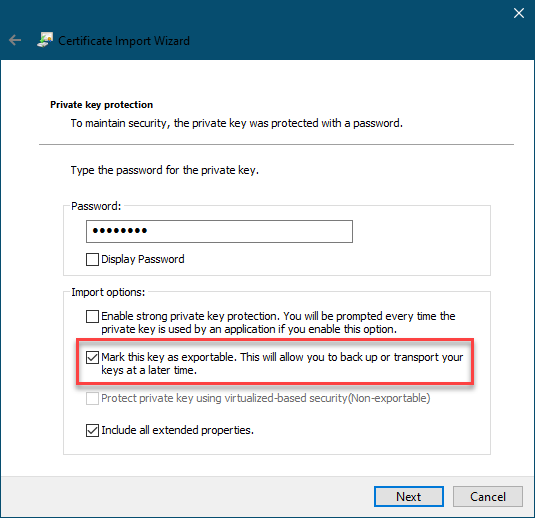
--tlsCertificateKeyFile--tlsCertificateSelector옵션과 옵션은 상호 배타적입니다. 하나만 지정할 수 있습니다.운영 체제의 인증서 저장소에서 일치하는 인증서를 선택하기 위해 인증서 속성을 지정합니다.
--tlsCertificateSelector는 형식의 인수를<property>=<value>허용하며, 여기서 속성 다음 중 하나일 수 있습니다.속성값 유형설명subjectASCII 문자열
인증서의 주체 이름 또는 일반 이름
thumbprint16진수 문자열
16진수로 표현되는 일련의 바이트로, SHA-1 다이제스트로 공개 키를 식별하는 데 사용됩니다.
thumbprint을(를)fingerprint(이)라고 부르기도 합니다.시스템 SSL 인증서 저장소를 사용할 때 온라인 인증서 상태 프로토콜(OCSP)을 사용해 인증서의 해지 상태를 확인할 수 있습니다.
--tlsDisabledProtocols <string>지정된 TLS 프로토콜을 비활성화합니다. 이 옵션은 다음 프로토콜을 인식합니다.
TLS1_0TLS1_1TLS1_2(버전 4.0.4, 3.6.9, 3.4.24부터)
TLS1_3macOS에서는
TLS1_1은 비활성화하고TLS1_0와TLS1_2가 모두 활성화된 상태를 유지할 수 없습니다. 예를 들어,TLS1_0,TLS1_1처럼 다른 2개의 프로토콜 중 하나 이상을 비활성화해야 합니다.여러 프로토콜을 나열하려면 쉼표로 구분된 프로토콜 목록으로 지정합니다( 예시:
TLS1_0,TLS1_1).지정된 비활성화 프로토콜은 기본으로 설정된 비활성화 프로토콜을 덮어씁니다.
버전 4.0 부터 MongoDB 시스템에서 TLS 1.0 1.1+를 사용할 수 있는 경우 TLS 사용을 비활성화합니다. 비활성화된 TLS 을 활성화 1.0 하려면
none을(를)(으)로--tlsDisabledProtocols지정합니다.
--tlsUseSystemCAmongosh셸 에 인증서를 명시적으로 지정하지 않고도 운영 체제의 인증 기관에서 이미 사용 가능한 TLS 인증서를 로드할 수 있습니다. 이 동작은 해제할 수 없습니다. 이전 버전과의--tlsUseSystemCA호환성을 위해 을 계속 설정하다 수 있지만 아무런 효과가 없습니다.참고
이 플래그는 MongoDB 연결과 OIDC 자격 증명 공급자 연결 모두에 적용됩니다.
인증 옵션
--authenticationDatabase <dbname>지정된 가 생성된
--username인증 데이터베이스 지정합니다. 인증 데이터베이스를 참조하세요.값을 지정하지 않으면 MongoDB Shell 연결 문자열 에 지정된 데이터베이스
--authenticationDatabase사용합니다.
--authenticationMechanism <name>MongoDB Shell
mongod또는mongos에 인증하는 데 사용하는 인증 메커니즘 을 지정합니다.authenticationMechanism을(를) 지정하지 않고 사용자 자격 증명 제공하는 경우, MongoDB Shell 및 드라이버는 SCRAM-SHA-256 사용을 시도합니다. 이 작업이 실패하면 SCRAM-SHA-1로 돌아갑니다.값설명SHA- 해시 함수를 사용하는RFC 표준 솔티드 챌린지 응답 인증 메커니즘.5802 1
SHA- 해시 함수를 사용하는RFC 표준 솔티드 챌린지 응답 인증 메커니즘.7677 256
featureCompatibilityVersion이
4.0으로 설정되어야 합니다.MongoDB TLS 인증서 인증.
GSSAPI (Kerberos)
Kerberos를 사용한 외부 인증. 이 메커니즘은 MongoDB Enterprise에서만 사용할 수 있습니다.
PLAIN (LDAP SASL)
LDAP 사용한 외부 인증 .
PLAIN을(를) 사용하여 데이터베이스 내 사용자를 인증할 수도 있습니다.PLAIN은(는) 비밀번호를 일반 텍스트로 전송합니다. 이 메커니즘은 MongoDB 엔터프라이즈 및 MongoDB Atlas 에서 사용할 수 있습니다.MONGODB-OIDC (OpenID Connect)
OpenID Connect를 사용한 외부 인증 . 이 메커니즘은 MongoDB 엔터프라이즈 및 MongoDB Atlas 에서 사용할 수 있습니다.
MONGODB-AWS(Amazon Web Services IAM)Amazon Web Services Identity and Access Management(Amazon Web Services IAM) 자격 증명 사용한 외부 인증 . 이 메커니즘은 MongoDB 엔터프라이즈 및 MongoDB Atlas 에서 사용할 수 있습니다.
--gssapiServiceNameGSSAPI/ Kerberos 사용하여 서비스 이름을 지정합니다. 서비스가 기본값 이름인
mongodb를 사용하지 않는 경우에만 필요합니다.이 옵션은 MongoDB Enterprise에서만 사용할 수 있습니다.
--sspiHostnameCanonicalization <string>호스트 이름 표준화 사용 여부를 지정합니다.
는 연결 문자열 의 부분에서
authMechanismProperties키 쌍을--sspiHostnameCanonicalization설정하는 것과 동일한 효과가 있습니다.CANONICALIZE_HOST_NAME:true|false가 다음으로 설정하다
--sspiHostnameCanonicalization경우:forwardAndReverse정방향 DNS 조회를 수행한 다음 역방향 조회를 수행합니다.mongosh1.3.0에 추가되었습니다.forwardauthMechanismProperties=CANONICALIZE_HOST_NAME:true설정과 효과가 동일합니다.noneauthMechanismProperties=CANONICALIZE_HOST_NAME:false설정과 효과가 동일합니다.
--oidcFlowsOpenID Connect 흐름을 쉼표로 구분된 목록으로 지정합니다. OpenID Connect 흐름은 인증 프로세스를 위해
mongosh가 멱등과 상호 작용하는 방법을 지정합니다.mongosh는 다음 OpenID Connect 흐름을 지원합니다.OpenID 연결 흐름설명auth-code기본값.
mongosh를 클릭하면 브라우저가 열리고 멱등 로그인 화면으로 리디렉션됩니다.device-authmongosh는 인증을 완료하기 위한 URL과 코드를 제공합니다. 이는 보안성이 낮은 OpenID Connect 흐름으로 간주되지만mongosh가 브라우저를 열 수 없는 환경에서 실행될 때 사용할 수 있습니다device-auth를auth-code의 대체 옵션으로 설정하는 방법은 다음 예시에서 확인 가능합니다.mongosh 'mongodb://localhost/' --authenticationMechanism MONGODB-OIDC --oidcFlows=auth-code,device-auth
--oidcDumpTokensmongosh가 예비 디버깅 정보가 포함된 토큰을 출력할지 여부를 지정합니다. 이 옵션은 디버깅 용도로만 사용합니다.--oidcDumpTokens옵션은 다음과 같은 값을 허용합니다.값설명redacted--oidcDumpTokens만 설정할 때 기본값입니다. 민감한 정보가 삭제된 상태로 토큰 디버깅 정보를 출력합니다.include-secrets데이터베이스 서버에 인증할 수 있는 자격 증명을 포함하여 토큰 디버깅 정보를 출력합니다.
중요
include-secrets값은 공격자가 인증에 사용할 수 있는 자격 증명을 노출합니다. 권한이 없는 사람이mongosh의 출력을 볼 수 없고 진단 목적으로 자격 증명이 필요한 경우에만 이 옵션을 사용하세요.
--oidcIdTokenAsAccessTokenmongosh가 자격 증명 공급자로부터 받은 ID 토큰을 액세스 토큰 대신 사용하는지 여부를 지정합니다. JWT 액세스 토큰을 제공하도록 구성할 수 없는 자격 증명 공급자와 함께 이 옵션을 사용합니다.
--oidcNoNonce기본값으로
mongosh은 OIDC 권한 부여 코드 흐름 중에 논스 매개 변수를 전송합니다.--oidcNoNonce옵션을 설정하다 하면mongosh은 논스 매개변수를 전송하지 않습니다. 자격 증명 공급자 가 권한 부여 의 일부로 논스 값을 지원 하지 않는 경우 이 옵션을 사용합니다.
--oidcRedirectUri인증 후 멱등이 사용자를 리디렉션할 URI를 지정합니다. URI는 멱등의 구성과 일치해야 합니다. 기본값은
http://localhost:27097/redirect입니다.
--oidcTrustedEndpoint현재 연결이 Atlas 또는
localhost이(가) 아닌 신뢰할 수 있는 엔드포인트에 있음을 나타냅니다. 이렇게 하면 액세스 토큰이 서버 로 전송됩니다. 신뢰할 수 있는 서버에 연결할 때만 이 옵션을 사용합니다.
--browserMONGODB-OIDC가 활성화된 경우mongosh가 리디렉션하는 브라우저를 지정합니다.이 옵션은 시스템 셸에서 실행됩니다.
브라우저 열기를 완전히 비활성화하려면
--no-browser를 설정합니다.
--password <password>, -p <password>인증 사용하는 MongoDB database 에 인증하는 데 사용할 비밀번호를
--username지정합니다. 및 옵션과 함께 사용합니다.--authenticationDatabaseMongoDB Shell 비밀번호를 입력하라는 메시지를 표시하려면 마지막 옵션으로 옵션을 입력하고 인수를
--password생략합니다.
--username <username>, -u <username>인증 사용하는 MongoDB database 에 인증할 사용자 이름
--password지정합니다. 및 옵션과 함께 사용합니다.--authenticationDatabase
세션 옵션
--retryWrites재시도 가능 쓰기를 활성화합니다.
기본적으로 재시도 가능한 쓰기는 다음과 같습니다.
활성화됨
mongosh레거시
mongo셸에서 비활성화됨
재시도 가능 쓰기를 비활성화하려면
--retryWrites=false를 사용합니다.세션 정보는 클라이언트 세션 및 인과적 일관성 보장에서 확인하세요.
필드 레벨 암호화 옵션
--cryptSharedLibPath <string>버전 8.2에 추가 되었습니다.
자동 암호화 공유 라이브러리의 경로입니다. 라이브러리는 8 2버전이.. 이상이어야 합니다.0
mongosh셸 세션에 자동 암호화 사용하는 데 필요합니다.
--awsAccessKeyId <string>AWS 키 관리 서비스(KMS )에 대한
List및 권한이 있는 IAM 사용자와Readmongosh연결된 AWS 액세스 키입니다. 은(는) 지정된 을(를) 사용하여--awsAccessKeyIdKMS 에 액세스 .셸 세션에
mongosh대해 클라이언트 측--awsAccessKeyId--awsAccessKeyId필드 레벨 암호화 활성화 하려면 이(가) 필요합니다. 에는 다음 명령줄 옵션이 모두 필요합니다.--awsAccessKeyId가 생략된 경우 셸 세션 내에서 생성자를 사용하여 클라이언트 사이드 필드 수준 암호화 활성화Mongo().액세스 키가 로그에 유출될 위험을 줄이려면 환경 변수를 로 지정하는 것이
--awsAccessKeyId좋습니다.
--awsSecretAccessKey <string>지정된
--awsAccessKeyId에 연결된 AWS 비밀 키입니다.세션에
mongosh--awsSecretAccessKey대해 클라이언트 측--awsSecretAccessKey필드 레벨 암호화 활성화 하려면 이(가) 필요합니다. 에는 다음 명령줄 옵션이 모두 필요합니다.및
--awsSecretAccessKey지원 옵션이 생략된 경우 셸 세션 내에서 를 사용하여 클라이언트 사이드 필드 수준 암호화 활성화 .Mongo()액세스 키가 로그에 유출될 위험을 줄이려면 환경 변수를 로 지정하는 것이
--awsSecretAccessKey좋습니다.
--awsSessionToken <string>지정된 에
--awsAccessKeyId연결된 AWS 세션 토큰입니다.셸 세션에
mongosh대해 클라이언트 측--awsSessionToken--awsSessionToken필드 레벨 암호화 활성화 하려면 이(가) 필요합니다. 에는 다음 명령줄 옵션이 모두 필요합니다.및
--awsSessionToken지원 옵션이 생략된 경우 셸 세션 내에서 를 사용하여 클라이언트 사이드 필드 수준 암호화 활성화 .Mongo()액세스 키가 로그에 유출될 위험을 줄이려면 환경 변수를 로 지정하는 것이
--awsSessionToken좋습니다.
--keyVaultNamespace <string>클라이언트 측 필드 레벨 암호화의 키 저장소로 사용되는 컬렉션의 전체 네임스페이스(
<database>.<collection>)입니다. 셸--keyVaultNamespacemongosh세션에 대해 클라이언트 측 필드 레벨 암호화를 활성화하려면 가 필요합니다.mongosh가 지정된 네임스페이스가 없는 경우 이를 생성합니다.--keyVaultNamespace에는 다음 명령줄 옵션이 모두 필요합니다.및
--keyVaultNamespace지원 옵션이 생략된 경우 셸 세션 내에서 생성자를 사용하여 클라이언트 사이드 필드 수준 암호화 활성화 .Mongo()