A good indexing strategy is crucial to ensuring that your MongoDB database returns your results in the most efficient way possible. To build a solid database index strategy, you need to consider factors like database schema, usage patterns, and database server configuration.
In this article, you will learn how database indexes work, how to use them in MongoDB, and how to leverage the MongoDB Atlas Performance Advisor to optimize your queries.
What is an index?
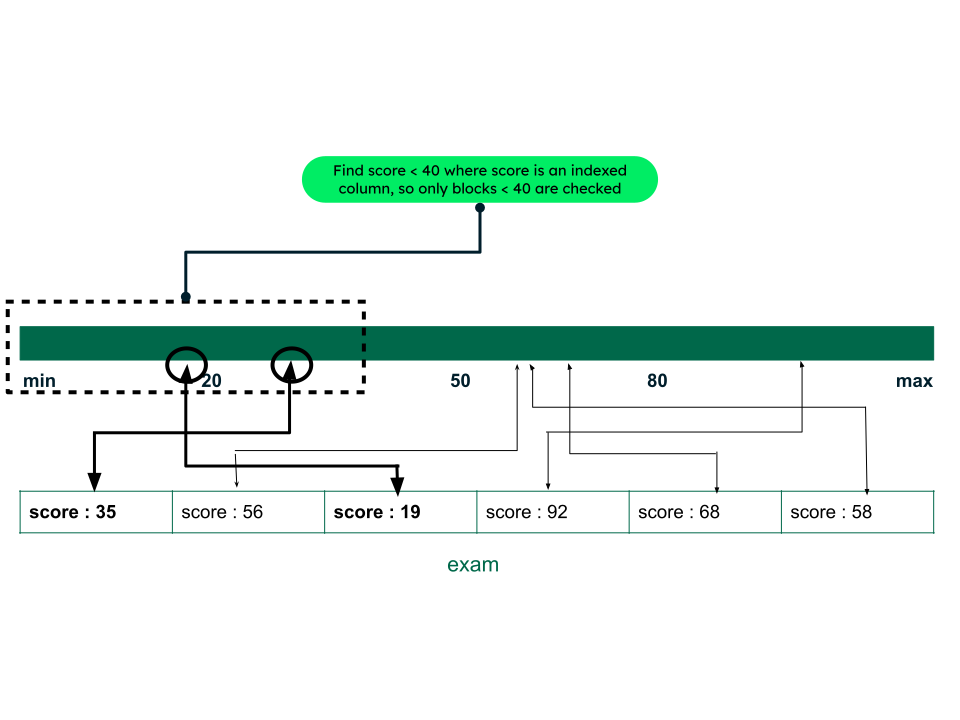
A database index is a special data structure that provides faster access to data and helps create highly performant applications. An index usually consists of two columns: the search key and the data pointer. The key stores the value you want to search for and the pointer points to the block where the data resides. Let’s say you have an index on the “score” field (indexed column) of a collection (table) named “exam”. When you want to access the scores that are less than 40, the index will scan through blocks rather than individual documents (rows).
Why indexing is important
A database index is a way to organize information for efficient and quick data retrieval. You can save significant time on grouping, sorting, and retrieving data. Databases allow you to add multiple indexes, further increasing the query efficiency. Without an index, the database engine needs to go through each record to see if there is a match.
How database indexes work
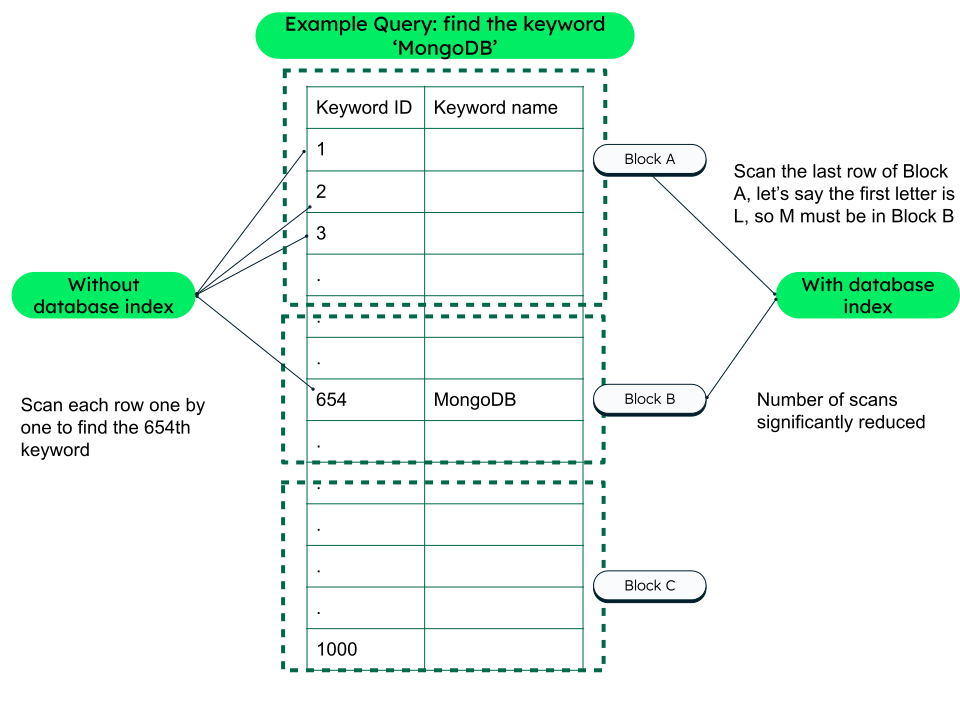
Think of a database index like a book appendix (usually at the end of the book). Each keyword is mentioned in alphabetical order along with the page numbers where the word is used, enabling users to search for the word quickly. Database indexes work in the same way. Suppose you have 1,000 keyword names (actual data) stored in the database, and your desired data is the document (row) with the keyword name MongoDB. If the data is sorted by name (a->z or z->a), it is easier for the query to look up for the last keyword, middle keyword, or a specific keyword, based on the sort.
To decide what fields or collections you want to be indexed, think about data that is used more often in queries—for example, name, ID, or a combination of both, based on the requirement. Similarly, index the fields that you are most likely to use for ordering, grouping, or sorting data.
Index data structure example
Consider the above example, with the keyword name as MongoDB and the id field value as 654. If you are using MongoDB, creating a database index on the keyword name field will create an index data structure (for example, B-tree in MongoDB), sorting data in ascending order based on the index field keyword name. Hence, instead of scanning all the documents, the (B-tree) index will perform a binary search.
Database index architecture
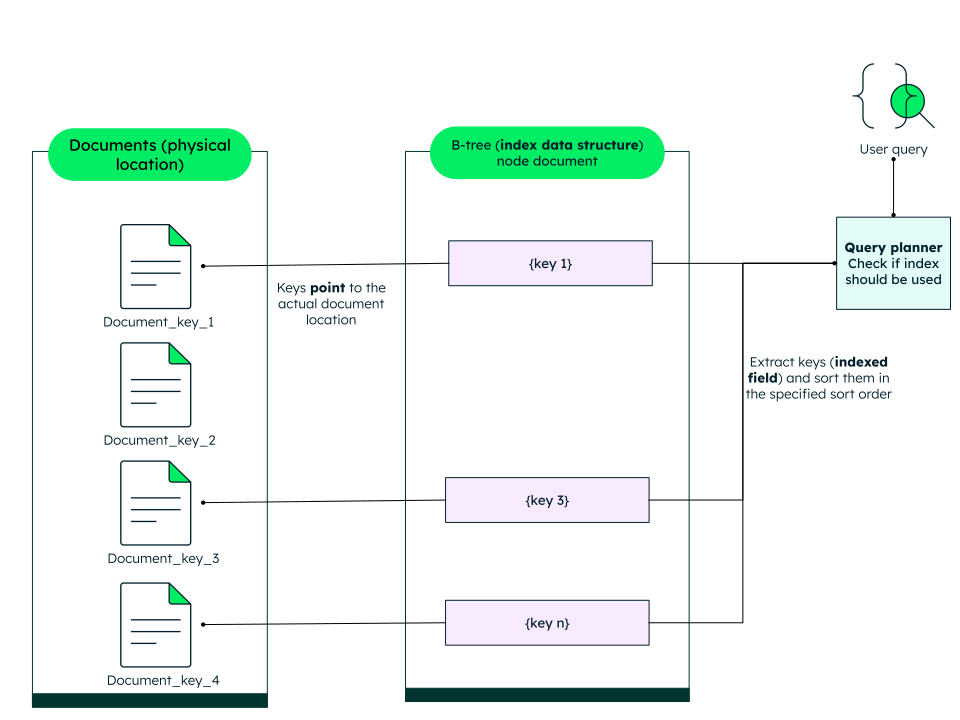
There are four main components in an index architecture:
Indexed field: This is the field that you want to index (indexed column in a relational database management system).
Index key: This is the value from the field used for the index.
Index data structure: The index data structure is usually B-tree, hash; it defines the underlying structure of indexes.
Pointer: This is a reference id to the actual document.
Index structures in MongoDB
Just like relational databases, MongoDB uses indexes to optimize queries. The default index data structure in MongoDB is the B-tree. Any collection in MongoDB can have one or more indexes, and those indexes can be made on one or multiple fields. Indexes introduce overhead, thus it’s important to design them strategically.
Querying all the documents in a collection is time-consuming and can take up many resources. If a database field is indexed, the database engine will quickly find the first matching document(s) and go through the list until it hits the desired criteria. This is much more efficient than going through each document individually.
Follow our University course to learn more about MongoDB indexes.
Index types in MongoDB
There are many types of indexes, which can be applied to a single field or to multiple fields, known as compound indexes. MongoDB offers more advanced index types that you can use if you deal with arrays, aggregations, geospatial data, or full-text search. In MongoDB, the _id field is always indexed. Let’s explore the various other index types.
Single field
Each collection in MongoDB automatically has an index on the _id field. This index can then be used to fetch documents from the database efficiently.
However, you will need to query data on other specific fields most of the time. This is where a single field index will come in handy.
Say you want to get the top three sales regularly.
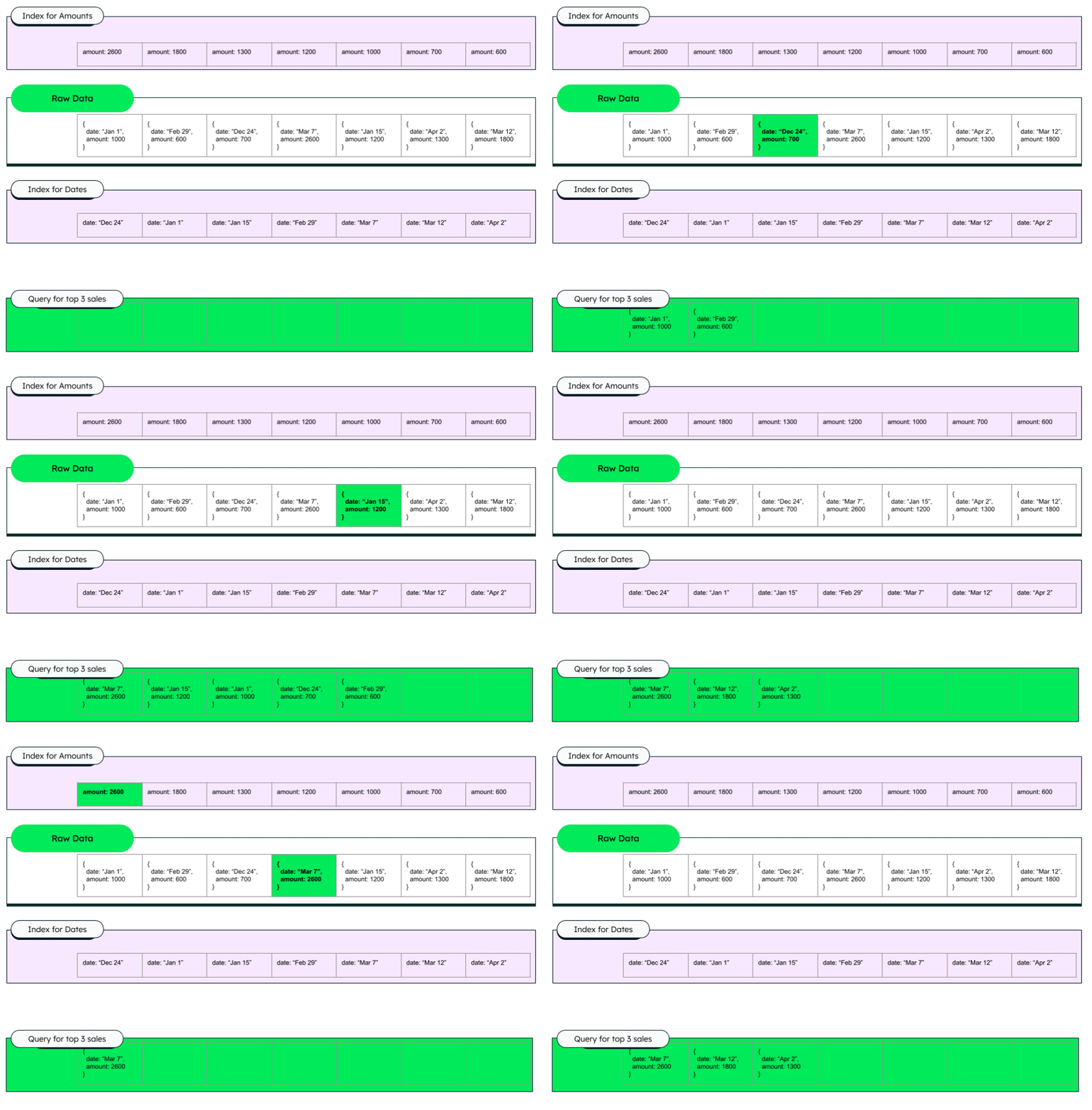
A good index here would be on the amount field, and the create index statement should be:
The top three sales will always be the first three elements in the index, making data retrieval faster than querying the whole collection every time.
Compound index
You can also add a query on multiple fields. Such indexes are called compound or composite indexes. Say you wanted to get the top three sales, but on a specific day. Adding a compound index that would include both the date and the amount would be the most efficient.
This will create an index where the sales are ordered by date and then by amount.
Multikey index
A multikey index is used on arrays. Once you create an index on an array value field, MongoDB sets it as a multikey index by default. For example, if you have an array named “social_media_handles” that has a field named “instagram”, and you create an index on “instagram”, MongoDB will create a multikey index on the “social_media_handles.instagram” field—i.e., a B-tree but with multiple index entries for the same document, one for each array element. All the multiple keys will point to the same _id (primary index in MongoDB), but stored as separate entries.
Hashed index
MongoDB uses hashed index for sharding, especially when using a hashed shard key to evenly distribute data across shards.
Sparse index
Contrary to a regular (dense) index, a sparse index does not include documents which do not have the indexed field.
Let’s say you have a collection of documents, where the index created is on the age field:
In the above example, “Amanda” will not be indexed, because the age field is missing.
Partial index
MongoDB also provides partial indexes, which index documents based on specific criteria. For example, index only those documents where age is greater than 20.
Geospatial index
MongoDB supports the geospatial index, which helps MongoDB efficiently store and query location-based data—like coordinates, maps, or places. These indexes are useful for high performance of location-based queries, like finding nearby places ($near) and finding places within a specific area ($geoWithin).
For more information about MongoDB index types, visit the documentation.
Index types in a relational database management system and MongoDB alternatives
If you are just starting with MongoDB, this comparison table will help you understand how the indexes in relational database systems (like SQL Server) have alternatives in MongoDB.
The ESR guideline for index creation
Creating the correct index for the queries is not always obvious. However, there is a general guideline that can help you, called the ESR (Equality, Sort, Range) guideline.
This guideline is a thought framework that describes how to build your compound (composite) indexes. Start with the fields that use an exact match, add the fields you use for sorting, and finally, add fields used for non-exact matches (i.e., $lt or $ne operators).
MongoDB Atlas index management
MongoDB Atlas uses the same indexing principles as MongoDB but gives tools to create indexes quickly.
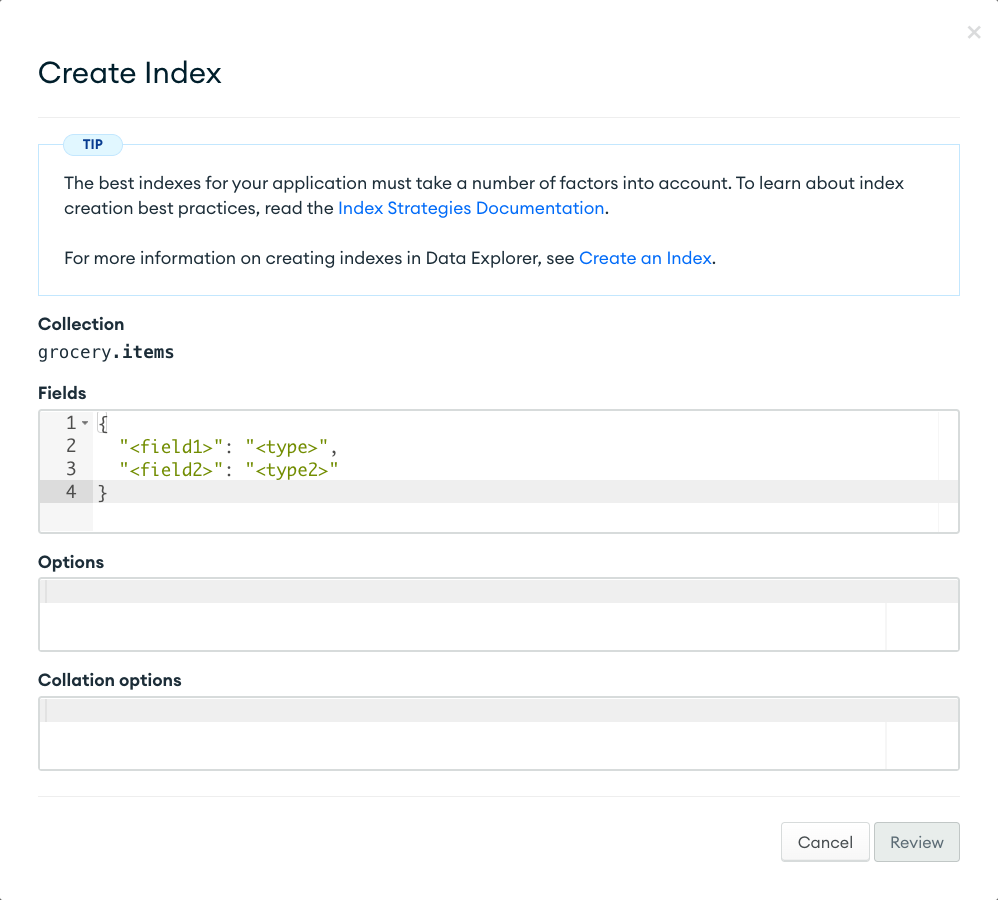
Create index
To create indexes, use the createIndex method.
The MongoDB Atlas UI provides you with a graphical user interface to create an index. You can also add full-text search indexes with Atlas Search.
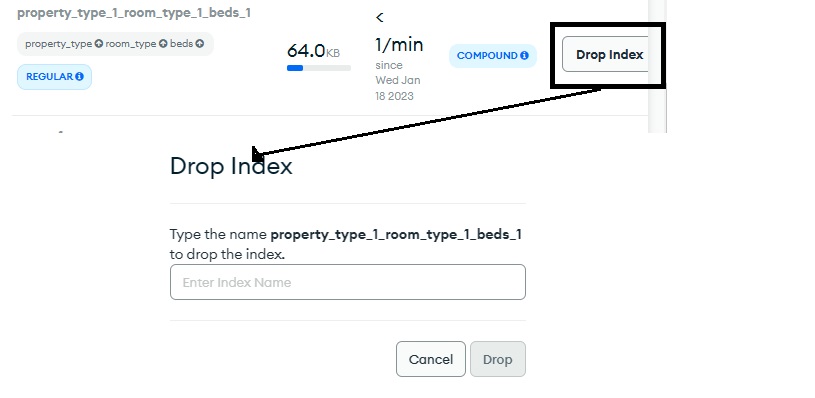
Drop/delete index
You can also drop the index created, using the MongoDB Atlas UI or Mongosh.
In MongoDB Atlas, you can drop an index from the Indexes tab on the Browse Collections page.
Index performance and optimization
The standard way to optimize indexes is to check the index usage. You can measure the usage of any index using $indexStats aggregation. Further, the explain() method shows how MongoDB executes a query, thus informing about how long the query took, how many documents were scanned, and which index was used.
MongoDB Atlas provides the database Performance Advisor tool that analyzes your frequent queries and suggests new indexes that you could create to increase database performance.
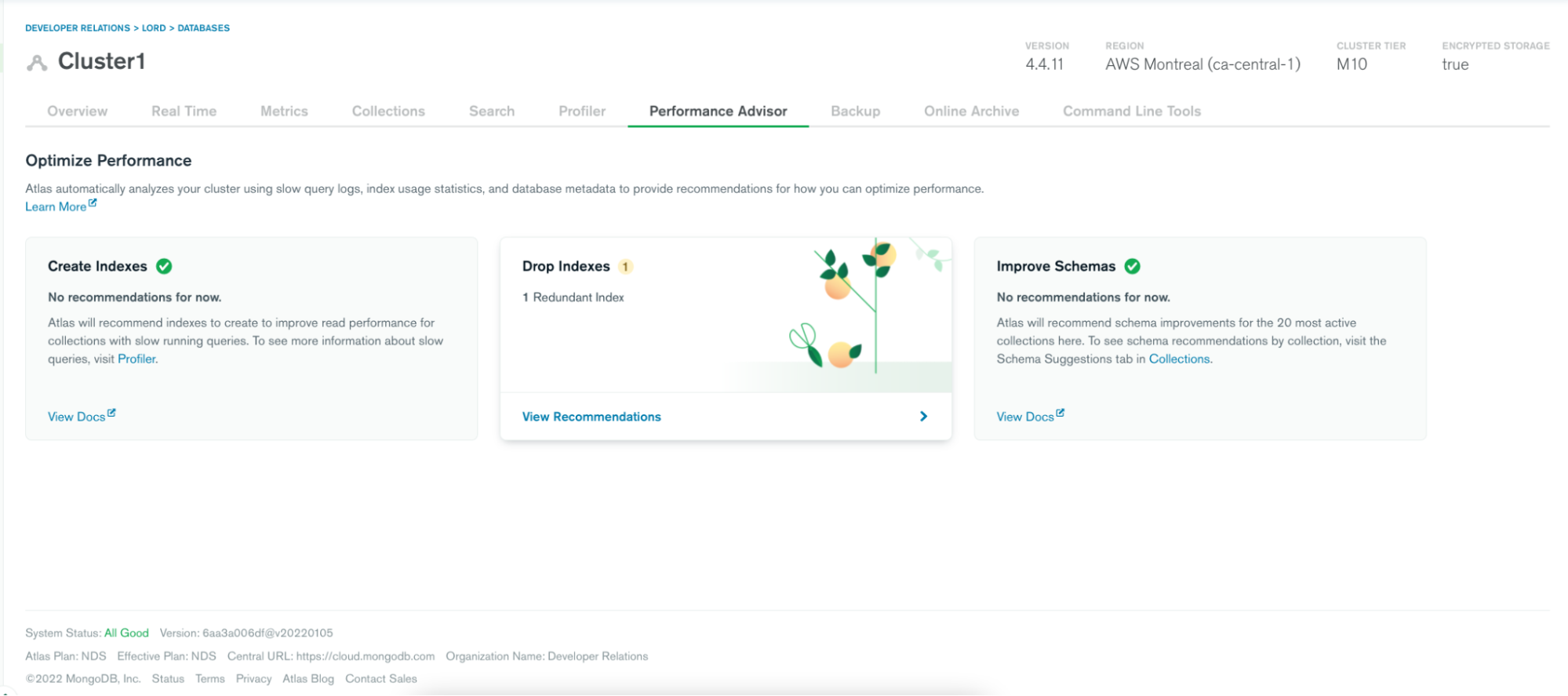
It can also recommend redundant or unused indexes that take up resources, add unnecessary maintenance cost, and impact write performance.
You can analyze your query plans individually using the explain method in the Mongo Shell.
Summary
When a database has performance issues, an easy fix can often be to add the appropriate indexes. These indexes will create a sorted map of your collection to make it easier to retrieve your documents. To find out which indexes you need to create, you should use the ESR guideline or the Performance Advisor in MongoDB Atlas. You can even try it out now for free. Once you start adding the appropriate indexes to your collections, you should be able to see significant improvements in your query performance. However, you should be mindful of not adding too many indexes.