MongoDB stores data records as documents (specifically BSON documents) which are gathered together in collections. A database stores one or more collections of documents.
You can manage databases and
collections on the Atlas cluster from
the Atlas UI, mongosh, or MongoDB Compass. This page describes
how to manage databases and collections on the Atlas cluster from the
Atlas UI. For self-managed deployments, you can use
mongosh or MongoDB Compass to manage databases and collections.
Select the client that you want to use to manage databases and collections.
MongoDB Atlas is a multi-cloud database service that simplifies deploying and managing your databases on the cloud providers of your choice.
MongoDB Compass is a powerful GUI for querying, aggregating, and analyzing your MongoDB data in a visual environment. To learn more, see MongoDB Compass.
Databases
In MongoDB, databases hold one or more collections of documents.
To select a database to use, log in to Atlas and go to the Data Explorer page for your project.
Open the Data Explorer
In the sidebar, click Data Explorer under the Database heading.
The Data Explorer displays.
To select a database to use, in mongosh, issue the
use <db> statement, as in the following example:
use myDB
To select a database to use, complete the following steps:
Start MongoDB Compass and connect to your cluster.
To learn more, see Connect to MongoDB.
Create a Database
To create a new database in Atlas, perform the following steps:
In MongoDB Atlas, go to the Data Explorer page for your project
If it's not already displayed, select the organization that contains your project from the Organizations menu in the navigation bar.
If it's not already displayed, select your project from the Projects menu in the navigation bar.
In the sidebar, click Data Explorer under the Database heading.
The Data Explorer displays.
Enter the Database Name and the Collection Name
Enter the Database Name and the Collection Name to create the database and its first collection.
If you want to use custom collation on the collection, select the Use Custom Collation checkbox and select the desired collation settings.
Important
Don't include sensitive information in your database and collection names.
For more information on MongoDB database names and collection names, see Naming Restrictions.
Optional. Specify a time series collection
Select whether the collection is a time series collection. If you select to create a time series collection, specify the time field and granularity. You can optionally specify the meta field and the time for old data in the collection to expire.
If a database does not exist, MongoDB creates the database when you
first store data for that database. As such, you can switch to a
non-existent database and perform the following operation in
mongosh:
use myNewDB db.myNewCollection1.insertOne( { x: 1 } )
The insertOne() operation creates both the
database myNewDB and the collection myNewCollection1 if they do
not already exist. Be sure that both the database and collection names
follow MongoDB Naming Restrictions.
Collections
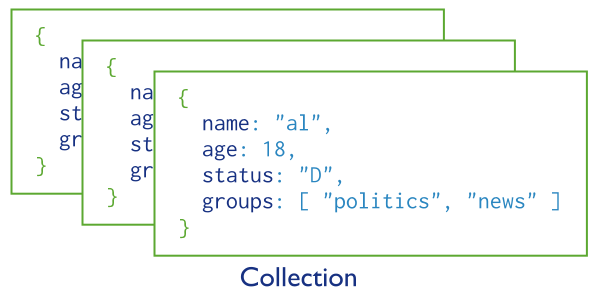
MongoDB stores documents in collections. Collections are analogous to tables in relational databases.
Create a Collection
If a collection does not exist, MongoDB creates the collection when you first store data for that collection.
To create a new collection in Atlas, perform the following steps:
In MongoDB Atlas, go to the Data Explorer page for your project
If it's not already displayed, select the organization that contains your project from the Organizations menu in the navigation bar.
If it's not already displayed, select your project from the Projects menu in the navigation bar.
In the sidebar, click Data Explorer under the Database heading.
The Data Explorer displays.
Enter the Collection Name.
In the Create Collection dialog box, enter the name of the collection you want to create.
MongoDB Atlas also provides Additional preferences. You can choose from the following options:
Important
Don't include sensitive information in your collection name.
For more information on MongoDB collection names, see Naming Restrictions.
Optional. Specify a time series collection.
Select whether the collection is a time series collection. If you select to create a time series collection, specify the time field and granularity. You can optionally specify the meta field and the time for old data in the collection to expire.
db.myNewCollection2.insertOne( { x: 1 } ) db.myNewCollection3.createIndex( { y: 1 } )
Both the insertOne() and the
createIndex() operations create their
respective collection if they do not already exist. Be sure that the
collection name follows MongoDB Naming Restrictions.
Explicit Creation
MongoDB provides the db.createCollection() method to
explicitly create a collection with various options, such as setting
the maximum size or the documentation validation rules. If you are not
specifying these options, you do not need to explicitly create the
collection since MongoDB creates new collections when you first store
data for the collections.
To modify these collection options, see collMod.
Schema Validation
By default, a collection does not require its documents to have the same schema; i.e. the documents in a single collection do not need to have the same set of fields and the data type for a field can differ across documents within a collection.
However, you can enforce schema validation rules for a collection during update and insert operations. See Schema Validation for details.
For deployments hosted in MongoDB Atlas, the Performance Advisor and the MongoDB Atlas UI detect common schema design issues and suggest modifications that follow MongoDB best practices. To learn more, see Schema Suggestions.
Modifying Document Structure
To change the structure of the documents in a collection, such as add new fields, remove existing fields, or change the field values to a new type, update the documents to the new structure.
Unique Identifiers
Collections are assigned an immutable UUID. The collection UUID remains the same across all members of a replica set and shards in a sharded cluster.
To retrieve the UUID for a collection, run either the
listCollections command
or the db.getCollectionInfos() method.