This guide describes the considerations for writing tests that prove your code example does what the docs claim. For a scannable summary of the Expect API, wildcard patterns, cleanup hooks, and common mistakes, see the Grove Testing Cheat Sheet.
Note
Most code examples in this guide use JavaScript syntax. The concepts apply to all languages.
Meaningful Tests
A test can pass and still prove nothing. The goal is not "the code ran without errors." The goal is "the code did what the docs say it does."
Before you write a test, identify what the example teaches the reader. Your test should verify that specific teaching point.
Test the Teaching Point, Not Just the Mechanics
Every code example exists to demonstrate a behavior:
A
find()example with a filter demonstrates filtering.An
updateOne()example demonstrates modifying a document.An
aggregate()example demonstrates a pipeline stage.
Your test proves that the behavior works as shown.
Weak versus Strong Tests
A weak test proves the command ran:
The example runs
db.movies.updateOne(), and the test checks that the output is{ acknowledged: true, matchedCount: 1, ... }.This example proves only that MongoDB accepted the command. If the
$setsyntax were wrong in a way that silently failed, this test would still pass.A strong test proves the teaching point:
The example runs
updateOnefollowed byfindOneto verify the change. The test checks thatfindOnereturns{ title: "The Godfather", rated: "PG" }.This test proves the update took effect, which is what the reader learns from the example.
Levels of Test Confidence
Levels of test strength exist on a spectrum:
Level | What It Proves | Example |
|---|---|---|
Acknowledgment test | The server accepted the command. | Checking |
Output test | The operation produced expected results | Checking that a query returns specific documents |
Behavior test | The operation had the intended effect | Running a follow-up query to verify a write, or checking that an index enforces a constraint |
Aim for output tests at minimum. Use behavior tests when the example teaches a write operation or a side effect such as index creation or schema validation.
Acknowledgment-level tests are acceptable when the acknowledgment is the teaching point. For instance, if the example covers write concerns and the docs specifically discuss the acknowledgment format.
Common Patterns That Feel Like Tests but Prove Little
Over-permissive schema validation. A schema that
asserts only a document count (and no required fields
or field values) allows almost any output to pass
validation, including results that have nothing to do
with what the example teaches:
// Weak - proves 5 documents came back, // but nothing about content Expect.that(result) .shouldResemble("output.json") .withSchema({ count: 5 }); // Better - proves documents contain the fields // the example queries Expect.that(result) .shouldResemble("output.json") .withSchema({ count: 5, requiredFields: ["title", "year", "genres"], fieldValues: { year: 2012 } });
Ignoring all the relevant fields. If you ignore every dynamic field, the assertion stops verifying anything meaningful:
// Weak - ignores the fields the example is about Expect.that(result) .withIgnoredFields( "_id", "title", "rated", "year" ) .shouldMatch("output.json"); // Better - only ignore truly dynamic fields, // verify the rest Expect.that(result) .withIgnoredFields("_id") .shouldMatch("output.json");
Testing the wrong output. If your example inserts data and then queries it, test the query result, not the insert acknowledgment:
// Weak - tests the insert, not the query // that is the point of the example const insertResult = await loadData(); Expect.that(insertResult) .shouldMatch("insert-output.json"); // Better - tests the query the example is // actually teaching const queryResult = await runPipeline(); Expect.that(queryResult) .shouldMatch("pipeline-output.json");
Considerations
Before you call your test done, verify the following information:
The test catches a silent failure in the core operation. For example, if your update set the wrong field, the test fails.
The assertion matches what the docs claim. For example, if the docs say "returns documents sorted by year," the test verifies the sort order using
withOrderedSort().The test is specific enough that a completely different query would not pass. For example, if the example teaches how to filter by a specific field value, the test checks that the result contains the correct documents.
Start With the Example
The most common mistake is jumping straight to the test file. The example file is what readers see. Write it first, get the code correct, then build everything else around the code.
Your workflow:
Write the example file (the working code that readers see).
Run it to see what it produces.
Capture that output as your expected output file.
Write the test to automate what you did manually.
If you skip the manual test, you spend time debugging test failures that are actually wrong expected output.
Capture Output
You do not always need to run the example manually. The test infrastructure can capture output for you.
MongoDB Shell
The test harness runs your example as a subprocess and
captures everything mongosh prints to stdout. Use the
following steps to generate your expected output file:
Write the example file and a minimal test. Point
shouldMatchat an output file that does not exist yet, or create a placeholder with incorrect content.Run the test. It fails, and the error message shows the actual output.
Copy the actual value into your expected output file.
Replace dynamic values such as
_idand timestamps with"...".Rerun the test. It passes.
This approach is often faster than connecting to
mongosh separately, especially when you need to
set up a specific database state first.
Driver Suites
For the language-based driver suites
(JavaScript, Python, Go, Java, and C#), your example
is a function that returns a value. The test calls the
function and passes the return value to Expect. When
the comparison fails, the error shows the actual value
the same way. You can use the same "write a failing
test, copy the actual output" workflow as the preceding
mongosh steps.
Running Manually
Running manually is useful when you want to explore or understand what an operation produces before you commit to a test structure. How you run the example depends on the language:
Language | How to Run |
|---|---|
| Paste into a |
JavaScript | Run the function in a Node script or REPL |
Python | Run the function in a Python script or REPL |
Go | Call the function from a |
Java | Call the method from a |
C# | Call the method from |
Decide the Test You Need
Every test falls into one of the following scenarios, depending on whether you're using sample data or creating custom data.
Use custom data when:
The docs page includes custom sample data as part of the example.
The example needs a specific schema or dataset.
Use sample data when:
You document a query pattern against a standard Atlas sample dataset (such as
sample_mflixorsample_restaurants).The docs page already references a sample dataset.
You do not need exact output, only the right shape.
Identify which scenario applies to save time.
Scenario 1: Read-Only Query Against Sample Data
Your example queries sample data and does not change anything. This is the simplest case. No need to reverse any changes.
// No need for any cleanup it("finds movies by year", async () => { const result = await findMoviesByYear(); Expect.that(result) .shouldResemble( "movies-by-year-output.json" ) .withSchema({ count: 8, requiredFields: [ "title", "genres", "year" ], }); });
Considerations:
Use your language's sample data utility so the test skips gracefully if the dataset is not loaded. See Add Tests for Examples for details.
Use
shouldMatchif the output is stable and predictable.Use
shouldResemblewithwithSchemaif you care only about shape. See the Choose BetweenshouldMatchandshouldResemblesection for details.
Scenario 2: Writes to Sample Data (Must Clean Up)
Your example modifies documents in a sample database. You must undo exactly what the example did. Think of it as a "reverse transaction."
// After each test, restore the original value afterEach(async () => { const db = client.db("sample_mflix"); await db.collection("movies").updateOne( { title: "The Godfather" }, { $set: { rated: "R" } } ); }); it("updates a movie rating", async () => { const result = await updateMovieRating(); Expect.that(result) .withIgnoredFields("upsertedId") .shouldMatch("update-rating-output.json"); });
Considerations:
You need to check the sample data before writing your cleanup to save the original values. Query the document, write down the fields your example changes, and restore those exact values in teardown.
For more cleanup patterns and strategies, see the Write Cleanup That Works section.
To understand why cleanup matters, see the Idempotency section.
Scenario 3: Custom Data (Create and Destroy)
Your example does not use sample data. It creates its own database with its own collections and data. This is the cleanest pattern. You control all the data, so you can drop the whole database after the test.
// After each test, drop the custom database afterEach(async () => { await client.db("iot_db").dropDatabase(); }); it("computes average temperature", async () => { const result = await computeAvgTemperature(); Expect.that(result) .shouldMatch("avg-temperature-output.json"); });
Choose Between shouldMatch and shouldResemble
Use the following descriptions to guide this decision.
shouldMatch = "The output must look like this."
shouldResemble = "The output must have this shape."
The following decision tree can help you choose between the two methods:

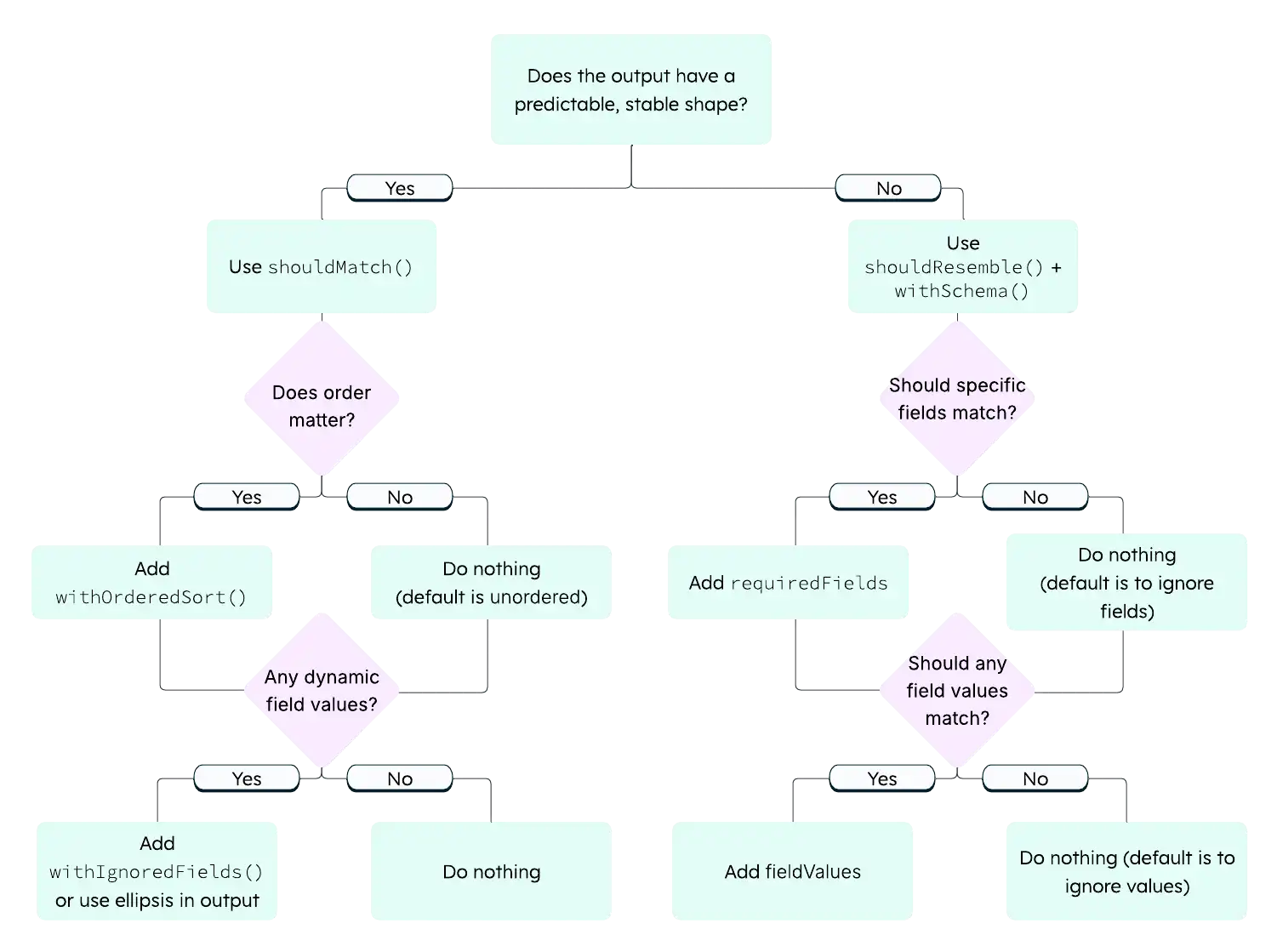
Use shouldMatch
Use shouldMatch when:
The output is predictable and stable across runs.
You want readers to see realistic output in the docs.
The exact values matter and are guaranteed to be consistent, such as when demonstrating an update result.
Expect.that(result) .shouldMatch("update-output.json");
Use shouldResemble
Use shouldResemble when:
The output order or exact values can vary across environments, such as with vector search.
You care only that the right number of documents came back containing the right fields.
Expect.that(result) .shouldResemble("find-output.json") .withSchema({ count: 8, requiredFields: [ "title", "genres", "year" ], });
When You're Not Sure
Start with shouldMatch. If the test is flaky (passes
sometimes, fails sometimes), switch to shouldResemble.
Note
Queries With Limit and No Sort
A query that uses limit without an explicit
sort can return different documents each run
because MongoDB may sample a different subset. This
commonly causes shouldMatch tests to pass locally
but fail during the PR check. Either add an explicit
sort to stabilize the results, or switch to
shouldResemble.
Writing Good Expected Output Files
The expected output file is where most debugging time goes. The following sections describe principles you can apply to your expected output files.
Capture Real Output First
Never hand-write expected output from scratch. Always run the example first and copy the real output. Then, edit it to replace dynamic values. You can get the real output either by running the example by hand or by running a deliberately-failing test and copying the actual value from the error message. For details, see Capturing Output.
withIgnoredFields vs. Ellipsis in the Output File
Both handle dynamic values, but they work differently.
withIgnoredFields("_id"): The field must exist in both actual and expected output, but the value comparison is skipped. Use this approach when the field is part of your example's story and you want readers to see it in the expected output:
// Test ignores the value comparison: Expect.that(result) .withIgnoredFields("_id") .shouldMatch("output.json"); Ellipsis in the output file: You can also use ellipsis patterns directly in the output file instead of
withIgnoredFields(). The comparison engine supports three forms:"..."as a field value means "this field exists but skip the value comparison." Use this for fields with dynamic values such as_idor timestamps:{ "_id": "...", "title": "The Godfather" } Standalone
...as its own line in the output file enables global ellipsis mode. This allows extra fields in the actual output that are not listed in the expected file. Use this when you want to verify specific fields but do not care what else the document contains:{ "title": "The Godfather", ... } "...": "..."as a key-value pair is an object wildcard that matches any object. Use this when a nested object can have any structure:{ "title": "The Godfather", "metadata": { "...": "..." } }
Either approach (withIgnoredFields or ellipsis
patterns) works. Use whichever reads more clearly in
context.
Be Strategic About What You Hard-Code
Value Type | Strategy |
|---|---|
| Use |
Timestamps and dates | Use |
Counts, booleans, enums | Hard-code. These are stable. |
String fields from sample data | Hard-code if they are core to the example. |
Long text fields | Truncate by using an ellipsis, for example:
|
Fields you do not care about | Use standalone |
For a quick reference of every supported wildcard pattern, see Grove Testing Cheat Sheet.
Output Format Notes
Format must match your language's output.
mongoshuses single quotes and unquoted keys ({ title: 'Argo' }). Driver suites typically produce standard JSON ({ "title": "Argo" }). Match what your example returns.Tip
MongoDB Shell Consideration
mongoshoutput uses single quotes, no trailing commas, and unquoted object keys. Your expected output file must match this style exactly.
Array wrappers. Multi-document results from
find()are wrapped in[...]. Single-document results fromfindOne()are not. Match what the driver or shell returns.
Idempotency
A test is idempotent if it produces the same result every time you run it (first run, tenth run, after another test, in CI on a machine you have never touched). If your test only passes under specific conditions, it's not a real test, it's a coincidence.
Almost every non-obvious test failure traces back to broken idempotency.
Symptom | Root Cause |
|---|---|
Passes first time, fails second time. | The example changed data and cleanup did not fully revert it. |
Fails in CI but passes locally. | Your local database has state left over from a previous manual run. |
Passes alone, fails when run with other tests. | Another test left behind data or indexes that changed your query results. |
Returns different document order each run. | The query plan or result set is non-deterministic.
Common causes include an index created by a prior
test changing the plan, a query with |
Fails locally with topology or "not supported" errors. | Your local MongoDB is a standalone instance. Some features (such as transactions and change streams) require a replica set. |
The Idempotency Test
Run your test twice in a row:
npm test -- -t "my test name" && \ npm test -- -t "my test name"
If the test does not pass both times, something in your test (usually cleanup) leaves the database in a different state than it started in.
What Makes a Test Non-Idempotent
Anything your example does that persists after the test ends causes non-idempotency. For example:
Modified documents: A field value differs from before.
Inserted documents: New documents appear in the collection.
Deleted documents: Expected documents are missing.
Created indexes: Query plans change, output order shifts.
Created collections or views: A
createCollectioncall fails with "already exists" on the second run.Changed configuration: Validation rules, collation settings.
If your example does any of these and you do not undo them, the next run starts from a different state and produces different results.
Cleanup Achieves Idempotency
Every persistent side effect needs a matching undo. The goal is not "tidy up after yourself" in the abstract. The goal is to ensure that the next run sees the same database state as the first run.
Write Cleanup That Works
This section describes how to write cleanup that runs reliably and leaves the database in a consistent state for subsequent tests.
Set Up Cleanup Before the Test Runs
If your test throws an error, the teardown hook still runs, but only if you set up your cleanup before the failure.
In driver suites, this is usually natural because
cleanup lives in a framework hook (afterEach,
tearDown, defer, @AfterEach, or [TearDown]
depending on the framework) that registers before the
test body runs. For the exact syntax per framework, see
Grove Testing Cheat Sheet.
In mongosh, where cleanup is sometimes a per-test
function, register it before calling Expect:
// mongosh pattern: register cleanup first test("my test", async () => { // 1. Register cleanup currentCleanup = myCleanupFunction; // 2. Run the test await Expect.outputFromExampleFiles(...) });
Cleanup Must Be Safe in Any State
Your cleanup might run when the database is in various states: the example succeeded, failed partway through, or did not run at all. Make each cleanup operation safe to run regardless of the database state:
// Node.js driver: each operation // tolerates "not found" afterEach(async () => { const db = client.db("sample_mflix"); try { await db.collection("users") .dropIndex("email_1"); } catch (e) { // Index may not exist if test failed // before creating it } await db.collection("users") .deleteMany({ testDoc: true }); });
# PyMongo: same idea def tearDown(self): db = self.client["sample_mflix"] try: db.users.drop_index("email_1") except Exception: pass db.users.delete_many({"testDoc": True})
Consider What Other Tests Assume
Your cleanup does not serve only your test. It protects every test that runs after yours. Consider the following:
If another test queries
sample_mflix.movies, does it find unexpected documents that you inserted?If another test creates an index on
users.email, does it fail because you left a duplicate index behind?If another test reads a specific document, does it see the original values or your modified ones?
Quick Cleanup Reference
Your Example Operation | Your Cleanup Should |
|---|---|
Updates a document | Restore original field values |
Inserts documents | Delete the inserted documents |
Deletes documents | Re-insert them (capture in setup first) |
Creates an index | Drop the index (wrap in try/catch) |
Creates a collection or view | Drop it |
Creates a custom database | Call |
Multi-Step Examples
Sometimes your example needs to set up data before querying it. How you handle this depends on the suite.
Driver Suites: Multiple Steps in One Function
Driver examples are functions, so you can include setup
and query logic in the same function. You can use Bluehawk's :remove:
tags to exclude setup from the extracted snippet if it
does not need to be included in the documentation:
// :snippet-start: avg-temperature export async function avgTemperature() { const client = new MongoClient( process.env.CONNECTION_STRING ); try { const db = client.db("iot_db"); // :remove-start: await db.collection("sensors").insertMany([ { sensorId: "s1", temperature: 22.5 }, { sensorId: "s2", temperature: 25.3 }, { sensorId: "s3", temperature: 18.7 } ]); // :remove-end: const result = await db .collection("sensors") .aggregate([ { $group: { _id: null, avgTemp: { $avg: "$temperature" } } } ]).toArray(); return result; } finally { await client.close(); } } // :snippet-end:
MongoDB Shell Options
Option A: Separate load and query files. The test runs them in sequence. Use this approach when both steps need to appear in the documentation:
await Expect .outputFromExampleFiles([ "topic/load-data.js", "topic/run-pipeline.js" ]) .withDbName("iot_db") .shouldMatch("topic/output.sh"); Option B: Comma operator in a single file. The harness captures only the last expression's result:
// :snippet-start: update-and-verify ( db.movies.updateOne( { title: "The Godfather" }, { $set: { rated: "PG-13" } } ), db.movies.findOne( { title: "The Godfather" }, { title: 1, rated: 1 } ) ) // :snippet-end: Note
Comma Operator is MongoDB Shell-Specific
The comma operator pattern applies only to
mongosh. Driver suites do not need it because they run multiple operations in a single function.
Handle Indexes in Tests
Index tests are uniquely tricky because indexes persist across test runs and change query behavior.
The Problem
Your test creates an index. The test passes. You run it again, and now the index already exists. Either:
The
createIndexcall returns a different result ("index already exists" instead of "created").Or, a subsequent query uses the index and returns results in a different order.
The Solution
Clean up indexes in both setup and teardown:
// Node.js driver: beforeEach + afterEach const cleanupIndexes = async () => { try { await collection.dropIndex("email_1"); } catch (e) { /* may not exist */ } }; beforeEach(cleanupIndexes); afterEach(cleanupIndexes);
# PyMongo: setUp + tearDown def _cleanup_indexes(self): try: self.collection.drop_index("email_1") except Exception: pass def setUp(self): self._cleanup_indexes() def tearDown(self): self._cleanup_indexes()
Setup handles the case where a previous test run crashed before teardown ran. Teardown handles the normal case so the next test starts clean.
Debug a Failing Test
When a test fails, work through this checklist.
Read the Error Message
The comparison engine produces detailed diffs. Look for the following:
"Expected N documents but got M": Your query returned a different number of results. Run the example by hand to see why.
"Field X: expected Y but got Z": A specific value did not match. Check if your cleanup restores the original value.
"Missing field X": The document structure does not match your expected output. Check the query projection.
Run the Example by Hand
Run the example outside the test framework. Compare the actual output to your expected output file. This usually reveals the mismatch immediately.
Check for Stale State
Run your test twice in a row. If the test passes once and fails the second time, your test is not idempotent. Cleanup is incomplete. Something your example changed is not reverted. See Idempotency for a list of things that might persist between runs.
Check for Index Side Effects
If your output order changed, an index might affect the query plan. Check what indexes exist on the collection.
Check the Generated File (MongoDB Shell Only)
When you get a syntax error in mongosh, the error
message shows the generated temp file content. This
reveals how the harness wrapped your code. Look for
mismatched parentheses or unexpected printjson()
wrapping.
Known Limitations
The Grove testing infrastructure does not support all MongoDB features and environments. Consider the following limitations when you write tests:
Upcoming server versions: You cannot test examples that require features available only in unreleased MongoDB server versions. Tests run against the server versions available in CI.
Sharding: Tests run against a replica set, not a sharded cluster. Examples that demonstrate sharding features such as shard keys, chunk migration, or
shhelper commands cannot be verified.Stream processing: Examples that demonstrate Atlas Stream Processing cannot be tested in the current infrastructure.
For examples that fall into one of these categories, skip the automated test and note in your PR that the example is not covered by Grove. Include a manual verification step in the PR description so reviewers know the example was exercised before the docs change merges.
Checklist: Before You Submit
Does it prove something:
Test verifies the teaching point of the example, not that the code ran.
If the core operation silently failed, the test catches it.
shouldResembleschemas includerequiredFieldsorfieldValues, not onlycount.
Does it work:
Example code runs successfully outside the test framework.
Expected output was captured from a real run, not hand-written.
Dynamic values use
"..."orwithIgnoredFields().Test passes on first run.
Test passes on second consecutive run (idempotency check).
Is it clean:
Cleanup reverts all changes to sample data.
Bluehawk snippet tags produce valid standalone code.
node snip.jsruns without errors.
For a list of common mistakes to avoid and a glossary of Grove terms, see Grove Testing Cheat Sheet.