Ops Manager is a required component for any Enterprise MongoDB deployment. Ops Manager automates, monitors, and performs backups of MongoDB databases. The MongoDBOpsManager custom resource defines three components:
Ops Manager Application — the main Ops Manager component and the front-end UI.
Application Database — the backing MongoDB database for Ops Manager.
Backup Daemon — supports the Ops Manager Application in backup and restore processes.
The Kubernetes Operator manages the MongoDBOpsManager resource's specification. When the specification changes, the Kubernetes Operator validates the changes and applies the appropriate updates in each Kubernetes cluster where you deploy Ops Manager components.
The following diagram shows the architecture of an Ops Manager deployment on a single Kubernetes cluster:
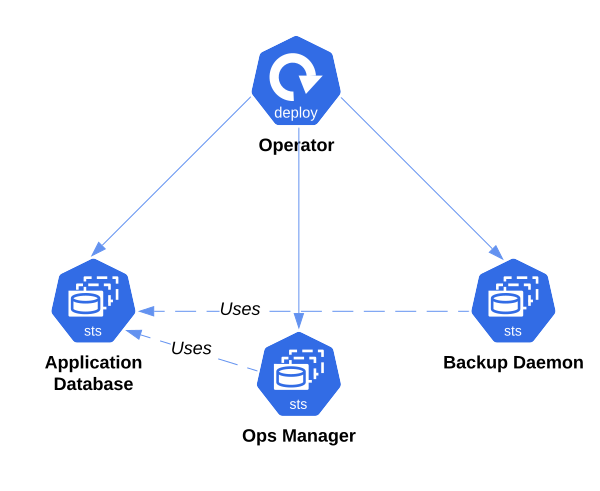
The Application Database
For the Application Database, the Kubernetes Operator deploys a MongoDB replica set as a StatefulSet. Each Pod has the following containers:
mongod — the database process.
MongoDB Agent — manages the
mongodlifecycle. You can override the MongoDB Agent version using the$AGENT_IMAGEenvironment variable oragent.versionin the Helm chart.Monitoring Agent — sends monitoring data to Ops Manager. The version is automatically selected for backwards compatibility and can't be overridden.
The Kubernetes Operator passes the Application Database configuration to the agents via a Secret (<om_resource_name>-db-config) mounted to each Pod.
Kubernetes creates one Pod per member. Each MongoDB Agent starts mongod and adds it to the replica set. The Kubernetes Operator creates PersistentVolumeClaims for each Pod, and you can customize them using spec.applicationDatabase.podSpec.persistence.
The Kubernetes Operator creates a headless Service for internal connectivity. In multi-cluster deployments, the Kubernetes Operator also creates one service per Pod (<om_resource_name>-db-N-svc) for individual mongod addressability.
Application Database Topology Considerations
To elect a primary, a majority of the Application Database replica set's nodes must be available. If possible, use an odd number of member Kubernetes clusters and distribute nodes across data centers, zones, or clusters.
Consider these distribution examples:
Five-member Application Database, two clusters: Place 3 members in Cluster 1 and 2 in Cluster 2. If Cluster 2 fails, Cluster 1 has a majority. If Cluster 1 fails, Cluster 2 does not.
Five-member Application Database, three clusters: Place 2 members each in Clusters 1 and 2, and 1 in Cluster 3. Any single-cluster failure leaves a majority.
Seven-member Application Database, two clusters: Place 4 in Cluster 1 and 3 in Cluster 2. Only the loss of Cluster 2 preserves a majority.
To learn more, see Replica Set Deployment Architectures and Disaster Recovery for Ops Manager and AppDB Resources.
The Ops Manager Application Resource
After the Application Database reaches a Running state, the Kubernetes Operator starts deploying the Ops Manager Application:
The Kubernetes Operator configures a StatefulSet on each member Kubernetes cluster.
Kubernetes creates one Pod per Ops Manager replica.
Each Pod contains one Ops Manager Application process.
To make a single-cluster deployment resilient to Pod failures, increase spec.replicas. To make a multi-cluster deployment resilient to data-center failures, set spec.topology to MultiCluster and distribute instances across Kubernetes clusters.
The Backup Daemon Resource
If spec.backup.enabled is true, the Kubernetes Operator starts the Backup Daemon after the Ops Manager Application reaches a Running state. The Kubernetes Operator deploys a StatefulSet for the Backup Daemon on each member cluster. Kubernetes creates as many Backup Daemon Pods as specified in spec.backup.members.
If backup is enabled, the Kubernetes Operator creates a PersistentVolumeClaim for the Backup Daemon's head database on each member cluster. You configure the head database through spec.backup.headDB.
The Kubernetes Operator invokes Ops Manager APIs to ensure the Ops Manager Application's backup configuration matches the custom resource definition. Configure oplog stores, blockstores, or S3 snapshot stores at the global spec.backup level, not per cluster.
You can also encrypt backup jobs, but limitations apply when the same Kubernetes Operator instance doesn't manage both the MongoDBOpsManager and MongoDB custom resources.
Ops Manager Reconciliation
The following diagram describes how the Kubernetes Operator reconciles changes to the MongoDBOpsManager CRD:
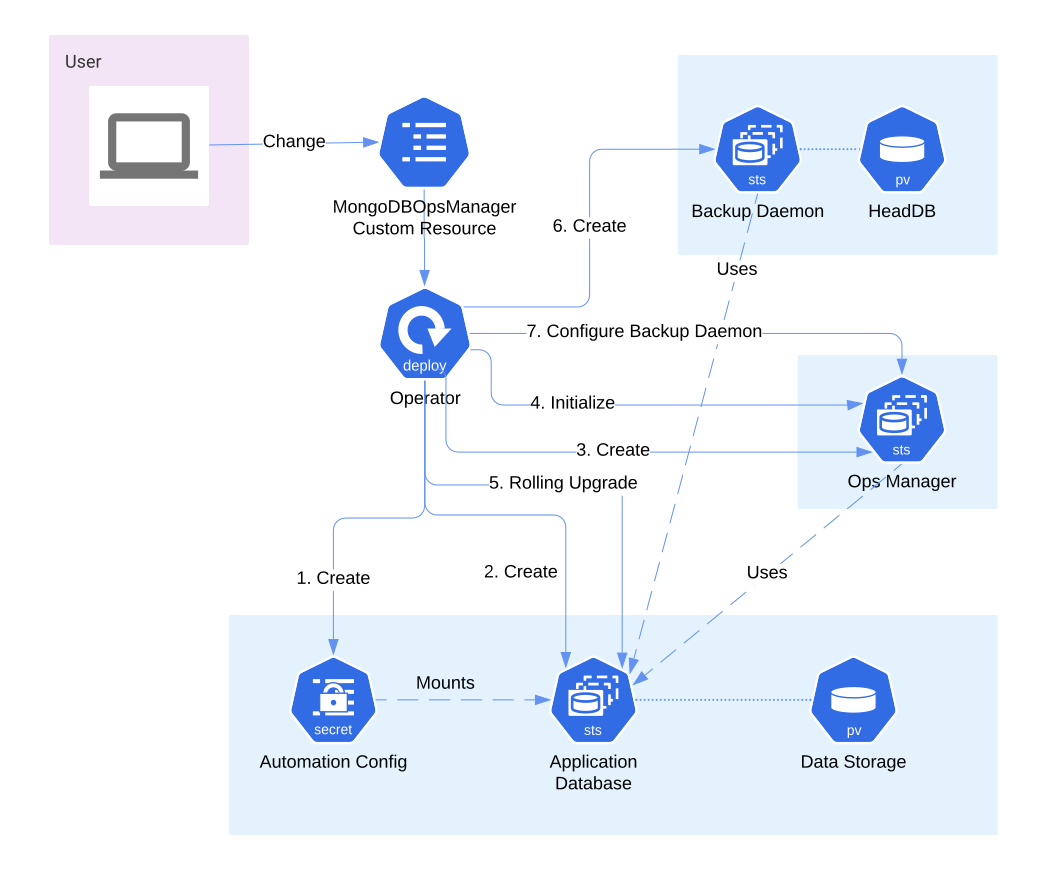
The reconciliation proceeds through these steps:
Creates or updates the
<om_resource_name>-db-configSecret containing the configuration that the MongoDB Agent uses to start the Application Database replica set.Creates or updates the
<om_resource_name>-dbStatefulSet for the Application Database. This StatefulSet contains at least three Pods. Each Pod runs one MongoDB Agent that starts amongodon its Pod. The configuration Secret is mounted to each Pod.In multi-cluster deployments, the StatefulSet is named
<om_resource_name>-db-<cluster-idx>(e.g.,om-db-1).Creates or updates the
<om_resource_name>StatefulSet for the Ops Manager application. Each replica connects to the Application Database. Most changes trigger a rolling upgrade. Enabling TLS for the Application Database also triggers a rolling restart because the connection string changes. Changes tospec.backupdo not trigger a rolling upgrade.In multi-cluster deployments, the StatefulSet is named
<om_resource_name>-<cluster-idx>(e.g.,om-1).Creates an admin user via the Ops Manager API and saves the credentials in the
<om_resource_name>-admin-keySecret. This step happens only on initial deployment.Enables monitoring by performing a rolling upgrade of the Application Database StatefulSet. This also happens only on initial deployment.
Deploys the Backup Daemon if
spec.backup.enabledistrue. The StatefulSet is named<om_resource_name>-backup-daemon(or<om_resource_name>-backup-daemon-<cluster-idx>in multi-cluster deployments).Configures backup via Ops Manager APIs to ensure the backup configuration matches the custom resource definition.