You can update documents using:
Your programming language's driver
The MongoDB Atlas UI (see Update a Document with MongoDB Atlas)
➤ Use the Select your language drop-down menu in the upper-right to set the language of the following examples.
This page uses the following mongosh methods:
The examples use the inventory collection.
Connect to a test database in your MongoDB instance then create the
inventory collection:
This page uses MongoDB Compass to update documents.
The examples use the inventory collection.
Connect to a test database in your MongoDB instance then create the
inventory collection:
This page uses the following MongoDB C Driver methods:
The examples use the inventory collection.
Connect to a test database in your MongoDB instance then create the
inventory collection:
This page uses the following MongoDB C# Driver methods:
The examples use the inventory collection.
Connect to a test database in your MongoDB instance then create the
inventory collection:
This page uses the following MongoDB Go Driver functions:
The examples use the inventory collection.
Connect to a test database in your MongoDB instance then create the
inventory collection:
This page uses the following Java Reactive Streams Driver methods:
com.mongodb.reactivestreams.client.MongoCollection.updateOne
com.mongodb.reactivestreams.client.MongoCollection.updateMany
com.mongodb.reactivestreams.client.MongoCollection.replaceOne
The examples use the inventory collection.
Connect to a test database in your MongoDB instance then create the
inventory collection:
This page uses the following Java Synchronous Driver methods:
The examples use the inventory collection.
Connect to a test database in your MongoDB instance then create the
inventory collection:
This page uses the following Kotlin Coroutine Driver methods:
The examples use the inventory collection.
Connect to a test database in your MongoDB instance then create the
inventory collection:
This page uses the following Motor driver methods:
The examples use the inventory collection.
Connect to a test database in your MongoDB instance then create the
inventory collection:
This page uses the following MongoDB Node.js Driver methods:
The examples use the inventory collection.
Connect to a test database in your MongoDB instance then create the
inventory collection:
This page uses the following MongoDB PHP Library methods:
The examples use the inventory collection.
Connect to a test database in your MongoDB instance then create the
inventory collection:
This page uses the following PyMongo Python driver methods:
The examples use the inventory collection.
Connect to a test database in your MongoDB instance then create the
inventory collection:
This page uses the following MongoDB Ruby Driver methods:
The examples use the inventory collection.
Connect to a test database in your MongoDB instance then create the
inventory collection:
This page uses the following MongoDB Scala Driver methods:
The examples use the inventory collection.
Connect to a test database in your MongoDB instance then create the
inventory collection:
db.inventory.insertMany( [ { item: "canvas", qty: 100, size: { h: 28, w: 35.5, uom: "cm" }, status: "A" }, { item: "journal", qty: 25, size: { h: 14, w: 21, uom: "cm" }, status: "A" }, { item: "mat", qty: 85, size: { h: 27.9, w: 35.5, uom: "cm" }, status: "A" }, { item: "mousepad", qty: 25, size: { h: 19, w: 22.85, uom: "cm" }, status: "P" }, { item: "notebook", qty: 50, size: { h: 8.5, w: 11, uom: "in" }, status: "P" }, { item: "paper", qty: 100, size: { h: 8.5, w: 11, uom: "in" }, status: "D" }, { item: "planner", qty: 75, size: { h: 22.85, w: 30, uom: "cm" }, status: "D" }, { item: "postcard", qty: 45, size: { h: 10, w: 15.25, uom: "cm" }, status: "A" }, { item: "sketchbook", qty: 80, size: { h: 14, w: 21, uom: "cm" }, status: "A" }, { item: "sketch pad", qty: 95, size: { h: 22.85, w: 30.5, uom: "cm" }, status: "A" } ] );
[ { "item": "canvas", "qty": 100, "size": { "h": 28, "w": 35.5, "uom": "cm" }, "status": "A" }, { "item": "journal", "qty": 25, "size": { "h": 14, "w": 21, "uom": "cm" }, "status": "A" }, { "item": "mat", "qty": 85, "size": { "h": 27.9, "w": 35.5, "uom": "cm" }, "status": "A" }, { "item": "mousepad", "qty": 25, "size": { "h": 19, "w": 22.85, "uom": "cm" }, "status": "P" }, { "item": "notebook", "qty": 50, "size": { "h": 8.5, "w": 11, "uom": "in" }, "status": "P" }, { "item": "paper", "qty": 100, "size": { "h": 8.5, "w": 11, "uom": "in" }, "status": "D" }, { "item": "planner", "qty": 75, "size": { "h": 22.85, "w": 30, "uom": "cm" }, "status": "D" }, { "item": "postcard", "qty": 45, "size": { "h": 10, "w": 15.25, "uom": "cm" }, "status": "A" }, { "item": "sketchbook", "qty": 80, "size": { "h": 14, "w": 21, "uom": "cm" }, "status": "A" }, { "item": "sketch pad", "qty": 95, "size": { "h": 22.85, "w": 30.5, "uom": "cm" }, "status": "A" } ]
For instructions on inserting documents using MongoDB Compass, see Insert Documents.
mongoc_collection_t *collection; mongoc_bulk_operation_t *bulk; bson_t *doc; bool r; bson_error_t error; bson_t reply; collection = mongoc_database_get_collection (db, "inventory"); bulk = mongoc_collection_create_bulk_operation_with_opts (collection, NULL); doc = BCON_NEW ( "item", BCON_UTF8 ("canvas"), "qty", BCON_INT64 (100), "size", "{", "h", BCON_DOUBLE (28), "w", BCON_DOUBLE (35.5), "uom", BCON_UTF8 ("cm"), "}", "status", BCON_UTF8 ("A")); r = mongoc_bulk_operation_insert_with_opts (bulk, doc, NULL, &error); bson_destroy (doc); if (!r) { MONGOC_ERROR ("%s\n", error.message); goto done; } doc = BCON_NEW ( "item", BCON_UTF8 ("journal"), "qty", BCON_INT64 (25), "size", "{", "h", BCON_DOUBLE (14), "w", BCON_DOUBLE (21), "uom", BCON_UTF8 ("cm"), "}", "status", BCON_UTF8 ("A")); r = mongoc_bulk_operation_insert_with_opts (bulk, doc, NULL, &error); bson_destroy (doc); if (!r) { MONGOC_ERROR ("%s\n", error.message); goto done; } doc = BCON_NEW ( "item", BCON_UTF8 ("mat"), "qty", BCON_INT64 (85), "size", "{", "h", BCON_DOUBLE (27.9), "w", BCON_DOUBLE (35.5), "uom", BCON_UTF8 ("cm"), "}", "status", BCON_UTF8 ("A")); r = mongoc_bulk_operation_insert_with_opts (bulk, doc, NULL, &error); bson_destroy (doc); if (!r) { MONGOC_ERROR ("%s\n", error.message); goto done; } doc = BCON_NEW ( "item", BCON_UTF8 ("mousepad"), "qty", BCON_INT64 (25), "size", "{", "h", BCON_DOUBLE (19), "w", BCON_DOUBLE (22.85), "uom", BCON_UTF8 ("cm"), "}", "status", BCON_UTF8 ("P")); r = mongoc_bulk_operation_insert_with_opts (bulk, doc, NULL, &error); bson_destroy (doc); if (!r) { MONGOC_ERROR ("%s\n", error.message); goto done; } doc = BCON_NEW ( "item", BCON_UTF8 ("notebook"), "qty", BCON_INT64 (50), "size", "{", "h", BCON_DOUBLE (8.5), "w", BCON_DOUBLE (11), "uom", BCON_UTF8 ("in"), "}", "status", BCON_UTF8 ("P")); r = mongoc_bulk_operation_insert_with_opts (bulk, doc, NULL, &error); bson_destroy (doc); if (!r) { MONGOC_ERROR ("%s\n", error.message); goto done; } doc = BCON_NEW ( "item", BCON_UTF8 ("paper"), "qty", BCON_INT64 (100), "size", "{", "h", BCON_DOUBLE (8.5), "w", BCON_DOUBLE (11), "uom", BCON_UTF8 ("in"), "}", "status", BCON_UTF8 ("D")); r = mongoc_bulk_operation_insert_with_opts (bulk, doc, NULL, &error); bson_destroy (doc); if (!r) { MONGOC_ERROR ("%s\n", error.message); goto done; } doc = BCON_NEW ( "item", BCON_UTF8 ("planner"), "qty", BCON_INT64 (75), "size", "{", "h", BCON_DOUBLE (22.85), "w", BCON_DOUBLE (30), "uom", BCON_UTF8 ("cm"), "}", "status", BCON_UTF8 ("D")); r = mongoc_bulk_operation_insert_with_opts (bulk, doc, NULL, &error); bson_destroy (doc); if (!r) { MONGOC_ERROR ("%s\n", error.message); goto done; } doc = BCON_NEW ( "item", BCON_UTF8 ("postcard"), "qty", BCON_INT64 (45), "size", "{", "h", BCON_DOUBLE (10), "w", BCON_DOUBLE (15.25), "uom", BCON_UTF8 ("cm"), "}", "status", BCON_UTF8 ("A")); r = mongoc_bulk_operation_insert_with_opts (bulk, doc, NULL, &error); bson_destroy (doc); if (!r) { MONGOC_ERROR ("%s\n", error.message); goto done; } doc = BCON_NEW ( "item", BCON_UTF8 ("sketchbook"), "qty", BCON_INT64 (80), "size", "{", "h", BCON_DOUBLE (14), "w", BCON_DOUBLE (21), "uom", BCON_UTF8 ("cm"), "}", "status", BCON_UTF8 ("A")); r = mongoc_bulk_operation_insert_with_opts (bulk, doc, NULL, &error); bson_destroy (doc); if (!r) { MONGOC_ERROR ("%s\n", error.message); goto done; } doc = BCON_NEW ( "item", BCON_UTF8 ("sketch pad"), "qty", BCON_INT64 (95), "size", "{", "h", BCON_DOUBLE (22.85), "w", BCON_DOUBLE (30.5), "uom", BCON_UTF8 ("cm"), "}", "status", BCON_UTF8 ("A")); r = mongoc_bulk_operation_insert_with_opts (bulk, doc, NULL, &error); bson_destroy (doc); if (!r) { MONGOC_ERROR ("%s\n", error.message); goto done; } /* "reply" is initialized on success or error */ r = (bool) mongoc_bulk_operation_execute (bulk, &reply, &error); if (!r) { MONGOC_ERROR ("%s\n", error.message); }
var documents = new[] { new BsonDocument { { "item", "canvas" }, { "qty", 100 }, { "size", new BsonDocument { { "h", 28 }, { "w", 35.5 }, { "uom", "cm" } } }, { "status", "A" } }, new BsonDocument { { "item", "journal" }, { "qty", 25 }, { "size", new BsonDocument { { "h", 14 }, { "w", 21 }, { "uom", "cm" } } }, { "status", "A" } }, new BsonDocument { { "item", "mat" }, { "qty", 85 }, { "size", new BsonDocument { { "h", 27.9 }, { "w", 35.5 }, { "uom", "cm" } } }, { "status", "A" } }, new BsonDocument { { "item", "mousepad" }, { "qty", 25 }, { "size", new BsonDocument { { "h", 19 }, { "w", 22.85 }, { "uom", "cm" } } }, { "status", "P" } }, new BsonDocument { { "item", "notebook" }, { "qty", 50 }, { "size", new BsonDocument { { "h", 8.5 }, { "w", 11 }, { "uom", "in" } } }, { "status", "P" } }, new BsonDocument { { "item", "paper" }, { "qty", 100 }, { "size", new BsonDocument { { "h", 8.5 }, { "w", 11 }, { "uom", "in" } } }, { "status", "D" } }, new BsonDocument { { "item", "planner" }, { "qty", 75 }, { "size", new BsonDocument { { "h", 22.85 }, { "w", 30 }, { "uom", "cm" } } }, { "status", "D" } }, new BsonDocument { { "item", "postcard" }, { "qty", 45 }, { "size", new BsonDocument { { "h", 10 }, { "w", 15.25 }, { "uom", "cm" } } }, { "status", "A" } }, new BsonDocument { { "item", "sketchbook" }, { "qty", 80 }, { "size", new BsonDocument { { "h", 14 }, { "w", 21 }, { "uom", "cm" } } }, { "status", "A" } }, new BsonDocument { { "item", "sketch pad" }, { "qty", 95 }, { "size", new BsonDocument { { "h", 22.85 }, { "w", 30.5 }, { "uom", "cm" } } }, { "status", "A" } }, }; collection.InsertMany(documents);
docs := []any{ bson.D{ {"item", "canvas"}, {"qty", 100}, {"size", bson.D{ {"h", 28}, {"w", 35.5}, {"uom", "cm"}, }}, {"status", "A"}, }, bson.D{ {"item", "journal"}, {"qty", 25}, {"size", bson.D{ {"h", 14}, {"w", 21}, {"uom", "cm"}, }}, {"status", "A"}, }, bson.D{ {"item", "mat"}, {"qty", 85}, {"size", bson.D{ {"h", 27.9}, {"w", 35.5}, {"uom", "cm"}, }}, {"status", "A"}, }, bson.D{ {"item", "mousepad"}, {"qty", 25}, {"size", bson.D{ {"h", 19}, {"w", 22.85}, {"uom", "in"}, }}, {"status", "P"}, }, bson.D{ {"item", "notebook"}, {"qty", 50}, {"size", bson.D{ {"h", 8.5}, {"w", 11}, {"uom", "in"}, }}, {"status", "P"}, }, bson.D{ {"item", "paper"}, {"qty", 100}, {"size", bson.D{ {"h", 8.5}, {"w", 11}, {"uom", "in"}, }}, {"status", "D"}, }, bson.D{ {"item", "planner"}, {"qty", 75}, {"size", bson.D{ {"h", 22.85}, {"w", 30}, {"uom", "cm"}, }}, {"status", "D"}, }, bson.D{ {"item", "postcard"}, {"qty", 45}, {"size", bson.D{ {"h", 10}, {"w", 15.25}, {"uom", "cm"}, }}, {"status", "A"}, }, bson.D{ {"item", "sketchbook"}, {"qty", 80}, {"size", bson.D{ {"h", 14}, {"w", 21}, {"uom", "cm"}, }}, {"status", "A"}, }, bson.D{ {"item", "sketch pad"}, {"qty", 95}, {"size", bson.D{ {"h", 22.85}, {"w", 30.5}, {"uom", "cm"}, }}, {"status", "A"}, }, } result, err := coll.InsertMany(context.TODO(), docs)
Publisher<Success> insertManyPublisher = collection.insertMany(asList( Document.parse("{ item: 'canvas', qty: 100, size: { h: 28, w: 35.5, uom: 'cm' }, status: 'A' }"), Document.parse("{ item: 'journal', qty: 25, size: { h: 14, w: 21, uom: 'cm' }, status: 'A' }"), Document.parse("{ item: 'mat', qty: 85, size: { h: 27.9, w: 35.5, uom: 'cm' }, status: 'A' }"), Document.parse("{ item: 'mousepad', qty: 25, size: { h: 19, w: 22.85, uom: 'cm' }, status: 'P' }"), Document.parse("{ item: 'notebook', qty: 50, size: { h: 8.5, w: 11, uom: 'in' }, status: 'P' }"), Document.parse("{ item: 'paper', qty: 100, size: { h: 8.5, w: 11, uom: 'in' }, status: 'D' }"), Document.parse("{ item: 'planner', qty: 75, size: { h: 22.85, w: 30, uom: 'cm' }, status: 'D' }"), Document.parse("{ item: 'postcard', qty: 45, size: { h: 10, w: 15.25, uom: 'cm' }, status: 'A' }"), Document.parse("{ item: 'sketchbook', qty: 80, size: { h: 14, w: 21, uom: 'cm' }, status: 'A' }"), Document.parse("{ item: 'sketch pad', qty: 95, size: { h: 22.85, w: 30.5, uom: 'cm' }, status: 'A' }") ));
collection.insertMany(asList( Document.parse("{ item: 'canvas', qty: 100, size: { h: 28, w: 35.5, uom: 'cm' }, status: 'A' }"), Document.parse("{ item: 'journal', qty: 25, size: { h: 14, w: 21, uom: 'cm' }, status: 'A' }"), Document.parse("{ item: 'mat', qty: 85, size: { h: 27.9, w: 35.5, uom: 'cm' }, status: 'A' }"), Document.parse("{ item: 'mousepad', qty: 25, size: { h: 19, w: 22.85, uom: 'cm' }, status: 'P' }"), Document.parse("{ item: 'notebook', qty: 50, size: { h: 8.5, w: 11, uom: 'in' }, status: 'P' }"), Document.parse("{ item: 'paper', qty: 100, size: { h: 8.5, w: 11, uom: 'in' }, status: 'D' }"), Document.parse("{ item: 'planner', qty: 75, size: { h: 22.85, w: 30, uom: 'cm' }, status: 'D' }"), Document.parse("{ item: 'postcard', qty: 45, size: { h: 10, w: 15.25, uom: 'cm' }, status: 'A' }"), Document.parse("{ item: 'sketchbook', qty: 80, size: { h: 14, w: 21, uom: 'cm' }, status: 'A' }"), Document.parse("{ item: 'sketch pad', qty: 95, size: { h: 22.85, w: 30.5, uom: 'cm' }, status: 'A' }") ));
collection.insertMany( listOf( Document("item", "canvas") .append("qty", 100) .append("size", Document("h", 28).append("w", 35.5).append("uom", "cm")) .append("status", "A"), Document("item", "journal") .append("qty", 25) .append("size", Document("h", 14).append("w", 21).append("uom", "cm")) .append("status", "A"), Document("item", "mat") .append("qty", 85) .append("size", Document("h", 27.9).append("w", 35.5).append("uom", "cm")) .append("status", "A"), Document("item", "mousepad") .append("qty", 25) .append("size", Document("h", 19).append("w", 22.85).append("uom", "cm")) .append("status", "P"), Document("item", "notebook") .append("qty", 50) .append("size", Document("h", 8.5).append("w", 11).append("uom", "in")) .append("status", "P"), Document("item", "paper") .append("qty", 100) .append("size", Document("h", 8.5).append("w", 11).append("uom", "in")) .append("status", "D"), Document("item", "planner") .append("qty", 75) .append("size", Document("h", 22.85).append("w", 30).append("uom", "cm")) .append("status", "D"), Document("item", "postcard") .append("qty", 45) .append("size", Document("h", 10).append("w", 15.25).append("uom", "cm")) .append("status", "A"), Document("item", "sketchbook") .append("qty", 80) .append("size", Document("h", 14).append("w", 21).append("uom", "cm")) .append("status", "A"), Document("item", "sketch pad") .append("qty", 95) .append("size", Document("h", 22.85).append("w", 30.5).append("uom", "cm")) .append("status", "A"), ) )
await db.inventory.insert_many( [ { "item": "canvas", "qty": 100, "size": {"h": 28, "w": 35.5, "uom": "cm"}, "status": "A", }, { "item": "journal", "qty": 25, "size": {"h": 14, "w": 21, "uom": "cm"}, "status": "A", }, { "item": "mat", "qty": 85, "size": {"h": 27.9, "w": 35.5, "uom": "cm"}, "status": "A", }, { "item": "mousepad", "qty": 25, "size": {"h": 19, "w": 22.85, "uom": "cm"}, "status": "P", }, { "item": "notebook", "qty": 50, "size": {"h": 8.5, "w": 11, "uom": "in"}, "status": "P", }, { "item": "paper", "qty": 100, "size": {"h": 8.5, "w": 11, "uom": "in"}, "status": "D", }, { "item": "planner", "qty": 75, "size": {"h": 22.85, "w": 30, "uom": "cm"}, "status": "D", }, { "item": "postcard", "qty": 45, "size": {"h": 10, "w": 15.25, "uom": "cm"}, "status": "A", }, { "item": "sketchbook", "qty": 80, "size": {"h": 14, "w": 21, "uom": "cm"}, "status": "A", }, { "item": "sketch pad", "qty": 95, "size": {"h": 22.85, "w": 30.5, "uom": "cm"}, "status": "A", }, ] )
await db.collection('inventory').insertMany([ { item: 'canvas', qty: 100, size: { h: 28, w: 35.5, uom: 'cm' }, status: 'A' }, { item: 'journal', qty: 25, size: { h: 14, w: 21, uom: 'cm' }, status: 'A' }, { item: 'mat', qty: 85, size: { h: 27.9, w: 35.5, uom: 'cm' }, status: 'A' }, { item: 'mousepad', qty: 25, size: { h: 19, w: 22.85, uom: 'cm' }, status: 'P' }, { item: 'notebook', qty: 50, size: { h: 8.5, w: 11, uom: 'in' }, status: 'P' }, { item: 'paper', qty: 100, size: { h: 8.5, w: 11, uom: 'in' }, status: 'D' }, { item: 'planner', qty: 75, size: { h: 22.85, w: 30, uom: 'cm' }, status: 'D' }, { item: 'postcard', qty: 45, size: { h: 10, w: 15.25, uom: 'cm' }, status: 'A' }, { item: 'sketchbook', qty: 80, size: { h: 14, w: 21, uom: 'cm' }, status: 'A' }, { item: 'sketch pad', qty: 95, size: { h: 22.85, w: 30.5, uom: 'cm' }, status: 'A' } ]);
$insertManyResult = $db->inventory->insertMany([ [ 'item' => 'canvas', 'qty' => 100, 'size' => ['h' => 28, 'w' => 35.5, 'uom' => 'cm'], 'status' => 'A', ], [ 'item' => 'journal', 'qty' => 25, 'size' => ['h' => 14, 'w' => 21, 'uom' => 'cm'], 'status' => 'A', ], [ 'item' => 'mat', 'qty' => 85, 'size' => ['h' => 27.9, 'w' => 35.5, 'uom' => 'cm'], 'status' => 'A', ], [ 'item' => 'mousepad', 'qty' => 25, 'size' => ['h' => 19, 'w' => 22.85, 'uom' => 'cm'], 'status' => 'P', ], [ 'item' => 'notebook', 'qty' => 50, 'size' => ['h' => 8.5, 'w' => 11, 'uom' => 'in'], 'status' => 'P', ], [ 'item' => 'paper', 'qty' => 100, 'size' => ['h' => 8.5, 'w' => 11, 'uom' => 'in'], 'status' => 'D', ], [ 'item' => 'planner', 'qty' => 75, 'size' => ['h' => 22.85, 'w' => 30, 'uom' => 'cm'], 'status' => 'D', ], [ 'item' => 'postcard', 'qty' => 45, 'size' => ['h' => 10, 'w' => 15.25, 'uom' => 'cm'], 'status' => 'A', ], [ 'item' => 'sketchbook', 'qty' => 80, 'size' => ['h' => 14, 'w' => 21, 'uom' => 'cm'], 'status' => 'A', ], [ 'item' => 'sketch pad', 'qty' => 95, 'size' => ['h' => 22.85, 'w' => 30.5, 'uom' => 'cm'], 'status' => 'A', ], ]);
db.inventory.insert_many( [ { "item": "canvas", "qty": 100, "size": {"h": 28, "w": 35.5, "uom": "cm"}, "status": "A", }, { "item": "journal", "qty": 25, "size": {"h": 14, "w": 21, "uom": "cm"}, "status": "A", }, { "item": "mat", "qty": 85, "size": {"h": 27.9, "w": 35.5, "uom": "cm"}, "status": "A", }, { "item": "mousepad", "qty": 25, "size": {"h": 19, "w": 22.85, "uom": "cm"}, "status": "P", }, { "item": "notebook", "qty": 50, "size": {"h": 8.5, "w": 11, "uom": "in"}, "status": "P", }, { "item": "paper", "qty": 100, "size": {"h": 8.5, "w": 11, "uom": "in"}, "status": "D", }, { "item": "planner", "qty": 75, "size": {"h": 22.85, "w": 30, "uom": "cm"}, "status": "D", }, { "item": "postcard", "qty": 45, "size": {"h": 10, "w": 15.25, "uom": "cm"}, "status": "A", }, { "item": "sketchbook", "qty": 80, "size": {"h": 14, "w": 21, "uom": "cm"}, "status": "A", }, { "item": "sketch pad", "qty": 95, "size": {"h": 22.85, "w": 30.5, "uom": "cm"}, "status": "A", }, ] )
client[:inventory].insert_many([ { item: 'canvas', qty: 100, size: { h: 28, w: 35.5, uom: 'cm' }, status: 'A' }, { item: 'journal', qty: 25, size: { h: 14, w: 21, uom: 'cm' }, status: 'A' }, { item: 'mat', qty: 85, size: { h: 27.9, w: 35.5, uom: 'cm' }, status: 'A' }, { item: 'mousepad', qty: 25, size: { h: 19, w: 22.85, uom: 'cm' }, status: 'P' }, { item: 'notebook', qty: 50, size: { h: 8.5, w: 11, uom: 'in' }, status: 'P' }, { item: 'paper', qty: 100, size: { h: 8.5, w: 11, uom: 'in' }, status: 'D' }, { item: 'planner', qty: 75, size: { h: 22.85, w: 30, uom: 'cm' }, status: 'D' }, { item: 'postcard', qty: 45, size: { h: 10, w: 15.25, uom: 'cm' }, status: 'A' }, { item: 'sketchbook', qty: 80, size: { h: 14, w: 21, uom: 'cm' }, status: 'A' }, { item: 'sketch pad', qty: 95, size: { h: 22.85, w: 30.5, uom: 'cm' }, status: 'A' } ])
collection.insertMany(Seq( Document("""{ item: "canvas", qty: 100, size: { h: 28, w: 35.5, uom: "cm" }, status: "A" }"""), Document("""{ item: "journal", qty: 25, size: { h: 14, w: 21, uom: "cm" }, status: "A" }"""), Document("""{ item: "mat", qty: 85, size: { h: 27.9, w: 35.5, uom: "cm" }, status: "A" }"""), Document("""{ item: "mousepad", qty: 25, size: { h: 19, w: 22.85, uom: "cm" }, status: "P" }"""), Document("""{ item: "notebook", qty: 50, size: { h: 8.5, w: 11, uom: "in" }, status: "P" }"""), Document("""{ item: "paper", qty: 100, size: { h: 8.5, w: 11, uom: "in" }, status: "D" }"""), Document("""{ item: "planner", qty: 75, size: { h: 22.85, w: 30, uom: "cm" }, status: "D" }"""), Document("""{ item: "postcard", qty: 45, size: { h: 10, w: 15.25, uom: "cm" }, status: "A" }"""), Document("""{ item: "sketchbook", qty: 80, size: { h: 14, w: 21, uom: "cm" }, status: "A" }"""), Document("""{ item: "sketch pad", qty: 95, size: { h: 22.85, w: 30.5, uom: "cm" }, status: "A" }""") )).execute()
Update Documents in a Collection
To modify field values, use Field Update Operators
such as $set.
Pass an update document to the update methods:
{ <update operator>: { <field1>: <value1>, ... }, <update operator>: { <field2>: <value2>, ... }, ... }
Some update operators, such as $set, will create the field if
the field does not exist. See the individual update operator reference for details.
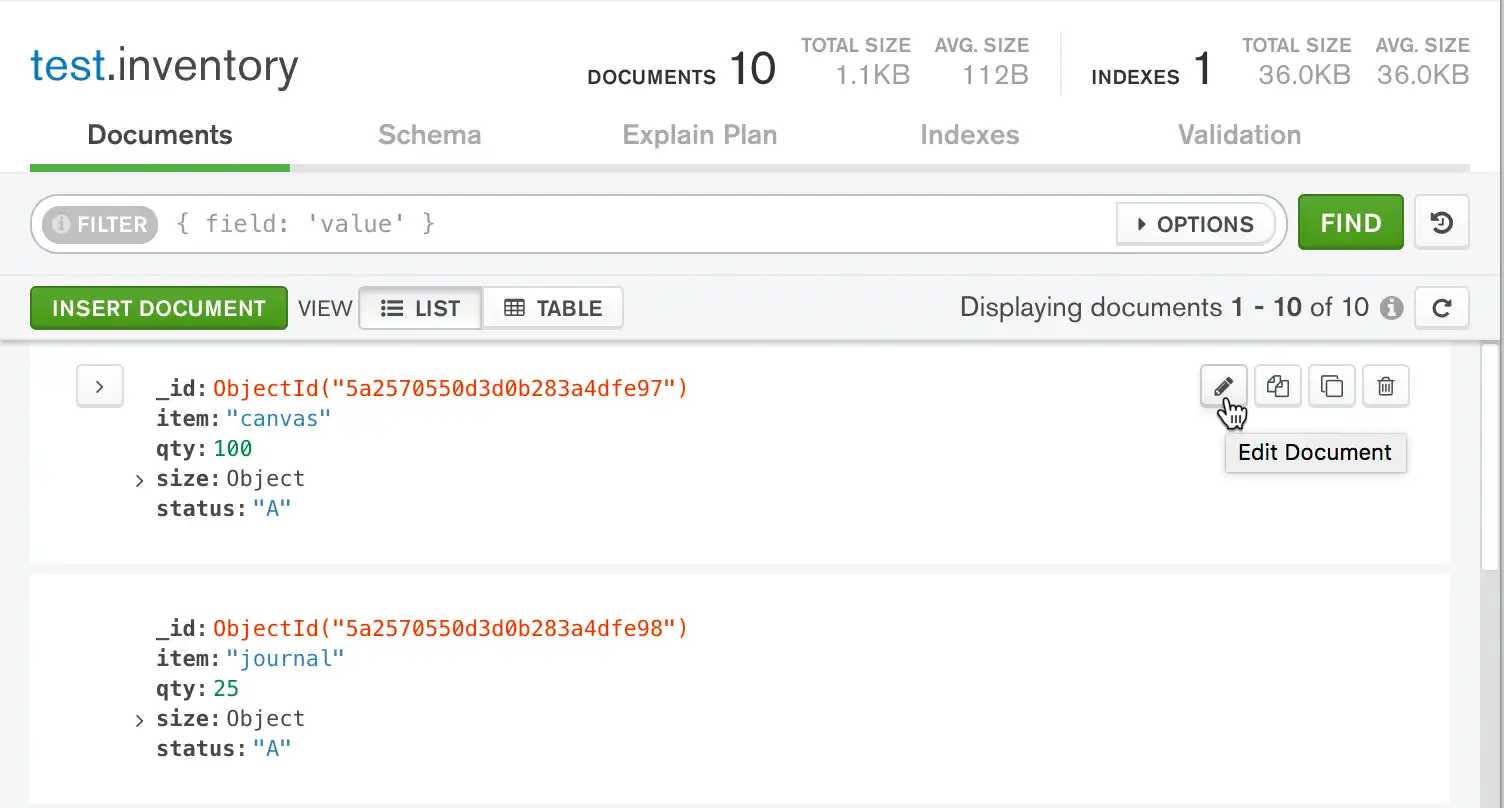
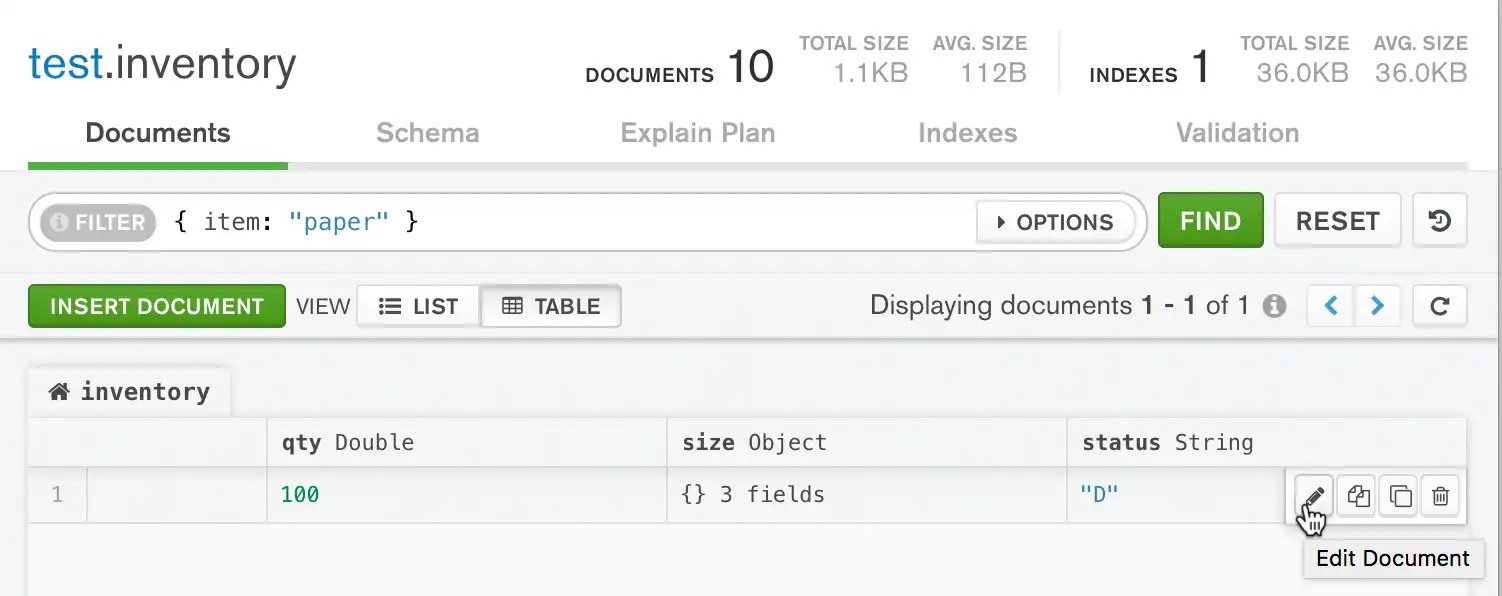
To update a document in Compass, hover over the target document and click the pencil icon:

After clicking the pencil icon, the document enters edit mode:

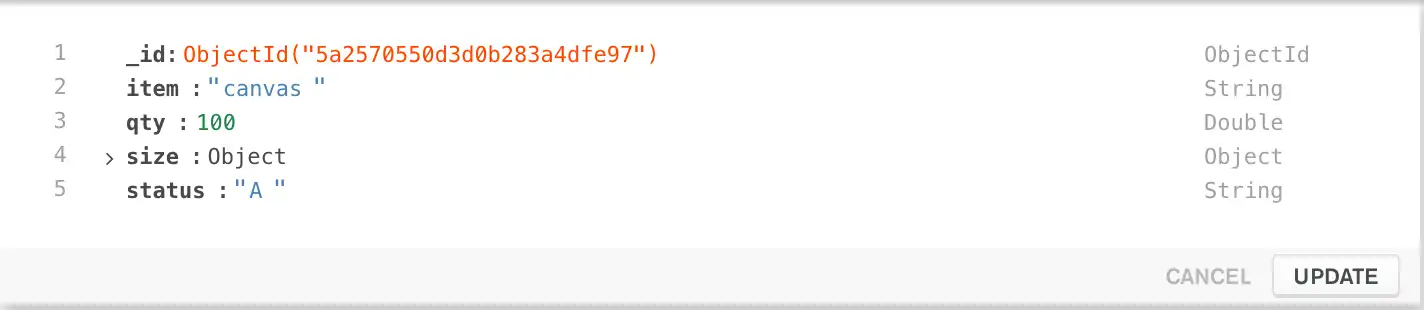
You can now change the this document by clicking the item you wish to change and modifying the value.
For detailed instructions, see Compass documentation or follow the example below.
To modify field values, use Field Update Operators
such as $set.
Pass an update document to the update functions:
{ <update operator>: { <field1>: <value1>, ... }, <update operator>: { <field2>: <value2>, ... }, ... }
Some update operators, such as $set, will create the field if
the field does not exist. See the individual update operator reference for details.
To modify field values, use Field Update Operators
such as $set.
Pass an update document to the update methods:
{ <update operator> => { <field1> => <value1>, ... }, <update operator> => { <field2> => <value2>, ... }, ... }
Some update operators, such as $set, will create the field if
the field does not exist. See the individual update operator reference for details.
To modify field values, use Field Update Operators
such as $set.
Some update operators, such as $set, will create the field if
the field does not exist. See the individual update operator reference for details.
To modify field values, use Field Update Operators
such as $set.
The driver provides the com.mongodb.client.model.Updates class to build update documents:
combine(set(<field1>, <value1>), set(<field2>, <value2>))
For a list of the update helpers, see com.mongodb.client.model.Updates.
Some update operators, such as $set, will create the field if
the field does not exist. See the individual update operator reference for details.
To modify field values, use Field Update Operators
such as $set.
The driver provides the com.mongodb.client.model.Updates class to build update documents:
combine(set(<field1>, <value1>), set(<field2>, <value2>))
For a list of the update helpers, see com.mongodb.client.model.Updates.
Some update operators, such as $set, will create the field if
the field does not exist. See the individual update operator reference for details.
To modify field values, use Field Update Operators
such as $set.
The driver provides the com.mongodb.client.model.Updates
class to build update documents. The following code shows an update
document that uses methods from the Updates builder class:
combine(set(<field1>, <value1>), set(<field2>, <value2>))
Some update operators, such as $set, will create the field if
the field does not exist. See the individual update operator reference for details.
To modify field values, use Field Update Operators
such as $set.
Pass an update document to the update methods:
{ <update operator>: { <field1>: <value1>, ... }, <update operator>: { <field2>: <value2>, ... }, ... }
Some update operators, such as $set, will create the field if
the field does not exist. See the individual update operator reference for details.
To modify field values, use Field Update Operators
such as $set.
Pass an update document to the update methods:
{ <update operator>: { <field1>: <value1>, ... }, <update operator>: { <field2>: <value2>, ... }, ... }
Some update operators, such as $set, will create the field if
the field does not exist. See the individual update operator reference for details.
To modify field values, use Field Update Operators
such as $set.
Pass an update document to the update methods:
[ <update operator> => [ <field1> => <value1>, ... ], <update operator> => [ <field2> => <value2>, ... ], ... ]
Some update operators, such as $set, will create the field if
the field does not exist. See the individual update operator reference for details.
To modify field values, use Field Update Operators
such as $set.
Pass an update document to the update methods:
{ <update operator>: { <field1>: <value1>, ... }, <update operator>: { <field2>: <value2>, ... }, ... }
Some update operators, such as $set, will create the field if
the field does not exist. See the individual update operator reference for details.
To modify field values, use Field Update Operators
such as $set.
Pass an update document to the update methods:
{ <update operator> => { <field1> => <value1>, ... }, <update operator> => { <field2> => <value2>, ... }, ... }
Some update operators, such as $set, will create the field if
the field does not exist. See the individual update operator reference for details.
To modify field values, use Field Update Operators
such as $set.
Pass an update document to the update methods:
( set (<field1>, <value1>), set (<field2>, <value2>), ... )
Some update operators, such as $set, will create the field if
the field does not exist. See the individual update operator reference for details.
Note
MongoDB can accept an aggregation pipeline instead of an update document. For details, see the method reference page.
Update a Single Document
The following example uses the
db.collection.updateOne() method on the
inventory collection to update the first document where
item equals "paper":
The following example demonstrates using MongoDB Compass to modify
a single document where item: paper in the inventory
collection:
Note
This example uses the Compass Table View to modify the document. The editing process using the Compass List View follows a similar approach.
For more information on the differences between Table View and List View in Compass, refer to the Compass documentation.
The following example uses the
mongoc_collection_update_one
function on the inventory collection to update the first document
where item equals "paper":
The following example uses the
IMongoCollection.UpdateOne() method on the
inventory collection to update the first document where
item equals "paper":
The following example uses the
Collection.UpdateOne method
on the inventory collection to update the first document
where item equals "paper":
The following example uses the
com.mongodb.reactivestreams.client.MongoCollection.updateOne
on the inventory collection to update the first document
where item equals "paper":
The following example uses the
com.mongodb.client.MongoCollection.updateOne method on the
inventory collection to update the first document where
item equals "paper":
The following example uses the
MongoCollection.updateOne()
method on the inventory collection to update the first
document where item equals "paper":
The following example uses the
update_one
method on the inventory collection to update the first
document where item equals "paper":
The following example uses the
Collection.updateOne()
method on the inventory collection to update the first
document where item equals "paper":
The following example uses the updateOne() method on the
inventory collection to update the first document where
item equals "paper":
The following example uses the
update_one method on
the inventory collection to update the first document
where item equals "paper":
The following example uses the
update_one()
method on the inventory collection to update the first
document where item equals "paper":
The following example uses the
updateOne()
method on the inventory collection to update the first
document where item equals "paper":
db.inventory.updateOne( { item: "paper" }, { $set: { "size.uom": "cm", status: "P" }, $currentDate: { lastModified: true } } )
The update operation:
uses the
$setoperator to update the value of thesize.uomfield to"cm"and the value of thestatusfield to"P",uses the
$currentDateoperator to update the value of thelastModifiedfield to the current date. IflastModifiedfield does not exist,$currentDatewill create the field. See$currentDatefor details.
Modify the target document as follows:
Change the
statusfield fromDtoP.Change the
size.uomfield fromintocm.Add a new field called
lastModifiedwhose value will be today's date.
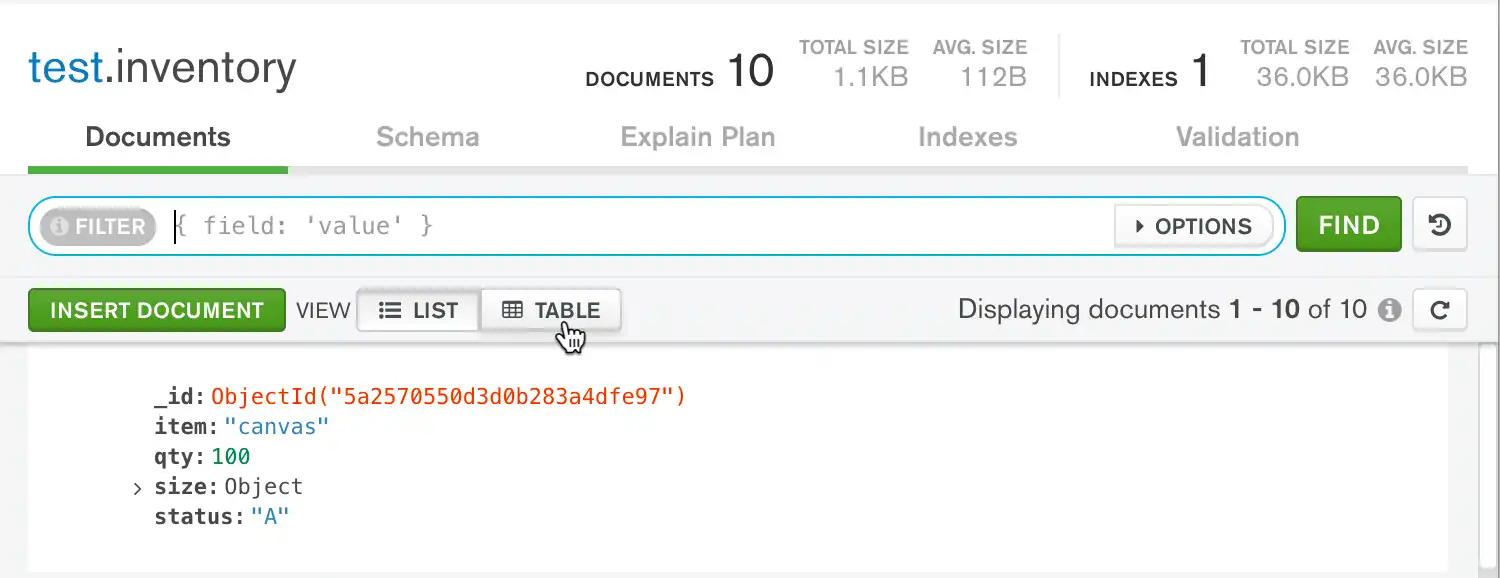
Click the Table button in the top navigation to access the Table View:
![Access Table View]()
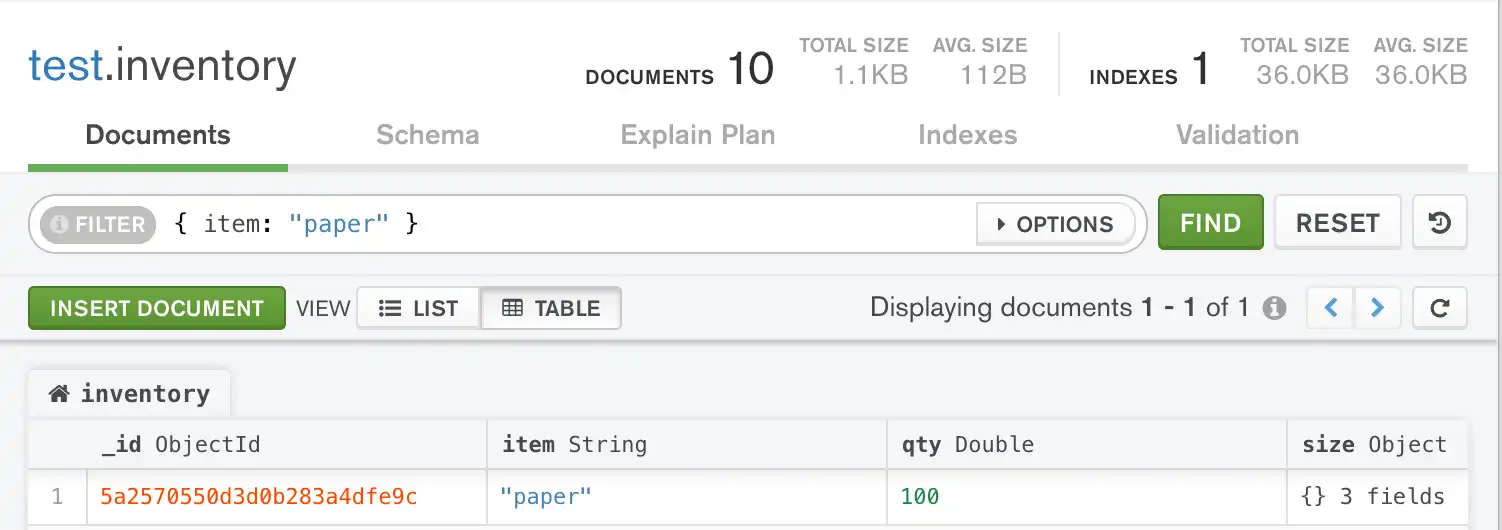
Use the Compass query bar to locate the target document.
Copy the following filter document into the query bar and click Find:
{ item: "paper" } ![Find Paper document]()
Hover over the
statusfield and click the pencil icon which appears on the right side of the document to enter edit mode:![Click edit button]()
Change the value of the field to
"P".Click the Update button below the field to save your changes.
Hover over the
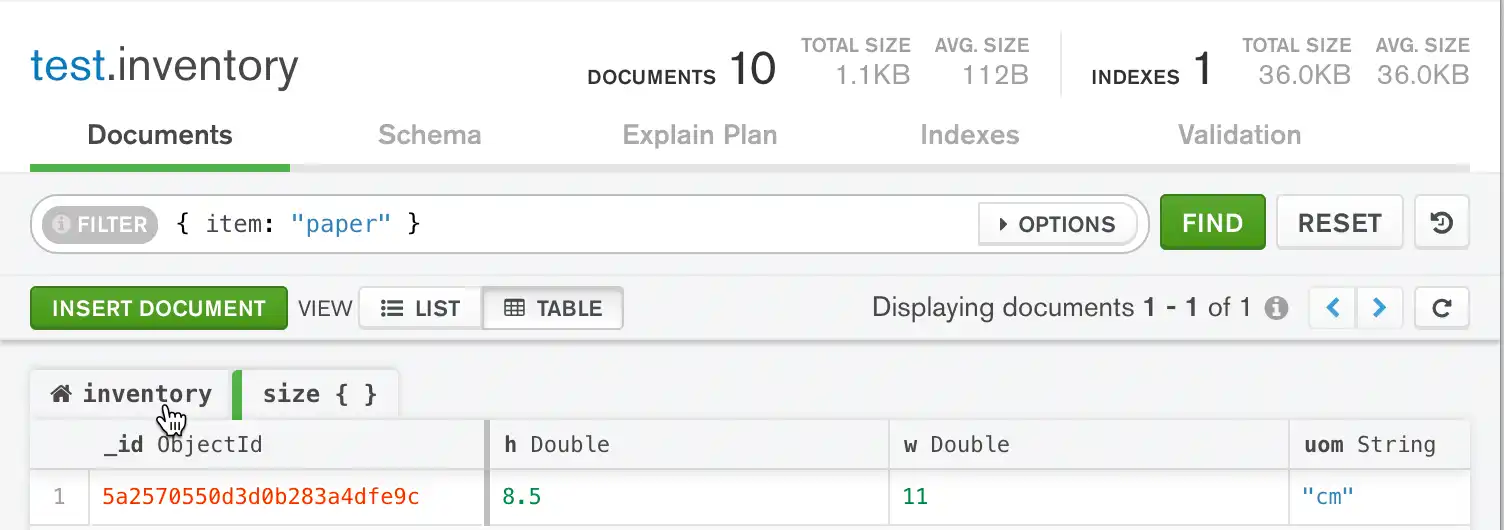
sizefield and click the outward-pointing arrows which appear on the right side of the field. This opens a new tab which displays the fields within thesizeobject:![Expand size object]()
Using the same process outlined in steps 3-5 for editing the
statusfield, change the value of thesize.uomfield to"cm".Click the left-most tab above the table labelled
inventoryto return to the original table view, which displays the top-level document:![Click inventory tab]()
Hover over the
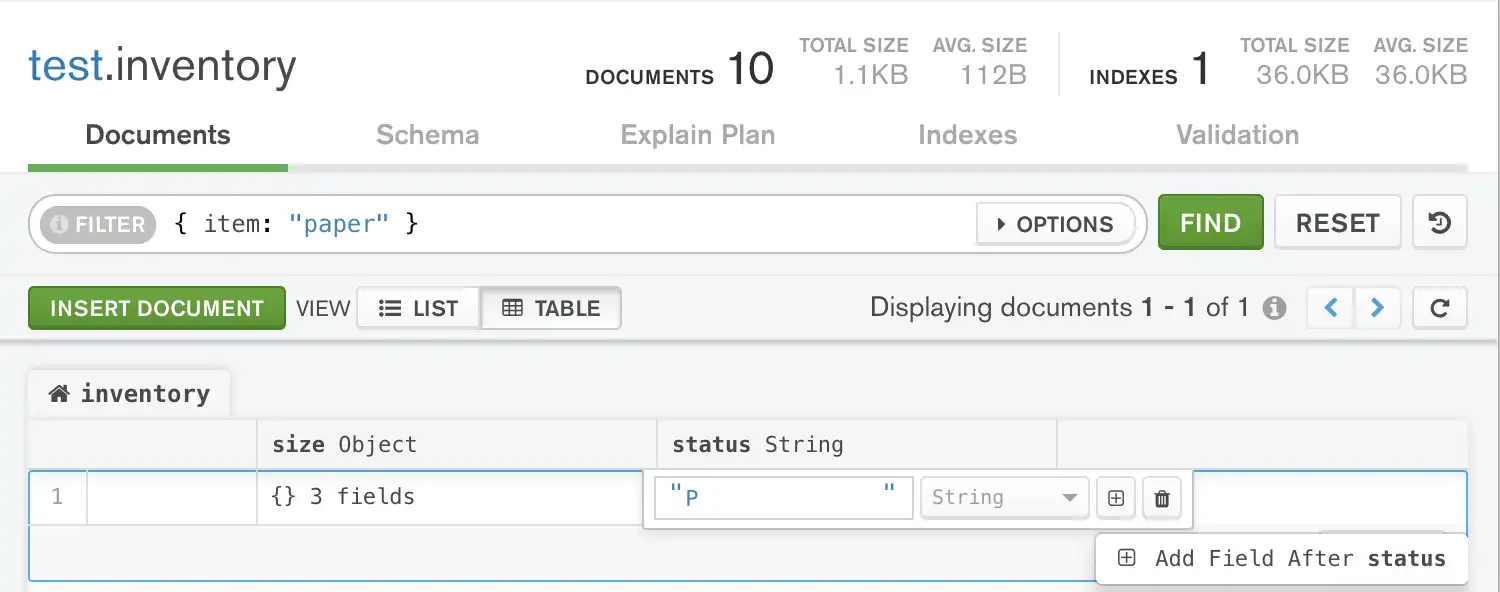
statusfield and click the pencil icon which appears on the right side of the document to re-enter edit mode.Click inside of the
statusfield and click the plus button icon which appears in the edit menu.Click the Add Field After status button which appears below the plus button:
![Add field after status]()
Add a new field called
lastModifiedwith a value of today's date. Set the field type toDate:![Submit update]()
Click the Update button below the field to save your changes.
Note
Because MongoDB Compass does not support
$currentDateor any other Field Update Operators, you must manually enter the date value in Compass.








mongoc_collection_t *collection; bson_t *selector; bson_t *update; bool r; bson_error_t error; collection = mongoc_database_get_collection (db, "inventory"); selector = BCON_NEW ("item", BCON_UTF8 ("paper")); update = BCON_NEW ( "$set", "{", "size.uom", BCON_UTF8 ("cm"), "status", BCON_UTF8 ("P"), "}", "$currentDate", "{", "lastModified", BCON_BOOL (true), "}"); r = mongoc_collection_update_one(collection, selector, update, NULL, NULL, &error); bson_destroy (selector); bson_destroy (update); if (!r) { MONGOC_ERROR ("%s\n", error.message); goto done; }
var filter = Builders<BsonDocument>.Filter.Eq("item", "paper"); var update = Builders<BsonDocument>.Update.Set("size.uom", "cm").Set("status", "P").CurrentDate("lastModified"); var result = collection.UpdateOne(filter, update);
The update operation:
uses the
$setoperator to update the value of thesize.uomfield to"cm"and the value of thestatusfield to"P",uses the
$currentDateoperator to update the value of thelastModifiedfield to the current date. IflastModifiedfield does not exist,$currentDatewill create the field. See$currentDatefor details.
result, err := coll.UpdateOne( context.TODO(), bson.D{ {"item", "paper"}, }, bson.D{ {"$set", bson.D{ {"size.uom", "cm"}, {"status", "P"}, }}, {"$currentDate", bson.D{ {"lastModified", true}, }}, }, )
The update operation:
uses the
$setoperator to update the value of thesize.uomfield to"cm"and the value of thestatusfield to"P",uses the
$currentDateoperator to update the value of thelastModifiedfield to the current date. IflastModifiedfield does not exist,$currentDatewill create the field. See$currentDatefor details.
Publisher<UpdateResult> updateOnePublisher = collection.updateOne(eq("item", "paper"), combine(set("size.uom", "cm"), set("status", "P"), currentDate("lastModified")));
The update operation:
uses the
$setoperator to update the value of thesize.uomfield to"cm"and the value of thestatusfield to"P",uses the
$currentDateoperator to update the value of thelastModifiedfield to the current date. IflastModifiedfield does not exist,$currentDatewill create the field. See$currentDatefor details.
collection.updateOne(eq("item", "paper"), combine(set("size.uom", "cm"), set("status", "P"), currentDate("lastModified")));
The update operation:
uses the
$setoperator to update the value of thesize.uomfield to"cm"and the value of thestatusfield to"P",uses the
$currentDateoperator to update the value of thelastModifiedfield to the current date. IflastModifiedfield does not exist,$currentDatewill create the field. See$currentDatefor details.
collection.updateOne(eq("item", "paper"), combine(set("size.uom", "cm"), set("status", "P"), currentDate("lastModified")));
The update operation:
uses the
$setoperator to update the value of thesize.uomfield to"cm"and the value of thestatusfield to"P",uses the
$currentDateoperator to update the value of thelastModifiedfield to the current date. IflastModifiedfield does not exist,$currentDatewill create the field. See$currentDatefor details.
await db.inventory.update_one( {"item": "paper"}, {"$set": {"size.uom": "cm", "status": "P"}, "$currentDate": {"lastModified": True}}, )
The update operation:
uses the
$setoperator to update the value of thesize.uomfield to"cm"and the value of thestatusfield to"P",uses the
$currentDateoperator to update the value of thelastModifiedfield to the current date. IflastModifiedfield does not exist,$currentDatewill create the field. See$currentDatefor details.
await db.collection('inventory').updateOne( { item: 'paper' }, { $set: { 'size.uom': 'cm', status: 'P' }, $currentDate: { lastModified: true } } );
The update operation:
uses the
$setoperator to update the value of thesize.uomfield to"cm"and the value of thestatusfield to"P",uses the
$currentDateoperator to update the value of thelastModifiedfield to the current date. IflastModifiedfield does not exist,$currentDatewill create the field. See$currentDatefor details.
$updateResult = $db->inventory->updateOne( ['item' => 'paper'], [ '$set' => ['size.uom' => 'cm', 'status' => 'P'], '$currentDate' => ['lastModified' => true], ], );
The update operation:
uses the
$setoperator to update the value of thesize.uomfield to"cm"and the value of thestatusfield to"P",uses the
$currentDateoperator to update the value of thelastModifiedfield to the current date. IflastModifiedfield does not exist,$currentDatewill create the field. See$currentDatefor details.
db.inventory.update_one( {"item": "paper"}, {"$set": {"size.uom": "cm", "status": "P"}, "$currentDate": {"lastModified": True}}, )
client[:inventory].update_one({ item: 'paper'}, { '$set' => { 'size.uom' => 'cm', 'status' => 'P' }, '$currentDate' => { 'lastModified' => true } })
The update operation:
uses the
$setoperator to update the value of thesize.uomfield to"cm"and the value of thestatusfield to"P",uses the
$currentDateoperator to update the value of thelastModifiedfield to the current date. IflastModifiedfield does not exist,$currentDatewill create the field. See$currentDatefor details.
collection.updateOne(equal("item", "paper"), combine(set("size.uom", "cm"), set("status", "P"), currentDate("lastModified")) ).execute()
The update operation:
uses the
$setoperator to update the value of thesize.uomfield to"cm"and the value of thestatusfield to"P",uses the
$currentDateoperator to update the value of thelastModifiedfield to the current date. IflastModifiedfield does not exist,$currentDatewill create the field. See$currentDatefor details.
Update Multiple Documents
The following example uses the
db.collection.updateMany() method on the inventory
collection to update all documents where qty is less than
50:
You can update only one document at a time in MongoDB Compass.
The following example uses the
mongoc_collection_update_many
function on the inventory collection to update all documents where qty
is less than 50:
The following example uses the
IMongoCollection.UpdateMany() method on the
inventory collection to update all documents where qty is
less than 50:
The following example uses the
Collection.UpdateMany
method on the inventory collection to update all documents
where qty is less than 50:
The following example uses the
com.mongodb.reactivestreams.client.MongoCollection.updateMany
method on the inventory collection to update all documents
where qty is less than 50:
The following example uses the
com.mongodb.client.MongoCollection.updateMany method on
the inventory collection to update all documents where
qty is less than 50:
The following example uses the
MongoCollection.updateMany()
method on the inventory collection to update all documents
where qty is less than 50:
The following example uses the
update_many
method on the inventory collection to update all documents
where qty is less than 50:
The following example uses the Collection.updateMany() method on the inventory
collection to update all documents where qty is less than
50:
The following example uses the updateMany() method on the
inventory collection to update all documents where qty is
less than 50:
The following example uses the
update_many method on
the inventory collection to update all documents where qty
is less than 50:
The following example uses the
update_many()
method on the inventory collection to update all documents
where qty is less than 50:
The following example uses the
updateMany()
method on the inventory collection to update all documents
where qty is less than 50:
db.inventory.updateMany( { "qty": { $lt: 50 } }, { $set: { "size.uom": "in", status: "P" }, $currentDate: { lastModified: true } } )
The update operation:
uses the
$setoperator to update the value of thesize.uomfield to"in"and the value of thestatusfield to"P",uses the
$currentDateoperator to update the value of thelastModifiedfield to the current date. IflastModifiedfield does not exist,$currentDatewill create the field. See$currentDatefor details.
To update multiple documents, connect to your
MongoDB deployment from mongosh or a MongoDB driver
and follow the examples in this section for your preferred method.
mongoc_collection_t *collection; bson_t *selector; bson_t *update; bool r; bson_error_t error; collection = mongoc_database_get_collection (db, "inventory"); selector = BCON_NEW ( "qty", "{", "$lt", BCON_INT64 (50), "}"); update = BCON_NEW ( "$set", "{", "size.uom", BCON_UTF8 ("in"), "status", BCON_UTF8 ("P"), "}", "$currentDate", "{", "lastModified", BCON_BOOL (true), "}"); r = mongoc_collection_update_many(collection, selector, update, NULL, NULL, &error); bson_destroy (selector); bson_destroy (update); if (!r) { MONGOC_ERROR ("%s\n", error.message); goto done; }
var filter = Builders<BsonDocument>.Filter.Lt("qty", 50); var update = Builders<BsonDocument>.Update.Set("size.uom", "in").Set("status", "P").CurrentDate("lastModified"); var result = collection.UpdateMany(filter, update);
The update operation:
uses the
$setoperator to update the value of thesize.uomfield to"in"and the value of thestatusfield to"P",uses the
$currentDateoperator to update the value of thelastModifiedfield to the current date. IflastModifiedfield does not exist,$currentDatewill create the field. See$currentDatefor details.
result, err := coll.UpdateMany( context.TODO(), bson.D{ {"qty", bson.D{ {"$lt", 50}, }}, }, bson.D{ {"$set", bson.D{ {"size.uom", "cm"}, {"status", "P"}, }}, {"$currentDate", bson.D{ {"lastModified", true}, }}, }, )
The update operation:
uses the
$setoperator to update the value of thesize.uomfield to"in"and the value of thestatusfield to"P",uses the
$currentDateoperator to update the value of thelastModifiedfield to the current date. IflastModifiedfield does not exist,$currentDatewill create the field. See$currentDatefor details.
Publisher<UpdateResult> updateManyPublisher = collection.updateMany(lt("qty", 50), combine(set("size.uom", "in"), set("status", "P"), currentDate("lastModified")));
The update operation:
uses the
$setoperator to update the value of thesize.uomfield to"in"and the value of thestatusfield to"P",uses the
$currentDateoperator to update the value of thelastModifiedfield to the current date. IflastModifiedfield does not exist,$currentDatewill create the field. See$currentDatefor details.
collection.updateMany(lt("qty", 50), combine(set("size.uom", "in"), set("status", "P"), currentDate("lastModified")));
The update operation:
uses the
$setoperator to update the value of thesize.uomfield to"in"and the value of thestatusfield to"P",uses the
$currentDateoperator to update the value of thelastModifiedfield to the current date. IflastModifiedfield does not exist,$currentDatewill create the field. See$currentDatefor details.
collection.updateOne(eq("item", "paper"), combine(set("size.uom", "cm"), set("status", "P"), currentDate("lastModified")));
The update operation:
uses the
$setoperator to update the value of thesize.uomfield to"in"and the value of thestatusfield to"P",uses the
$currentDateoperator to update the value of thelastModifiedfield to the current date. IflastModifiedfield does not exist,$currentDatewill create the field. See$currentDatefor details.
await db.inventory.update_many( {"qty": {"$lt": 50}}, {"$set": {"size.uom": "in", "status": "P"}, "$currentDate": {"lastModified": True}}, )
The update operation:
uses the
$setoperator to update the value of thesize.uomfield to"in"and the value of thestatusfield to"P",uses the
$currentDateoperator to update the value of thelastModifiedfield to the current date. IflastModifiedfield does not exist,$currentDatewill create the field. See$currentDatefor details.
await db.collection('inventory').updateMany( { qty: { $lt: 50 } }, { $set: { 'size.uom': 'in', status: 'P' }, $currentDate: { lastModified: true } } );
The update operation:
uses the
$setoperator to update the value of thesize.uomfield to"in"and the value of thestatusfield to"P",uses the
$currentDateoperator to update the value of thelastModifiedfield to the current date. IflastModifiedfield does not exist,$currentDatewill create the field. See$currentDatefor details.
$updateResult = $db->inventory->updateMany( ['qty' => ['$lt' => 50]], [ '$set' => ['size.uom' => 'cm', 'status' => 'P'], '$currentDate' => ['lastModified' => true], ], );
The update operation:
uses the
$setoperator to update the value of thesize.uomfield to"in"and the value of thestatusfield to"P",uses the
$currentDateoperator to update the value of thelastModifiedfield to the current date. IflastModifiedfield does not exist,$currentDatewill create the field. See$currentDatefor details.
db.inventory.update_many( {"qty": {"$lt": 50}}, {"$set": {"size.uom": "in", "status": "P"}, "$currentDate": {"lastModified": True}}, )
client[:inventory].update_many({ qty: { '$lt' => 50 } }, { '$set' => { 'size.uom' => 'in', 'status' => 'P' }, '$currentDate' => { 'lastModified' => true } })
The update operation:
uses the
$setoperator to update the value of thesize.uomfield to"in"and the value of thestatusfield to"P",uses the
$currentDateoperator to update the value of thelastModifiedfield to the current date. IflastModifiedfield does not exist,$currentDatewill create the field. See$currentDatefor details.
collection.updateMany(lt("qty", 50), combine(set("size.uom", "in"), set("status", "P"), currentDate("lastModified")) ).execute()
The update operation:
uses the
$setoperator to update the value of thesize.uomfield to"in"and the value of thestatusfield to"P",uses the
$currentDateoperator to update the value of thelastModifiedfield to the current date. IflastModifiedfield does not exist,$currentDatewill create the field. See$currentDatefor details.
Replace a Document
To replace the entire content of a document except for the _id
field, pass an entirely new document as the second argument to
db.collection.replaceOne().
When replacing a document, the replacement document must consist of only field/value pairs. The replacement document cannot include update operators expressions.
The replacement document can have different fields from the original
document. In the replacement document, you can omit the _id field
since the _id field is immutable. However, if you do include the
_id field, it must have the same value as the current value.
The following example replaces the first document from the
inventory collection where item: "paper":
You can't replace a document in MongoDB Compass.
To replace the entire content of a document except for the _id
field, pass an entirely new document as the third argument to
mongoc_collection_replace_one.
When replacing a document, the replacement document must consist of only field/value pairs. The replacement document cannot include update operators expressions.
The replacement document can have different fields from the original
document. In the replacement document, you can omit the _id field
since the _id field is immutable. However, if you do include the
_id field, it must have the same value as the current value.
The following example replaces the first document from the
inventory collection where item: "paper":
To replace the entire content of a document except for the _id
field, pass an entirely new document as the second argument to
IMongoCollection.ReplaceOne().
When replacing a document, the replacement document must consist of only field/value pairs. The replacement document cannot include update operators expressions.
The replacement document can have different fields from the original
document. In the replacement document, you can omit the _id field
since the _id field is immutable. However, if you do include the
_id field, it must have the same value as the current value.
The following example replaces the first document from the
inventory collection where item: "paper":
To replace the entire content of a document except for the _id
field, pass an entirely new document as the second argument to
Collection.ReplaceOne.
When replacing a document, the replacement document must consist of only field/value pairs. The replacement document cannot include update operators expressions.
The replacement document can have different fields from the original
document. In the replacement document, you can omit the _id field
since the _id field is immutable. However, if you do include the
_id field, it must have the same value as the current value.
The following example replaces the first document from the
inventory collection where item: "paper":
To replace the entire content of a document except for the _id
field, pass an entirely new document as the second argument to
com.mongodb.reactivestreams.client.MongoCollection.replaceOne.
When replacing a document, the replacement document must consist of only field/value pairs. The replacement document cannot include update operators expressions.
The replacement document can have different fields from the original
document. In the replacement document, you can omit the _id field
since the _id field is immutable. However, if you do include the
_id field, it must have the same value as the current value.
The following example replaces the first document from the
inventory collection where item: "paper":
To replace the entire content of a document except for the _id
field, pass an entirely new document as the second argument to
com.mongodb.client.MongoCollection.replaceOne.
When replacing a document, the replacement document must consist of only field/value pairs. The replacement document cannot include update operators expressions.
The replacement document can have different fields from the original
document. In the replacement document, you can omit the _id field
since the _id field is immutable. However, if you do include the
_id field, it must have the same value as the current value.
The following example replaces the first document from the
inventory collection where item: "paper":
To replace the entire content of a document except for the _id
field, pass an entirely new document as the second argument to
the MongoCollection.replaceOne() method.
When replacing a document, the replacement document must consist of only field/value pairs. The replacement document cannot include update operators expressions.
The replacement document can have different fields from the original
document. In the replacement document, you can omit the _id field
since the _id field is immutable. However, if you do include the
_id field, it must have the same value as the current value.
The following example replaces the first document from the
inventory collection where item: "paper":
To replace the entire content of a document except for the _id
field, pass an entirely new document as the second argument to
replace_one.
When replacing a document, the replacement document must consist of only field/value pairs. The replacement document cannot include update operators expressions.
The replacement document can have different fields from the original
document. In the replacement document, you can omit the _id field
since the _id field is immutable. However, if you do include the
_id field, it must have the same value as the current value.
The following example replaces the first document from the
inventory collection where item: "paper":
To replace the entire content of a document except for the
_id field, pass an entirely new document as the second
argument to
Collection.replaceOne().
When replacing a document, the replacement document must consist of only field/value pairs. The replacement document cannot include update operators expressions.
The replacement document can have different fields from the original
document. In the replacement document, you can omit the _id field
since the _id field is immutable. However, if you do include the
_id field, it must have the same value as the current value.
The following example replaces the first document from the
inventory collection where item: "paper":
To replace the entire content of a document except for the _id
field, pass an entirely new document as the second argument to
replaceOne().
When replacing a document, the replacement document must consist of only field/value pairs. The replacement document cannot include update operators expressions.
The replacement document can have different fields from the original
document. In the replacement document, you can omit the _id field
since the _id field is immutable. However, if you do include the
_id field, it must have the same value as the current value.
The following example replaces the first document from the
inventory collection where item: "paper":
To replace the entire content of a document except for the _id
field, pass an entirely new document as the second argument to
replace_one.
When replacing a document, the replacement document must consist of only field/value pairs. The replacement document cannot include update operators expressions.
The replacement document can have different fields from the original
document. In the replacement document, you can omit the _id field
since the _id field is immutable. However, if you do include the
_id field, it must have the same value as the current value.
The following example replaces the first document from the
inventory collection where item: "paper":
To replace the entire content of a document except for the _id
field, pass an entirely new document as the second argument to
replace_one().
When replacing a document, the replacement document must consist of only field/value pairs. The replacement document cannot include update operators expressions.
The replacement document can have different fields from the original
document. In the replacement document, you can omit the _id field
since the _id field is immutable. However, if you do include the
_id field, it must have the same value as the current value.
The following example replaces the first document from the
inventory collection where item: "paper":
To replace the entire content of a document except for the _id
field, pass an entirely new document as the second argument to
replaceOne()
When replacing a document, the replacement document must consist of only field/value pairs. The replacement document cannot include update operators expressions.
The replacement document can have different fields from the original
document. In the replacement document, you can omit the _id field
since the _id field is immutable. However, if you do include the
_id field, it must have the same value as the current value.
The following example replaces the first document from the
inventory collection where item: "paper":
db.inventory.replaceOne( { item: "paper" }, { item: "paper", instock: [ { warehouse: "A", qty: 60 }, { warehouse: "B", qty: 40 } ] } )
To replace a document, connect to your
MongoDB deployment from mongosh or a MongoDB driver
and follow the examples in this section for your preferred method.
mongoc_collection_t *collection; bson_t *selector; bson_t *replacement; bool r; bson_error_t error; collection = mongoc_database_get_collection (db, "inventory"); selector = BCON_NEW ("item", BCON_UTF8 ("paper")); replacement = BCON_NEW ( "item", BCON_UTF8 ("paper"), "instock", "[", "{", "warehouse", BCON_UTF8 ("A"), "qty", BCON_INT64 (60), "}","{", "warehouse", BCON_UTF8 ("B"), "qty", BCON_INT64 (40), "}", "]"); /* MONGOC_UPDATE_NONE means "no special options" */ r = mongoc_collection_replace_one(collection, selector, replacement, NULL, NULL, &error); bson_destroy (selector); bson_destroy (replacement); if (!r) { MONGOC_ERROR ("%s\n", error.message); goto done; }
Clean up any open resources by calling the following methods, as appropriate:
var filter = Builders<BsonDocument>.Filter.Eq("item", "paper"); var replacement = new BsonDocument { { "item", "paper" }, { "instock", new BsonArray { new BsonDocument { { "warehouse", "A" }, { "qty", 60 } }, new BsonDocument { { "warehouse", "B" }, { "qty", 40 } } } } }; var result = collection.ReplaceOne(filter, replacement);
result, err := coll.ReplaceOne( context.TODO(), bson.D{ {"item", "paper"}, }, bson.D{ {"item", "paper"}, {"instock", bson.A{ bson.D{ {"warehouse", "A"}, {"qty", 60}, }, bson.D{ {"warehouse", "B"}, {"qty", 40}, }, }}, }, )
Publisher<UpdateResult> replaceOnePublisher = collection.replaceOne(eq("item", "paper"), Document.parse("{ item: 'paper', instock: [ { warehouse: 'A', qty: 60 }, { warehouse: 'B', qty: 40 } ] }"));
collection.replaceOne(eq("item", "paper"), Document.parse("{ item: 'paper', instock: [ { warehouse: 'A', qty: 60 }, { warehouse: 'B', qty: 40 } ] }"));
collection.replaceOne(eq("item", "paper"), Document.parse("{ item: 'paper', instock: [ { warehouse: 'A', qty: 60 }, { warehouse: 'B', qty: 40 } ] }"));
await db.inventory.replace_one( {"item": "paper"}, { "item": "paper", "instock": [{"warehouse": "A", "qty": 60}, {"warehouse": "B", "qty": 40}], }, )
await db.collection('inventory').replaceOne( { item: 'paper' }, { item: 'paper', instock: [ { warehouse: 'A', qty: 60 }, { warehouse: 'B', qty: 40 } ] } );
$updateResult = $db->inventory->replaceOne( ['item' => 'paper'], [ 'item' => 'paper', 'instock' => [ ['warehouse' => 'A', 'qty' => 60], ['warehouse' => 'B', 'qty' => 40], ], ], );
db.inventory.replace_one( {"item": "paper"}, { "item": "paper", "instock": [{"warehouse": "A", "qty": 60}, {"warehouse": "B", "qty": 40}], }, )
client[:inventory].replace_one({ item: 'paper' }, { item: 'paper', instock: [ { warehouse: 'A', qty: 60 }, { warehouse: 'B', qty: 40 } ] })
collection.replaceOne(equal("item", "paper"), Document("""{ item: "paper", instock: [ { warehouse: "A", qty: 60 }, { warehouse: "B", qty: 40 } ] }""") ).execute()
Update a Document with MongoDB Atlas
Note
The MongoDB Atlas UI updates one document at a time. To update multiple
documents or replace an entire document, connect to your Atlas deployment
from mongosh or a MongoDB driver and follow the example for
your preferred method.
This example uses the sample supplies dataset. To load the sample dataset, see Load Sample Data.
To update a document in MongoDB Atlas, follow these steps:
In the MongoDB Atlas UI, go to the Clusters page for your project.
If it's not already displayed, select the organization that contains your desired project from the Organizations menu in the navigation bar.
If it's not already displayed, select your project from the Projects menu in the navigation bar.
In the sidebar, click Clusters under the Database heading.
The Clusters page displays.
Specify a query filter.
You can specify a query filter document in the Filter field. A query filter document uses query operators to specify search conditions.
Copy the following query filter document into the Filter search bar and click Apply:
{ saleDate: { $gte: { $date: "2016-01-01T00:00-00:00" }, $lte: { $date: "2016-01-02T00:00-00:00" } } }
This query filter returns all documents in the sample_supplies.sales
collection where saleDate is on or between January 1 and 2, 2016
UTC time.
Edit a document.
To edit a document displayed in the query results, hover over the document and click on the pencil icon. In the document editor, you can:
Add a new field.
Delete an existing field.
Edit a field's name, value, or type.
Revert a specific change.
For detailed instructions, see Create, View, Update, and Delete Documents.
Behavior
Atomicity
All write operations are atomic at the document level. For more information, see Atomicity and Transactions.
_id Field
Once set, you cannot update the _id field value nor can you replace a
document with one that has a different _id value.
Idempotent Operations
Use updateMany() only for idempotent operations.
Field Order
For write operations, MongoDB preserves the order of the document fields except for the following cases:
The
_idfield is always the first field in the document.Updates that include
renamingof field names may result in the reordering of fields in the document.
Upsert Option
If updateOne(),
updateMany(), or
replaceOne() includes upsert : true
and no documents match the specified filter, then the
operation creates a new document and inserts it. If there are
matching documents, then the operation modifies or replaces the
matching document or documents.
For details on the new document created, see the individual reference pages for the methods.
The upsert option is not available in MongoDB Compass.
If mongoc_collection_update_one,
mongoc_collection_update_many, or
mongoc_collection_replace_one includes
upsert : true and no documents match the specified
filter, then the operation creates a new document and inserts
it. If there are matching documents, then the operation
modifies or replaces the matching document or documents.
For details on the new document created, see the individual reference pages for the functions.
If UpdateOne(),
UpdateMany(), or
ReplaceOne() includes an
UpdateOptions
argument instance with the IsUpsert option set to true
and no documents match the specified filter, then the
operation creates a new document and inserts it. If there are
matching documents, then the operation modifies or replaces the
matching document or documents.
For details on the new document created, see the individual reference pages for the methods.
If Collection.UpdateOne includes the Upsert option set to true and no documents match the specified filter, then the operation creates a new document and inserts it. If there are matching documents, then the operation modifies or replaces the matching document or documents.
For details on the new document created, see the individual reference pages for the methods.
If the update and replace methods include the UpdateOptions parameter that specifies UpdateOptions.upsert(true) and no documents match the specified filter, then the operation creates a new document and inserts it. If there are matching documents, then the operation modifies or replaces the matching document or documents.
For details on the new document created, see the individual reference pages for the methods.
If the update and replace methods include the com.mongodb.client.model.UpdateOptions parameter that specifies com.mongodb.client.model.UpdateOptions.upsert(true) and no documents match the specified filter, then the operation creates a new document and inserts it. If there are matching documents, then the operation modifies or replaces the matching document or documents.
For details on the new document created, see the individual reference pages for the methods.
If the update and replace methods include the
com.mongodb.client.model.UpdateOptions
parameter that specifies upsert(true),
and no documents match the specified filter, then the
operation creates a new document and inserts it. If there are
matching documents, then the operation modifies or replaces
the matching document or documents.
For details on the new document created, see the individual reference pages for the methods.
If
update_one,
update_many,
or
replace_one
includes upsert : true and no documents match the
specified filter, then the operation creates a new document and
inserts it. If there are matching documents, then the operation
modifies or replaces the matching document or documents.
For details on the new document created, see the individual reference pages for the methods.
If updateOne(),
updateMany(), or
replaceOne() include
upsert : true in the options parameter document and
no documents match the specified filter, then the operation
creates a new document and inserts it. If there are matching
documents, then the operation modifies or replaces the matching
document or documents.
For details on the new document created, see the individual reference pages for the methods.
If updateOne(),
updateMany(), or
replaceOne() includes upsert =>
true and no documents match the specified filter, then the
operation creates a new document and inserts it. If there are
matching documents, then the operation modifies or replaces the
matching document or documents.
For details on the new document created, see the individual reference pages for the methods.
If update_one,
update_many, or
replace_one includes
upsert : true and no documents match the specified
filter, then the operation creates a new document and inserts
it. If there are matching documents, then the operation
modifies or replaces the matching document or documents.
For details on the new document created, see the individual reference pages for the methods.
If
update_one(),
update_many(),
or
replace_one()
includes upsert => true and no documents match the
specified filter, then the operation creates a new document and
inserts it. If there are matching documents, then the operation
modifies or replaces the matching document or documents.
For details on the new document created, see the individual reference pages for the methods.
If
updateOne(),
updateMany(),
or
replaceOne()
includes upsert => true and no documents match the
specified filter, then the operation creates a new document and
inserts it. If there are matching documents, then the operation
modifies or replaces the matching document or documents.
For details on the new document created, see the individual reference pages for the methods.
Write Acknowledgement
Specify the level of acknowledgment requested from MongoDB for write operations with write concerns.