You can use explain results to determine the following information about a query:
The amount of time a query took to complete
Whether the query used an index
The number of documents and index keys scanned to fulfill a query
Note
Explain plan results for queries are subject to change between MongoDB versions.
The cursor.explain("executionStats") and the db.collection.explain("executionStats") methods provide statistics about the performance of a query. These statistics can be useful in measuring if and how a query uses an index. See db.collection.explain() for details.
MongoDB Compass provides an Explain Plan modal, which displays statistics about the performance of a query. These statistics can be useful in measuring if and how a query uses an index.
Evaluate the Performance of a Query
The examples on this page use data from the sample_mflix dataset. For details on how to load this dataset into your self-managed MongoDB deployment, see Load the Sample Dataset. If you made any modifications to the sample databases, you may need to drop and recreate the databases to run the examples on this page.
The examples on this page use data from the sample_mflix sample dataset. For details on how to load this dataset into your deployment, see Import Sample Data Into Your Atlas Deployment.
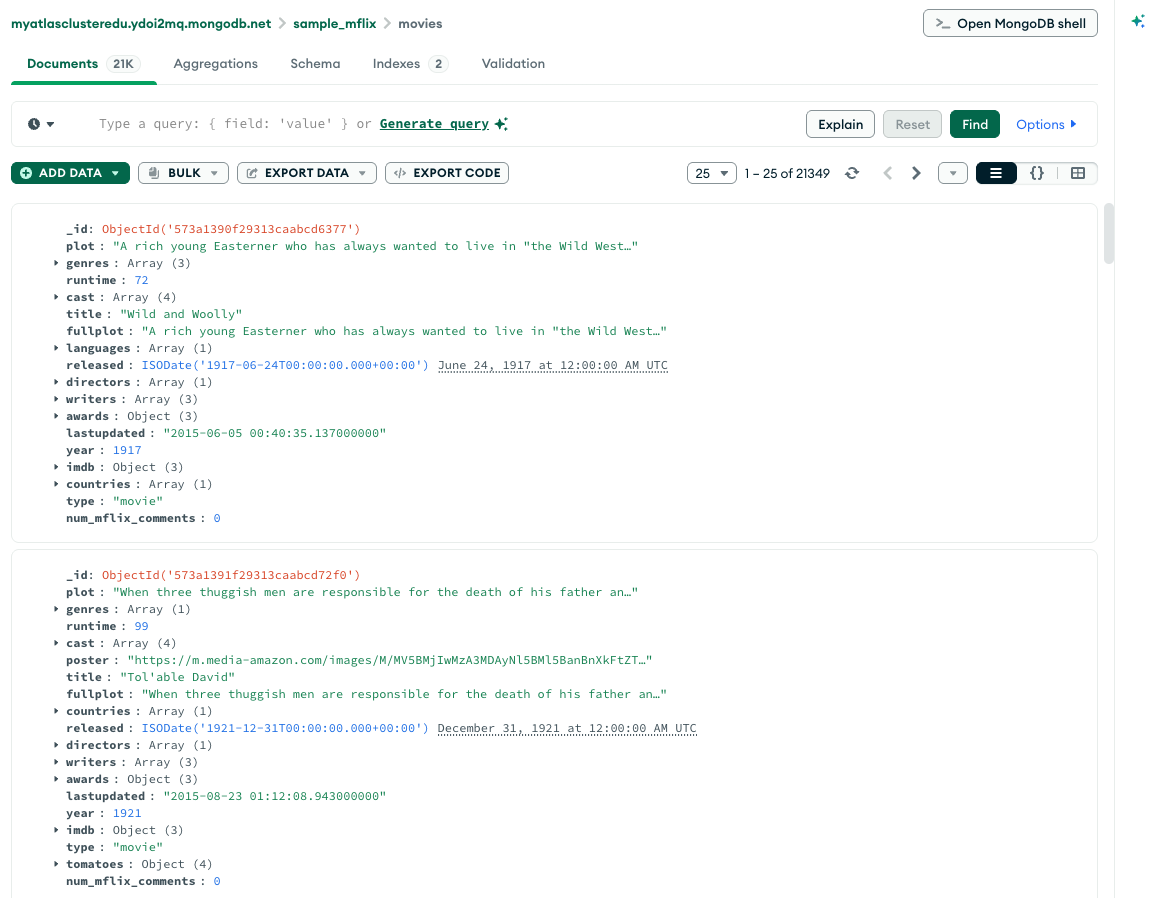
After you load the dataset, connect MongoDB Compass to the same deployment and open the movies collection.
The collection documents appear in MongoDB Compass as follows:
Query with No Index
The following query retrieves documents where the year field has a value between 2000 and 2005, inclusive:
db.movies.find( { year: { $gte: 2000, $lte: 2005 } } )
This query matches 3809 of the 21349 documents in the collection.
To view the query plan selected, chain the cursor.explain("executionStats") cursor method to the end of the find command:
db.movies.find( { year: { $gte: 2000, $lte: 2005 } } ).explain("executionStats")
{ queryPlanner: { namespace: 'sample_mflix.movies', winningPlan: { stage: 'COLLSCAN', '...': '...' }, '...': '...' }, executionStats: { executionSuccess: true, nReturned: 3809, totalKeysExamined: 0, totalDocsExamined: 21349, executionStages: { stage: 'COLLSCAN', '...': '...' }, '...': '...' }, '...': '...' }
queryPlanner.winningPlan.stagedisplaysCOLLSCANto indicate a collection scan.Collection scans indicate that the
mongodhad to scan the entire collection document by document to identify the results. This is a generally expensive operation and can result in slow queries.executionStats.nReturneddisplays3809to indicate that the winning query plan returns 3,809 documents.executionStats.totalKeysExamineddisplays0to indicate that this query is not using an index.executionStats.totalDocsExamineddisplays21349to indicate that MongoDB had to scan all 21,349 documents in the collection to find the 3,809 matching documents.
The following query retrieves documents where the year field has a value between 2000 and 2005, inclusive:
Copy the following filter into the Compass query bar and click Find:
{ year: { $gte: 2000, $lte: 2005 } }
This query matches 3809 of the 21349 documents in the collection.
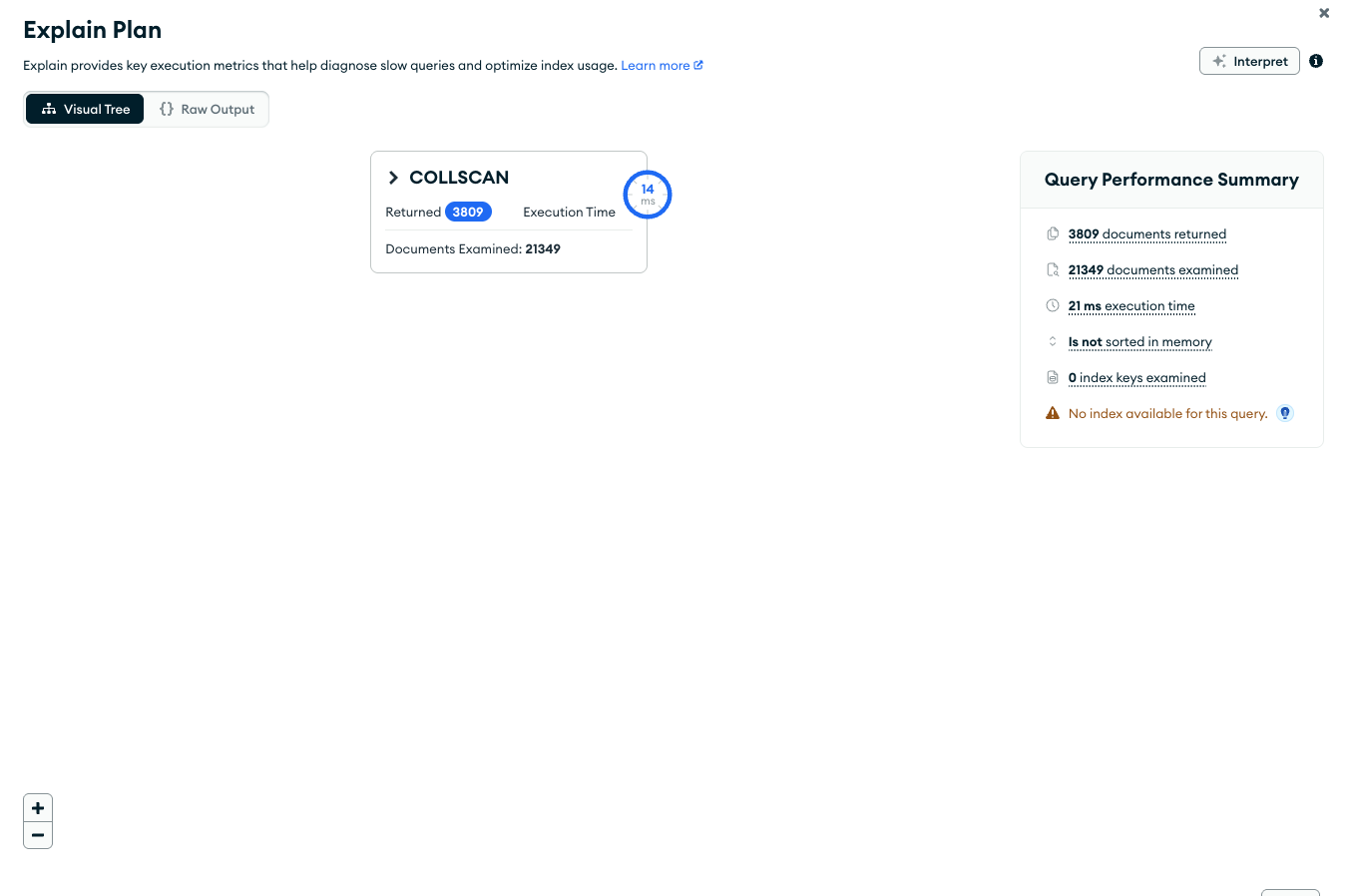
To view the query plan, click Explain in the query bar.
MongoDB Compass displays the query plan as follows:
Visual Tree
The Query Performance Summary shows the execution stats of the query:
Documents Returned displays
3809to indicate that the winning query plan returns 3,809 documents.Documents Examined displays
21349to indicate that MongoDB had to scan all 21,349 documents in the collection to find the 3,809 matching documents.Index Keys Examined displays
0to indicate that this query is not using an index.
MongoDB Compass displays the
COLLSCANquery stage to indicate that a collection scan was used for this query. Collection scans indicate that themongodhad to scan the entire collection document by document to identify the results. This is a generally expensive operation and can result in slow queries.
Raw JSON
The Explain Plan details can also be viewed in raw JSON format by clicking the Raw Output option:
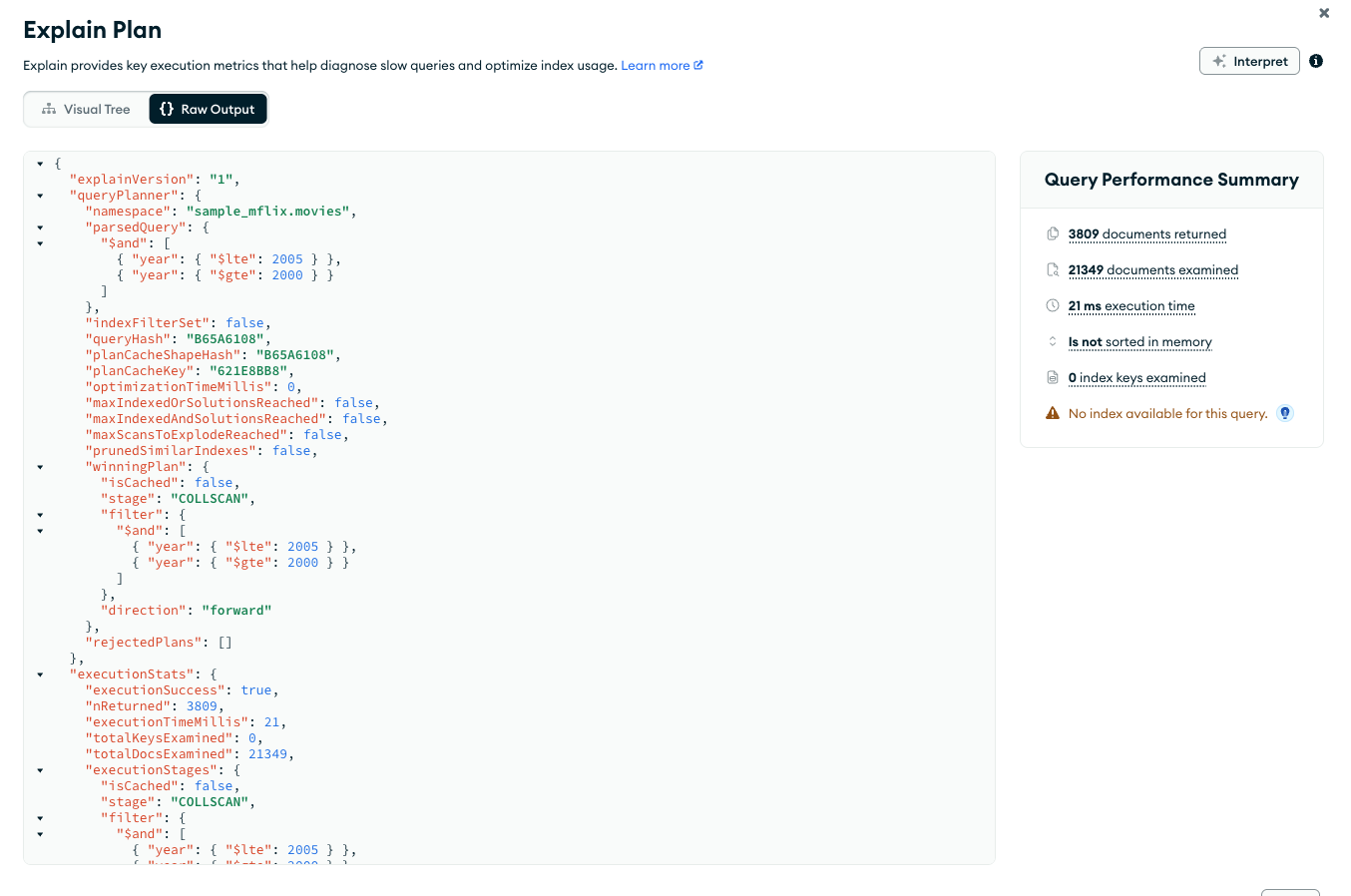
The difference between the number of matching documents and the number of examined documents may suggest that the query might benefit from the use of an index to improve efficiency.
Query with Index
To support the query on the year field, add an index on the year field:
db.movies.createIndex( { year: 1 } )
To view the query plan statistics, use the explain() method:
db.movies.find( { year: { $gte: 2000, $lte: 2005 } } ).explain("executionStats")
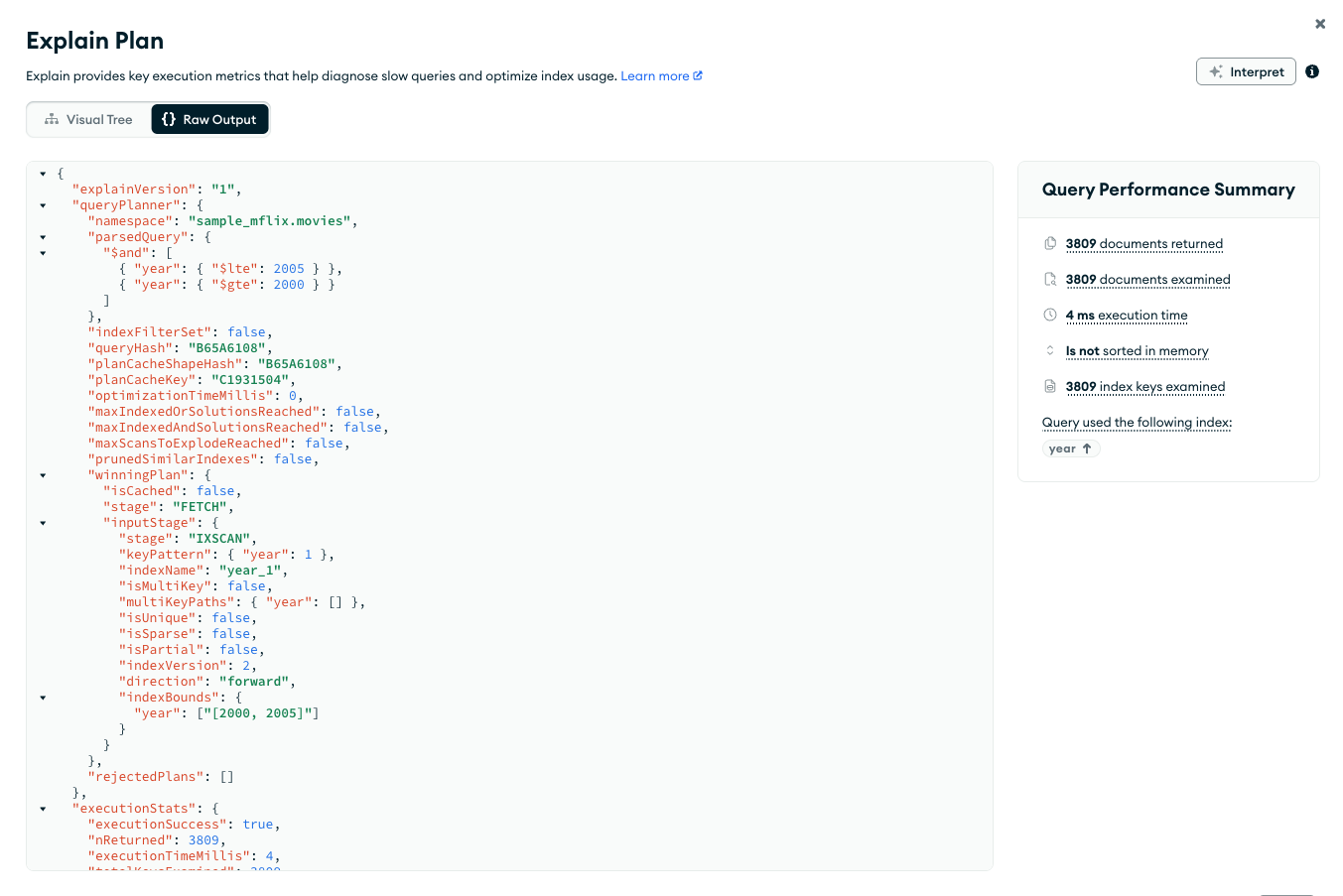
{ queryPlanner: { namespace: 'sample_mflix.movies', winningPlan: { stage: 'FETCH', inputStage: { stage: 'IXSCAN', keyPattern: { year: 1 }, '...': '...' }, '...': '...' }, '...': '...' }, executionStats: { executionSuccess: true, nReturned: 3809, totalKeysExamined: 3809, totalDocsExamined: 3809, '...': '...' }, '...': '...' }
queryPlanner.winningPlan.inputStage.stagedisplaysIXSCANto indicate index use.executionStats.nReturneddisplays3809to indicate that the winning query plan returns 3,809 documents.executionStats.totalKeysExamineddisplays3809to indicate that MongoDB scanned 3,809 index entries. The number of keys examined match the number of documents returned, meaning that themongodonly had to examine index keys to return the results. Themongoddid not have to scan all of the documents, and only the 3,809 matching documents had to be pulled into memory. This results in a very efficient query.executionStats.totalDocsExamineddisplay3809to indicate that MongoDB scanned 3,809 documents.
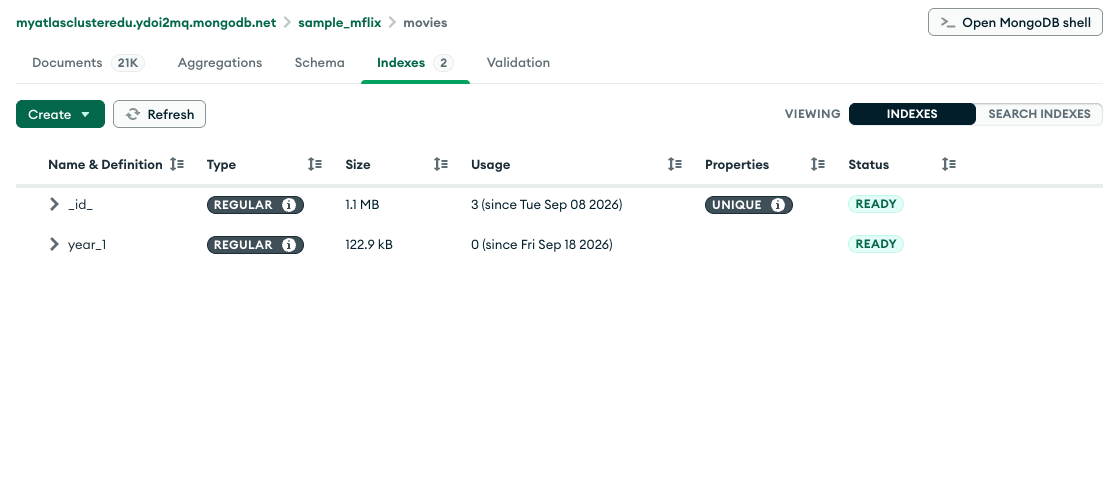
To support the query on the year field, add an index on the year field:
Click the Indexes tab for the
sample_mflix.moviescollection.Click Create, then select Index from the dropdown menu.
Select
yearfrom the Select or type a field name dropdown.Select
1 (asc)from the Select a type dropdown.Click Create Index.
Note
Leaving the index name field blank causes MongoDB Compass to create a default name for the index.
You can now see your newly created index in the Indexes tab:
Return to the Documents tab for the sample_mflix.movies collection and re-run the query from the previous step:
{ year: { $gte: 2000, $lte: 2005 } }
Open the Explain Plan modal. MongoDB Compass displays the query plan as follows:
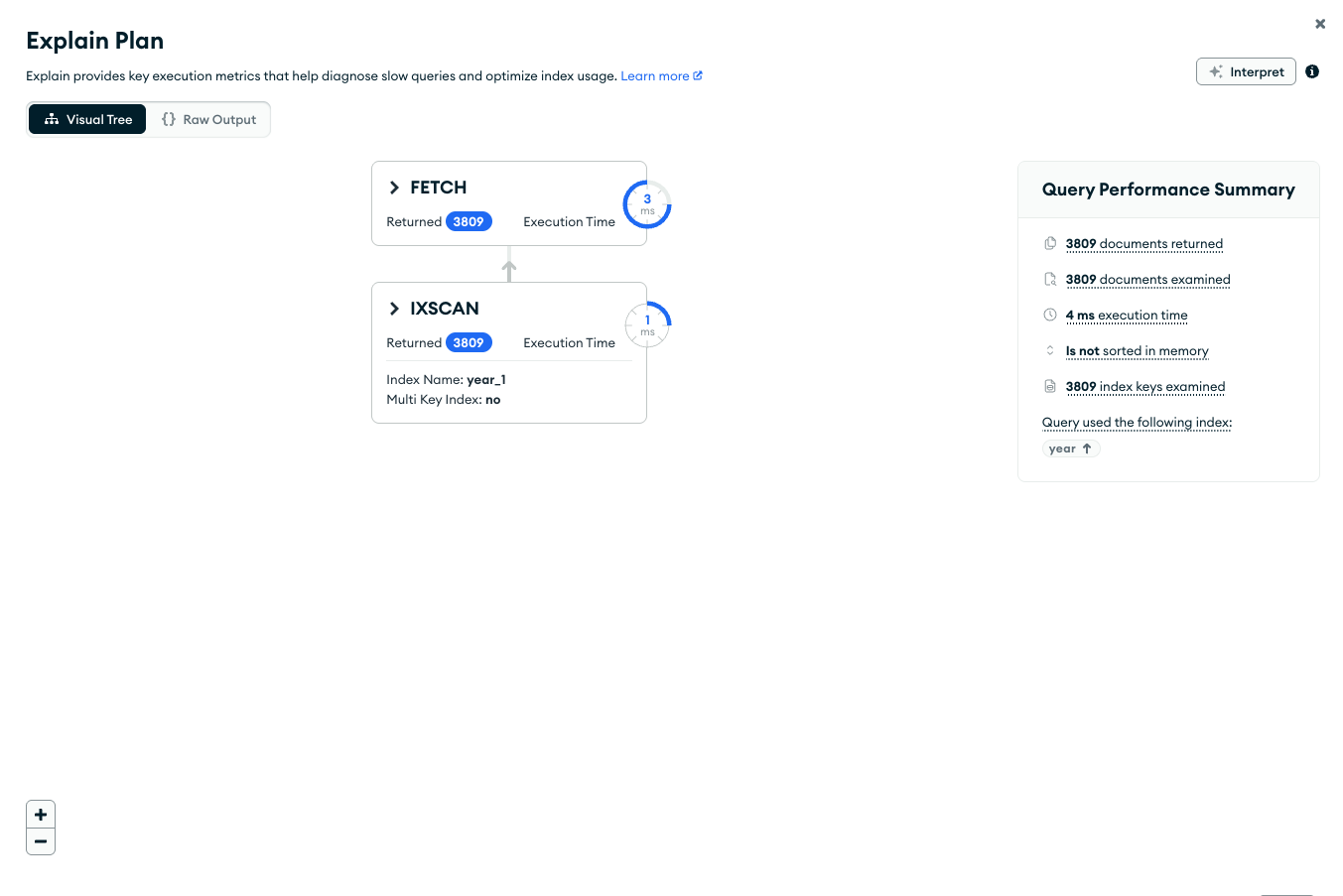
Visual Tree
The Query Performance Summary shows the execution stats of the query:
Documents Returned displays
3809to indicate that the winning query plan returns 3,809 documents.Documents Examined displays
3809to indicate that MongoDB scanned 3,809 documents.Index Keys Examined displays
3809to indicate that MongoDB scanned 3,809 index entries. The number of keys examined match the number of documents returned, meaning that themongodonly had to examine index keys to return the results. Themongoddid not have to scan all of the documents, and only the 3,809 matching documents had to be pulled into memory. This results in a very efficient query.At the bottom of the Query Performance Summary, MongoDB Compass shows that the query used the
yearindex.
To the left of the Query Performance Summary, MongoDB Compass displays the query stages
FETCHandIXSCAN.IXSCANindicates that themongodused an index to satisfy the query before executing theFETCHstage and retrieving the documents.
Raw JSON
The explain details can also be viewed in raw JSON format by clicking the Raw Output option:
Without the index, the query scans the entire collection to return the matching documents. The query also has to scan the entirety of each document, potentially pulling them into memory. This results in an expensive and potentially slow query operation.
When run with an index, the query scans only as many index entries and documents as it returns, resulting in a more efficient query.
Compare Performance of Indexes
To manually compare the performance of a query using more than one index, you can use the hint() method in conjunction with the explain() method.
Consider the following query:
db.movies.find( { year: { $gte: 2000, $lte: 2005 }, rated: "PG" } )
This query matches 235 documents.
To support the query, add a compound index. With compound indexes, the order of the fields matter.
For example, add the following two compound indexes. The first index orders by year field first, and then the rated field. The second index orders by rated first, and then the year field.
db.movies.createIndex( { year: 1, rated: 1 } ) db.movies.createIndex( { rated: 1, year: 1 } )
Evaluate the effect of the first index on the query:
db.movies.find( { year: { $gte: 2000, $lte: 2005 }, rated: "PG" } ).hint( { year: 1, rated: 1 } ).explain("executionStats")
{ queryPlanner: { namespace: 'sample_mflix.movies', winningPlan: { stage: 'FETCH', inputStage: { stage: 'IXSCAN', keyPattern: { year: 1, rated: 1 }, '...': '...' }, '...': '...' }, '...': '...' }, executionStats: { executionSuccess: true, nReturned: 235, totalKeysExamined: 246, totalDocsExamined: 235, '...': '...' }, '...': '...' }
MongoDB scanned 246 index keys (executionStats.totalKeysExamined) to return 235 matching documents (executionStats.nReturned).
Evaluate the effect of the second index on the query:
db.movies.find( { year: { $gte: 2000, $lte: 2005 }, rated: "PG" } ).hint( { rated: 1, year: 1 } ).explain("executionStats")
{ queryPlanner: { namespace: 'sample_mflix.movies', winningPlan: { stage: 'FETCH', inputStage: { stage: 'IXSCAN', keyPattern: { rated: 1, year: 1 }, '...': '...' }, '...': '...' }, '...': '...' }, executionStats: { executionSuccess: true, nReturned: 235, totalKeysExamined: 235, totalDocsExamined: 235, '...': '...' }, '...': '...' }
MongoDB scanned 235 index keys (executionStats.totalKeysExamined) to return 235 matching documents (executionStats.nReturned).
The second compound index, { rated: 1, year: 1 }, is therefore the more efficient index for supporting the example query, as the MongoDB server only needs to scan 235 index keys to find all matching documents using this index, compared to 246 when using the compound index { year: 1, rated: 1 }.