Build future-ready Open Banking ecosystems using MongoDB Atlas and agentic AI to power consent journeys and data sharing.
Use cases: Artificial Intelligence, Single View, Personalization
Industries: Financial Services
Products and tools: MongoDB Vector Search, MongoDB MCP Server, MongoDB Queryable Encryption
Partners: LangChain
Solution Overview
This solution presents an open banking ecosystem and demonstrates how to share financial data securely between institutions by using MongoDB Atlas and agentic AI.
Learn how to implement an agentic AI framework with LangGraph to streamline consent approval and give customers a consolidated, multi-bank view of their finances. MongoDB Atlas serves as the BIAN-aligned data layer that underpins these Open Banking architectures.
Reference Architectures
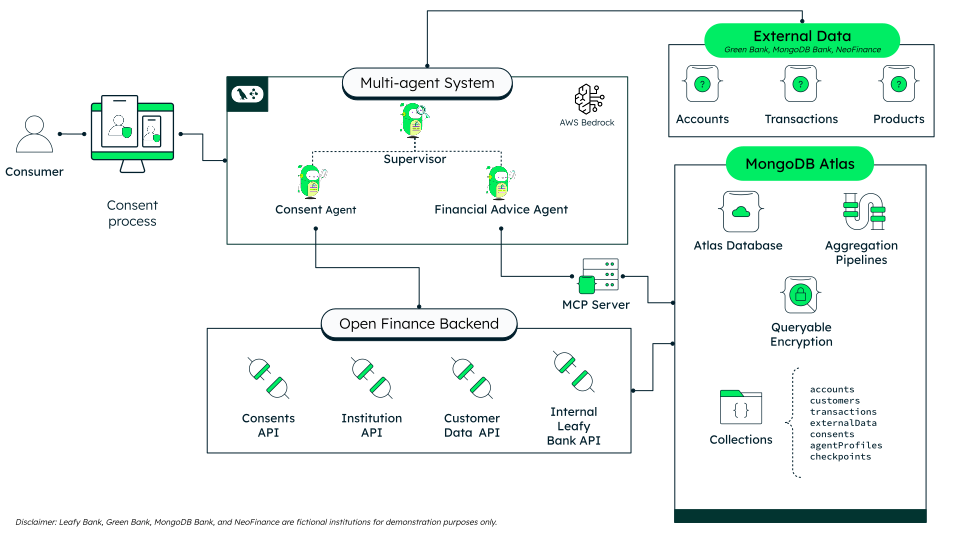
Figure 1. Open Banking Reference Architecture.
As the diagram shows, the process begins when the customer logs into Leafy Bank (our fictional financial institution). The customer grants or denies consent to access external data—Third-Party Provider (TPP) data or other financial institution data (in this demo: MongoDB Bank, NeoFinance, and Green Bank).
A multi-agent workflow receives the customer request and performs the following tasks:
Supervisor Agent: Reads the conversation and routes each request to the correct specialist.
Consent Agent: Guides customers through secure data-sharing consent with external banks. It handles institution selection, consent creation, bank login, explicit customer approval, and revocation.
Financial Advice Agent: Answers ad hoc questions about the customer's accounts, transactions, and products, and analyzes spending across internal and external banks by querying MongoDB directly through the MCP server.
Core Capabilities
This demo shows the following capabilities where MongoDB Atlas and agentic AI power secure, intelligent Open Banking workflows:
Queryable Encryption for consent and agent privacy
Storing consent records in plaintext exposes sensitive fields to database administrators, backup processes, and potential breaches. To prevent these risks, Open Banking regulations require institutions to protect consumer identity across every consent life cycle event: creation, authorization, data retrieval, and revocation. Encryption at rest also protects AI agent configurations—such as system prompts and tool definitions—to limit exposure of proprietary logic.
MongoDB Queryable Encryption solves this problem by encrypting sensitive fields at the driver level, ensuring the server never sees plaintext. Fields that need filtering can be configured for equality queries. The driver encrypts the query value before sending it, so the server matches on ciphertext without ever seeing the plaintext. Fields that only require read-after-decrypt remain encrypted without query support.
The demo applies Queryable Encryption in two places:
Consent Collection (
openbankingConsentsin theleafy_bank_biandatabase, managed by the Open Banking backend), with four encrypted fields:Consumer.UserNameConsumer.UserIdPermissionsSourceInstitution.InstitutionName
The
Consumer.UserNamefield supports equality queries so services can list a customer's consents without the database ever seeing the username in plaintext.Agent Profile Collection (
openbankingAgentProfilesin the chatbot backend), with three encrypted fields:agent_name(equality-queryable)system_prompttool_config
Agent prompts are loaded from encrypted MongoDB at runtime. Queryable Encryption generates a separate Data Encryption Key for each field. It supports AWS Key Management Service (KMS), Azure Key Vault, and Google Cloud KMS as key management providers.
The following example shows the encrypted connection setup for the Open Banking backend:
from pymongo import MongoClient from pymongo.encryption_options import AutoEncryptionOpts class EncryptedMongoDBConnection(MongoDBConnection): """Subclasses the standard connection — services that type-hint MongoDBConnection accept it without modification.""" def __init__(self, uri: str, auto_encryption_opts: AutoEncryptionOpts): self.uri = uri self.client = MongoClient(self.uri, auto_encryption_opts=auto_encryption_opts)
Consent queries work identically to plaintext—the driver handles encryption and decryption transparently:
# Standard query on a plaintext field — works as usual consent = consents_collection.find_one({"ConsentId": consent_id}) # Equality query on an encrypted field — same syntax, driver encrypts the filter value consents = list(consents_collection.find({"Consumer.UserName": user_name}))
The encrypted connection extends the standard MongoDBConnection, so every service that type-hints the base class accepts it without modification.
Agentic data access with the MongoDB MCP Server
Financial advisors and consumers often need ad hoc answers about account data: "What's my total balance?", "Show my last 10 transactions", or "Which products do I qualify for?". Building custom API endpoints for every possible query is impractical.
The MongoDB MCP Server exposes MongoDB collections as tools that LLM agents can invoke directly. The demo launches the MCP server as a subprocess at application startup, connects it to the leafy_bank_bian database in read-only mode, and passes the resulting tools to a LangGraph agent through a persistent session.
The following example shows the MCP server integration:
from langchain_mcp_adapters.client import MultiServerMCPClient from langchain_mcp_adapters.tools import load_mcp_tools mcp_client = MultiServerMCPClient({ "mongodb": { "command": "npx", "args": ["-y", "mongodb-mcp-server@latest"], "transport": "stdio", "env": { **os.environ, "MDB_MCP_CONNECTION_STRING": LEAFY_BANK_MONGODB_URI, "MDB_MCP_READ_ONLY": "true", "MDB_MCP_DISABLED_TOOLS": disabled_tools, }, } }) # Persistent session keeps MongoDB connection state across tool calls async with mcp_client.session("mongodb") as session: all_mcp_tools = await load_mcp_tools(session) # Pre-connect so the agent never handles connection strings connect_tool = next((t for t in all_mcp_tools if t.name == "connect"), None) if connect_tool: await connect_tool.ainvoke({"connectionString": LEAFY_BANK_MONGODB_URI}) # Only expose read/query tools to the agent allowed_tools = {"find", "aggregate", "count", "list-collections", "collection-schema"} mcp_tools = [t for t in all_mcp_tools if t.name in allowed_tools]
The leafy bank agent receives these filtered tools plus a get_current_user_id tool that reads the authenticated customer's identifier from the LangGraph config. It answers natural language questions by generating MongoDB queries autonomously—the agent can perform the following actions:
find: use for lookups.aggregate: use for calculations.Collection-schema: use for discovery.
No custom tool code is needed per collection.
Multi-agent orchestration with LangGraph
Open Banking workflows span distinct domains—consent management, financial analysis, and internal bank data queries. A single monolithic agent handling all three would need a large toolset and a system prompt covering conflicting concerns. Splitting into specialized agents keeps each toolset small and each prompt focused.
A supervisor agent orchestrates the following specialists:
Consent Agent: Manages data-sharing flows.
Financial Advice Agent: Analyzes spending and queries Leafy Bank data through the MCP server.
LangGraph routes each customer message to the appropriate specialist based on intent, and MongoDB Atlas persists conversation state through checkpoint collections.
The following example shows supervisor routing with structured output:
from langgraph.graph import StateGraph, START, END from langgraph.checkpoint.mongodb import MongoDBSaver # Each specialist is built from a factory that loads its system prompt # from a Queryable-Encryption-backed MongoDB collection at startup. consent_agent = create_consent_agent(prompts["consent_agent"]) financial_advice_agent = create_financial_advice_agent( prompts["financial_advice_agent"], mcp_tools ) supervisor = create_supervisor_node(prompts["supervisor"]) def route_from_supervisor(state: AgentState) -> str: # The supervisor writes its routing decision to state["next"] return state.get("next", "FINISH") workflow = StateGraph(AgentState) workflow.add_node("supervisor", supervisor) workflow.add_node("consent_agent", consent_agent) workflow.add_node("financial_advice_agent", financial_advice_agent) workflow.add_edge(START, "supervisor") workflow.add_conditional_edges("supervisor", route_from_supervisor, { "consent_agent": "consent_agent", "financial_advice_agent": "financial_advice_agent", "FINISH": END, }) workflow.add_edge("consent_agent", "supervisor") workflow.add_edge("financial_advice_agent", "supervisor") checkpointer = MongoDBSaver( client=db.client, db_name=DATABASE_NAME, checkpoint_collection_name=CHECKPOINTS_AIO_COLLECTION, writes_collection_name=CHECKPOINTS_WRITES_AIO_COLLECTION, ) graph = workflow.compile(checkpointer=checkpointer)
Regulated workflows—consent approvals, KYC reviews, payment authorizations—require human checkpoints where an agent must pause and wait for a decision before proceeding. LangGraph's interrupt() mechanism handles this requirement by serializing the full graph state to MongoDB and returning a payload to the caller. The workflow resumes when the external process completes:
from langgraph.types import interrupt, Command # Agent pauses, returns review payload to the calling application review = interrupt({ "type": "APPROVAL_REQUIRED", "details": approval_details, }) # Application resumes the workflow after the human decision await agent.ainvoke(Command(resume=decision), config)
MongoDB Atlas checkpoint collections persist the full conversation state:
Message history
Active consents
Routing decisions
The workflow survives interrupts that last seconds (a button click) or hours (an overnight compliance review). Each sub-agent runs a ReAct loop (reason → act → observe) until it produces a final response and then returns control to the supervisor agent for the next routing decision.
Data Model Approach
The demo uses two MongoDB Atlas databases:
leafy_bank_bian: This database contains the shared, BIAN-aligned, operational model the demo runs on, such as customers (PartyReferenceDataDirectory), accounts (CurrentAccount), transactions, and products. This database also holds the consent records in the Queryable-EncryptedopenbankingConsentscollection, and thecachedExternalDatacollection that stores external data fetched under an approved consent.open_finance: This database contains the external institutions' source data—external_accountsandexternal_productsfrom partner institutions—plus an institutions registry.
Leafy Bank owns and writes the leafy_bank_bian data. External data is borrowed through consent, not owned. The data is read from open_finance per approved consent, cached in cachedExternalData tagged with the granting ConsentId, and purged when the consent is revoked or expires. It is never merged into the institution's own account and transaction records.
The following are examples of documents in the collections:
accounts(fromleafy_bank_bian):{ "accountId": "ACC-e0583b3b", "accountBank": "Leafy Bank", "accountNumber": "212100310", "currency": "USD", "balance": { "current": 315, "available": 315, "ledger": 315, "hold": 0, "overdraftLimit": 0 }, "customerSnapshot": { "customerId": "CUST-00528224" }, "gl": { "accountCode": "2121", "costCenter": "CC-RETAIL-DEFAULT" }, "productId": "PROD-STD-SA-USD", "openedAt": "2024-12-07" } openbankingConsents(fromleafy_bank_bian), a consent record with Queryable Encryption on the sensitive fields:{ "ConsentId": "urn:greenbank:Cf5b9ff59e06f77", "Status": "AUTHORISED", "Consumer": { "UserName": "< encrypted >", "UserId": "< encrypted >" }, "Permissions": "< encrypted >", "Purpose": "FINANCIAL_ADVICE", "SourceInstitution": { "InstitutionName": "< encrypted >", "InstitutionId": "679a1001a9711d00a3bb01a1" }, "CreationDateTime": "2026-02-05T10:55:30Z", "ExpirationDateTime": "2026-08-04T10:55:30Z", "StatusHistory": [ { "Status": "AWAITING_AUTHORISATION", "DateTime": "2026-02-05T10:55:30Z" }, { "Status": "AUTHORISED", "DateTime": "2026-02-05T10:56:06Z" } ] }
External transactions use the same BIAN-aligned schema as Leafy Bank's own transactions—the account holder appears as payer on outgoing transactions and payee on incoming ones—so data from different institutions lands in a consistent shape.
Visit the GitHub repositories in the next section to explore sample data from all the collections in the solution.
Build the Solution
To build this solution, implement the following coordinated services: the Open Banking backend, the agentic chatbot backend, and the integrated UI.
For the complete implementation, follow the instructions in the corresponding GitHub repositories.
Part 1: Open Banking backend (GitHub repository)
Expose Open Banking APIs
Implement and verify the secure endpoints for the following tasks:
Manage consents: Create, approve, revoke, and list consents for a customer.
Fetch external customer data: Retrieve accounts, loans, repayment history, identification, and transactions filtered by consent scope.
Cache external data: Store data fetched under an approved consent so the advice agent reads it without a live re-fetch.
Calculate data: Determine balances, debt totals, and loan portability offers by using aggregation pipelines.
Configure indexes and consent-expiry handling (the background sweeper) as described in the README.
Part 2: Agentic chatbot backend (GitHub repository)
Configure the supervisor and child agents.
Implement the supervisor pattern so it routes customer messages to the correct agent. Configure the two agents to perform the following tasks:
Consent Agent: Lists institutions, creates consents, triggers external bank login, and approves or revokes data sharing. It uses LangGraph
interrupt()to pause for bank login and explicit consent approval.Financial Advice Agent: Answers ad hoc questions about the customer's accounts, transactions, and products, and analyzes spending across internal and external banks. It queries MongoDB directly through the read-only MCP server.
Part 3: Integrated UI (GitHub repository)
For step-by-step setup commands, environment variables, and API details, follow the instructions in the README file of each repository mentioned above.
Key Learnings
Unify open banking data on MongoDB Atlas: Unify internal and external datasets on MongoDB Atlas as your operational data layer to reduce integration complexity and duplication.
Simplify analytics with aggregation pipelines: Use MongoDB aggregation pipelines to compute balances, debt totals, and spending scores across internal and external accounts in a single query path.
Protect sensitive consent data with MongoDB queryable encryption: Apply Queryable Encryption to consent attributes so you can query on sensitive fields while maintaining strong privacy controls for regulated Open Banking workloads.
Streamline consent journeys with agentic AI: Integrate a LangGraph-based multi-agent chatbot to explain consent scope, duration, and purpose in natural language, reducing abandonment across multibank flows and improving customer experience.
Standardize data with a BIAN-aligned model: Model internal and external accounts, transactions, and consents on the BIAN service-domain standard so data from every institution lands in a consistent shape.
Authors
Saul Calderon
Kiran Tulsulkar
Ainhoa Múgica
Andrea Alaman Calderon