Use MongoDB Atlas Stream Processing and AI to prevent customer churn. Detect customer hesitation in real time and trigger a next best action.
Use cases: Artificial Intelligence, Personalization
Industries: Retail
Products: MongoDB Voyage AI, MongoDB Atlas, MongoDB Atlas Stream Processing, MongoDB Vector Search
Partners: Amazon Bedrock
Solution Overview
Customer retention refers to an organization’s ability to keep customers buying its products and from switching to other providers. Improve retention to drive long-term success in retail. Increasing retention by 5% can raise profits by 25% to 95%. Retaining customers costs far less than acquiring new ones. Modern commerce platforms generate large volumes of behavioral data. Customers create this data through searches, product views, cart actions, and browsing activity.
Most retailers store this data in Systems of Record and analyze it later through batch pipelines. Because of this, they react only after the session ends. Hours later, they:
Send abandoned cart emails.
Start retargeting campaigns.
Review dashboards.
By then, the customer has already left, and you lose the opportunity to influence the purchase. Respond while the customer is still active. Move from a System of Record to a System of Action. Detect behavioral signals during the session and react in real time.
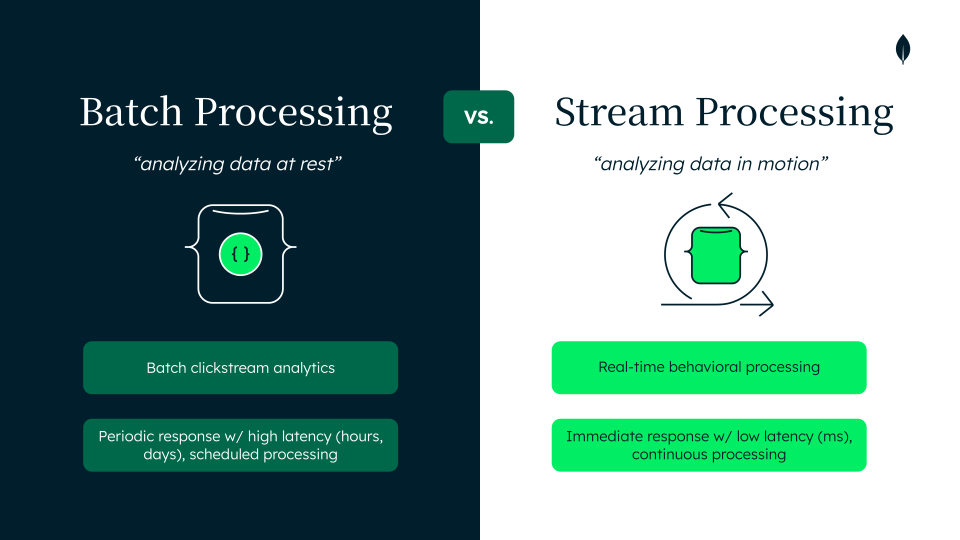
Figure 1. Batch processing vs. stream processing: stored data analyzed later vs. events analyzed in real time
Use MongoDB Atlas and Atlas Stream Processing to build real-time behavioral pipelines. These pipelines process clickstream events as they occur and convert raw events into actionable context. With these tools, you can:
Create live session memory that captures the current behavioral context.
Detect behavioral signals from near real-time interaction patterns.
Trigger Agentic Next Best Actions (NBA) that guide the customer toward conversion.
React to behavioral signals through MongoDB Change Streams.
Combine session memory, customer data, and business policies in a unified MongoDB intelligence data layer.
By using Atlas Stream Processing, with the familiar MongoDB Query API (MQL) and Aggregation Framework on the same platform, you avoid the rigidity of SQL-based stream processing. By using the flexible MongoDB document model, you can represent evolving session context. A single session document captures historical behavior and the latest activity snapshot, which enables near real-time behavioral analysis.
Simplify your architecture by processing streams directly in MongoDB instead of managing separate streaming infrastructure and deliver event-driven applications faster.
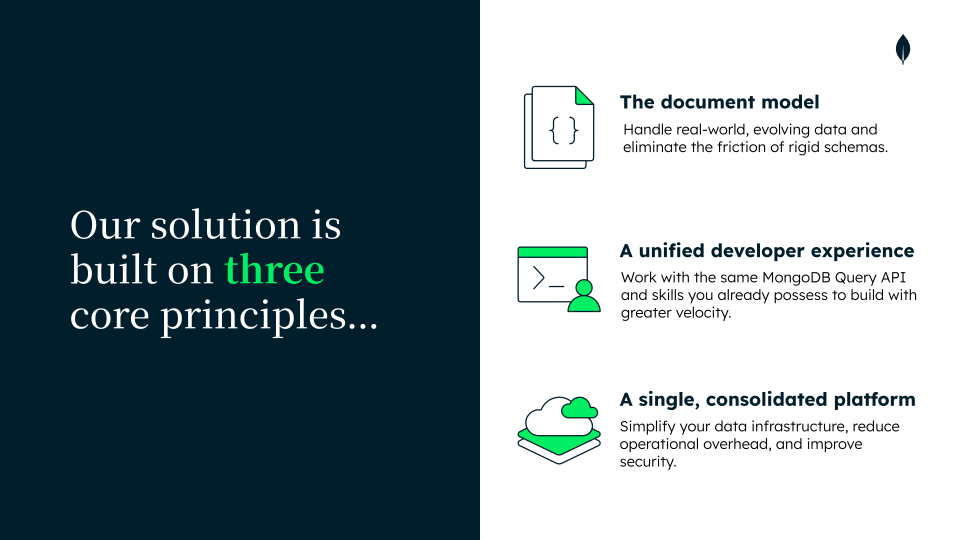
Figure 2. Achieve these three core principles with Atlas Stream Processing
You can detect behavioral patterns in real time to improve customer retention, such as:
Purchase intent
Search friction
Risk of abandonment
Respond immediately when these signals appear. Trigger targeted actions such as:
Tailored product recommendations
Contextual social proof notifications
Shipping-related offers
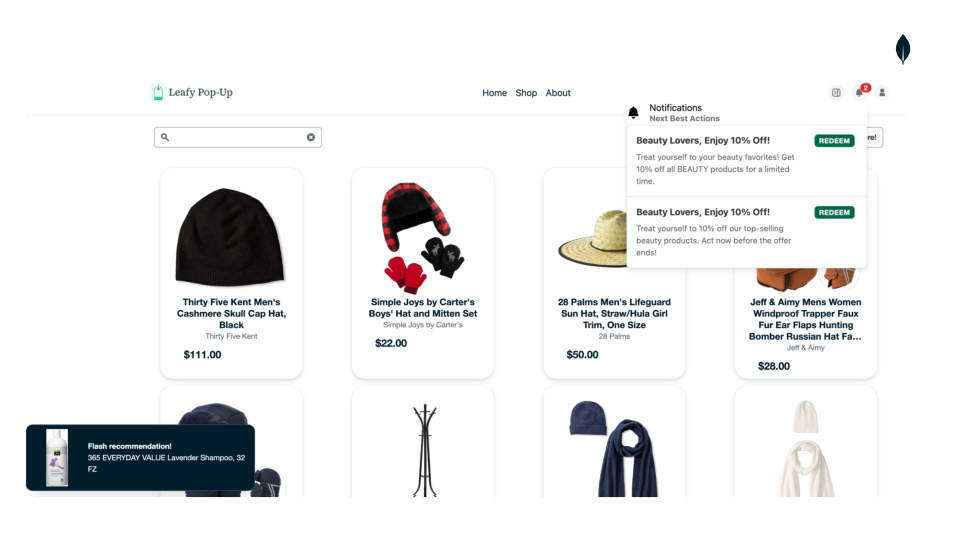
Figure 3. Trigger real-time next best actions based on live user behavior that increase the likelihood of conversion
Act while the customer session is active to:
Increase conversion rates.
Improve customer lifetime value.
Build long-term loyalty.
Build a real-time customer retention system powered by MongoDB Atlas.
Reference Architectures
Customer Retention Architecture Overview with Atlas Stream Processing and MongoDB Atlas
To implement this solution, you must understand the data flow, event processing stages, and the key architecture components:
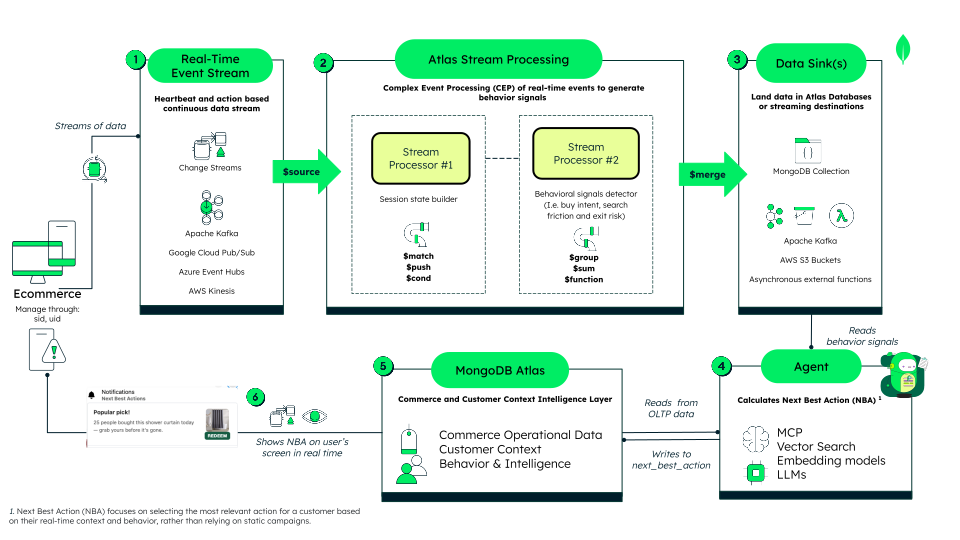
Figure 4. Customer retention engine, powered by MongoDB Atlas
Event Ingestion Layer
In your ecommerce application, customer interactions generate a real-time event stream. You can use this application to:
Emit a heartbeat event every 10 seconds to signal that the customer session remains active.
Capture customer actions such as search, product views, add-to-cart, and exit hover.
In this demo solution, you stream events into a MongoDB collection. Change Streams expose each document as a new event, creating a real-time event source that feeds the stream processing layer.
You can also ingest these streams from platforms such as Apache Kafka, Google Cloud Pub/Sub, Azure Event Hubs, or AWS Kinesis as a source for Atlas Stream Processing without storing the events in MongoDB Atlas.
Atlas Stream Processing
Atlas Stream Processing is used to process data as it arrives. This enables you to:
Connect to the data stream by using the
$sourceoperator.Use multiple stream processors for different tasks, such as building the session state and detecting behavioral signal patterns.
Generate behavioral signals such as high purchase intent, search friction, and exit risk.
Data Sinks
The
$mergeoperator is used to send processed data to a destination. In this solution:Stream processors write session state to MongoDB to act as live session memory for the agentic decision layer.
Atlas Stream Processing writes behavioral signals derived from processed events to MongoDB.
MongoDB Change Streams expose these signals to trigger the Agentic NBA layer when key customer retention signals appear.
The
$mergeoperator can also send results to Apache Kafka, AWS S3, or external functions.Agent
Deploy an AI agent to read behavioral signals and calculate an NBA such as:
Tailored product recommendations
Contextual social proof notifications
Shipping-related offers
The agent acts as the decision layer. It can be implemented as a simple or advanced agent. This solution uses a deterministic agent that combines Model Context Protocol (MCP), Vector Search, Voyage AI embedding models, and large language models (LLMs). These tools evaluate context and generate the optimal NBA to keep active shoppers engaged.
MongoDB Atlas
Use MongoDB Atlas as the commerce and customer context layer. The agent reads operational data and customer history from Atlas for context. The agent evaluates this data and writes the NBA to a MongoDB collection.
Atlas simplifies data integration across the agent ecosystem securely and at a scale. This enables operational data to live alongside embeddings for catalog, customer preferences, and other vector search use cases.
Real-Time Experience
Display the NBA on the customer screen in real time. The ecommerce application uses Change Streams to monitor the NBA collection. The application then surfaces targeted notifications to the active shopper. Examples include:
Fire icons on strategic products
Social proof messages as notifications or within the cart list
Flash recommendations or discount notifications as pop-ups
Behavior Signal Detection with Atlas Stream Processing
Each product view, search, or cart action contains a trace of intent, though raw events are often noisy. Use Atlas Stream Processing to transform these events into clear session context.
Keep this context updated in real time. Use it to track behavior across the session and detect important patterns. Provide the decision layer fast access to this context in a format that is easy to query, explain, and act on. In this architecture, Atlas Stream Processing performs that role.
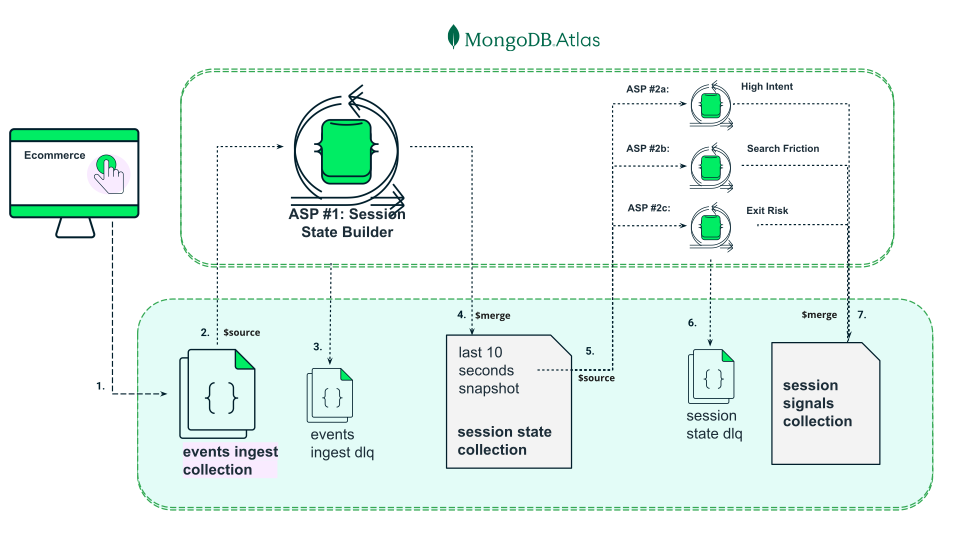
Figure 5. Behavioral Signal Detection with Atlas Stream Processing
ASP #1 continuously transforms clickstream (1) (2) into a single session_state document per active session, combining session memory with the latest 10-second behavioral snapshot (4). ASP #2 reads that new source of events (5) to detect higher-level behavioral signals and sink them in session_signals (7). Both store processed data in MongoDB, while invalid events are routed to DLQ collections (3) (6) for debugging and troubleshooting.
Atlas Stream Processing No.1: Build a live session state
Build a live session state for each customer session. Use this session state for two purposes:
Build session memory: Create the session memory that downstream systems require. Maintain one processed document per session and update it every 10 seconds. Store essential session context, such as first activity, last activity, interaction counts, recent behavior, and search history.
Interpret intent: Go beyond storing activity by interpreting it through an intent model tailored to your domain.
In this demo, group recent customer events every 10 seconds to create a structured view of behavior. Use this view to track where the customer places attention and how that attention shifts over time.
Define the intent model with three concepts:
Dimension: The behavioral lens for each interaction. A product event identifies both a specific product and broader context, such as
articleTypeandbrand.This enables you to read intent at multiple levels for each event. A customer might explore several products while remaining focused on the same type of ‘dimension’, such as an articleType.Weight: The strength of the interaction signal. Not all actions carry the same significance.
In this demo, the weights are:
view-product = 3
add-to-cart = 7
For each item in a dimension, calculate the weight as follows:
Weight(item) = sum of event weights for that item in the 10-second window
Example:
If the customer views a ‘X’ product (
P1) twice, and adds P1 to the cart once, and the articleType is “shoes” then:Weight(P1) = 3 + 3 + 7 = 13
Weight(shoes) = 3 + 3 + 7 = 13
This calculation indicates strong interest in both the specific product and in “shoes”.
Focus: Use focus to measure how concentrated the customer’s attention is inside a dimension.
For each item in a dimension, calculate:
Focus(item) = Weight(item) / Total weight of that dimension in the same window
Example:
If P1 is the only product the customer interacts with in that window, then:
Focus(P1) = 13 / 13 = 1.0
This means the customer is fully focused on one product.
If the customer interacts with two products in the same window, and each product belongs to a different articleType, then:
views product P1, where articleType = Shampoo → Weight(Shampoo) = 3
views product P2, and adds product P2 to cart, where articleType = Conditioner → Weight(Conditioner) = 3+7 = 10
Then:
Total weight(articleType) = 3 + 10 = 13
So:
Focus(Shampoo) = 3 / 13 = 0.23
Focus(Conditioner) = 10 / 13 = 0.77
This means the customer’s attention is spread across multiple items in the articleType dimension, but with a stronger focus on Conditioner.
Use this model to track these variables over time. Each 10-second snapshot becomes a structured behavioral input for Atlas Stream Processing No.2, which evaluates higher-level patterns over time. This helps you determine if the customer is:
Focused on a specific item, category, or brand
Exploring broadly
Displaying clear or uncertain intent
Build this session state with native Atlas Stream Processing capabilities:
Use $source to read events from
events_ingestand preserve event time for windowing.Use $validate to enforce the event contract and send invalid events to
events_ingest_dlq.Use $tumblingWindow with a 10-second event-time interval to create one stable processing frame per session.
Use $group to collapse multiple raw events into one per-session snapshot for each window.
Use $addFields and $switch to assign a weight to each interaction.
Use $function to calculate the intent model of weight and focus for each dimension. You process the events in each tumbling window with JavaScript logic, using counters and arithmetic to generate a structured snapshot of session behavior every 10 seconds. This creates a new set of data that Atlas Stream Processing No. 2 consumes in the next stage.
Use $merge to upsert the result into
session_stateand keep one live document per session with both the latest snapshot and accumulated session memory.
Atlas Stream Processing No. 2: Detect behavior patterns over time
Read the structured session snapshots from session_state instead of raw clickstream events. This provides a processed, time-aware behavioral layer for evaluation.
In this demo, Atlas Stream Processing No.2 uses three stream processors. Each processor detects one signal type:
high-intentsearch-frictionexit-risk
All three processors follow the same pattern:
read session snapshots from
session_stateevaluate behavior across 30-second windows
write insert-only signal documents to
session_signals
This design keeps the pipeline simple and modular. Each processor uses the same source and sink pattern, but applies different rules to detect behavioral signals.Use these signals as behavioral checkpoints. Each one captures a meaningful shifts in session behavior, such as:
Product convergence
Unresolved exploration
Intent to leave.
Keep the signals sparse, time-bounded, and explainable. This enables the decision layer to react only when something relevant happens, instead of processing every raw event.
Atlas Stream Processing No.2 does not decide the next action. It builds the behavioral signal layer that the decision system uses to reason and act in real time.
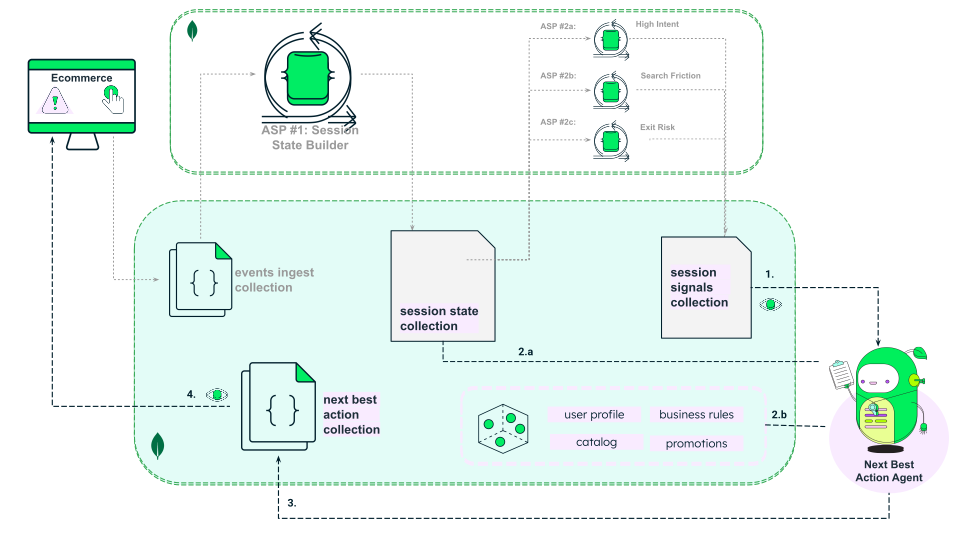
Figure 6. Building a Unified Intelligence Data Layer for AI Agents
The next best action agent runs on top of a unified intelligence data layer in MongoDB. It reacts to behavioral signals (1) through Change Streams, takes live context from session_state (2.a), and combines it with business and semantic context stored in MongoDB, such as user profile, catalog, promotions, rules, embeddings, and MongoDB Vector Search (2.b). The agent calculates and stores the next best action in real time (3), which the ecommerce application then consumes through Change Streams and displays during the live session for customer retention purposes (4).
By storing session state, behavioral signals, and decision outputs in MongoDB, you give the agent a unified intelligence data layer. The agent can read fresh behavioral context and historical signals for that session. It then combines this data with profile, catalog, promotions, and business rules to write back the NBA on the same operational platform. This keeps the architecture simple, reduces data movement, and gives the agent fast access to the context it needs to act in real time in a secure and scalable way.
Data Model Approach
MongoDB provides a flexible document model for real-time architectures. Store diverse customer events with different schemas in a single collection. Update your schema as business logic evolves.
The document model handles complex structures such as arrays and subdocuments. Use these structures to build a compact, queryable session memory. This design provides immediate context for AI agents without database joins. Use Time-to-live (TTL) indexes to eliminate manual data cleanup scripts.
This solution uses four main collections:
events_ingest: Stores raw, short-lived data events. It acts as the primary source for the streaming pipelines.
session_state: Stores the live operational context per session and gets updates approximately every 10 seconds.
session_signals: Stores interpretable behavior signals. Atlas Stream Processing generates one document per detected signal.
next_best_actions: Stores the final action contract for the ecommerce interface.
Raw Event Ingestion (events_ingest)
The ecommerce application streams raw events into the
events_ingestcollection. Each event follows a common structure that contains timestamp, tags, and metadata. The event field identifies the event type, while the metadata section stores event-specific attributes. This polymorphic design enables different event types to coexist in the same collection without enforcing a rigid schema. Use a short TTL index to manage this ephemeral data.{ "timestamp": "2026-01-05T14:55:12.321Z", "tags": { "sessionId": "1767624420027", "userId": "66fe219d625d93a100528224", "event": "search" }, "metadata": { // Event-specific fields } } Materialized Session State (session_state)
The session state document represents a single live source of truth per session. Atlas Stream Processing No. 1 updates this document every 10 seconds. This creates a compact context that serves as the source for Atlas Stream Processing No. 2 and as live, short-term context for agent decision-making within the active session.
The document separates cumulative activity (
sessionTotals) from recent micro-window activity (last10s). Track event counts, recent searches, and cart updates. Calculate item preference scores by using a weighted interaction model. This model measures interest intensity and focus direction.{ "_id": { "$oid": "69c16dd2f2145b31c07b1beb" }, "firstSeen": { "$date": "2026-03-23T16:43:59.013Z" }, "lastEvent": { "event": "view-product", "ts": { "$date": "2026-03-23T16:49:29.849Z" } }, "lastSeen": { "$date": "2026-03-23T16:49:29.849Z" }, "sessionId": "d73477b8-3879-4749-a402-321a526cdc33", "userId": "671ff2451ec726b417352703", "last10s": { "intent": { "products": [ { "productId": "67192b4264d161905fbe8342", "searchCount": 0, "viewCount": 0, "addToCartCount": 1, "weight": 7, "focus": 0.4375 }, { "productId": "67192b4264d161905fbe8245", "searchCount": 0, "viewCount": 1, "addToCartCount": 0, "weight": 3, "focus": 0.1875 }, { "productId": "67192b4264d161905fbe82a1", "searchCount": 0, "viewCount": 1, "addToCartCount": 0, "weight": 3, "focus": 0.1875 }, { "productId": "67192b3f64d161905fbe77af", "searchCount": 0, "viewCount": 1, "addToCartCount": 0, "weight": 3, "focus": 0.1875 } ], "articleTypes": [ { "articleType": "SHOES", "searchCount": 0, "viewCount": 2, "addToCartCount": 1, "weight": 13, "focus": 0.8125 }, { "articleType": "CARGO_STRAP", "searchCount": 0, "viewCount": 1, "addToCartCount": 0, "weight": 3, "focus": 0.1875 } ], "subCategories": [ { "subCategory": "Shoes", "searchCount": 0, "viewCount": 2, "addToCartCount": 1, "weight": 13, "focus": 0.8125 }, { "subCategory": "Hardware", "searchCount": 0, "viewCount": 1, "addToCartCount": 0, "weight": 3, "focus": 0.1875 } ], "dimensionTotals": { "productWeightTotal": 16, "articleTypeWeightTotal": 16, "subCategoryWeightTotal": 16 } }, "lastEvent": { "event": "view-product", "ts": { "$date": "2026-03-23T16:49:29.849Z" } }, "window": { "start": { "$date": "2026-03-23T16:49:20.000Z" }, "end": { "$date": "2026-03-23T16:49:30.000Z" } } }, "sessionTotals": { "eventCounts": { "heartbeat": 30, "search": 2, "view-product": 21, "add-to-cart": 13, "exit-risk": 14 }, "windowCount": 30 }, "searchHistory": [ "shoes", "running shoes" ] } Actionable Diagnosis (session_signals)
Atlas Stream Processing No.2 evaluates the session state every 30 seconds, identifies behavioral patterns and generates signals. Use one document per signal instead of an array of signals inside the session document. This insert-only approach avoids write amplification and prevents hot documents during high retail traffic peaks.
The solution focuses on three core behavioral signals that represent high-impact retention moments in most ecommerce journeys.
High-Intent: The customer is actively considering a purchase and showing strong intent signals (such as repeated product focus, cart progression, concentrated interest). This is the ideal moment to reduce doubt and accelerate conversion through reassurance, product guidance, availability and delivery clarity.
Exit-Risk: The customer is likely to leave without converting, often after meaningful engagement or cart activity. This is the last chance to retain the session, recover cart, preserve intent, or provide immediate assistance.
Search-Friction: The customer is searching and browsing repeatedly without progressing—suggesting difficulty finding a match or frustration building up. This is one of the highest-value opportunities to intervene early, before the customer abandons the session due to fatigue or frustration.
The following is an example document of a search friction signal:
{ "_id": "69c172667348bc2e9b60ee7b", "evidence": "Explored a considerable number of products in the last 30 seconds, while articleType focus remained predominant on 'PET_SUPPLIES'. The absence of add-to-cart suggests stable topic-level intent combined with choice overload at the product level", "severity": "medium", "sid": "d73477b8-3879-4749-a402-321a526cdc33", "signal": "search-friction", "topic": { "dimension": "articleType", "value": "PET_SUPPLIES" }, "ts": "2026-03-23T17:03:20.000Z", "uid": "671ff2451ec726b417352703" }
Build the Solution
To reproduce this demo in your own environment, follow these steps.
Set up prerequisites
Create a MongoDB Atlas Account.
Preload a database with products. Use the provided dump files to restore the data.
Deploy the Leafy Pop-Up Store main application. This application contains the frontend and the event stream system.
Python 3.12 or later
AWS credentials for Bedrock access.
Voyage AI API key.
Configure Atlas Stream Processing
Create a Stream Processing Workspace
Create a workspace in your Atlas account with these settings:
SettingValueReasonWorkspace Name
retail-retention-demo
Clear ownership and purpose; easy to identify later.
Tier
SP10
Sufficient for demo-scale pipelines (~2k sessions) while keeping costs low.
Provider / Region
AWS / us-east-1 (N. Virginia)
Should match your Atlas cluster region to reduce latency and avoid cross-region traffic.
Maximum Tier Size (optional)
Leave default or set to SP30
Allows quick scale-up if needed without enabling autoscaling.
Register the Database Connection
Open your Stream Processing workspace and configure these connection settings:
Connection TypeAtlas DatabaseConnection Name
retail_customer_retention
Atlas Cluster
Select the cluster containing the leafy_popup_store database
Execute As
Read and write to any database
Create the Stream Processors
Create four Atlas Stream Processors in your workspace. Follow these steps for the first processor. Replicate the process for the remaining three processors.
Create Atlas Stream Processing No. 1: Session State Builder
Open your Stream Processing workspace.
Click Create Processor.
Enter asp1_session_state_builder for the processor name.
Open the asp1_session_state_builder_.js file from the repository.
Copy the pipeline definition.
Paste the pipeline into the Processor Definition editor.
Click Create Processor.
Click Start.
Replicate the previous steps to create these three processors:
Processor NamePipelineasp2_exit_riskasp2_high_intentasp2_search_friction
Configure NBA Decision Layer
Clone the repository.
git clone https://github.com/mongodb-industry-solutions/retail-customer-retention-backend/tree/staging cd retail-customer-retention-backend Create and activate the virtual environment.
python3 -m venv .venv source .venv/bin/activate # On Windows: .venv\Scripts\activate Install the dependencies.
pip install -r requirements.txt Create a
.envfile in the root directory and configure these environment variables:MONGODB_URI= AWS_REGION= AWS_ACCESS_KEY_ID= AWS_SECRET_ACCESS_KEY= VOYAGE_API_KEY= Start the application. This script starts the MCP server and the change stream monitor.
python main.py
Test the Solution
Open the application at /shop. Interact with the catalog. The application displays the Next Best Action on the screen.
Key Learnings
Retain customers in real time: With Atlas Stream Processing, you can process clickstream events to trigger next best actions during active sessions. This enables retailers to move from reactive damage control to proactive in-the-moment intervention.
Simplify your data architecture: With the MongoDB document model, you can store raw clickstream events, session states, and behavior signals in a single platform. Avoid extract, transform, and load pipelines and manual cleanup by using TTL indexes and flexible collections.
Build an Agentic Next Best Action on top of an intelligence data layer in MongoDB: Connect AI agents directly to live session context and operational data in MongoDB. Enrich next best actions with AI capabilities such as Vector Search to deliver tailored experiences.
Authors
Angie Guemes, MongoDB
Florencia Arin, MongoDB
Rodrigo Leal, MongoDB
Daniel Jamir, MongoDB