Builders use Mastra, an open-source TypeScript framework, to create increasingly capable agents with MongoDB. But preparing retrieval for those agents can mean copying operational data into a separate collection, generating and syncing embeddings, merging semantic and keyword results, reranking, and fetching full records: a lot of code to maintain, and a lot of places for data to drift.
Today, we're bringing all of it into a single query in Mastra: Hybrid Search now works together with Automated Embedding, BYOC, pre-filtering, and Native Reranking to return the most relevant full documents from your existing collection, with no separate copy or sync job.
Here's what each piece does:
Hybrid Search combines semantic and keyword matching in one query, so your application doesn’t have to coordinate separate searches.
Automated Embedding generates and maintains embeddings for text fields and queries, removing application-side embedding and synchronization work.
Bring Your Own Collection (BYOC) lets Mastra search your original MongoDB collection and return full documents, avoiding the need for a separate retrieval copy, ID tracking, and follow-up fetches. If you are starting a new Mastra application, we recommend using BYOC so that Mastra can query your operational data, rather than creating a separate copy for semantic search and retrieval.
Pre-filtering narrows vector search candidates inside $vectorSearch, using fields you declare in filterFields, and applies the same filter to keyword results, helping keep results focused as your collections grow.
Native Reranking reorders search candidates to surface the most relevant results.
Together, they simplify retrieval from ingestion through query. In this article, we’ll show you how these features can improve your existing load and retrieval workflows.
What did retrieval setup in Mastra require before this release?
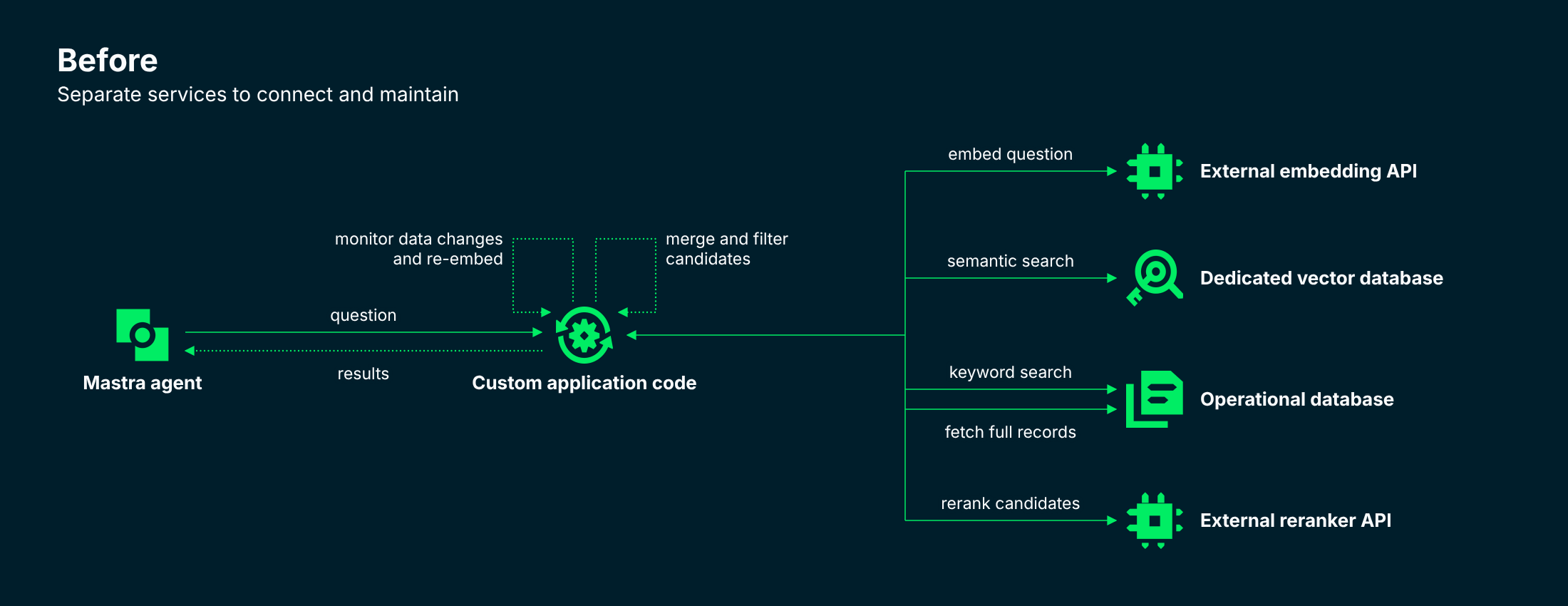
Before this release, for an agent to search a product catalog or transaction history by meaning, a Mastra application typically had to prepare the data for vector search like this:
Create a separate managed vector collection to store embeddings and retrieval metadata.
Call an embedding service to vectorize source text, then store the embeddings with retrieval metadata.
Track the source IDs so the application can fetch the full product records for the final recommendations.
Monitor changes to the source data and re-embed and sync any indexed text fields.
Figure 1. Your application handles: embedding queries and documents, merging results from semantic and text searches, retrieving full documents from winning hits, and re-embedding data.
Keeping the retrieval copy up to date is still your responsibility, whether you use change streams, a cron job, or another approach.
How do Automated Embedding and Bring Your Own Collection simplify setup?
MongoDB and Mastra simplify both sides of retrieval prep. Automated Embedding lets you configure a text field and a Voyage AI model, so MongoDB handles embeddings for you; and when your operational data already lives in MongoDB, you can Bring Your Own Collection so Mastra searches that collection directly.
Tip: BYOC works with Automated Embedding or manual embeddings if you prefer to use a model outside the Voyage AI family. Check out Mastra’s documentation on managing embeddings yourself.
This example uses both to prepare the collection that Hybrid Search will query: Automated Embedding keeps vectors current, while BYOC lets Mastra search the original documents:
And that’s all it takes to configure both indexes.
How does hybrid search answer questions that mix intent and constraints?
One hybrid search query can match what a buyer means while enforcing hard limits on price and availability. Imagine someone asks an e-commerce agent: “What’s the best laptop for video editing under $1,500?” A useful answer needs more than a text match. The agent should find products whose descriptions are relevant to video editing, honor constraints such as “under $1,500” or “in stock,” and prioritize the strongest matches.
In a traditional retrieval flow, an application may need to run semantic search and keyword search separately, combine and deduplicate their results, apply price and availability rules, send candidates through another ranking step to boost relevance, and fetch the full product records for the winners.
How do hybrid search, pre-filtering, and reranking work together in one query?
Hybrid search is the search-time glue: one query combines semantic and keyword matching, applies pre-filters such as price and availability, and uses Native Reranking to prioritize the most relevant results. Automated Embedding keeps the indexed vectors up to date, and BYOC lets Mastra query the original collection. So the agent can interpret “best for video editing” while respecting the buyer’s concrete constraints and prioritizing the most relevant results, without requiring your application to coordinate separate retrieval steps.
Figure 2. Atlas manages for you: Embeddings, Reranking, and Vector and Text Search (Hybrid Search). BYOC queries your operational data directly.
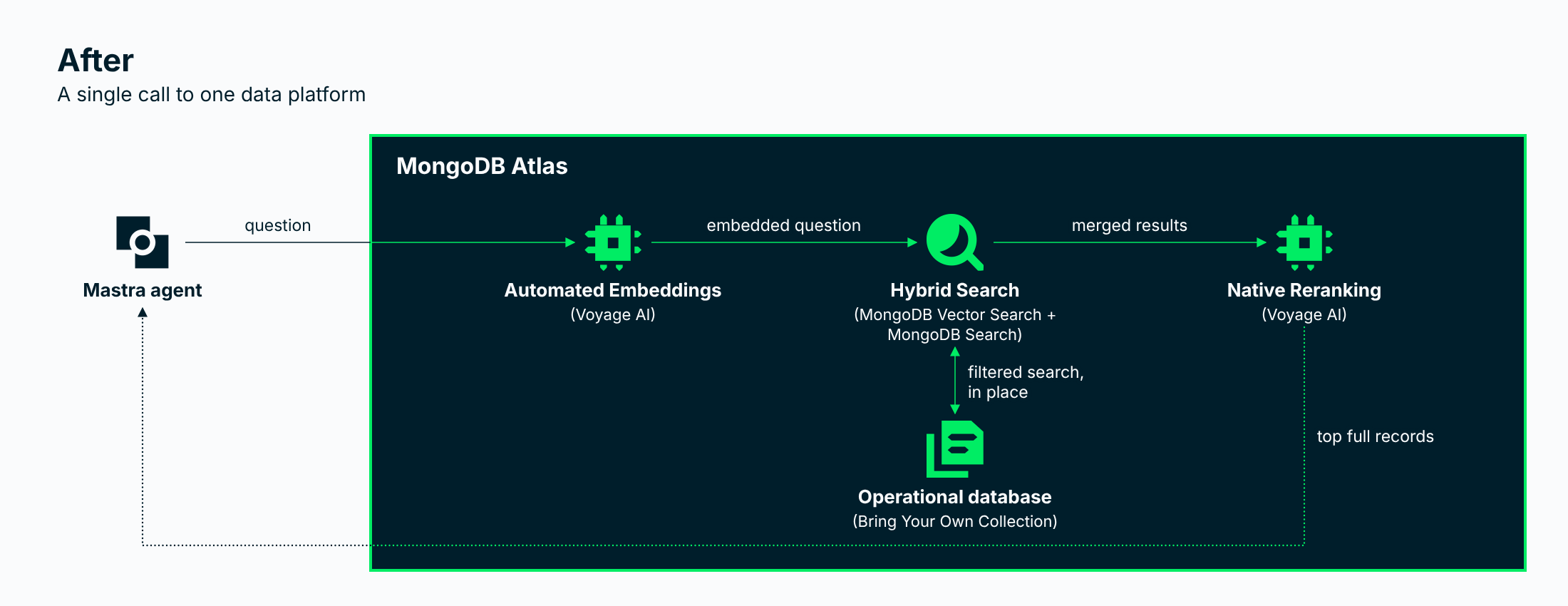
Unlike the traditional flow described before, you can now pass the search text directly as the vector query. MongoDB generates its embedding, so the application doesn’t need a separate query-embedding call.
A hybrid search call combining all these features looks like this:
Get started with hybrid search and Automated Embedding in Mastra
Install the latest MongoDB integration for Mastra to start using these features today:
Have a look at the Automated Embedding docs to check the requirements.
To try the new Native Reranking, you will need a MongoDB Atlas cluster running version 9.0 with reranking enabled (see the instructions).
Linked resources: