We’re excited to announce the MongoDB Google ADK Integration, which provides developers with the building blocks they need to create durable memory for agent state.
As agents move from prototypes to real-world applications, they need secure, dependable access to data and the ability to retain context over a long time. However, developers still need to build their own tooling for a data store that provides durable agent memory for agent state.
This integration gives developers a cohesive, ADK-native experience for using MongoDB as the data platform for agents.
What is the Google ADK?
The Google Agent Development Kit (ADK) is an open source agent development framework that lets you build, debug, and deploy reliable AI agents at enterprise scale. It is available in Python, TypeScript, Go, Java, and Kotlin.
Google ADK offers developers an extensive set of tools for creating, deploying, assessing, and scaling agents, enabling developers to build anything from personal AI assistants to mission-critical business workflows.
How does the MongoDB Google ADK Integration help?
Developers can prototype an agent that searches a product catalog or knowledge base, then evolve it into a production experience that preserves user context across conversations and recalls relevant prior interactions. With MongoDB as the data layer, developers can keep the data their agents search over, the conversation state that needs to survive a restart or a scaled-out instance, and the memories agents build over time, all in the same place as the rest of their application data. That means no separate database to stand up for retrieval, no pipeline syncing app data into a different memory index, and no added latency pulling context from another system before the agent can respond.
ADK supplies the agent framework and tool interface; this integration provides the data and persistence layer beneath it, so developers can easily take an agent from prototype to production. These agents can maintain conversation and session memory independent of any single machine, and carry a user's history across sessions.
Providing a unified agent architecture
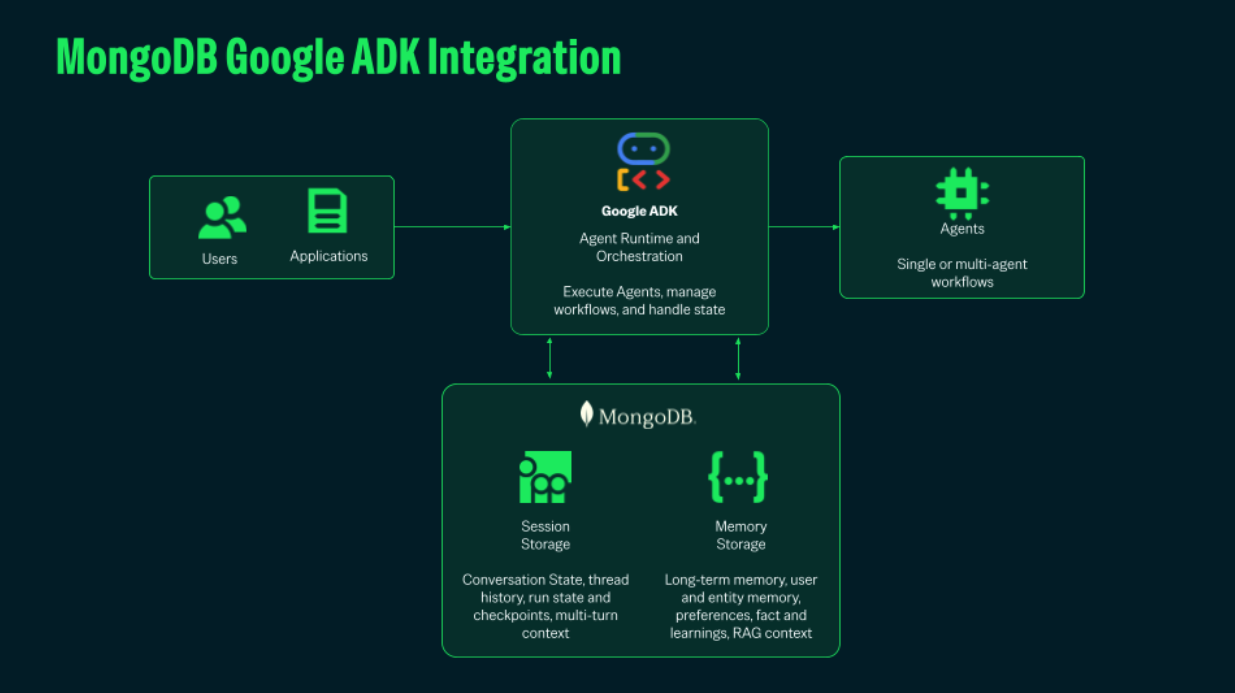
At the core of this integration is Google ADK 2.0, which serves as the code-first orchestration layer for multi-agent systems. ADK 2.0 provides the deployment framework, while MongoDB provides session and memory storage for agents.
Integrating directly with the Gemini Enterprise Agent Platform, ADK 2.0 eliminates the need for custom routing logic by providing standardized tool-calling interfaces, native telemetry, and enterprise access controls out of the box. Developers can use Gemini 4 Argon for multi-step reasoning and Gemini 3.8 Flash for low-latency execution.
Figure 1. The MongoDB Google ADK Integration adds session and memory storage for single or multi-agent workflows.
How do Sessions and Memory storage work?
Great agent experiences improve with context. This integration introduces MongoDbSessionService to persist sessions, events, and application-, user-, and session-scoped state to MongoDB.
This means developers can build agents that retain the context needed for longer-running and multi-turn interactions. The session service includes optimistic concurrency control to help applications safely manage concurrent updates, while configurable collections make it easier to fit the service into existing data architectures.
The following Python code shows how you can add MongoDbSessionService to your agent:
For agents that need memory beyond a single session, MongoDBMemoryService ingests session events into MongoDB collections and recalls relevant memories through keyword matching. Memory ingestion is idempotent, which prevents duplicates when a session is added again.
Together, these services help agents become more useful over time without requiring developers to stitch together separate systems for retrieval, state, and memory.
How does MongoDB Search help agents with data retrieval?
Having memory for agent state is essential, but agents also need fast access to the operational data they search over, the same product catalogs, documents, and records your application already queries. This is where MongoDB's built-in search capabilities come in. MongoDB Vector Search leverages Voyage AI's embedding models, which are the same engine backing MemoryService's semantic retrieval in this integration.
Developers can also perform hybrid search by combining vector search with full-text search using the $rankFusion aggregation stage.
This gives agents access to the right information and context at the right time, delivering better responses in production. Whether you are building product discovery, knowledge assistants, support experiences, or domain-specific copilots, agents can automatically leverage semantic and hybrid retrieval to ground their responses in your data.
The application owns the database connection, database name, and search configuration. The agent gets focused tools to call, without exposing those operational details in its context.
The following Python code shows how to add MongoDB Search to your agents:
Using MongoDB as the operational data store, the memory layer for agent state, and the search engine over both, developers get one platform instead of three, on whatever deployment they run it on. There's no separate vector database to stand up, no search engine to sync against a second copy of the data, and no added latency from hopping between systems before the agent can respond.
Which deployment versions does this integration support?
The integration supports MongoDB Atlas and self-managed MongoDB 8.0+ deployments for vector and hybrid search. Developers can provide a connection string or bring an existing PyMongo client, and configure search behavior through MongoDbToolSettings, including index names, embedding fields, limits, and candidate counts.
That flexibility makes it possible to align the integration with existing data models, deployment choices, and performance requirements.
Get started today!
Install the MongoDB Google ADK Integration by running the command below:
You can learn more about the integration in the documentation.