The journey from an initial vision to a production-grade application is often stalled by the infrastructure tax, those grueling hours spent navigating complex configurations and rigid data schemas. In the modern cloud landscape, the integration of MongoDB Atlas with Google Cloud’s Application Design Center (ADC) is helping to eliminate these hurdles by offering a unified path for visualizing, designing, and deploying cloud-native applications at scale.
By integrating MongoDB Atlas directly into the Application Design Center, developers can now easily incorporate this powerful, fully managed database into their application blueprints. This integration provides several key benefits:
- Streamlined provisioning: With the integration, developers can drag and drop MongoDB Atlas components into their ADC design canvas. ADC then uses the MongoDB Terraform provider to automatically provision a new MongoDB Atlas cluster on Google Cloud, helping to ensure consistency and adherence to organizational standards.
- Automated connection string management: ADC simplifies the complex task of managing database connection strings. Once the MongoDB cluster is provisioned, ADC automatically captures the connection string and injects it as an environment variable into connected Google Cloud compute resources (e.g., Cloud Run or Google Kubernetes Engine (GKE) instances). This eliminates manual configuration errors and accelerates application deployment.
- Unified billing: The integration enables unified billing through the Google Cloud Marketplace. This simplifies expense management and provides a single view of all cloud resources. Note: Initial MVP requires a manual step for marketplace activation.
- Accelerated application development: By automating infrastructure provisioning and connection management, this integration significantly reduces the time and effort required to deploy MongoDB Atlas-powered applications on Google Cloud. Developers can focus on building innovative applications rather than managing complex infrastructure.
In this blog post, learn how to bypass the 'infrastructure tax' by automating MongoDB Atlas deployments directly within your application blueprints.
Deploy with MongoDB Atlas pipeline in ADC
Integrating MongoDB into your application architecture using the Application Design Center is straightforward. Follow these steps to design and deploy your data-driven application.
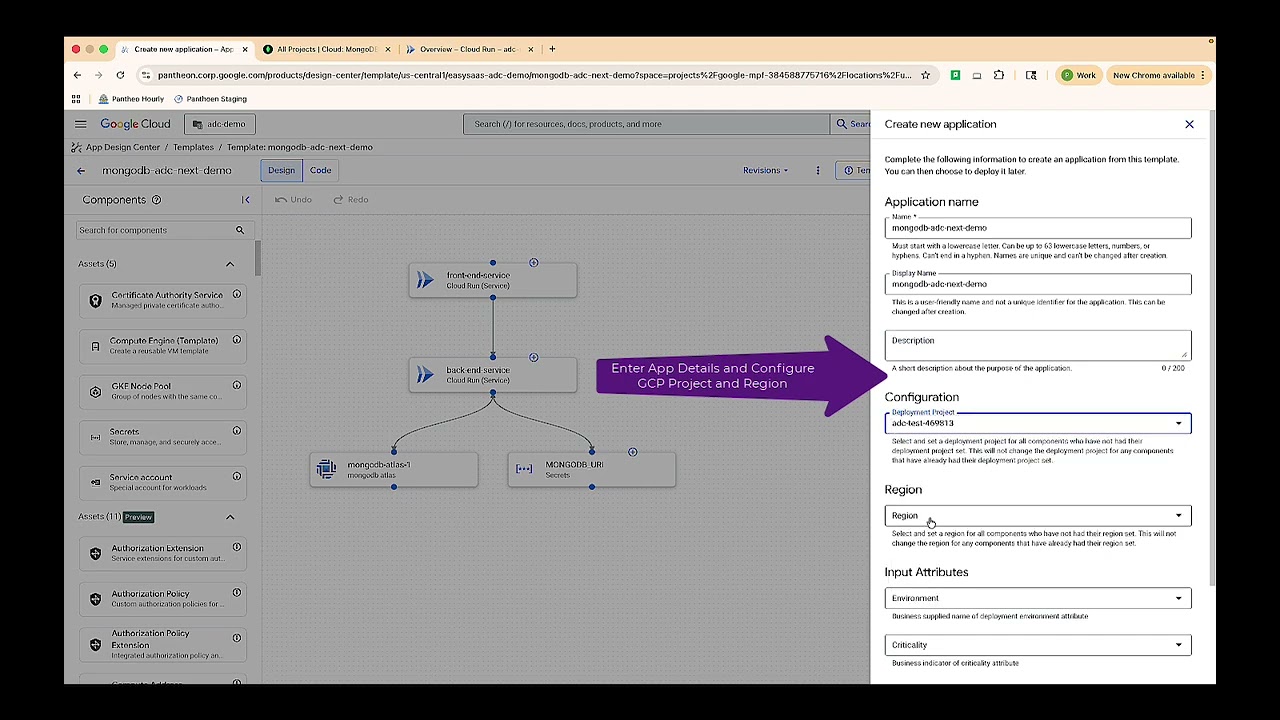
Building and deploying applications using ADC and MongoDB
Create your application template: Access the canvas by navigating to the Templates page in the Google Cloud console and clicking Create Template. Design your architecture by dragging and dropping your application components (such as Cloud Run or GKE) onto the design canvas. Add MongoDB by using the Components search or Gemini Cloud Assist to find and add the MongoDB Connector to your canvas.
Configure the Connection: To configure the MongoDB connection, first, define the relationship by drawing a connection from your compute component, such as your backend service, to the MongoDB component. Next, click on the MongoDB component to set essential parameters, including selecting the deployment Project ID, specifying the MongoDB Atlas connection string or Instance details, and securely mapping your database users and passwords under Credentials, ideally integrating with a Secret Manager.
Draft and verify: To draft and verify your deployment, begin by clicking "Configure an app" on the canvas to create a specific deployment draft, such as one for a "Test" environment. Once the draft is created, validate the configuration by ensuring that all components display a green checkmark, which confirms that all necessary deployment parameters have been successfully set.
Deploy to Google Cloud: To deploy your application to Google Cloud, you first need to select or create a service account that has the required IAM roles to manage the necessary resources. After selecting the service account, click "Deploy." Application Deployment Controller (ADC) will then manage the underlying infrastructure provisioning, including setting up networking and IAM bindings, to ensure your application can effectively communicate with MongoDB.
Helping developers focus on innovation
The integration between MongoDB Atlas and Google Cloud's Application Design Center offers a powerful combination for building and deploying robust, scalable, and manageable applications on Google Cloud. By automating infrastructure management and simplifying database provisioning, developers can accelerate their time-to-market and focus on innovation.
To experience the benefits of this integration firsthand, check out the Google Cloud documentation.
Next Steps
Experience the power of this integration firsthand. Check out the MongoDB Atlas on Google Cloud to explore deep integration between MongoDB Atlas and Google Cloud services.