read 访问权限,并在Compass中启用 只读选项。智能助手是一款基于AI的工具,专为在MongoDB Compass中集成MongoDB开发支持而设计。它可以回答自然语言问题,协助调试错误,并提供性能优化指导。
启用 AI 功能
要使用MongoDB Compass中的智能助手,请先在设置中启用AI功能。
有关在MongoDB Compass中切换AI的更多信息,请参阅启用自然语言查询。
访问智能助手
要访问权限MongoDB Compass中的智能助手,请单击侧边栏面板与 。这将打开助手,您可以在其中提出与MongoDB Compass连接错误、查询输出、解释计划统计信息等相关的各种问题。

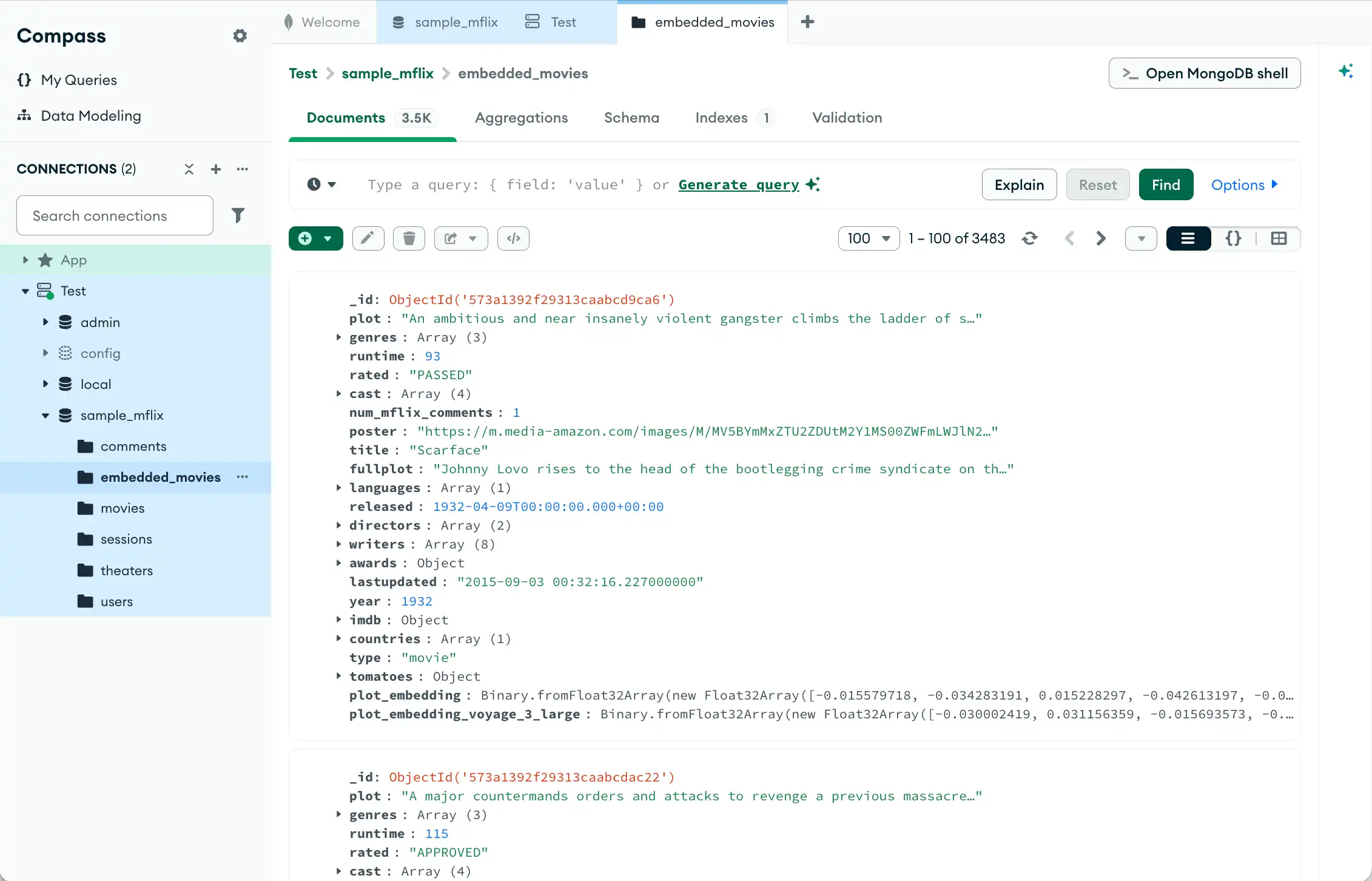
图 1。附带助手的MongoDB Compass主页崩溃了。

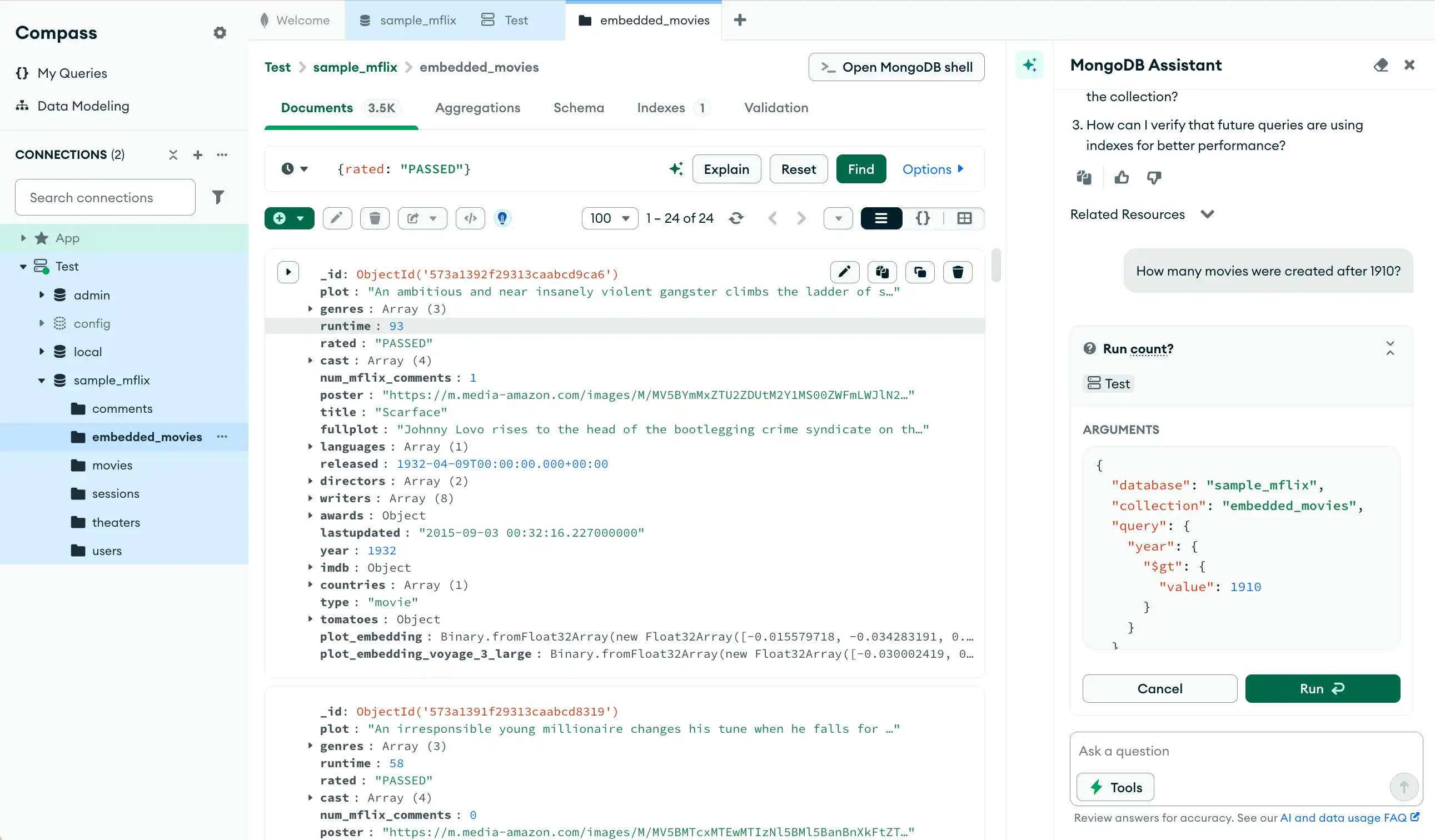
图 2。带有助手的MongoDB Compass主页已展开。
只读工具
MongoDB Compass 助手中的只读工具从当前任务中获取上下文,或在人工批准的情况下对连接的MongoDB 部署执行数据库操作。与会话响应不同,这些工具可以执行实际的数据库查询并从数据库返回实时数据。
助手工具具有以下主要特征:
只读:工具无法修改、插入、更新或删除数据。
用户批准:每次工具执行都需要用户明确确认。
上下文:助手在决定调用工具时会考虑当前的数据库、集合和连接。
实时数据:结果来自实时连接的MongoDB 部署。
Compass 工具
以下工具会为用户获取敏感内容并需要确认。这些工具不与数据库交互,但在使用前需要用户确认:
Compass工具名称 | 说明 |
|---|---|
| 从查询栏中提取活动的MongoDB查询参数 |
| 从聚合构建器中提取活动聚合管道 |
Database Tools
数据库工具名称 | 说明 |
|---|---|
| 显示MongoDB 部署中可用的所有数据库及其存储大小。 |
| 显示特定数据库中的所有集合。 |
| 从集合中检索匹配特定搜索条件的实际文档。 |
| 快速返回集合中的文档总数,而无需检索文档本身。 |
| 执行复杂的数据处理操作,例如跨文档分组、筛选、转换和计算统计信息。 |
| 列出集合上定义的所有索引。 |
| 分析集合以揭示文档的结构,包括字段名称和数据类型。 |
| 报告集合占用的物理磁盘空间,包括数据和索引。 |
| 提供数据库运行状况的全面概述,包括集合计数、文档总数、存储使用情况和索引统计信息。 |
| 检索最新的服务器日志以进行故障排除、性能监控和安全 Atlas 审核。 |
| 显示详细的查询执行计划和性能统计信息,揭示MongoDB如何处理查询以及它是否使用索引。 |
注意
工具调用不支持聚合管道阶段$out 和 $merge,因为它们执行写入操作。助手仅支持只读工具。
示例流程
示例
以下场景展示了MongoDB Compass中智能助手的几种使用方式。
连接错误
如果收到连接错误消息,则会出现一个弹出窗口,指导您使用MongoDB助手来调试错误。单击 Debug 会提示助手自动生成诊断错误的提示。
Diagnose why my Compass connection is failing and help me debug it. Connection string (password redacted): mongodb+srv://user:****@cluster0.pndqllj.mongodb.net/ Error message: querySrv ECONNREFUSED
The error message querySrv ECONNREFUSED in MongoDB Compass typically points to a network issue when Compass is trying to discover your Atlas cluster using DNS SRV records in your connection string. Here are the most common causes and solutions for this issue: 1. Incorrect Hostname or Cluster Name - Ensure that the cluster hostname (cluster0.hrdfe.mongodb.net) in your connection string matches what is shown in your Atlas dashboard. - Typos or a deleted/renamed cluster will cause connection refusal. 2. Network Restrictions or Firewall Blocking - Atlas clusters operate on port 27017. Compass must be able to reach that port through your network. - Firewalls, VPNs, or proxies might block outbound connections to MongoDB Atlas. - Try connecting from a different network/location to rule out local filtering. - You can test if your network allows access to this port using http://portquiz.net:27017/. 3. DNS Issues - Compass uses DNS to resolve the SRV record in the connect string. If your DNS settings are incorrect or your network blocks DNS SRV lookups, connection will fail. Try restarting your computer or flushing your DNS cache. 4. Cluster Status - Verify that your MongoDB Atlas cluster is running and not paused or shut down. 5. Compass Version - Make sure you’re using an up-to-date version of MongoDB Compass. Atlas typically requires recent client versions. Recommended Steps to Debug: - Double-check your Atlas cluster name and hostname. - Ensure your local firewall allows outbound connections to “*.mongodb.net” over port 27017. - Check that the Atlas cluster is running (not paused). - Make sure your connection string is correct. - Use another network or device to see if the issue persists. If you’re still having trouble after these checks, please provide more details about your environment (e.g., Compass version, operating system, network setup), and I’ll be happy to help you further! For further reading, I recommend checking the Compass troubleshooting documentation, which covers these scenarios in detail before making any major changes to your environment.
解释计划
让智能助手分析MongoDB Compass查询的输出:
Interpret this explain plan for me.
## Summary - **Query Logic:** This pipeline counts the number of Italian restaurants in Manhattan by first filtering documents and then aggregating the count. - **Performance:** Fair - **Recommendations:** Create a compound index on `{ borough: 1, cuisine: 1 }` to optimize document retrieval. ## Details ### Query Logic 1. `$match`: Filters documents where `borough` is "Manhattan" and `cuisine` is "Italian". 2. `$count`: Counts the number of documents matching the filter and outputs the total. ### Performance Analysis - The winning plan uses an index scan on the `cuisine` field (`cuisine_1`) and applies an in-memory filter for `borough` ("Manhattan"). - Both `totalKeysExamined` and `totalDocsExamined` are high (43,207), which implies that every document with `cuisine: "Italian"` is examined and then filtered by `borough`. - No compound index exists, meaning MongoDB cannot efficiently combine both filter criteria in a single index lookup. - The pipeline does properly filter before counting, but index usage is only partial, causing increased resource usage. ### Recommendations - Create a compound index on `{ borough: 1, cuisine: 1 }` to allow MongoDB to retrieve documents matching both criteria directly from the index, minimizing documents examined. - This optimization will reduce execution time and system load without changing the output of your aggregation pipeline. Below is the recommended Aggregation Pipeline. This optimized Aggregation Pipeline will leverage the compound index to scan fewer documents, as both filter criteria are present in the index. ```json [ { "$match": { "borough": "Manhattan", "cuisine": "Italian" } }, { "$count": "totalItalianRestaurants" } ] ``` ### Follow-Up Questions 1. How do I create a compound index in MongoDB Compass or via a shell command? 2. What other fields should I consider adding to my indexes for restaurant lookups? 3. How can I further optimize aggregations when working with larger datasets?
用户提问
以下示例演示了您可以向智能助手询问的有关MongoDB Compass函数和查询的问题。
How is MongoDB data modeling different from data modeling with a relational database?
MongoDB data modeling differs from relational database (RDBMS) data modeling in some important ways: 1. Document-Oriented vs. Table-Oriented - MongoDB stores data as flexible, hierarchical JSON-like documents. - Relational databases use tables with fixed schemas and columns. 2. Schema Flexibility - In MongoDB, collections can contain documents with different structures. Schema enforcement is optional. - RDBMS tables have a strict schema that enforces data types and relationships. 3. Embedding vs. Normalization - MongoDB encourages embedding related data inside documents when appropriate (denormalization). Example: An order document may include an array of items directly inside it. - Relational databases emphasize normalization—splitting data across tables connected by foreign keys. 4. Relationships - MongoDB does support references between documents (similar to foreign keys), but joins are less central and not as efficient as in RDBMS. - RDBMSs use normalized data and JOIN operations to relate tables efficiently. 5. Performance & Scaling - MongoDB’s data model enables horizontal scaling (sharding), making it well-suited for large, distributed datasets. - RDBMS scaling typically relies on vertical scaling or complex clustering; JOINs can become expensive as data grows. 6. Use Cases and Design Philosophy - MongoDB models are often designed to optimize common query patterns, reducing the need for joins and complex queries. - RDBMS models are designed for transactional consistency and for representing organized, well-structured relationships. In summary, MongoDB encourages a more flexible, application-driven approach to modeling, while relational databases rely on rigid schemas and normalized relationships. Compass provides tools to visually explore your document structures and relationships, which can be especially helpful as your model evolves.
How can I combine multiple conditions in a single $search query?
To combine multiple conditions in a single $search query in MongoDB Atlas Search (including Compass), you should use the compound operator. The compound operator allows you to specify multiple criteria using must, mustNot, filter, and should clauses. Example: Combine Multiple Conditions Suppose you want to: - Match documents where the plot field contains "baseball" - Exclude documents where the genres field contains "Comedy" or "Romance" Your $search stage would look like this: { "$search": { "compound": { "must": [ { "text": { "query": "baseball", "path": "plot" } } ], "mustNot": [ { "text": { "query": ["Comedy", "Romance"], "path": "genres" } } ] } } }