MongoDB Atlas is a modern, real-time, hybrid, multi-cloud database service that simplifies deploying and managing your database, giving you what you need to build resilient global applications on the cloud providers of your choice. We offer two different deployment options: Atlas Core for predictable workloads and Atlas Infinite for unpredictable, spiky workloads.
Both deployment options use the same interface, drivers, and APIs, and your existing queries and connection code work in either one. The difference is how each one handles compute and storage. Atlas Core puts them on the same node, while Atlas Infinite separates them into independent layers. Choosing between them is a matter of workload fit, giving builders the flexibility to run the right deployment option for their specific application needs.
Key takeaways
- Atlas Core supports the full Atlas feature set and runs on Amazon Web Services (AWS), Microsoft Azure, and Google Cloud across Free, Flex, and Dedicated tiers.
- Now in public preview, Atlas Infinite lets you scale compute and storage separately, so storage can grow without moving to a larger cluster tier.
- Atlas Infinite cuts scaling time by more than 96% compared to Atlas Core, letting you scale compute and storage independently in minutes, not hours.
- Atlas Infinite supports replica sets that hold 10x the data of Atlas Core, growing from prototype to a petabyte on the same foundation with up to 189% more throughput per dollar.
- Both deployment options use the same interface, drivers, and APIs, and Atlas handles provisioning, patching, backup, monitoring, and scaling in both, as well.
Table of contents
- What’s the difference between Atlas Core and Atlas Infinite?
- What is the Atlas Core deployment option?
- What is the Atlas Infinite deployment option?
- How does scaling work in each deployment option?
- When should you use Atlas Core?
- When should you use Atlas Infinite?
- FAQs
What’s the difference between Atlas Core and Atlas Infinite?
While the similarities are many, there is one big difference: the way each one provisions compute and storage
- Atlas Core deployment option couples compute and storage on the same nodes. Dedicated clusters can scale storage independently within the limits of their current tier; exceeding those limits requires scaling to a higher tier.
- Atlas Infinite deployment option runs compute and storage as independent layers, so you can add storage without changing the cluster tier.
Which deployment option works for you depends on how much incoming data you store and how hard it is to predict your query volume. Neither option replaces the other—they’re complementary architectures optimized for different workload profiles.
The following diagram compares the two.
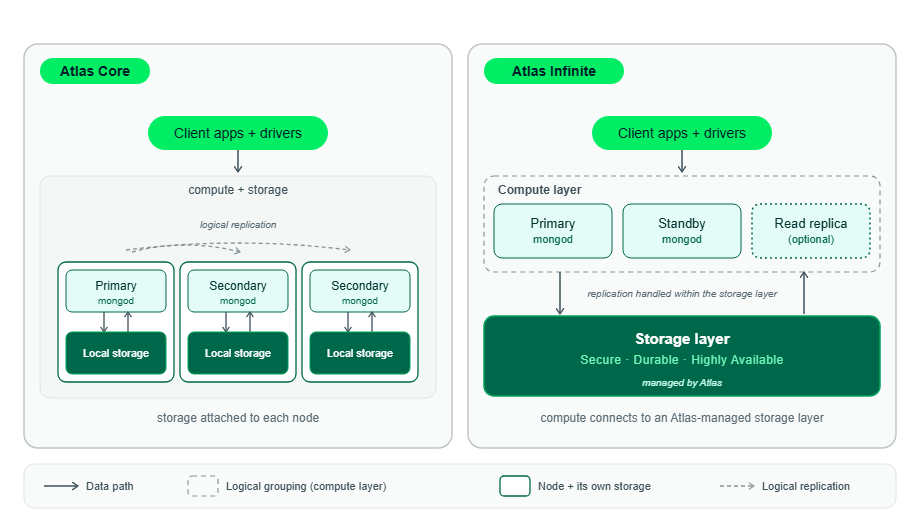
Atlas Core couples compute and storage on each node, while Atlas Infinite runs compute and storage as separate layers.
The table below provides a side-by-side feature comparison.
Consider two teams with very different workload profiles. One operates a fleet-tracking service. Its data grows continuously as vehicles generate location, status, and operational records, while query demand fluctuates sharply throughout the day. Spikes may occur during peak travel periods, incidents, dispatch events, or sudden customer activity. If compute and storage scale together, the team may need to provision enough of both to handle peak demand—leaving resources underused during quieter periods. Atlas Infinite is a strong fit because storage can grow with the dataset while compute expands to absorb bursts and contracts when demand falls.
The other team runs a steady, predictable payment service across multiple regions. Its traffic patterns and capacity requirements are well understood, and it depends on capabilities that Atlas Infinite does not yet support. Atlas Core is the better choice because its resources are fully provisioned and it supports the multi-region deployment this workload requires.
What is the Atlas Core deployment option?
Atlas Core is an Atlas cluster architecture where nodes run both compute and storage. Each data-bearing node holds a copy of your data on a virtual machine with its own storage.
Atlas Core is available across every Atlas deployment type: Free clusters, Flex clusters, and Dedicated cluster tiers on AWS, Azure, and Google Cloud. It supports the full Atlas feature set, including multi-region and multi-cloud clusters.
Atlas Core covers what the payment team needs. Their load is steady, so the tier they pick today will still work for them later. They also need a cluster that can run across more than one region, and Atlas Core offers multi-region.
What is the Atlas Infinite deployment option?
Atlas Infinite is an Atlas cluster architecture that separates compute from storage into independent layers. MongoDB manages the storage layer, and the compute nodes that run your queries connect to it. It’s designed to handle mission-critical, high-performance workloads.
Atlas Infinite is available as a public preview, so you can use it now, but the product and its documentation might change during the preview period. Some Atlas features aren’t supported yet.
Preview also limits where and how large you can run it. Atlas Infinite runs on AWS, in supported regions, on M10 through M60 replica sets with 128 TB of storage capacity on each.
The fleet-tracking team’s data accumulates whether or not the query traffic does, so on Atlas Infinite they can add storage without changing the cluster tier. If they’re already on AWS, they would need to check whether their region is supported and whether the preview covers the features they need.
Here are some other key stats:
- Scaling delay: Atlas Infinite cuts scaling time by more than 96% compared to Atlas Core. Compute and storage automatically scale independently within minutes, not hours.
- Storage ceiling: At 10x higher, Atlas Infinite grows with you, from prototype to a petabyte, on the same foundation. You scale on your terms, when you need more performance, not when you run out of room. Atlas Infinite supports replica sets that hold 10x the data of replica sets in Atlas Core.
- Capacity planning: Atlas Infinite meets your needs in real time as you scale up and down. Atlas Infinite also runs more efficiently on the same hardware compared to Atlas Core, so you get nearly twice the performance per dollar.
- Re-architecture: Zero application changes required. Enjoy more elasticity and scalability on literally the same database.
Atlas Infinite is a more capable, more performant engine. Internal tests using MongoDB 9.0 have shown that Atlas Infinite provides 189% more throughput per dollar compared with Atlas Core.
How does scaling work in each deployment option?
On Atlas Core, the tier you’re on limits both compute and storage. On Atlas Infinite, storage grows without changing the tier.
Architecture: On Atlas Core, compute and storage sit on the same nodes. On Atlas Infinite, MongoDB manages the storage layer and the compute nodes connect to it.
Compute scaling: On both options, compute changes when the cluster changes.: you pick a different cluster tier. On Atlas Core, Atlas restarts your nodes, and Dedicated clusters stay available through it. On Atlas Infinite, your data doesn’t move, so the change is faster. Atlas Infinite cuts scaling time by more than 96% compared to Atlas Core—scaling in minutes, not hours.
Storage scaling: On Atlas Core, you can scale storage separately from compute on Dedicated clusters, but only up to the tier maximum. Past that, you move to a higher tier. On Atlas Infinite, storage increases independently of the tier, without downtime. Atlas Infinite supports replica sets that hold 10x the data of replica sets in Atlas Core, growing from prototype to a petabyte on the same foundation.
Horizontal scaling: Sharding splits your data across multiple servers so no single one holds all of it. On Atlas Core, you shard when your data approaches the tier’s storage capacity. On Atlas Infinite, a single shard holds up to 128 TB, so you don’t have to shard just to add storage. Sharded clusters aren’t available on Atlas Infinite during preview.
The fleet-tracking team runs out of storage before it runs out of compute. Their data accumulates continuously, so on Atlas Core they would reach the storage maximum for their tier and have to move to a larger tier to keep going. On Atlas Infinite, they would add storage and stay on the same tier.
When should you use Atlas Core?
Use Atlas Core when:
- You want the full Atlas feature set.
- You need multi-region or multi-cloud clusters.
- You need sharded clusters.
Atlas Core also covers anything the Atlas Infinite preview leaves out. If you’re deploying on Azure or Google Cloud, or you need a free or Flex cluster, Atlas Core is the option that supports it.
The payment team uses Atlas Core. Their load is steady, so separating compute and storage would not change much for them, and they depend on features the preview doesn’t include yet.
When should you use Atlas Infinite?
Consider Atlas Infinite when:
- You want to scale compute and storage independently without scaling delays (minutes, not hours).
- Your workload has spikes that are difficult to size for in advance.
- You want to grow storage capacity up to 10x higher without scaling the cluster tier or re-architecting your application.
- You want nearly twice the performance and 189% more throughput per dollar.
- You want faster failover and recovery.
Atlas Infinite fits the fleet-tracking team. Their data accumulates continuously, their query volume swings by time of day, and on Atlas Core they would have to move to a larger tier every time they outgrow their storage.
Related resources
MongoDB Cluster Types — Compare dedicated cluster tiers from M10 up, and see how auto-scaling adjusts capacity within limits you set.
What Is the Shared Responsibility Model? — Learn how security, compliance, and maintenance duties are divided between you and MongoDB Atlas.
How MongoDB Sharding Works — Discover how horizontal scaling distributes data across multiple instances as your storage and throughput demands outgrow a single replica set.
MongoDB University — Access free, self-paced courses and official learning paths covering database administration, cluster management, and application development.
MongoDB Basics & Developer Tutorials — Explore fundamental guides on database setup, document model design, and basic CRUD operations.