Overview
このガイドでは、Rocket を Webフレームワークとして使用するRust Webアプリケーションを作成する方法について説明します。Rocket は、安全でタイプセーフなウェブ アプリケーションを作成できる Rust のフレームワークです。
このチュートリアルのアプリケーションは、次のレイヤーで構成されています。
データベースレイヤー: MongoDB は、データのストレージと検索を提供します。
アプリケーションレイヤー: Rocket は、HTTPリクエスト、ルーティング、および論理プロセシングを取り扱います。
プレゼンテーションレイヤー: HTML テンプレートは、ウェブページ上のレストラン データをレンダーします。
Rustと Rocket でMongoDB を使用する理由
MongoDB を Rust および Rocket と統合することで、Rust のメモリの安全性とパフォーマンス特性を MongoDB の柔軟なドキュメントモデルと並行して使用できます。Rocket の型システムにより、APIエンドポイントとなる接続されたデバイスのコンパイル時保証が確実にされ、MongoDB のドキュメントストレージは Rust の直列化ライブラリ(Serde など)と効率的に連携します。
Rust、Rocket、MongoDBの組み合わせは、高パフォーマンス、型安全性、スケーラビリティを必要とするアプリケーションをサポートします。その結果、このスタックは、高スループット API、マイクロサービス、または厳格なパフォーマンス保証を必要とするシステムなどの本番環境のアプリケーション向けに適切に設計されています。
クイック スタート チュートリアル
このチュートリアルでは、RustとRocketを使用してWebアプリケーションをビルドする方法を説明します。アプリケーションはサンプルレストラン データにアクセスし、データをクエリし、スタイルを指定して HTML テンプレートに表示します。このチュートリアルには、 MongoDB AtlasでホストされているMongoDBクラスターに接続し、データベースのデータにアクセスして表示する手順も含まれています。
Tip
Rocket なしでRustドライバーを使用してMongoDBに接続する場合は、Rustドライバー クイック スタート チュートリアルを参照してください。
プロジェクトを設定する
このセクションの手順に従って、プロジェクトの依存関係のインストール、Atlas クラスターの作成、およびアプリケーション構造の設定を行います。
前提条件を確認します
クイック スタートアプリケーションを作成するには、開発環境に次のソフトウェアをインストールします。
前提条件 | ノート |
|---|---|
| |
コードエディター | このチュートリアルでは Visual Studio Code と Rust 拡張機能を使用しますが、お好みのエディターを使用できます。 |
ターミナルアプリとシェル | MacOS ユーザーの場合は、 ターミナル または 類似アプリを使用します。Windowsユーザーの場合は、 PowerShell を使用します。 |
MongoDB Atlasクラスターを作成する
MongoDB Atlas は、MongoDB配置をホストするマネージドクラウドデータベースサービスです。MongoDB配置がない場合は、MongoDBを使い始めるチュートリアルを完了することで、MongoDBクラスターを無料で作成できます(クレジットは不要)。MongoDBを使い始めるチュートリアルでは、このチュートリアルで使用されるsample_restaurantsデータベースなど、サンプルデータセットをクラスターにロードする方法も説明します。
MongoDBクラスターに接続するには、接続 URI を使用する必要があります。接続文字列を検索する方法については、MongoDBを使い始めるチュートリアルの接続文字列の追加セクションを参照してください。
重要
接続stringを安全な場所に保存します。
プロジェクトの依存関係を設定する
Cargo.tomlファイルに移動し、その内容を次のコードで置き換えます。
[package] name = "rocket-quickstart" version = "0.1.0" edition = "2024" [dependencies] rocket = {version = "0.5.0", features = ["json"]} serde = "1.0.136" dotenv = "0.15.0" tokio = {version = "1.32.0", features = ["full"]} rocket_dyn_templates = { version = "0.1.0", features = ["handlebars"] } [dependencies.mongodb] version = "3.4.1"
依存関係をインストールするには、rocket-quickstartディレクトリから次のコマンドを実行中。
cargo build
このコマンドは、次の依存関係をインストールします。
Rocket、JSONをサポートするプロジェクトのフレームワーク
Serde、データ直列化用
MongoDB Rustドライバー(MongoDB操作用)
非同期ランタイム(Token)
buckets_din_templates、ハンドルバーテンプレートレンダリング用
プロジェクト構造を作成する
このアプリケーションに必要なディレクトリとファイルを作成するには、rocket-quickstartディレクトリから次のコマンドを実行します。
mkdir -p src/models src/repository src/api templates static touch src/models/restaurant.rs src/repository/mongodb_repo.rs src/api/restaurant_api.rs touch src/models.rs src/repository.rs src/api.rs touch templates/index.hbs static/style.css
これらのコマンドは、Rust のモジュール型アーキテクチャ パターンに従ってプロジェクトを構成し、ファイルを目的に応じて異なるディレクトリにグループ化します。コマンドの実行中後は、次のディレクトリが作成されます。
src/models:レストラン データをモデル化するためのデータ構造が含まれていますsrc/repository:データベースアクセス ロジックが含まれていますsrc/api: HTTPエンドポイントとなる接続されたデバイス ハンドラーが含まれていますtemplates:データをレンダリングするための ハンドルバー のテンプレートファイルが含まれていますstatic: スタイル用の CSSファイルが含まれています
コマンドは、各 src/ディレクトリのモジュール宣言ファイルも作成します。このファイルには、対応するディレクトリで使用可能なモジュールが一覧表示され、アプリケーション全体でそれらにアクセスできるようになります。
バックエンドの設定
プロジェクト構造と依存関係を設定したら、このセクションの手順に従ってMongoDBに接続し、データモデルを設定します。
接続 URI を指定する
rocket-quickstartディレクトリから次のコマンドを実行中て、MONGO_URI 環境変数を接続 URI に設定します。
export MONGO_URI="<connection URI>"
<connection URI>プレースホルダーを、前の手順で保存した接続 URI に置き換えます。
データモデルを作成する
src/models/restaurant.rsファイルに移動し、次のコードを貼り付けます。
use serde::{Deserialize, Serialize}; use mongodb::bson::oid::ObjectId; pub struct Restaurant { pub id: Option<ObjectId>, pub name: Option<String>, pub borough: Option<String>, pub cuisine: Option<String>, pub address: Option<Address>, } pub struct Address { pub building: Option<String>, pub street: Option<String>, pub zipcode: Option<String>, }
このファイルは、sample_restaurants.restaurantsサンプルコレクション内のデータを表す Restaurant と Address のモデルを定義します。
プロジェクトファイルでモデルを使用するには、restaurant.rsファイルに対応する restaurant モジュールを登録する必要があります。src/models.rsファイルに移動し、次のコードを貼り付けます。
pub mod restaurant; pub use restaurant::*;
MongoDBサンプルコレクションにアクセスする
src/repository/mongodb_repo.rsファイルに移動し、次のコードを貼り付けます。
use std::env; use mongodb::{ bson::{extjson::de::Error, doc}, Client, Collection }; use crate::models::Restaurant; pub struct MongoRepo { col: Collection<Restaurant>, } impl MongoRepo { pub async fn init() -> Self { dotenv::dotenv().ok(); let uri = match env::var("MONGO_URI") { Ok(v) => v.to_string(), Err(_) => format!("Error loading env variable"), }; let client = Client::with_uri_str(uri).await.unwrap(); let db = client.database("sample_restaurants"); let col: Collection<Restaurant> = db.collection("restaurants"); MongoRepo { col } } pub async fn get_all_restaurants(&self) -> Result<Vec<Restaurant>, Error> { let mut cursor = self .col .find(doc! {}) .await .map_err(|e| Error::DeserializationError { message: e.to_string() })?; let mut restaurants: Vec<Restaurant> = Vec::new(); while cursor.advance().await.map_err(|e| Error::DeserializationError { message: e.to_string() })? { match cursor.deserialize_current() { Ok(restaurant) => restaurants.push(restaurant), Err(e) => { // Skips documents that can't be deserialized and logs the error eprintln!("Warning: Skipping document due to deserialization error: {}", e); continue; } } } Ok(restaurants) } pub async fn get_filtered_restaurants(&self) -> Result<Vec<Restaurant>, Error> { let filter = doc! { "borough": "Queens", "name": { "$regex": "Moon", "$options": "i" } }; let mut cursor = self .col .find(filter) .await .map_err(|e| Error::DeserializationError { message: e.to_string() })?; let mut restaurants: Vec<Restaurant> = Vec::new(); while cursor.advance().await.map_err(|e| Error::DeserializationError { message: e.to_string() })? { match cursor.deserialize_current() { Ok(restaurant) => restaurants.push(restaurant), Err(e) => { // Skips documents that can't be deserialized and logs the error eprintln!("Warning: Skipping document due to deserialization error: {}", e); continue; } } } Ok(restaurants) } }
このファイルは、sample_restaurantsデータベース内の restaurantsコレクションにアクセスします。次に、コレクションドキュメントを検索する次のクエリ メソッドを定義します。
get_all_restaurants():restaurantsコレクション内のすべてのドキュメントを検索しますget_filtered_restaurants():restaurantsコレクション内の、borough値が"Queens"で、かつname値が"Moon"を含むドキュメントを検索する。$options値は、このnameクエリが大文字と小文字を区別しないことを指定します。
このコードには、逆シリアル化できないドキュメントをスキップするロジックも含まれています。これにより、ドキュメントに Restaurant モデルで定義されている各フィールドが含まれていない場合にエラーを回避できます。
次に、src/repository.rs にモジュールを登録します。
pub mod mongodb_repo; pub use mongodb_repo::*;
フロントエンドの設定
データレイヤーを設定したら、このセクションの手順に従って、ユーザー インターフェース用のRocket APIハンドラーとテンプレートを作成します。
APIハンドラーを作成する
src/api/restaurant_api.rsファイルに移動し、次のコードを貼り付けます。
use rocket::{State, serde::json::Json, get, http::Status}; use crate::{models::Restaurant, repository::MongoRepo}; pub async fn get_all_restaurants(db: &State<MongoRepo>) -> Result<Json<Vec<Restaurant>>, Status> { let restaurants = db.get_all_restaurants().await; match restaurants { Ok(restaurants) => Ok(Json(restaurants)), Err(_) => Err(Status::InternalServerError), } } pub async fn get_filtered_restaurants(db: &State<MongoRepo>) -> Result<Json<Vec<Restaurant>>, Status> { let restaurants = db.get_filtered_restaurants().await; match restaurants { Ok(restaurants) => Ok(Json(restaurants)), Err(_) => Err(Status::InternalServerError), } }
このコードは、/restaurants と /restaurants/browse のエンドポイントとなる接続されたデバイスを作成します。これらのエンドポイントとなる接続されたデバイスは、レストラン情報を動的に読み込んで表示するためにフロントエンドJavaScriptコードによって消費されるクエリメソッドからのJSONデータを提供します。
次に、src/api.rs でAPIモジュールを登録します。
pub mod restaurant_api; pub use restaurant_api::*;
メインのアプリケーションファイルを更新する
src/main.rsファイルに移動し、次のコードを貼り付けます。
mod api; mod models; mod repository; extern crate rocket; use rocket::{get, fs::FileServer, response::content::RawHtml}; use rocket_dyn_templates::Template; use api::restaurant_api::{get_all_restaurants, get_filtered_restaurants}; use repository::MongoRepo; async fn index() -> RawHtml<String> { let template_content = std::fs::read_to_string("templates/index.hbs").unwrap_or_else(|_| { r#"<!DOCTYPE html> <html><head><title>Error</title></head> <body><h1>Template not found</h1></body></html>"#.to_string() }); RawHtml(template_content) } async fn browse() -> RawHtml<String> { let template_content = std::fs::read_to_string("templates/index.hbs").unwrap_or_else(|_| { r#"<!DOCTYPE html> <html><head><title>Error</title></head> <body><h1>Template not found</h1></body></html>"#.to_string() }); RawHtml(template_content) } async fn rocket() -> _ { let db = MongoRepo::init().await; rocket::build() .manage(db) .mount("/", routes![index, browse, get_all_restaurants, get_filtered_restaurants]) .mount("/static", FileServer::from("static/")) .attach(Template::fairing()) }
このファイルは、Rocket Webサーバーを設定し、次のルートを構成します。
/: すべてのレストランが表示されるメインのインデックスページを形式する HTML コードを返します/browse: フィルタリングされたレストラン ページの形式を示す HTML コードを返します
ハンドルバー テンプレートの作成
templates/index.hbsファイルに移動し、次のコードを貼り付けます。
<!DOCTYPE html> <html lang="en"> <head> <meta charset="UTF-8"> <meta name="viewport" content="width=device-width, initial-scale=1.0"> <title>Restaurant Explorer</title> <link rel="stylesheet" href="/static/style.css"> </head> <body> <div class="container"> <header> <h1>Restaurant Directory</h1> </header> <div class="controls"> <a href="/" class="btn" id="all-btn">All Restaurants</a> <a href="/browse" class="btn" id="browse-btn">Browse Filtered</a> </div> <div id="restaurants-container"> <div class="loading">Loading restaurants...</div> </div> </div> <script> // Sets the active button based on the current path const path = window.location.pathname; if (path === '/browse') { document.getElementById('browse-btn').classList.add('active'); } else { document.getElementById('all-btn').classList.add('active'); } // Loads the restaurant documents async function loadRestaurants() { try { const apiEndpoint = path === '/browse' ? '/restaurants/browse' : '/restaurants'; const response = await fetch(apiEndpoint); const restaurants = await response.json(); displayRestaurants(restaurants); } catch (error) { document.getElementById('restaurants-container').innerHTML = '<div class="error">Error loading restaurants. Please try again later.</div>'; } } // Displays restaurants in a grid format function displayRestaurants(restaurants) { const container = document.getElementById('restaurants-container'); if (restaurants.length === 0) { container.innerHTML = '<div class="error">No restaurants found.</div>'; return; } const restaurantsHTML = restaurants.map(function(restaurant) { return '<div class="restaurant-card">' + '<div class="restaurant-name">' + (restaurant.name || 'Unknown Name') + '</div>' + (restaurant.cuisine ? '<div class="cuisine-tag">' + restaurant.cuisine + '</div>' : '') + (restaurant.borough ? '<div class="restaurant-info"><strong>Borough:</strong> ' + restaurant.borough + '</div>' : '') + (restaurant.restaurant_id ? '<div class="restaurant-info"><strong>ID:</strong> ' + restaurant.restaurant_id + '</div>' : '') + (restaurant.address ? '<div class="address">' + (restaurant.address.building ? restaurant.address.building + ' ' : '') + (restaurant.address.street ? restaurant.address.street : '') + (restaurant.address.zipcode ? ', ' + restaurant.address.zipcode : '') + '</div>' : '') + '</div>'; }).join(''); container.innerHTML = '<div class="restaurants-grid">' + restaurantsHTML + '</div>'; } loadRestaurants(); </script> </body> </html>
この Handlebars テンプレートは、JavaScriptを使用して、APIエンドポイントとなる接続されたデバイスからレストランデータを動的に読み込み、レストランをインタラクティブなグリッドレイアウトで表示する応答性の高いウェブインターフェイスを作成します。
Add CSS styling
次のコードを static/style.css に追加します。
/* Modern, clean styling for the restaurant app */ * { margin: 0; padding: 0; box-sizing: border-box; } body { font-family: -apple-system, BlinkMacSystemFont, 'Segoe UI', Roboto, Oxygen, Ubuntu, Cantarell, sans-serif; line-height: 1.6; color: #333; background: rgb(198, 240, 209); min-height: 100vh; } .container { max-width: 1200px; margin: 0 auto; padding: 20px; } header { text-align: center; margin-bottom: 40px; color: rgb(0, 0, 0); } h1 { font-size: 3rem; margin-bottom: 10px; } .subtitle { font-size: 1.2rem; opacity: 0.9; } .controls { display: flex; justify-content: center; gap: 20px; margin-bottom: 30px; } .btn { background: white; color: #0d8958; border: none; padding: 12px 24px; border-radius: 25px; font-weight: 600; text-decoration: none; cursor: pointer; transition: all 0.3s ease; box-shadow: 0 4px 15px rgba(0,0,0,0.2); } .btn:hover { transform: translateY(-2px); box-shadow: 0 6px 20px rgba(0,0,0,0.3); } .btn.active { background: #0d8958; color: white; } .restaurants-grid { display: grid; grid-template-columns: repeat(auto-fill, minmax(350px, 1fr)); gap: 20px; margin-top: 20px; } .restaurant-card { background: white; border-radius: 15px; padding: 20px; box-shadow: 0 8px 25px rgba(0,0,0,0.1); transition: transform 0.3s ease, box-shadow 0.3s ease; } .restaurant-card:hover { transform: translateY(-5px); box-shadow: 0 12px 35px rgba(0,0,0,0.15); } .restaurant-name { font-size: 1.4rem; font-weight: 700; color: #000000; margin-bottom: 10px; } .restaurant-info { margin-bottom: 8px; } .restaurant-info strong { color: #555; } .cuisine-tag { display: inline-block; background: #0d8958; color: white; padding: 4px 12px; border-radius: 15px; font-size: 0.85rem; font-weight: 600; margin-top: 10px; } .address { color: #666; font-style: italic; margin-top: 8px; } .loading { text-align: center; color: white; font-size: 1.2rem; margin: 40px 0; } .error { text-align: center; color: #ff6b6b; background: white; padding: 20px; border-radius: 10px; margin: 20px 0; } @media (max-width: 768px) { .container { padding: 10px; } h1 { font-size: 2rem; } .controls { flex-direction: column; align-items: center; } .restaurants-grid { grid-template-columns: 1fr; } }
この CSSファイルは、ウェブページに表示されるレストラン データをスタイルします。
アプリケーションの実行
最後に、このセクションの手順に従って、ブラウザインターフェイスを使用してウェブアプリケーションを実行し、レストランのデータを調べます。
Rocketアプリケーションの起動
プロジェクトディレクトリに移動し、次のコマンドを実行してください。
cargo run
成功させた場合、コマンド出力は次の例のようになります。
Configured for debug. >> address: 127.0.0.1 >> port: 8000 ... Routes: >> (index) GET / >> (browse) GET /browse >> (get_all_restaurants) GET /restaurants >> (get_filtered_restaurants) GET /restaurants/browse >> (FileServer: static/) GET /static/<path..> [10] Fairings: >> Templating (ignite, liftoff, request) >> Shield (liftoff, response, singleton) Shield: >> X-Frame-Options: SAMEORIGIN >> Permissions-Policy: interest-cohort=() >> X-Content-Type-Options: nosniff Templating: >> directory: templates >> engines: ["hbs"] Rocket has launched from http://127.0.0.1:8000
Webアプリケーションを開く
ウェブ ブラウザで http://:127.0.0.1 8000を開きます。最初のランディング ページには、sample_restaurants.restaurantsコレクション内のすべてのレストランが表示されます。

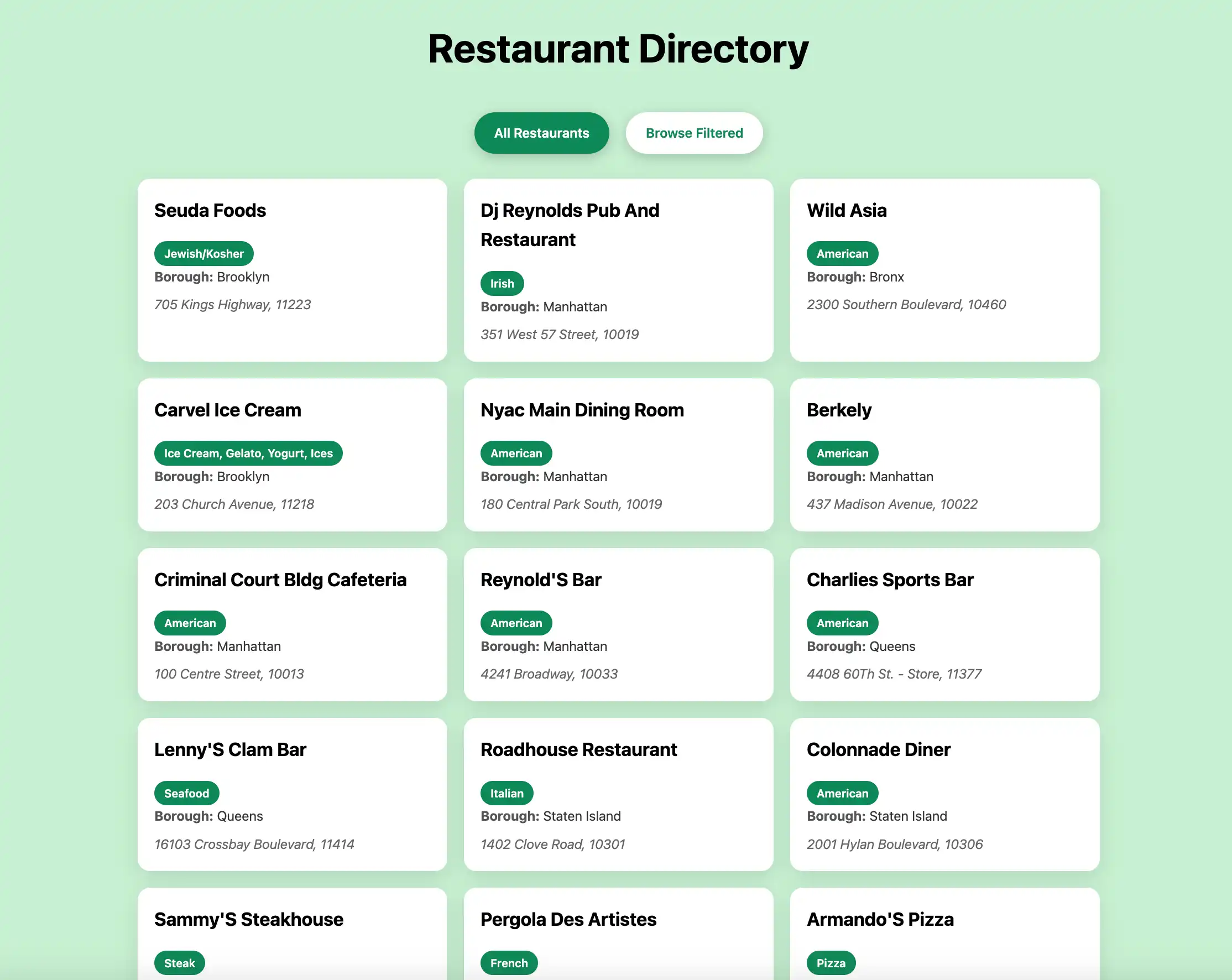
次に、[Browse Filtered] ボタンをクリックして、名前に "Moon" が含まれるクイーンズのレストランを表示します。

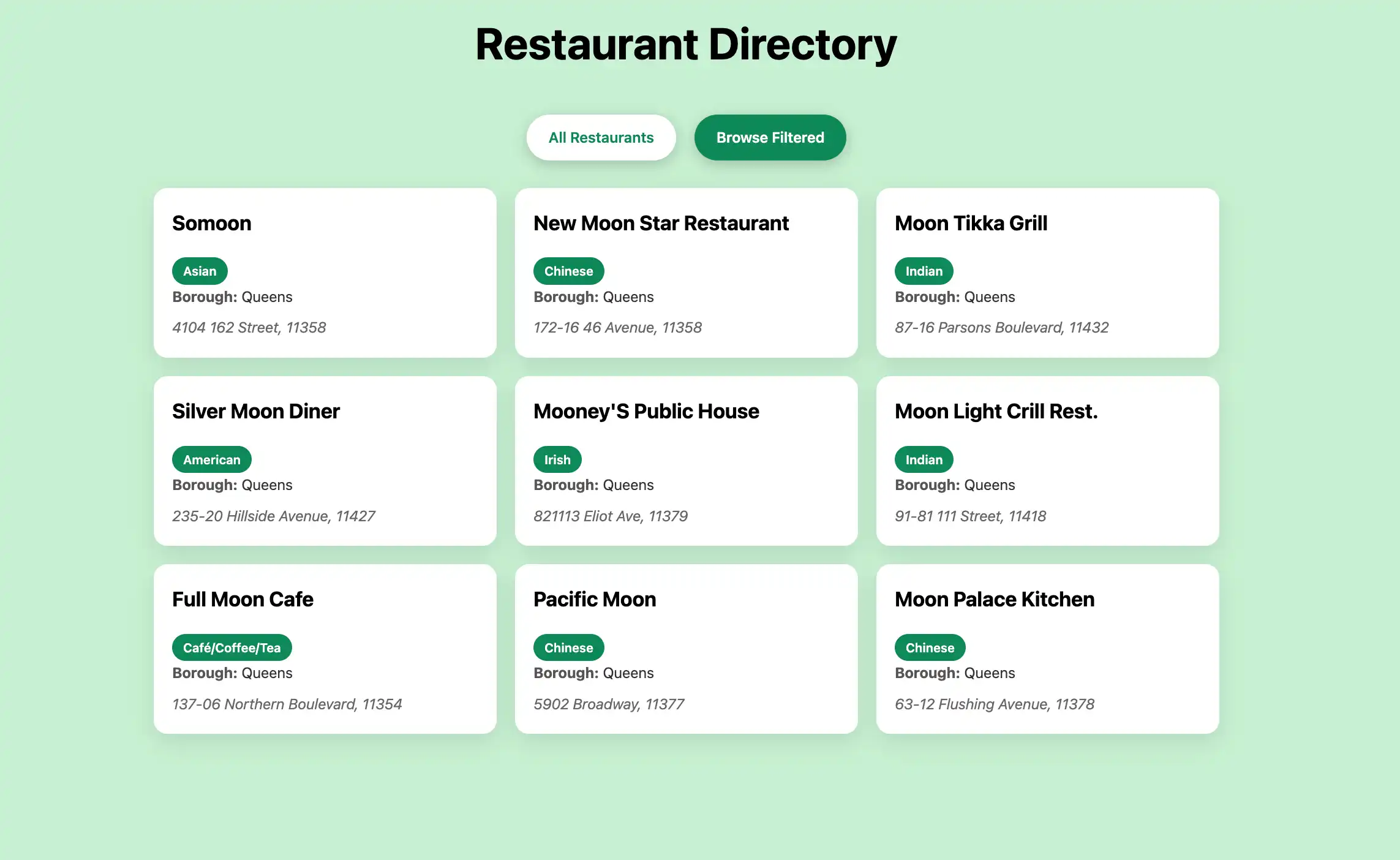
クイック スタート チュートリアルが完了しました。これらの手順を完了すると、 MongoDB配置に接続し、サンプルレストラン データに対してクエリを実行し、ローカルでホストされたウェブアプリケーションに結果を表示するRustと Rocket のウェブアプリケーションが作成されます。
追加リソース
Rust、Rocket、 MongoDBの詳細については、次のリソースを参照してください。
Rocket のドキュメント
MongoDB Rustドライバー ドキュメント
サーバー直列化フレームワーク
ハンドラーのテンプレート言語