In this guide, you learn how to generate your first vector embeddings with Voyage AI and build a basic application.
Work with a runnable version of this tutorial as a Python notebook.
Create a Model API Key
To access Voyage AI models, create a model API key in the MongoDB Atlas UI.
Sign up for a free Atlas account or log in.
If you're new to Atlas, it creates an organization and project for you.
To learn more, see Create an Atlas Account.
Create a model API key for your project.
In your Atlas project, select AI Models from the navigation bar.
Click Create model API key.
Give the API key a name and then click Create.
To learn more, see Model API Keys.
Generate Your First Embeddings
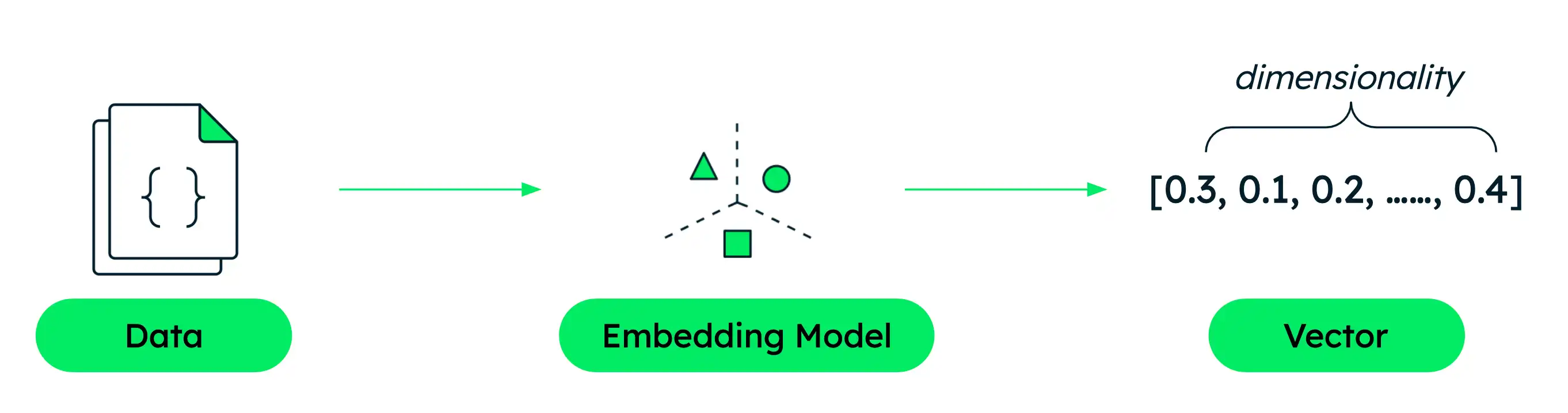
In this section, you generate vector embeddings using a Voyage AI embedding model and the Python client.

Create your script.
Create a file named quickstart.py in your project and paste the following code into it.
This code initializes the Voyage AI client, defines sample texts,
and uses the client to access the Voyage API to generate vector embeddings
with the voyage-4-large model.
For details, see Python Client or explore the full API specification.
import voyageai # Initialize Voyage client vo = voyageai.Client() # Sample texts texts = [ "hello, world", "welcome to voyage ai!" ] # Generate embeddings result = vo.embed( texts, model="voyage-4-large" ) print(f"Generated {len(result.embeddings)} embeddings") print(f"Each embedding has {len(result.embeddings[0])} dimensions") print(f"First embedding (truncated): {result.embeddings[0][:5]}...")
Run the script.
Run the following command in your terminal to generate the embeddings.
python quickstart.py
Generated 2 embeddings Each embedding has 1024 dimensions First embedding (truncated): [-0.02806740067899227, 0.05503412336111069, 0.0038576999213546515, -0.04668188467621803, 0.007834268733859062]...
Build a Basic RAG Application
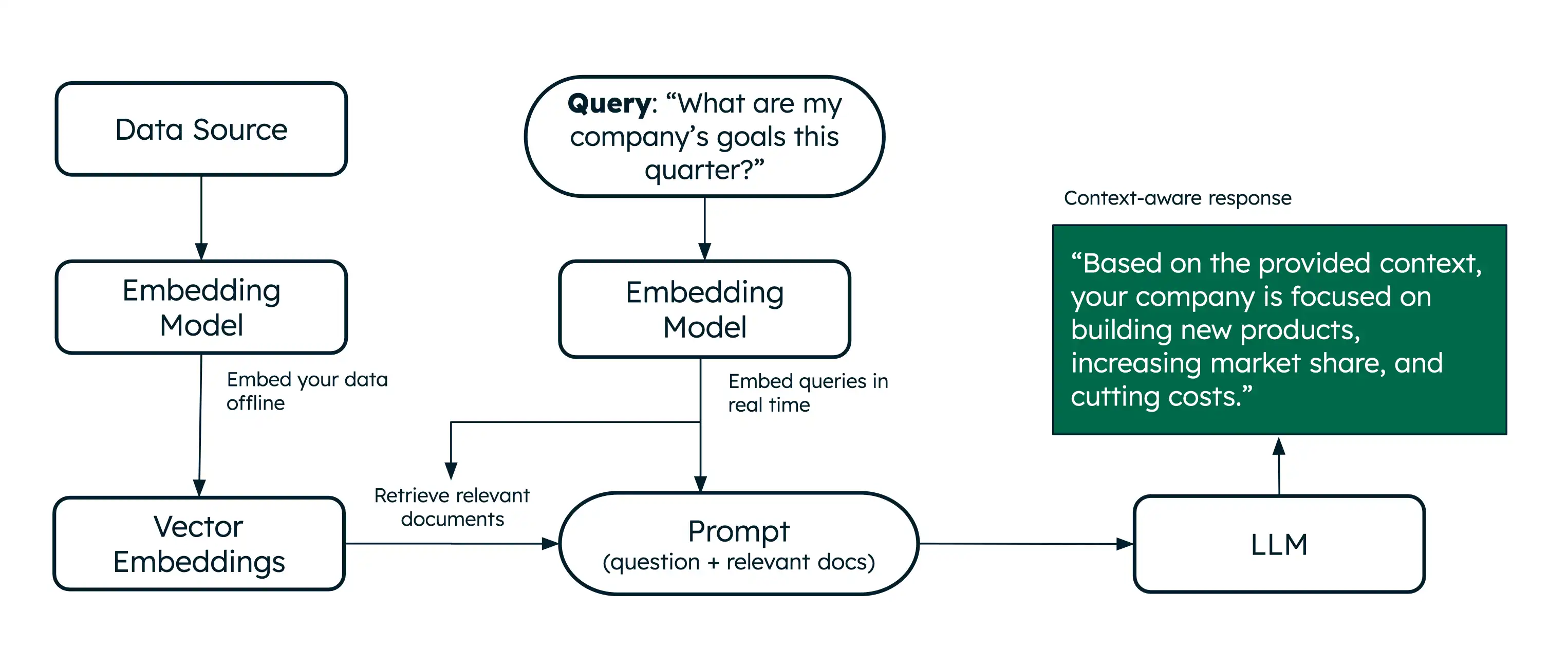
Now that you know how to generate vector embeddings, build a basic RAG application to learn how to use Voyage AI models to implement AI search and retrieval. RAG enables LLMs to generate context-aware responses by retrieving relevant information from your data before generating answers.
Note
RAG applications require access to an LLM. This tutorial provides examples using Anthropic or OpenAI, but you can use any LLM provider of your choice.

Learning Summary
Now that you've created your first application with Voyage AI, expand the following sections to learn more about the concepts covered in this quick start:
You used the voyage-4-large embedding model to convert text into
1024-dimensional vectors. Each dimension represents a learned feature
that captures aspects of the text's meaning.
You also used the rerank-2.5 reranking model to refine your
search results against the query. Higher scores indicate stronger
similarity between the query and document content.
To learn more, see Models Overview.
You used the voyageai Python SDK to access the
Embedding and Reranking API.
When calling the models using the SDK, you specified the
input_type parameter to improve search accuracy:
document: To optimize the embeddings that represent your data.query: To optimize your query embeddings.
To learn more, see Text Embeddings Usage and Specifying Input Type.
You used the dot product similarity function to find
semantically similar documents. Numpy is an open-source library that
provides built-in functions for vector operations, and this application
uses the dot() and argsort() functions to compute the dot product
similarity between the query and document embeddings, and
then sort the documents by their similarity scores.
To learn more about semantic search, see Semantic Search with Voyage AI Embeddings.
For more details on text embeddings usage and the input_type parameter,
see Usage.
You combined semantic search and reranking with an LLM to create a basic RAG system. The system retrieves relevant documents using semantic search, reranks them, and then provides the most relevant document to an LLM to generate accurate, grounded responses to your queries.
To learn more about RAG, see Retrieval-Augmented Generation (RAG) with Voyage AI.
Next Steps
To continue learning, see the following resources:
Skill Level | Documentation Resources |
|---|---|
Basic | |
Intermediate |