Overview
This guide shows you how to integrate MongoDB Client-Side Field Level Encryption (CSFLE) with Spring Data MongoDB.
Note
If you haven't worked with CSFLE before, see the CSFLE Tutorials guide in the MongoDB Server manual.
If you haven't worked with Spring Data MongoDB before, see the Spring Data MongoDB documentation.
GitHub Repository
To view the source code for this guide, see the mongodb-java-spring-boot-csfle repository on GitHub.
You can also retrieve the source code from its GitHub repository by running the following command:
git clone git@github.com:mongodb-developer/mongodb-java-spring-boot-csfle.git
Prerequisites
Before you use this guide, perform the following steps:
Install Java 17
Install the MongoDB Automatic Encryption Shared Library v7.0.2 or later
Review the README.md for information on how to run the example code.
You also need access to a MongoDB cluster running MongoDB v7.0.2 or later.
Example Features
This example provides templated code for a production environment, and includes the following features:
Multiple encrypted collections
Automated JSON Schema generation
Server-side JSON Schema
Separated clusters for Data Encryption Keys (DEKs) and encrypted collections
Automated DEK generation or retrieval
Spring Expression Language (SpEL) evaluation extension
Auto-implemented repositories
OpenAPI 3.0.1 documentation
The template follows SOLID principles to increase code readability and reuse. To learn more about SOLID, see SOLID on Wikipedia.
Project Diagrams
The following diagram shows the components required to create a
CSFLE-enabled MongoClient that can encrypt and decrypt fields
automatically. The arrows in the diagram show dependencies and relationships
between components.

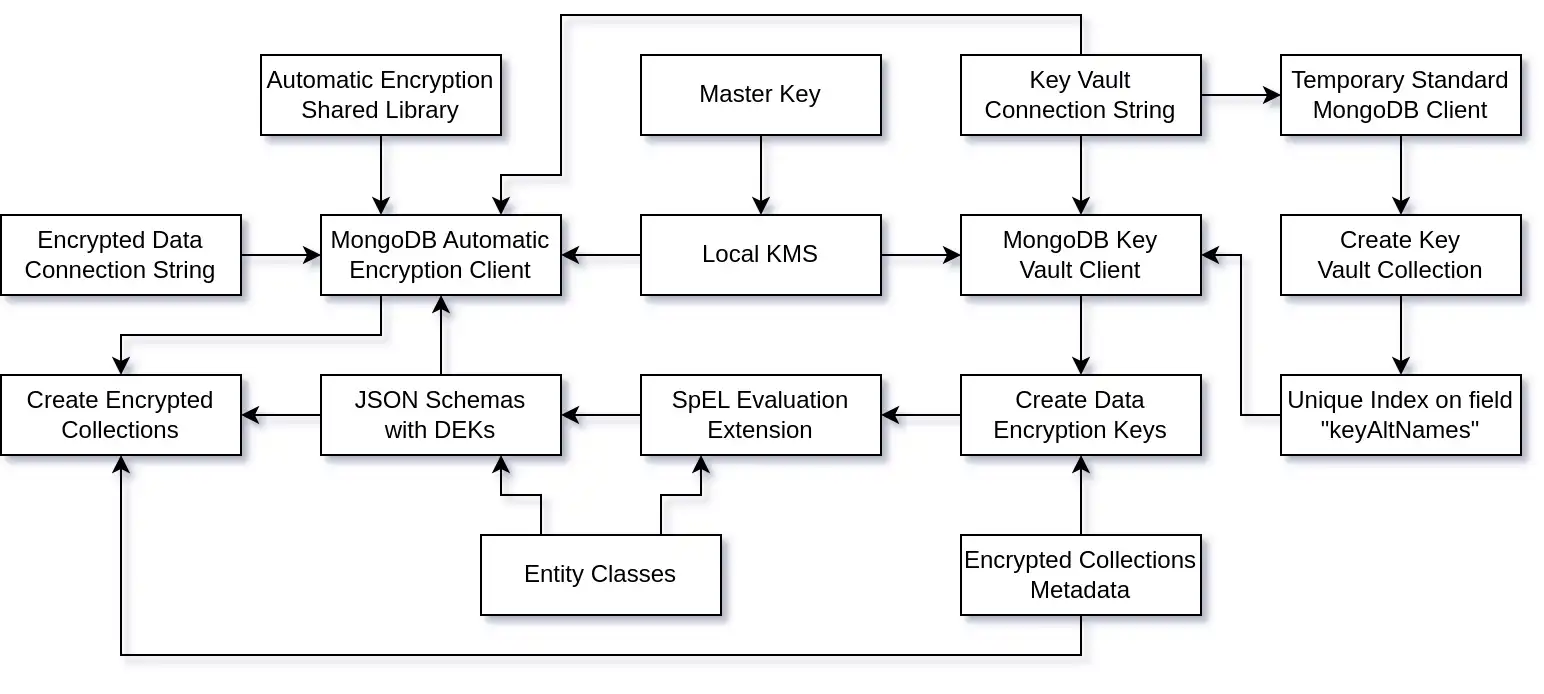
The arrows in the diagram show dependencies and relationships between components.
After the application establishes a connection with MongoDB, it uses a three-tier architecture to expose a REST API and manage communication with the MongoDB database, as shown in the following diagram:

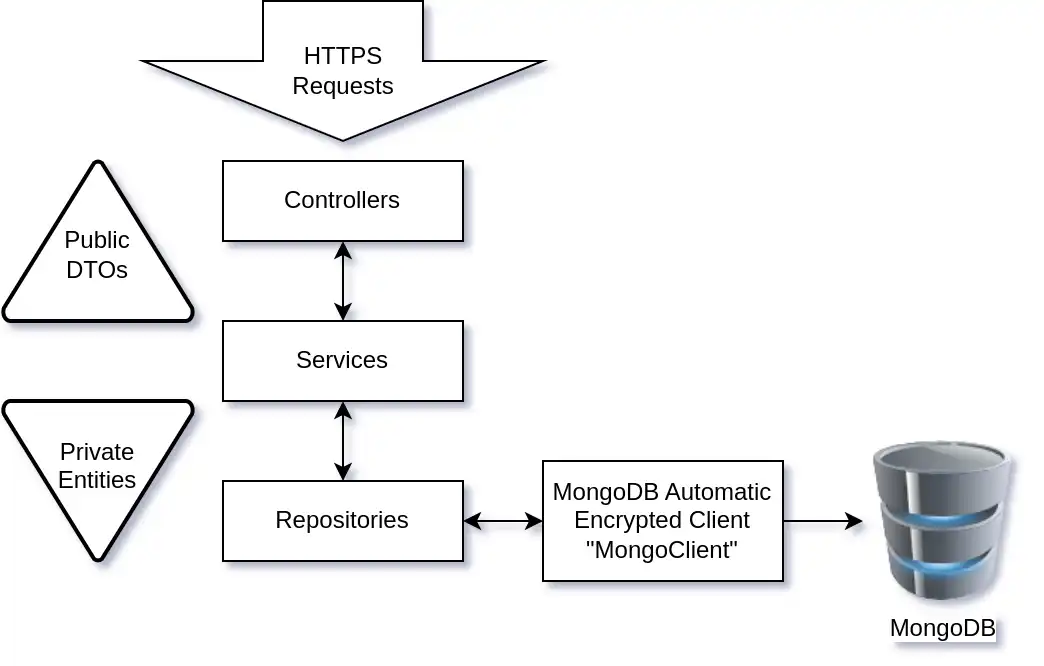
Create the Key Vault Collection
This section shows you how to create the key vault collection and its unique index.
If you are starting from a new MongoDB cluster, you must first create
the key vault collection and its unique index on the
keyAltNames field.
Set Up the Key Vault and DEKs
The KeyVaultAndDekSetup class creates the key vault collection
and its unique index by using a standard connection to MongoDB.
Then it creates the DEKs required to encrypt
the documents in each encrypted collection.
The following code shows the KeyVaultAndDekSetup class:
public class KeyVaultAndDekSetup { private static final Logger LOGGER = LoggerFactory.getLogger(KeyVaultAndDekSetup.class); private final KeyVaultService keyVaultService; private final DataEncryptionKeyService dataEncryptionKeyService; private String CONNECTION_STR; public KeyVaultAndDekSetup(KeyVaultService keyVaultService, DataEncryptionKeyService dataEncryptionKeyService) { this.keyVaultService = keyVaultService; this.dataEncryptionKeyService = dataEncryptionKeyService; } public void postConstruct() { LOGGER.info("=> Start Encryption Setup."); LOGGER.debug("=> MongoDB Connection String: {}", CONNECTION_STR); MongoClientSettings mcs = MongoClientSettings.builder() .applyConnectionString(new ConnectionString(CONNECTION_STR)) .build(); try (MongoClient client = MongoClients.create(mcs)) { LOGGER.info("=> Created the MongoClient instance for the encryption setup."); LOGGER.info("=> Creating the encryption key vault collection."); keyVaultService.setupKeyVaultCollection(client); LOGGER.info("=> Creating the Data Encryption Keys."); EncryptedCollectionsConfiguration.encryptedEntities.forEach(dataEncryptionKeyService::createOrRetrieveDEK); LOGGER.info("=> Encryption Setup completed."); } catch (Exception e) { LOGGER.error("=> Encryption Setup failed: {}", e.getMessage(), e); } } }
Important
In production, you can create the key vault collection and its
unique index on the keyAltNames field manually. After you
create them, you can remove this code.
This code uses a standard (not CSFLE-enabled) and temporary
MongoClient connection in a try-with-resources block to create
a collection and an index in the MongoDB cluster.
Create the Key Vault Collection
The KeyVaultServiceImpl class creates the key vault collection
and the keyAltNames unique index.
The following code shows the KeyVaultServiceImpl class:
public class KeyVaultServiceImpl implements KeyVaultService { private static final Logger LOGGER = LoggerFactory.getLogger(KeyVaultServiceImpl.class); private static final String INDEX_NAME = "uniqueKeyAltNames"; private String KEY_VAULT_DB; private String KEY_VAULT_COLL; public void setupKeyVaultCollection(MongoClient mongoClient) { LOGGER.info("=> Setup the key vault collection {}.{}", KEY_VAULT_DB, KEY_VAULT_COLL); MongoDatabase db = mongoClient.getDatabase(KEY_VAULT_DB); MongoCollection<Document> vault = db.getCollection(KEY_VAULT_COLL); boolean vaultExists = doesCollectionExist(db, KEY_VAULT_COLL); if (vaultExists) { LOGGER.info("=> Vault collection already exists."); if (!doesIndexExist(vault)) { LOGGER.info("=> Unique index created on the keyAltNames"); createKeyVaultIndex(vault); } } else { LOGGER.info("=> Creating a new vault collection & index on keyAltNames."); createKeyVaultIndex(vault); } } private void createKeyVaultIndex(MongoCollection<Document> vault) { Bson keyAltNamesExists = exists("keyAltNames"); IndexOptions indexOpts = new IndexOptions().name(INDEX_NAME) .partialFilterExpression(keyAltNamesExists) .unique(true); vault.createIndex(new BsonDocument("keyAltNames", new BsonInt32(1)), indexOpts); } private boolean doesCollectionExist(MongoDatabase db, String coll) { return db.listCollectionNames().into(new ArrayList<>()).stream().anyMatch(c -> c.equals(coll)); } private boolean doesIndexExist(MongoCollection<Document> coll) { return coll.listIndexes() .into(new ArrayList<>()) .stream() .map(i -> i.get("name")) .anyMatch(n -> n.equals(INDEX_NAME)); } }
After you create the key vault collection and index, you can close the standard MongoDB connection.
Create the Data Encryption Keys
This section shows you how to create the DEKs by using the ClientEncryption
connection.
Configure the Key Vault Client
The MongoDBKeyVaultClientConfiguration class creates a
ClientEncryption bean that the DataEncryptionKeyService
uses to create the DEKs.
The following code shows the
MongoDBKeyVaultClientConfiguration class:
public class MongoDBKeyVaultClientConfiguration { private static final Logger LOGGER = LoggerFactory.getLogger(MongoDBKeyVaultClientConfiguration.class); private final KmsService kmsService; private String CONNECTION_STR; private String KEY_VAULT_DB; private String KEY_VAULT_COLL; private MongoNamespace KEY_VAULT_NS; public MongoDBKeyVaultClientConfiguration(KmsService kmsService) { this.kmsService = kmsService; } public void postConstructor() { this.KEY_VAULT_NS = new MongoNamespace(KEY_VAULT_DB, KEY_VAULT_COLL); } /** * MongoDB Encryption Client that can manage Data Encryption Keys (DEKs). * * @return ClientEncryption MongoDB connection that can create or delete DEKs. */ public ClientEncryption clientEncryption() { LOGGER.info("=> Creating the MongoDB Key Vault Client."); MongoClientSettings mcs = MongoClientSettings.builder() .applyConnectionString(new ConnectionString(CONNECTION_STR)) .build(); ClientEncryptionSettings ces = ClientEncryptionSettings.builder() .keyVaultMongoClientSettings(mcs) .keyVaultNamespace(KEY_VAULT_NS.getFullName()) .kmsProviders(kmsService.getKmsProviders()) .build(); return ClientEncryptions.create(ces); } }
You can create a ClientEncryption bean by using the
Key Management System (KMS)
and use it to generate the DEKs. You need one DEK for each
encrypted collection.
Implement the Data Encryption Key Service
The DataEncryptionKeyServiceImpl class creates and stores the DEKs. When you evaluate
the SpEL expressions in the entities to create the JSON Schemas, you must
retrieve the DEKs.
The following code shows the DataEncryptionKeyServiceImpl
class:
public class DataEncryptionKeyServiceImpl implements DataEncryptionKeyService { private static final Logger LOGGER = LoggerFactory.getLogger(DataEncryptionKeyServiceImpl.class); private final ClientEncryption clientEncryption; private final Map<String, String> dataEncryptionKeysB64 = new HashMap<>(); private String KMS_PROVIDER; public DataEncryptionKeyServiceImpl(ClientEncryption clientEncryption) { this.clientEncryption = clientEncryption; } public Map<String, String> getDataEncryptionKeysB64() { LOGGER.info("=> Getting Data Encryption Keys Base64 Map."); LOGGER.info("=> Keys in DEK Map: {}", dataEncryptionKeysB64.entrySet()); return dataEncryptionKeysB64; } public String createOrRetrieveDEK(EncryptedEntity encryptedEntity) { Base64.Encoder b64Encoder = Base64.getEncoder(); String dekName = encryptedEntity.getDekName(); BsonDocument dek = clientEncryption.getKeyByAltName(dekName); BsonBinary dataKeyId; if (dek == null) { LOGGER.info("=> Creating Data Encryption Key: {}", dekName); DataKeyOptions dko = new DataKeyOptions().keyAltNames(of(dekName)); dataKeyId = clientEncryption.createDataKey(KMS_PROVIDER, dko); LOGGER.debug("=> DEK ID: {}", dataKeyId); } else { LOGGER.info("=> Existing Data Encryption Key: {}", dekName); dataKeyId = dek.get("_id").asBinary(); LOGGER.debug("=> DEK ID: {}", dataKeyId); } String dek64 = b64Encoder.encodeToString(dataKeyId.getData()); LOGGER.debug("=> Base64 DEK ID: {}", dek64); LOGGER.info("=> Adding Data Encryption Key to the Map with key: {}", encryptedEntity.getEntityClass().getSimpleName()); dataEncryptionKeysB64.put(encryptedEntity.getEntityClass().getSimpleName(), dek64); return dek64; } }
Note
Because the DEKs are stored in a map, you don't need to retrieve them again later for the JSON Schemas.
Define Entities
Spring Data MongoDB uses a POJO-centric model to implement the repositories and map the documents to the MongoDB collections.
Create the Person Entity
The following code shows the PersonEntity class:
public class PersonEntity { private ObjectId id; private String firstName; private String lastName; private String ssn; private String bloodType; public PersonEntity() { } public PersonEntity(ObjectId id, String firstName, String lastName, String ssn, String bloodType) { this.id = id; this.firstName = firstName; this.lastName = lastName; this.ssn = ssn; this.bloodType = bloodType; } public String toString() { return "PersonEntity{" + "id=" + id + ", firstName='" + firstName + '\'' + ", lastName='" + lastName + '\'' + ", ssn='" + ssn + '\'' + ", bloodType='" + bloodType + '\'' + '}'; } public ObjectId getId() { return id; } public void setId(ObjectId id) { this.id = id; } public String getFirstName() { return firstName; } public void setFirstName(String firstName) { this.firstName = firstName; } public String getLastName() { return lastName; } public void setLastName(String lastName) { this.lastName = lastName; } public String getSsn() { return ssn; } public void setSsn(String ssn) { this.ssn = ssn; } public String getBloodType() { return bloodType; } public void setBloodType(String bloodType) { this.bloodType = bloodType; } }
The preceding class contains all the information needed to automate CSFLE. The class uses
the @Encrypted annotation in the following ways:
The
@Encryptedclass annotation contains the SpEL expression#{mongocrypt.keyId(#target)}. This expression specifies thekeyIdof the DEK that you generated or retrieved in a previous step. CSFLE uses this DEK for encryption.The
@Encryptedannotation on thessnfield specifies that it requires a deterministic algorithm.The
@Encryptedannotation on thebloodTypefield specifies that it requires a random algorithm.
The JSON Schema generated by Spring Data MongoDB for this entity is as follows:
{ "encryptMetadata": { "keyId": [ { "$binary": { "base64": "WyHXZ+53SSqCC/6WdCvp0w==", "subType": "04" } } ] }, "type": "object", "properties": { "ssn": { "encrypt": { "bsonType": "string", "algorithm": "AEAD_AES_256_CBC_HMAC_SHA_512-Deterministic" } }, "bloodType": { "encrypt": { "bsonType": "string", "algorithm": "AEAD_AES_256_CBC_HMAC_SHA_512-Random" } } } }
Configure SpEL Evaluation
The EntitySpelEvaluationExtension class enables evaluation of the SpEL expression.
The following code shows this class:
public class EntitySpelEvaluationExtension implements EvaluationContextExtension { private static final Logger LOGGER = LoggerFactory.getLogger(EntitySpelEvaluationExtension.class); private final DataEncryptionKeyService dataEncryptionKeyService; public EntitySpelEvaluationExtension(DataEncryptionKeyService dataEncryptionKeyService) { this.dataEncryptionKeyService = dataEncryptionKeyService; } public String getExtensionId() { return "mongocrypt"; } public Map<String, Function> getFunctions() { try { return Collections.singletonMap("keyId", new Function( EntitySpelEvaluationExtension.class.getMethod("computeKeyId", String.class), this)); } catch (NoSuchMethodException e) { throw new RuntimeException(e); } } public String computeKeyId(String target) { String dek = dataEncryptionKeyService.getDataEncryptionKeysB64().get(target); LOGGER.info("=> Computing dek for target {} => {}", target, dek); return dek; } }
Note
This class retrieves the DEKs and matches them with the
target. In this example, the target is
PersonEntity.
Generate JSON Schemas and Configure MongoClient
The following sections show how to generate JSON Schemas in a Spring Data MongoDB project.
Understand the Schema Generation Process
To generate the JSON Schemas, you need the MappingContext
entities that are created by the automatic
configuration of Spring Data. The automatic configuration creates
the MongoClient connection and the MongoTemplate.
However, to create the MongoClient with automatic encryption
enabled, you need JSON Schemas.
The solution is to inject the JSON Schema creation in the
autoconfiguration process by instantiating the
MongoClientSettingsBuilderCustomizer bean.
Configure the Secure MongoDB Client
The following code shows the MongoDBSecureClientConfiguration
class:
public class MongoDBSecureClientConfiguration { private static final Logger LOGGER = LoggerFactory.getLogger(MongoDBSecureClientConfiguration.class); private final KmsService kmsService; private final SchemaService schemaService; private String CRYPT_SHARED_LIB_PATH; private String CONNECTION_STR_DATA; private String CONNECTION_STR_VAULT; private String KEY_VAULT_DB; private String KEY_VAULT_COLL; private MongoNamespace KEY_VAULT_NS; public MongoDBSecureClientConfiguration(KmsService kmsService, SchemaService schemaService) { this.kmsService = kmsService; this.schemaService = schemaService; } public void postConstruct() { this.KEY_VAULT_NS = new MongoNamespace(KEY_VAULT_DB, KEY_VAULT_COLL); } public MongoClientSettings mongoClientSettings() { LOGGER.info("=> Creating the MongoClientSettings for the encrypted collections."); return MongoClientSettings.builder().applyConnectionString(new ConnectionString(CONNECTION_STR_DATA)).build(); } public MongoClientSettingsBuilderCustomizer customizer(MappingContext mappingContext) { LOGGER.info("=> Creating the MongoClientSettingsBuilderCustomizer."); return builder -> { MongoJsonSchemaCreator schemaCreator = MongoJsonSchemaCreator.create(mappingContext); Map<String, BsonDocument> schemaMap = schemaService.generateSchemasMap(schemaCreator) .entrySet() .stream() .collect(toMap(e -> e.getKey().getFullName(), Map.Entry::getValue)); Map<String, Object> extraOptions = Map.of("cryptSharedLibPath", CRYPT_SHARED_LIB_PATH, "cryptSharedLibRequired", true); MongoClientSettings mcs = MongoClientSettings.builder() .applyConnectionString( new ConnectionString(CONNECTION_STR_VAULT)) .build(); AutoEncryptionSettings oes = AutoEncryptionSettings.builder() .keyVaultMongoClientSettings(mcs) .keyVaultNamespace(KEY_VAULT_NS.getFullName()) .kmsProviders(kmsService.getKmsProviders()) .schemaMap(schemaMap) .extraOptions(extraOptions) .build(); builder.autoEncryptionSettings(oes); }; } }
Tip
If you want to use different backup retention policies for different clusters, you can store one DEK in each cluster. This lets you fully erase a DEK from a cluster and all backups, which might be required for legal compliance.
For more information, see CSFLE with the Java Driver.
Implement the Schema Service
The following code shows the SchemaServiceImpl class, which
stores the generated JSON Schemas in a map:
public class SchemaServiceImpl implements SchemaService { private static final Logger LOGGER = LoggerFactory.getLogger(SchemaServiceImpl.class); private Map<MongoNamespace, BsonDocument> schemasMap; public Map<MongoNamespace, BsonDocument> generateSchemasMap(MongoJsonSchemaCreator schemaCreator) { LOGGER.info("=> Generating schema map."); List<EncryptedEntity> encryptedEntities = EncryptedCollectionsConfiguration.encryptedEntities; return schemasMap = encryptedEntities.stream() .collect(toMap(EncryptedEntity::getNamespace, e -> generateSchema(schemaCreator, e.getEntityClass()))); } public Map<MongoNamespace, BsonDocument> getSchemasMap() { return schemasMap; } private BsonDocument generateSchema(MongoJsonSchemaCreator schemaCreator, Class<?> entityClass) { BsonDocument schema = schemaCreator.filter(MongoJsonSchemaCreator.encryptedOnly()) .createSchemaFor(entityClass) .schemaDocument() .toBsonDocument(); LOGGER.info("=> JSON Schema for {}:\n{}", entityClass.getSimpleName(), schema.toJson(JsonWriterSettings.builder().indent(true).build())); return schema; } }
The application stores its JSON Schemas because this template also implements server-side JSON Schemas. This is a best practice for CSFLE.
Create or Update Encrypted Collections
Understand Server-Side JSON Schemas
Only the client-side JSON Schemas are required for the Automatic Encryption Shared Library. However, without server-side JSON Schemas, another misconfigured client or an admin connected directly to the cluster could insert or update documents without encrypting the fields.
To prevent this, you can use the server-side JSON Schema to enforce a field type in a document.
The JSON Schema changes with the different versions of your application, so the JSON Schemas need to be updated each time you restart your application.
Implement Encrypted Collections Setup
The following code shows the EncryptedCollectionsSetup class:
public class EncryptedCollectionsSetup { private static final Logger LOGGER = LoggerFactory.getLogger(EncryptedCollectionsSetup.class); private final MongoClient mongoClient; private final SchemaService schemaService; public EncryptedCollectionsSetup(MongoClient mongoClient, SchemaService schemaService) { this.mongoClient = mongoClient; this.schemaService = schemaService; } public void postConstruct() { LOGGER.info("=> Setup the encrypted collections."); schemaService.getSchemasMap() .forEach((namespace, schema) -> createOrUpdateCollection(mongoClient, namespace, schema)); } private void createOrUpdateCollection(MongoClient mongoClient, MongoNamespace ns, BsonDocument schema) { MongoDatabase db = mongoClient.getDatabase(ns.getDatabaseName()); String collStr = ns.getCollectionName(); if (doesCollectionExist(db, ns)) { LOGGER.info("=> Updating {} collection's server side JSON Schema.", ns.getFullName()); db.runCommand(new Document("collMod", collStr).append("validator", jsonSchemaWrapper(schema))); } else { LOGGER.info("=> Creating encrypted collection {} with server side JSON Schema.", ns.getFullName()); db.createCollection(collStr, new CreateCollectionOptions().validationOptions( new ValidationOptions().validator(jsonSchemaWrapper(schema)))); } } public BsonDocument jsonSchemaWrapper(BsonDocument schema) { return new BsonDocument("$jsonSchema", schema); } private boolean doesCollectionExist(MongoDatabase db, MongoNamespace ns) { return db.listCollectionNames() .into(new ArrayList<>()) .stream() .anyMatch(c -> c.equals(ns.getCollectionName())); } }
Support Multiple Entities
The template in this guide can support any number of entities.
To add another type of entity, create the components of the
three-tier architecture as described in previous steps. Then, add the entity
to the EncryptedCollectionsConfiguration class, as shown in the following
example:
public class EncryptedCollectionsConfiguration { public static final List<EncryptedEntity> encryptedEntities = List.of( new EncryptedEntity("mydb", "persons", PersonEntity.class, "personDEK"), new EncryptedEntity("mydb", "companies", CompanyEntity.class, "companyDEK")); }
Because you added the @Encrypted(algorithm = "AEAD_AES_256_CBC_HMAC_SHA_512-Deterministic")
annotation to fields in the entity class, the framework uses the server-side
JSON Schema to automatically generate the DEKs and create the encrypted collection.
Query by an Encrypted Field
This template implements the findFirstBySsn(ssn) method. You can
use this method to find a person's document by their Social Security number, even if
this field is encrypted.
Note
This method works only because a deterministic encryption algorithm is used.
Implement the Person Repository
The following code shows the PersonRepository interface:
public interface PersonRepository extends MongoRepository<PersonEntity, String> { PersonEntity findFirstBySsn(String ssn); }
Additional Resources
If you have questions, open an issue in the mongodb-java-spring-boot-csfle repository or ask a question in the MongoDB Community Forum.
To learn more about CSFLE, see the following resources:
CSFLE with the Java Driver (without Spring Data)
To learn more about Spring Data MongoDB, see the following resources:
You can view a version of this guide in video format on the MongoDB YouTube channel.