Build an event-driven inventory management system that uses MongoDB Atlas to enable real-time analytics, automation, and inventory visibility.
Industries: Manufacturing
Products: MongoDB Change Streams, MongoDB Atlas Charts, MongoDB Atlas Search, MongoDB Atlas Triggers
Partners: Next.js
Solution Overview
In the competitive business landscape of manufacturing, having the right inventory of goods in the right place at the right time is crucial. Insufficient inventory leads to operational disruptions and missed opportunities. Excess inventory increases costs and risks associated with storage. Companies of all sizes struggle with inventory management.
Solutions, such as a single view of inventory, real-time analytics, and event-driven architectures, can help businesses overcome these challenges and improve their inventory management.
This guide covers the process of building an inventory management system tailored for diverse industries, such as manufacturing.
Inventory Management in the Manufacturing Industry
Modern manufacturing supply chains are complex, interconnected systems. Efficient supply chains can control operational costs and ensure on-time delivery to customers. Inventory optimization and management are key components in achieving these goals. While maintaining higher inventory levels enables suppliers to manage unexpected fluctuations in demand, they come with higher inventory-holding costs that might be passed on to customers. Thus, every player in the supply chain strives to strike a balance between inventory levels to maximize profitability and competitive advantage in the market. Effective inventory management mitigates the risk of the bullwhip effect, in which sudden demands can disrupt the supply chain costs and performance.
A significant example of inventory management challenges in manufacturing involves overstock. Nearly 8% of surplus stock globally will ultimately end up as waste, with approximately $163 billion of inventory discarded annually. For manufacturers, managing and optimizing inventory levels starts with maintaining an accurate and real-time view of inventory levels across multiple plants, warehouses, and suppliers. This visibility is essential because it is impossible to optimize without visibility into current inventory levels.
Real-time data integration helps manufacturers track inventory movements and optimize stock levels, but it also is essential for automation. Automated alerts and workflow triggers maintain inventory levels without constant manual oversight. This automation improves accuracy and enables manufacturers to respond swiftly to changes in production needs or supply chain disruptions, maintaining a smooth operation.
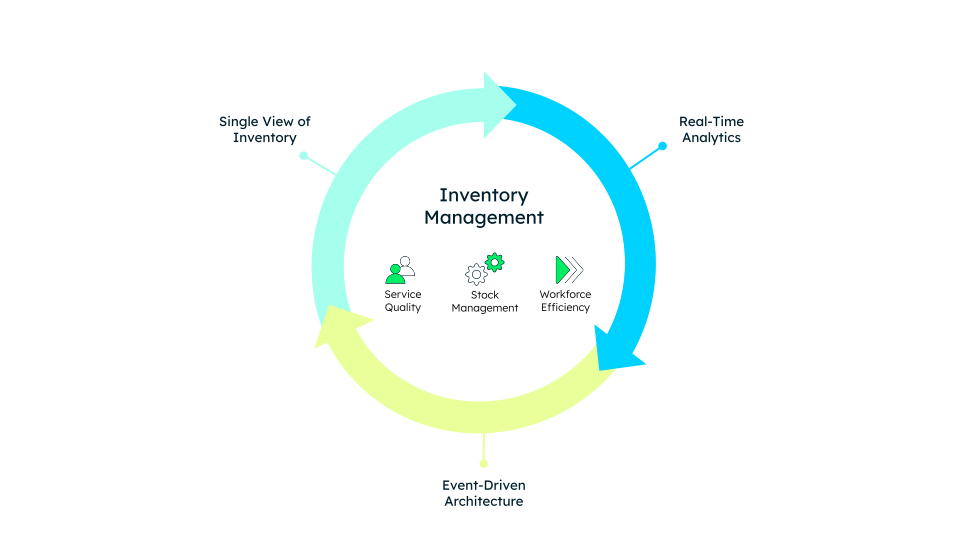
Figure 1. Inventory management overview
In this system, MongoDB helps businesses enhance service quality, workforce efficiency, and optimize stock management by enabling a single view of inventory, event-driven architectures, and real-time analytics.
These capabilities lay the groundwork for other advanced scenarios, such as:
IoT and RFID Tag Integration
AI/ML Forecasts for precise demand prediction
Distributed logistics
Reference Architectures
The inventory management solution leverages a Next.js application seamlessly integrated with MongoDB Atlas, providing a flexible and scalable backend, as shown in Figure 2.
The solution uses the following components:
MongoDB Atlas stores four key collections:
products,transactions,users, andlocations. These collections manage inventory, process transactions, and track user and location data.ACID-compliant operations ensure data consistency and integrity, particularly during stock level changes due to transactions. Both the
productsandtransactionscollections receive updates to maintain reliability and consistency across the system.The application connects to MongoDB through the MongoDB Node.js driver.
Atlas Search enhances the applications' search capabilities, enabling advanced full-text search features. This allows users to perform complex queries, such as searching by product category or applying facet filters.
Atlas Triggers automate backend logic by executing functions in response to database changes, such as automatically reordering inventory when stock falls below a certain threshold.
Change Streams act as real-time listeners, detecting changes in the database and pushing updates to the application. This enables real-time alerts, such as low stock notifications, to be sent to inventory managers.
Atlas Charts provides a visualization tool for real-time analytics, allowing users to create interactive charts and dashboards directly from MongoDB data. This empowers decision-makers to track key metrics, such as inventory levels and sales trends, in real time.
Workload isolation analytics queries run on a dedicated node, which ensures that operational performance remains unaffected.
This cohesive architecture supports real-time data interactions and automates key tasks to streamline processes. It allows the Next.js application to provide a responsive and dynamic user experience, built on MongoDB's robust data management features.
Through this integration, the solution effectively balances performance, automation, and scalability, making it well-suited for modern inventory management challenges.
Architecture with MongoDB
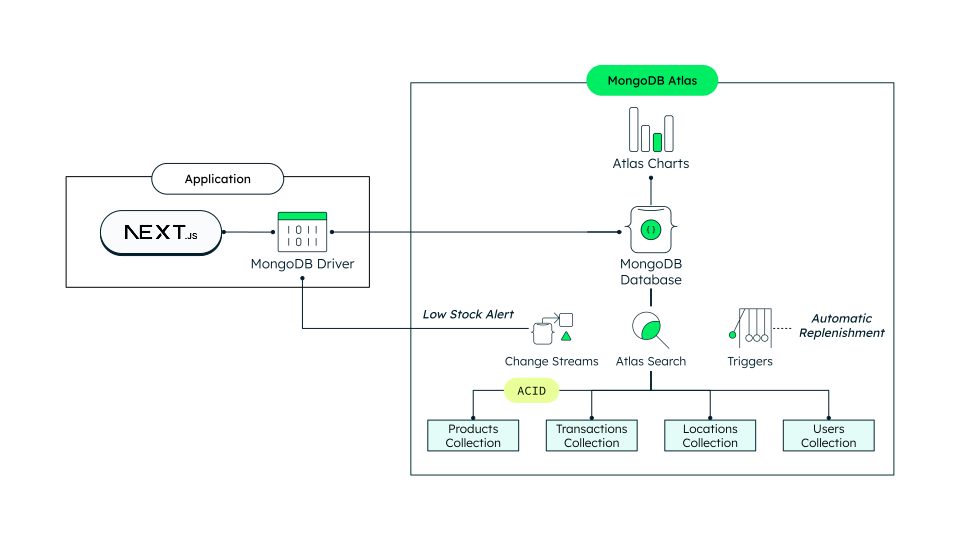
Figure 2. Inventory management system architecture using MongoDB Atlas and Next.js
Data Model Approach
The inventory management system stores data across four collections:
products, transactions, users, and locations. These
collections respectively represent stock, incoming and outgoing
movements that affect stock levels, application users, and the locations
the system serves.
What sets the document data model apart from traditional tabular models is its remarkable flexibility. With a tabular approach, achieving a comprehensive overview of your inventory would typically involve complex joins across multiple tables. With MongoDB's document model, this complexity is eliminated.
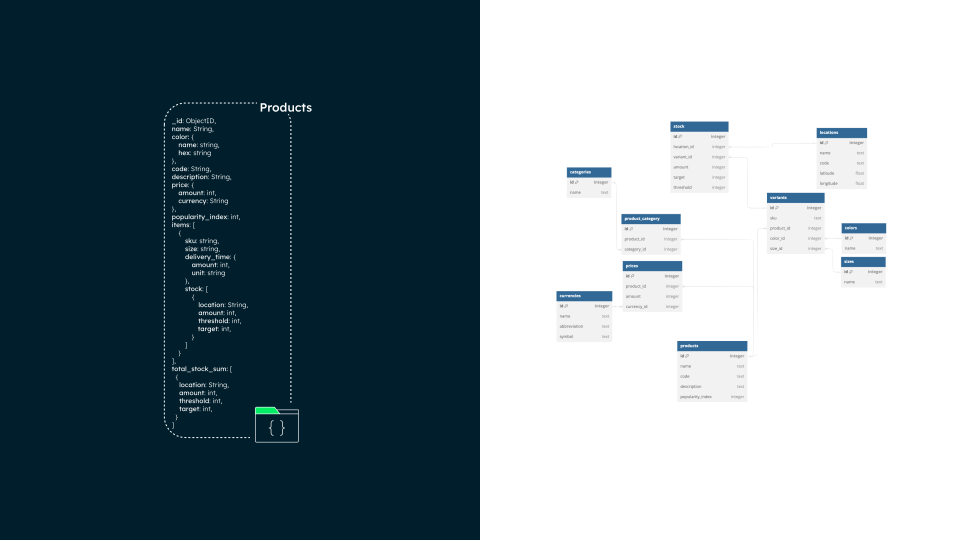
Figure 3. Product collection equivalent in a tabular setup
The transactions collection uses the Extended
Reference pattern to reference items. As such, the transaction
document includes the product.id field for internal
reference, and the product.name. This pattern allows the UI
to display relevant information to the user without using
additional queries or joins on the products collection.
The products collection contains what would require 10 separate
tables in a relational database. The individual documents include:
Embedded arrays for product variants, allowing different configurations of the same product to be stored together.
Product stock and location information, which would typically require additional tables in a relational database.
This flexibility provides a more intuitive design, optimizes data access, and ensures related data is stored together.
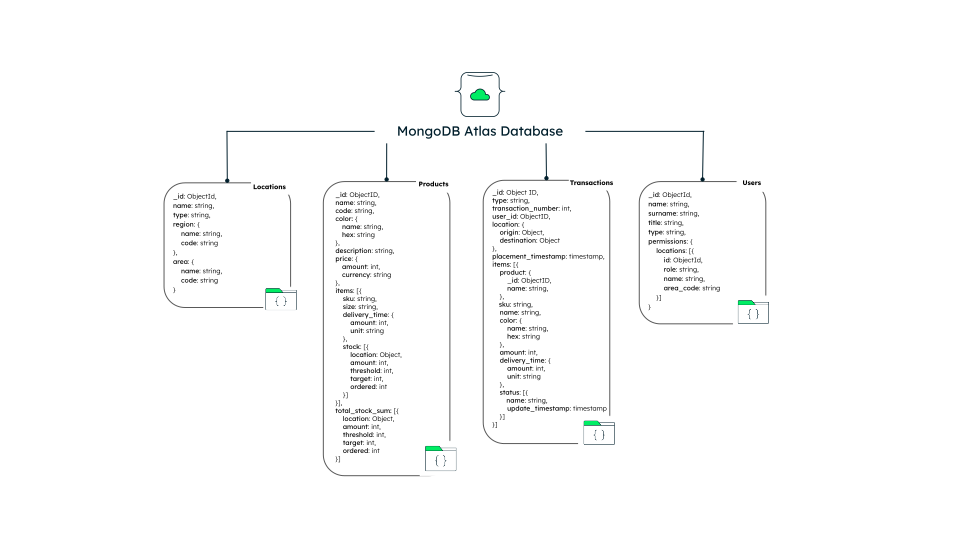
Figure 4. Representation of how complex documents and arrays are embedded within the document
Here's an example of a transaction document:
{ "type": "inbound", "location": { "origin": { "type": "warehouse" }, "destination": { "type": "factory", "id": { "$oid": "65c63cb61526ffd3415fadbd" }, "name": "Bogatell Factory" } }, "placement_timestamp": { "$date": "2024-04-08T15:13:58.822Z" }, "items": [ { "sku": "CT001-PT-MDB0001", "name": "Programmable Thermostats", "unit": "pieces", "delivery_time": { "amount": 3, "unit": "seconds" }, "status": [ { "name": "placed", "update_timestamp": { "$date": "2024-04-08T15:13:58.822Z" } }, { "name": "arrived", "update_timestamp": { "$date": "2024-04-08T15:14:03.741Z" } } ], "amount": 15, "product": { "id": { "$oid": "65cce1a4ccdfb7402dbb4db4" }, "name": "Controls and Thermostats", "image": { "url": "/images/products/thermostats.png" } } } ], "automatic": true, "transaction_number": 133 }
Build the Solution
To replicate this solution, you need to setup MongoDB Atlas and to configure your application. For detailed instructions, see the GitHub repository. The GitHub page guides you through the following steps:
Enable full-text search and filter facets
Configure search indexes for full-text search and filter facets in the products and transactions collections.
Set up real-time analytics with Atlas Charts
Enhance your application's visualization and analytics capabilities with Atlas Charts. Unlock real-time analytics and create custom charts based on your preferences.
Configure your app frontend
Clone the GitHub repository to your local machine, update the
environment variables with your own values, install the
dependencies, and run the app locally at
http://localhost:3000.
Key Learnings
This solution highlights the following capabilities:
Real-time alerts: Implement real-time low-stock alerts in your frontend using Change Streams.
Workflow automation: Leverage database triggers to automate stock replenishment workflows.
Real-time analytics: Stay on top of your data, analyze trends, and make informed decisions in a timely manner with Atlas Charts.
Single view of inventory: Take advantage of the flexibility of the document model to create a comprehensive single view of inventory.
Feel free to explore, tweak, and enhance your inventory management system to fit your own needs.
Author
Dr. Humza Akhtar, MongoDB
Ramiro Pinto Prieto, MongoDB
Tamar Alphaidze, MongoDB