One platform for telemetry, defect images, and RCA reports. Use multimodal search to find root causes faster.
Use cases: Artificial Intelligence
Industries: Manufacturing & Motion
Products and tools: MongoDB Atlas, MongoDB Atlas Vector Search, MongoDB Time Series Collections
Partners: Amazon Bedrock, Amazon Web Services, LangChain
Solution Overview
Semiconductor manufacturing generates massive volumes of data across disconnected systems. When an excursion occurs, you must manually correlate sensor telemetry, defect images, and historical RCA reports to find the source of the problem. This process takes hours and every hour of unplanned downtime costs up to 1 million dollars.
Agentic AI systems combine LLMs, specialized tools, and persistent memory to investigate failures autonomously. By unifying telemetry, images, and knowledge in a single platform with multimodal search, AI agents find root causes faster while you focus on resolution.
This solution focuses on excursion detection and root cause analysis in a wafer fab. You can apply the same architecture across different manufacturing scenarios.
To build this solution, agentic systems require timely and contextual access to data. Traditional fab IT systems store telemetry, images, and knowledge in separate databases, which makes it difficult for agents to analyze the full context.
MongoDB Atlas provides native support for time series, vector, and document data. For semiconductor agentic AI, MongoDB Atlas enables the following:
Sensor telemetry ingestion: This capability allows you to ingest high-volume sensor data in real time using specialized Time Series Collections.
Multimodal embedding storage: The platform stores both image and text embeddings to facilitate advanced semantic searches for wafer defects.
Agent memory persistence: This feature maintains a record of conversation states and agent history to ensure full auditability and the ability to resume sessions.
Low-latency scalability: The architecture scales dynamically to handle massive streaming data loads while maintaining high performance.
With MongoDB Atlas, you can unify industrial data and agentic AI capabilities to move from reactive troubleshooting to automatic investigation.
Reference Architectures
Use this solution to build an agentic AI system for semiconductor yield optimization using MongoDB Atlas, LangGraph, and Amazon Bedrock. Together, these technologies automate excursion detection, root cause analysis, and defect pattern matching across multimodal data. This solution works as follows:
MongoDB Atlas serves as the unified agentic data layer. It stores telemetry, alerts, defect images, historical reports, and agent memory. Atlas also provides vector search, hybrid search, and aggregation tools to the agent.
LangGraph orchestrates the Root Cause Agent workflow with persistent state and tool coordination.
Amazon Bedrock supplies the LLM (Claude) that enables the agent to reason, analyze sensor correlations, and generate structured RCA reports.
Voyage AI generates multimodal embeddings that combine wafer defect images with textual context for semantic similarity search.
The architecture follows a real-time event-driven pattern. Machine telemetry flows into MongoDB Atlas, where the Excursion Detection System monitors sensor streams using Change Streams. When the system violates a threshold, it creates an alert and starts the root cause agent. The root cause agent uses three specialized tools to investigate:
Query Wafer Defects: Performs multimodal vector search to find similar historical defect patterns.
Query Historical Knowledge: Searches RCA reports and technical documentation using semantic embeddings.
Query Time Series Data: Analyzes sensor telemetry around the excursion window using the Aggregation Framework.
Users interact with the system through a Live Monitoring Dashboard. The dashboard displays real-time alerts, sensor charts, and wafer defects. You can also chat directly with the Root Cause Agent to investigate incidents or ask follow-up questions. Each tool in this architecture queries MongoDB Atlas directly. The agent's memory and conversation state persist in checkpoints, enabling audit trails and session resumption.
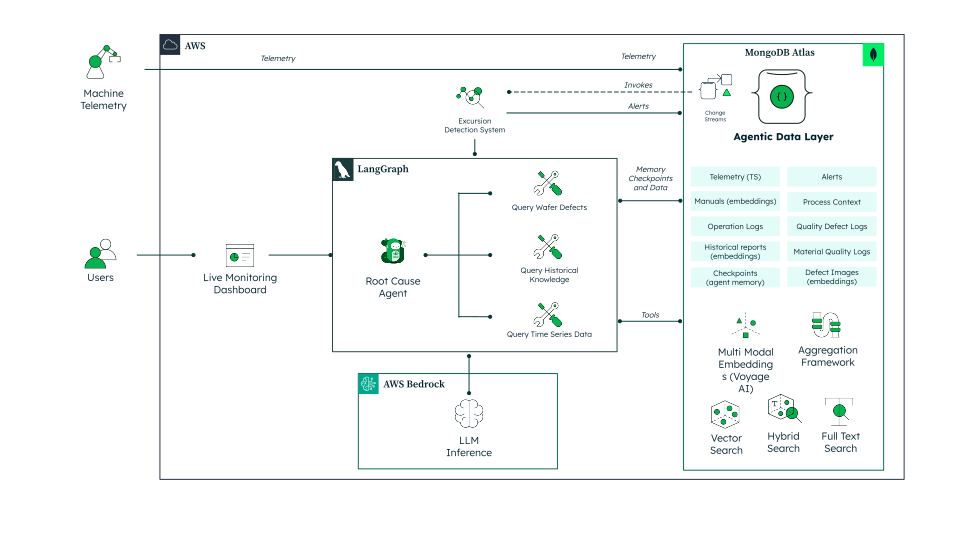
Figure 1. Agentic Yield Analytics with MongoDB
Multimodal Embeddings for Wafer Defects
This solution uses Voyage AI's voyage-multimodal-3 model to generate embeddings that combine wafer defect images with textual context. This enables semantic similarity search across both visual patterns and descriptive text.
Embedding Service
The EmbeddingService class handles embedding generation using the
Voyage AI client:
import voyageai from PIL import Image import base64 import io class EmbeddingService: def __init__(self): self.voyage_client = voyageai.Client(api_key=os.getenv("VOYAGE_API_KEY")) self.multimodal_model = "voyage-multimodal-3" self.embedding_dimension = 1024 async def generate_image_embedding( self, image_data: str, text_context: str = None ) -> List[float]: """Generate multimodal embedding from image and text.""" # Decode base64 image to PIL Image image_bytes = base64.b64decode(image_data) pil_image = Image.open(io.BytesIO(image_bytes)) # Combine text and image inputs inputs = [] if text_context: inputs.append(text_context) inputs.append(pil_image) # Generate embedding result = self.voyage_client.multimodal_embed( inputs=[inputs], model=self.multimodal_model, input_type="document" ) return result.embeddings[0]
Processing Wafer Defects
For each wafer defect document, the pipeline performs the following actions:
Builds text content from observable characteristics (wafer ID, defect pattern, equipment, yield, wafer description).
Fetches the ink map image from Amazon S3.
Generates a multimodal embedding combining both inputs.
Stores the 1024-dimensional vector in the
embeddingfield.
# Build text from observable facts only (not suspected causes) text_content = f"Wafer ID: {wafer['wafer_id']} " text_content += f"Defect pattern: {wafer['defect_summary']['defect_pattern']} " text_content += f"Equipment: {wafer['process_context']['equipment_used'][0]} " text_content += f"Yield: {wafer['defect_summary']['yield_percentage']}%" # Get image data image_data = wafer["ink_map"]["thumbnail_base64"] # Generate multimodal embedding embedding = await embedding_service.generate_image_embedding( image_data=image_data, text_context=text_content ) # Store in document await db.wafer_defects.update_one( {"_id": wafer["_id"]}, {"$set": { "embedding": embedding, "embedding_type": "multimodal", "embedding_model": "voyage-multimodal-3" }} )
Vector Search Index
Create a vector search index on the wafer_defects collection in
MongoDB Atlas:
{ "name": "wafer_defects_vector_search", "type": "vectorSearch", "definition": { "fields": [ { "path": "embedding", "type": "vector", "numDimensions": 1024, "similarity": "cosine" } ] } }
This enables the Root Cause Agent to find similar historical defects by using vector search, even when the new wafer has no known root cause.
Agent Tools
Tools are domain-specific functions that enable the agent to interact with MongoDB Atlas. They query sensor data, perform semantic search, and retrieve historical patterns. Each tool returns structured data that the LLM analyzes to generate RCA reports.
The following code shows how to register a tool for the Root Cause Agent by using LangChain's @tool decorator. In this example, the tool uses vector search to find similar wafer defect patterns.
from langchain_core.tools import tool async def query_wafer_info( wafer_id: str, include_similar_patterns: bool = True, similarity_limit: int = 3 ) -> Dict[str, Any]: """ Get wafer defect details and find similar historical patterns. Returns the wafer data plus similar past defects with known root causes. """ db = _get_db() wafer = await db.wafer_defects.find_one({"wafer_id": wafer_id}) if not wafer: return {"error": f"Wafer {wafer_id} not found"} similar_patterns = None if include_similar_patterns and "embedding" in wafer: pipeline = [ { "$vectorSearch": { "index": "wafer_defects_vector_index", "path": "embedding", "queryVector": wafer["embedding"], "numCandidates": 100, "limit": similarity_limit + 1 } }, {"$match": {"wafer_id": {"$ne": wafer_id}}}, {"$addFields": {"similarity_score": {"$meta": "vectorSearchScore"}}}, {"$limit": similarity_limit} ] results = await db.wafer_defects.aggregate(pipeline).to_list(length=None) similar_patterns = [ { "wafer_id": r.get("wafer_id"), "description": r.get("description"), "root_cause": r.get("root_cause"), "similarity_score": round(r.get("similarity_score", 0), 4) } for r in results ] return { "wafer": wafer, "similar_historical_patterns": similar_patterns } # Tool registry TOOLS = [query_alerts, query_wafer_info, query_time_series_data, vector_search_knowledge_base]
The Root Cause Agent uses the following tools to investigate excursions:
query_alertsRetrieves recent alerts filtered by equipment, severity, or time window.
Returns violation details, affected wafers, and source sensor data.
query_wafer_infoFetches wafer defect details including yield percentage, defect pattern, and severity.
Performs multimodal vector search to find similar historical defects with known root causes.
query_time_series_dataQueries sensor telemetry around a specific time window.
Returns aggregated statistics (min, max, avg) to reduce token usage.
Identifies sensor anomalies correlated with defect events.
vector_search_knowledge_baseSearches historical RCA reports and technical documentation by using semantic embeddings.
Returns matching documents with titles, root causes, and corrective actions.
Helps the agent reference past solutions for similar failures.
You can expand this toolset to match your fab's processes. For example, add tools to query equipment maintenance logs, verify recipe parameters, or retrieve operator shift notes.
Agent Memory
For agents to work effectively, they need memory to store context and reasoning steps. This capability enables agents to:
Maintain continuity within an investigation.
Recall previous steps and tool outputs.
Build context across user interactions.
In this architecture, MongoDB Atlas stores all agent memory. Memory consists of the following types:
Short-term memory: Stores the intermediate state as the agent moves through the investigation. This memory ensures that if a process is interrupted, it can resume without losing progress. The following collections store this type of memory:
checkpoints: Captures the agent state at each reasoning step.checkpoint_writes: Logs the tool calls and their outputs.
Long-term memory: Stores historical data that informs current investigations. Agents retrieve this data by using vector search, ensuring that historical context drives reasoning. Collections include:
wafer_defects: Wafer inspection data with multimodal embeddings for similarity search.historical_knowledge: RCA reports, technical documentation, and tribal knowledge.alerts: Active and resolved alerts with violation details and source data.process_sensor_ts: Time series sensor telemetry for correlation analysis.
To configure short-term memory, use the MongoDBSaver class from
LangGraph. This class writes agent progress to the checkpoints
collections as follows:
from langgraph.checkpoint.mongodb import MongoDBSaver from pymongo import MongoClient mongo_client = MongoClient(os.getenv("MONGODB_URI")) checkpointer = MongoDBSaver(mongo_client, "smf-yield-defect")
This setup enables memory and fault-tolerance capabilities for the Root Cause Agent.
Agent State Graph
A state graph models workflows as nodes and edges. Each node represents a reasoning step, tool call, or checkpoint. Edges define transitions between these steps. State graphs make workflows explicit, repeatable, and resilient.
In this solution, LangGraph enables the state graph to coordinate the Root Cause Agent and its tools. The agent follows a ReAct (Reasoning + Acting) pattern:
Reason: The LLM analyzes the current state and decides the next action.
Act: The agent calls a tool to retrieve data from MongoDB.
Observe: The agent processes the tool output and updates its reasoning.
Repeat: The cycle continues until the agent has enough evidence.
This architecture ensures the following capabilities:
The agent can branch based on findings, such as similar patterns found versus no matches.
Each step writes to memory and reads from it automatically.
Engineers can resume conversations or audit the reasoning chain.
The following code builds a ReAct agent with MongoDB checkpointing:
from langgraph.prebuilt import create_react_agent from langchain_aws import ChatBedrock async def create_rca_agent(): """Create LangGraph agent with MongoDB checkpointing.""" # Initialize LLM llm = ChatBedrock( model_id="anthropic.claude-3-5-sonnet-20241022-v2:0", region_name=os.getenv("AWS_REGION", "us-east-1") ) # Initialize MongoDB checkpointer mongo_client = MongoClient(os.getenv("MONGODB_URI")) checkpointer = MongoDBSaver(mongo_client, "smf-yield-defect") # System prompt system_prompt = """You are an expert semiconductor yield engineer. When investigating alerts: 1. First, query the alert details 2. Get wafer defect information and similar historical patterns 3. Query sensor data around the alert time 4. Search the knowledge base for similar RCA reports 5. Synthesize findings into a structured root cause analysis Always cite evidence from the tools.""" # Create agent agent = create_react_agent( model=llm, tools=TOOLS, checkpointer=checkpointer, prompt=system_prompt ) return agent
With this setup, you can trace, resume, and debug the entire investigation workflow.
End-to-End Workflow
The following describes how the system processes an excursion:
You can expand and customize this workflow with the following capabilities:
Automated remediation: Trigger equipment isolation or recipe adjustments based on RCA findings.
Predictive alerts: Use historical patterns to warn before thresholds are violated.
Multi-tool correlation: Add tools to query recipe parameters, chamber logs, or maintenance schedules.
Because tools, memory, and graph orchestration are modular, you can add new capabilities without disrupting existing workflows.
Data Model Approach
A semiconductor yield optimization system relies on a wide range of data, including the following:
High-frequency sensor telemetry
Wafer inspection images and defect patterns
Historical RCA reports and tribal knowledge
Agent memory and conversation state
Equipment status and process context
MongoDB's flexible document model makes it easy to operationalize this data in a single solution. In MongoDB Atlas, you can store the following data:
Time series data: This format captures sensor telemetry at second-level granularity.
Vector embeddings: These enable semantic search across wafer defects and the broader knowledge base.
Multimodal embeddings: These structures combine defect images with specific textual context.
Metadata: This information unifies context by tracking equipment ID, lot ID, or process steps.
Operational data: This category manages real-time information for alerts, equipment status, and process parameters.
Main Collections
This solution uses the following collections to store data:
sensor_events: Real-time sensor events for Change Stream monitoring.
This regular collection enables the Excursion Detection System to watch
for threshold violations in real time.
alerts: Active excursions and threshold violations that trigger the
Root Cause Agent. Each alert captures the violation details, affected
wafer, and source sensor data. Status transitions from "open" to
"acknowledged" to "resolved".
wafer_defects: Wafer inspection data with multimodal embeddings for
semantic search. Each document includes defect patterns, yield
percentages, severity levels, and the combined image-text embedding
generated by Voyage AI.
historical_knowledge: RCA reports and technical documentation stored
with vector embeddings. Agents search this collection to find similar
past incidents, troubleshooting procedures, and proven corrective
actions.
process_context: Manufacturing process metadata, including recipe
parameters, equipment configurations, and baseline values for
correlation analysis.
checkpoints: Agent state captured at each reasoning step by
LangGraph's MongoDBSaver to enable conversation persistence, session
resumption, and audit trails.
process_sensor_ts: Process sensor telemetry stored as a time series
collection for efficient historical analysis. Time series collections
efficiently store and query millions of readings. They preserve
contextual metadata, such as equipment ID, lot ID, and process step.
The following example shows a sample document in the
process_sensor_ts collection:
{ "timestamp": { "$date": "2025-01-24T10:30:00.000Z" }, "equipment_id": "CMP_TOOL_01", "metrics": { "particle_count": 1234, "temperature": 68.5, "rf_power": 1502.3, "chamber_pressure": 5.2 }, "metadata": { "lot_id": "LOT_2025_001", "wafer_id": "W_004_16", "process_step": "Oxide CMP" } }
The time series document includes the following fields:
timestamp: The timestamp of the readingequipment_id: The identifier of the source toolmetrics: Numeric sensor values for particle count, temperature, RF power, and chamber pressuremetadata: Contextual tags for lot, wafer, and process step
The following example shows a sample document in the wafer_defects
collection:
{ "_id": "W_CMP_001", "wafer_id": "W_CMP_001", "lot_id": "LOT_2025_001", "inspection_timestamp": { "$date": "2025-01-24T10:30:00Z" }, "description": "Edge-concentrated particle contamination from slurry degradation", "defect_summary": { "defect_pattern": "edge_cluster", "severity": "critical", "yield_percentage": 72.5, "failed_dies": 22, "total_dies": 80 }, "process_context": { "equipment_used": ["CMP_TOOL_01"], "last_process_step": "Oxide CMP", "recipe_id": "CMP_STD_01", "slurry_batch": "SLR-2025-0142" }, "ink_map": { "thumbnail_base64": "iVBORw0KGgo...", "thumbnail_size": { "width": 200, "height": 200 }, "full_image_url": "s3://bucket/wafers/W_CMP_001.png" }, "embedding": [0.123, -0.456, ...] }
The wafer defect document includes the following fields:
wafer_idandlot_id: Links the defect to the production contextdescription: Contains the root cause analysis for historical wafersdefect_summary: Captures the pattern type, severity, yield impact, and die countsprocess_context: Tracks equipment, recipe, and materials for correlation analysisink_map: Stores the wafer map visualization (thumbnail for display, S3 URL for full image)embedding: Contains the 1024-dimensional multimodal vector for similarity search
Build the Solution
To view the full demo implementation,see the GitHub repository. The repository's README covers the following steps:
Install the prerequisites
Install Python 3.10 or later and Node.js 18 or later. Configure a MongoDB Atlas cluster (M10 or higher for Atlas Vector Search) and set up access to AWS Bedrock and Voyage AI.
Clone the repository:
git clone https://github.com/mongodb-industry-solutions/smf-yield-defect-detection.git cd smf-yield-defect-detection
Configure the backend
Navigate to the backend directory and install dependencies by
using uv:
cd backend # Install UV package manager curl -LsSf https://astral.sh/uv/install.sh | sh # Install dependencies uv sync
Create a .env file with your credentials:
# MongoDB Atlas connection MONGODB_URI=mongodb+srv://<username>:<password>@<cluster>.mongodb.net/ # Voyage AI for embeddings VOYAGE_API_KEY=your-voyage-api-key # AWS Bedrock for LLM inference AWS_REGION=us-east-1 AWS_ACCESS_KEY_ID=your-access-key AWS_SECRET_ACCESS_KEY=your-secret-key
Launch the application
Start the backend server:
cd backend uv run uvicorn main:app --host 0.0.0.0 --port 8000 --reload
Start the frontend server in a separate terminal:
cd frontend npm run dev
Access the application at the following addresses:
Frontend Dashboard: http://localhost:3000
Backend API: http://localhost:8000
API Documentation: http://localhost:8000/docs
Key Learnings
Use agentic AI: AI agents can investigate excursions autonomously, correlating sensor data, defect images, and historical reports to generate root cause analysis in seconds instead of hours.
Build a modern data foundation: High-performance, low-latency, and scalable data infrastructure is essential to effectively operate AI agents at scale. MongoDB Atlas provides the unified platform for time series, vectors, and documents.
Enable multimodal search: Combining image and text embeddings enables engineers to find similar defects, regardless of how they were originally described. Voyage AI's multimodal model captures both visual patterns and textual context.
Act on excursions in real time: Change Streams enable immediate detection of threshold violations. The system creates alerts within milliseconds, not at the end of a shift.
Persistent agent memory: MongoDB checkpointing enables engineers to resume investigations, ask follow-up questions, and audit the agent's reasoning chain. This transparency builds trust and enables continuous improvement.
Authors
Humza Akhtar, MongoDB
Kiran Tulsulkar, MongoDB
Daniel Jamir, MongoDB