For organizations leveraging MongoDB Atlas on Google Cloud, network architecture is a critical component of performance and scalability. Today, we are excited to announce a significant architectural enhancement that simplifies the connection between these two platforms. This new feature, Port Mapping for Private Service Connect (PSC), reduces developer efforts and enables faster scaling by streamlining connection management and resource allocation.
The legacy challenge: Complexity and overhead
To appreciate the value of Port Mapping, it is important to understand the friction points of the previous architecture. Previously, establishing private connections between Google Cloud and MongoDB Atlas required managing complex sets of legacy endpoints.
The sheer volume of resources required for a standard deployment was substantial. For every single Atlas node, a dedicated customer forwarding rule, a service attachment, and a load balancer were getting provisioned. Default deployments typically involved 50 private service connections per region, requiring 50 customer forwarding rules, 50 service attachments, and 50 load balancers.
While this method was effective, management overhead grew alongside the clusters. Customers were required to use a script to handle this infrastructure, and the deployment process was lengthy. Furthermore, changing the number of PSC endpoints per region required a full redeployment - deleting and recreating the service -which caused friction whenever customers needed to scale their cluster configurations.
The solution: How port mapping works
Port Mapping introduces a more elegant architecture. It allows multiple nodes to be targeted via a single customer IP address, with each node accessible on a distinct port. By decoupling the Atlas Node count from the IP address count, this new PSC Port Mapping architecture enables greater flexibility in scaling Atlas clusters within a project.
This architectural shift significantly reduces resource provisioning, enabling easier scaling and faster deployment times than the legacy method.
Key infrastructure benefits
Adopting Port Mapping brings immediate operational advantages:
Elimination of IP exhaustion: Previously, Atlas defaulted to consuming 50 customer IP addresses per region (one for each private service connection). This high overhead was problematic for customers with limited IP space. Port Mapping resolves this by consolidating access to a single IP per region.
No static configuration friction: Changing the number of PSC endpoints per region required full redeployment (deleting and recreating the service), causing friction when customers needed to scale their cluster configurations.
Speed: Customers were required to use a script, and the deployment included 50 customer forwarding rules, 50 service attachments, and 50 load balancers by default. It took a lot of time to deploy this infrastructure.
The new architecture significantly reduces resource provisioning and enables easier scaling and faster deployment.
Migration: A seamless transition
We have designed the migration path to be as smooth as possible. If you are currently using legacy GCP private endpoints -identifiable by the pl-[index] pattern in your connection string -rest assured that they will continue to work for your existing clusters.
However, to take advantage of the new PSC architecture or for any new clusters, you will want to move to the new psc-[index] strings.
Three steps to upgrade:
Create: Generate a new private endpoint for your region, ensuring portMappingEnabled is set to true.
Update: Modify your application to use the new connection string format: mongodb+srv://....
Verify: Once you verify the connection is active and stable, you can safely delete your legacy endpoint.
Please use the official documentation for more specific details regarding this process. For users who deploy their infrastructure using Terraform, a Terraform migration guide is available.
Ready to get started?
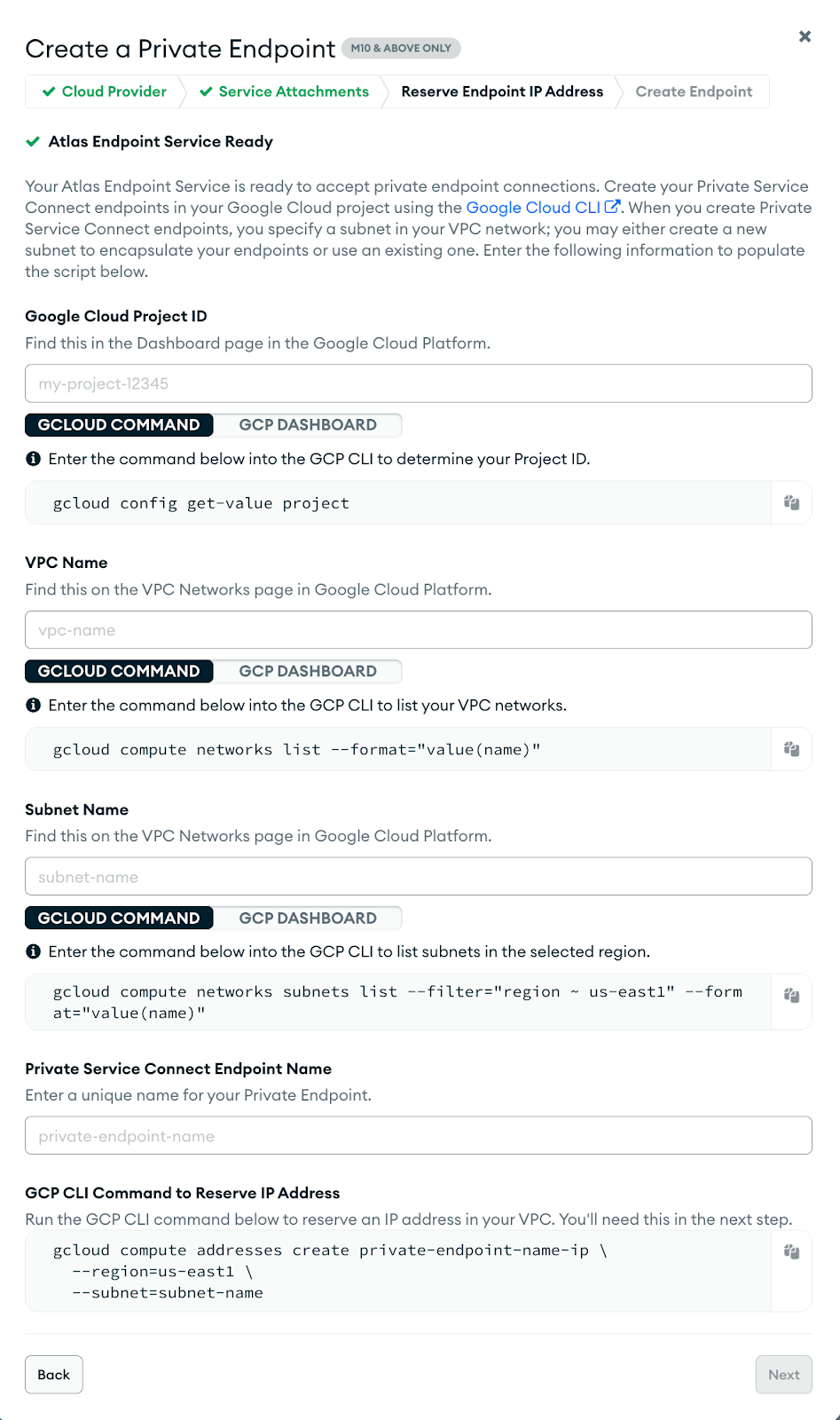
If you hold Organization Owner or Project Owner access, you can enable Port Mapping immediately via the Atlas UI, the API, or Terraform.
Atlas UI:
For developers who prefer programmatic deployment, view the Terraform resource documentation.
Here is a quick example of how to trigger this feature via the API. Note the inclusion of the header accepting the specific API version and the portMappingEnabled flag in the data payload:
Port Mapping Architecture is the preferred architecture for new GCP private endpoints in Atlas. By moving your legacy GCP private endpoints to the port-mapped, you ensure your infrastructure is ready for scale, conserving valuable IP resources while simplifying management.