If you are building generative AI (gen AI) applications in 2025, you’ve probably heard the term “embeddings” a few times by now and are seeing new embedding models hit the shelf every week. So why do so many people suddenly care about embeddings, a concept that has existed since the 1950s? And if embeddings are so important and you must use them, how do you choose among the vast number of options for embedding models out there?
This tutorial will cover the following:
What are embeddings?
Importance of embeddings in RAG applications
How to choose the best embedding model for your RAG application
Evaluating embedding models
What are embeddings and embedding models?
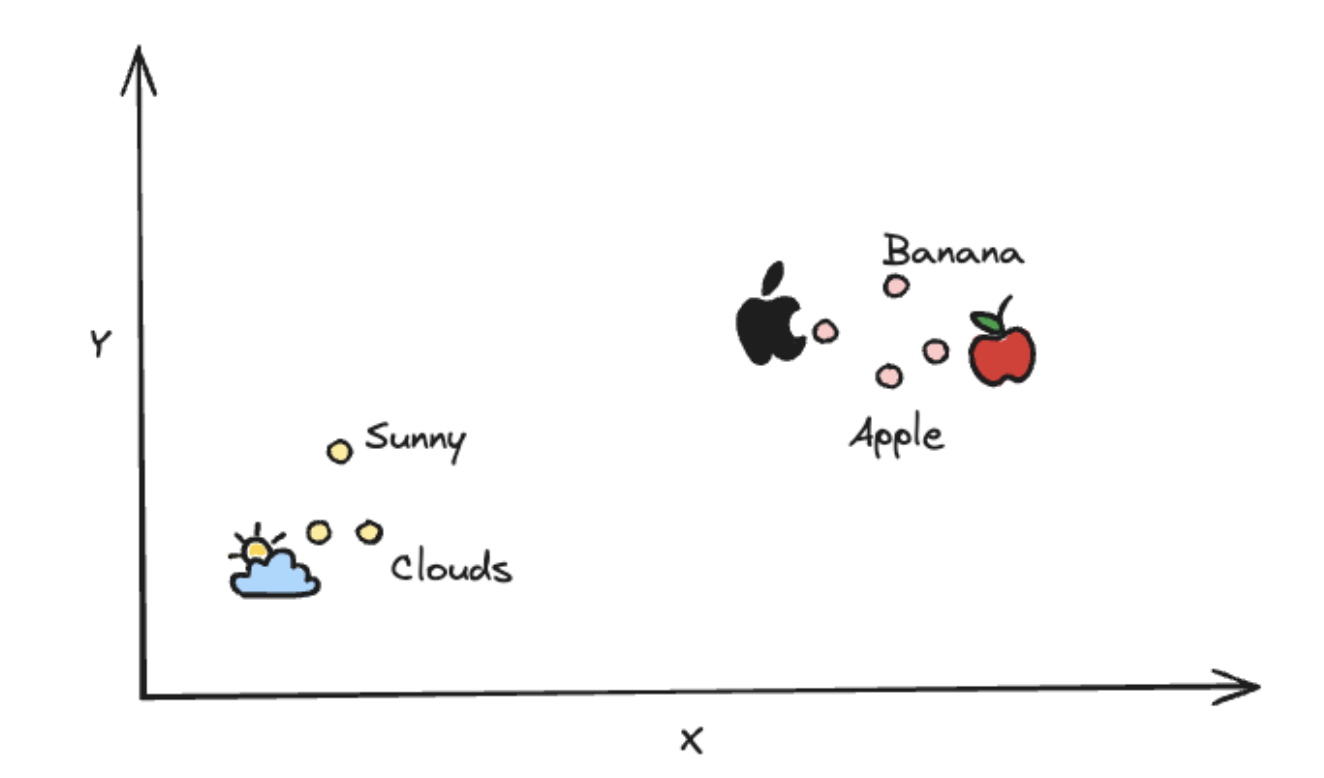
An embedding is an array of numbers (a vector) representing a piece of information, such as text, images, audio, video, etc. Together, these numbers capture semantics and other important features of the data. The immediate consequence of doing this is that semantically similar entities map close to each other while dissimilar entities map farther apart in the vector space. For clarity, see the image below for a depiction of a high-dimensional vector space:
Embedding models are specialized machine learning models that are trained on large corpora of data to learn complex semantic relationships within them. Given a raw piece of information as input, these models generate multi-dimensional vectors (embeddings) that capture the semantic meaning and key attributes of the input data.
What is RAG (briefly)
Retrieval-augmented generation, as the name suggests, aims to improve the quality of pre-trained large language model (LLM) generation using data retrieved from external knowledge sources. The success of RAG lies in retrieving the most relevant results from the knowledge base. This is where embeddings come into the picture. A RAG pipeline looks something like this:
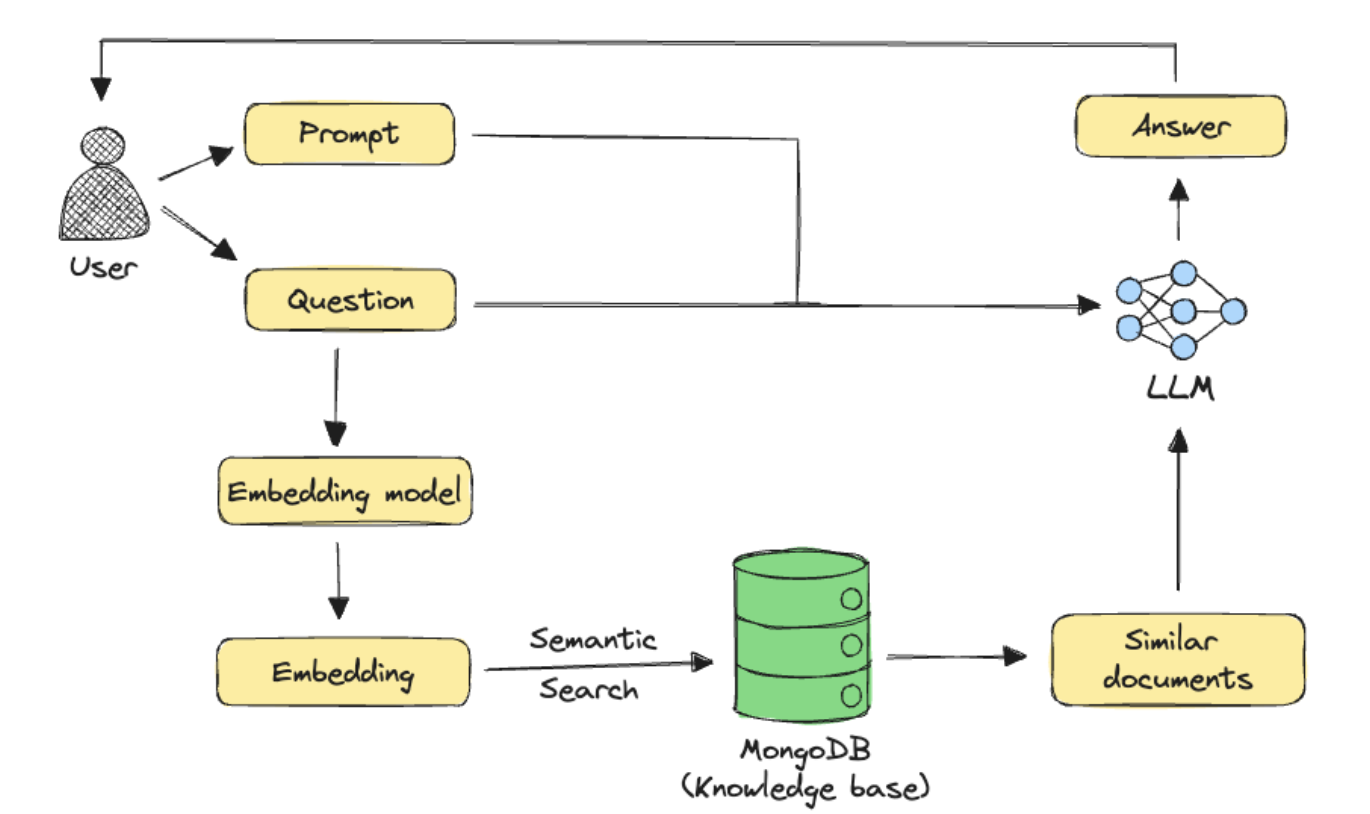
The pipeline above shows semantic search, a common retrieval approach in GenAI applications. In this technique, embeddings are first generated for all documents in the knowledge base using an embedding model. When a user asks a question, the same embedding model generates an embedding for the query. The system then finds the most relevant documents by comparing how similar their embeddings are to the query embedding. Finally, the retrieved documents are sent to an LLM along with the user's question and any additional prompts to generate an answer.
Choosing the best embedding model for your RAG application
As we have seen above, embeddings are central to RAG. But with so many embedding models out there, how do we choose the best one for our use case?
A good place to start when looking for the best embedding models is the Retrieval Embedding Benchmark (RTEB) Leaderboard on Hugging Face. RTEB improves upon existing benchmarks, such as MTEB, by evaluating embedding models on a combination of open and private datasets, thereby creating a fair, transparent, and application-focused standard for measuring how models perform on unseen data.
Evaluations of this magnitude for multimodal models are just emerging (see the Massive Multimodal Embedding Benchmark (MMEB)), so we will only focus on text embedding models for this tutorial. However, all the guidance here on choosing the best embedding model also applies to multimodal models.
While the RTEB leaderboard is a great starting point, we recommend benchmarking a few candidate models on your data to validate their performance for your specific use case and constraints, such as cost and latency. We will see how to do this later in the tutorial, but first, let’s take a closer look at the leaderboard.
Here’s a snapshot of the top 10 best embedding models on the RTEB leaderboard currently, sorted in decreasing order of overall retrieval performance, indicated by the Mean(Task) column:
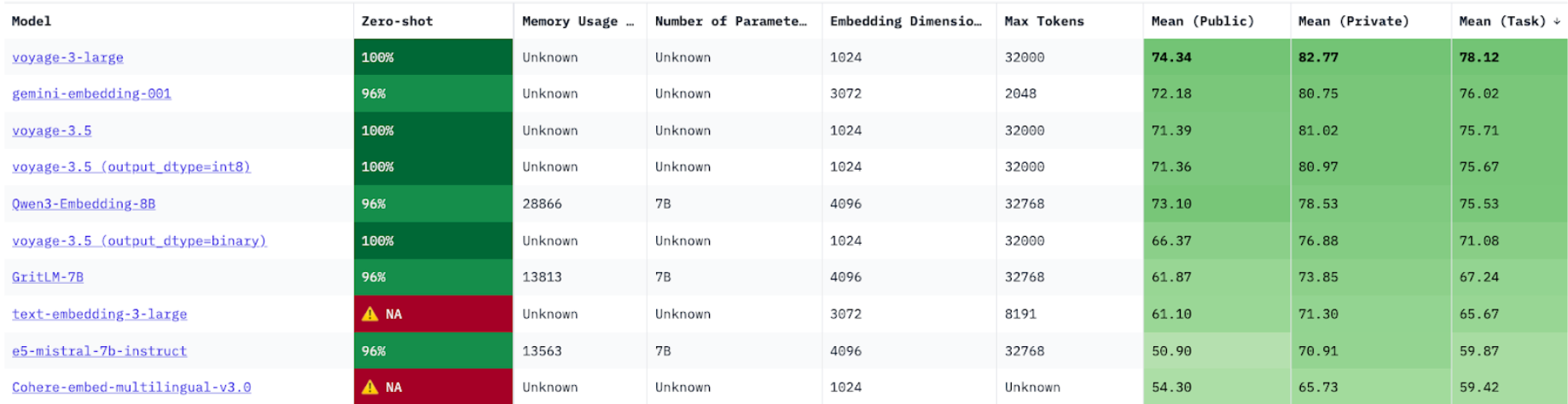
When choosing candidate models for evaluation, we recommend focusing on the following columns:
Mean (task): Represents average Normalized Discounted Cumulative Gain (NDCG) @ 10 across several open and private datasets. NDCG is a common metric to measure the performance of retrieval systems. A higher NDCG indicates an embedding model that is better at ranking relevant items higher in a list of retrieved results.
Embedding dimensions: Length of the embedding vector produced by the embedding model. Smaller embeddings are more storage-efficient and will be faster to retrieve, while more dimensions can capture nuanced details and relationships in the data. Ultimately, you want a good trade-off between capturing the complexity of data and operational efficiency.
Max tokens: Maximum number of tokens that can be compressed into a single embedding. While higher token limits offer more flexibility, embedding too much data in a single vector can degrade retrieval quality. The optimal token count for your use case requires additional experimentation but is beyond the scope of this tutorial.
Model size: Number of parameters in the embedding model. This is roughly proportional to the amount of compute and memory required to run the model. While retrieval performance generally scales with model size, larger models also increase application latency. This latency-performance trade-off becomes especially important in production environments. This metric is particularly relevant when hosting your own open-source models. Note that most top-performing models on the leaderboard are currently fully managed proprietary models, the parameter counts of which are not publicly disclosed.
The top 10 best embedding models on the leaderboard contain a mix of proprietary vs open-source models. Let’s compare some of these to find the best embedding model for our dataset.
Before we begin
Here are some things to note about our evaluation experiment.
Dataset
MongoDB’s cosmopedia-wikihow-chunked dataset, which is available on Hugging Face, and consists of prechunked WikiHow-style articles.
Embedding models evaluated
voyage-3-large: The top-performing model on the leaderboard, which is a proprietary general-purpose text embedding model from VoyageAI.
gemini-embedding-001: Google’s first embedding model from the Gemini model family.
text-embedding-3-large: The latest embedding model from OpenAI, and a popular choice among developers.
Evaluation metrics
We used the following metrics to evaluate embedding performance:
Embedding latency: Time taken to generate embeddings
Retrieval quality: Relevance of retrieved documents to the user query
Where’s the code?
Evaluation notebooks for each of the above embedding models are available:
Voyage AI’s voyage-3-large
Google’s gemini-embedding-001
OpenAI’s text-embedding-3-large
To run the notebooks, simply click the Open in Colab shield at the top of the notebook. This will open the notebook in Google Colab, a hosted Jupyter Notebook service that requires no setup to use and provides free access to computing resources, including GPUs.
Step 1: Install the required libraries
The libraries required for each embedding model differ slightly, but the common ones are as follows:
datasets: Python library to get access to datasets available on Hugging Face Hub.
numpy: Python library that provides tools to perform mathematical operations on arrays.
pandas: Python library for data analysis, exploration, and manipulation.
tdqm: Python module to show a progress bar for loops.
Additionally for Voyage AI:
voyageai: Python library to interact with Voyage AI’s APIs.
Additionally for Gemini:
google-genai: Google’s GenAI Python SDK.
Additionally for the OpenAI:
openai: Python library to access OpenAI’s APIs.
Step 2: Set up prerequisites
The Voyage AI, Gemini, and OpenAI models are available via APIs. So you’ll need to obtain API keys and make them available to the respective clients. Follow the steps below to obtain API keys:
Initialize Voyage AI client:
Initialize Gemini client:
Initialize OpenAI client:
Step 3: Download the evaluation dataset
As mentioned previously, we will use MongoDB’s cosmopedia-wikihow-chunked dataset. The dataset is quite large (1M+ documents). So we will stream it and grab the first 2k records, instead of downloading the entire dataset to disk.
Here’s a snapshot of what the dataset looks like:
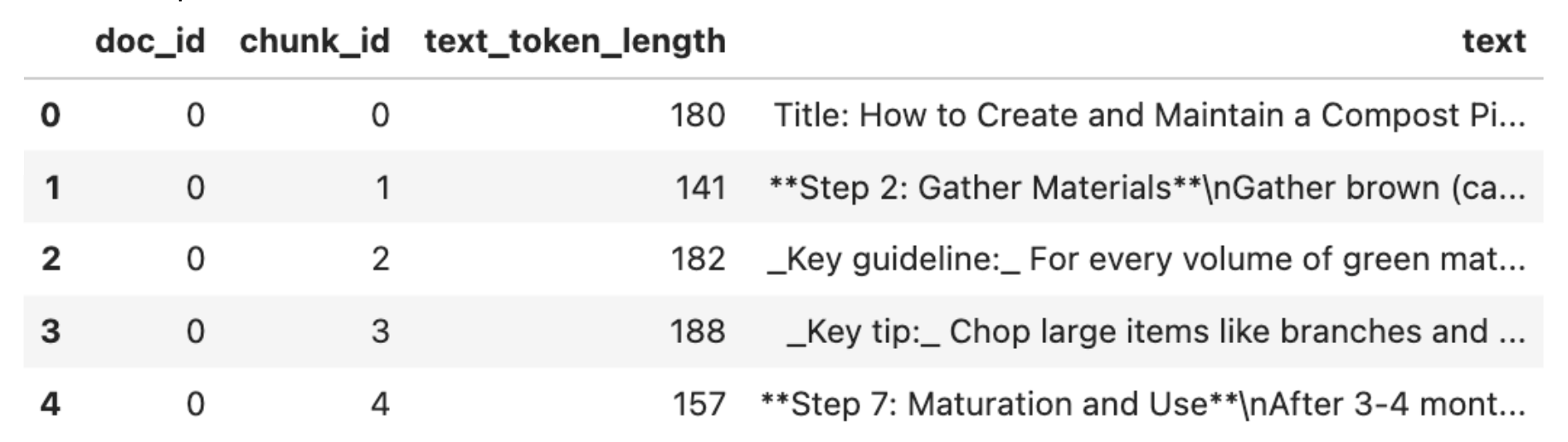
The dataset consists of ~350 WikiHow documents broken up into smaller chunks, since in RAG you typically embed smaller chunks of a large document rather than the entire document at once. Each row in the dataset represents a single chunk, and the text column contains the chunk content that we will embed.
Step 4: Create embeddings
Now, let’s create embedding functions for each of our embedding models.
For voyage-3-large:
The embedding function above uses the embed method of Voyage AI’s API. The method takes a text string (text), model name (model), in this case voyage-3-large, and an input_type as arguments and returns an embeddings object consisting of the embedding vector of the input text. The input_type can be document or query, depending on whether you are embedding a list of documents or user queries. Voyage uses this value to prepend the inputs with special prompts to enhance retrieval quality.
For gemini-embedding-001:
The embedding function for gemini-embedding-001 is similar to the previous one, with some key differences. It uses the embed_content method from Google’s GenAI SDK. The method takes a text string (contents) and model name (model), in this case gemini-embedding-001, as arguments and returns an embeddings object consisting of the embedding vector of the input text.
For text-embedding-3-large:
Finally, the embedding function for text-embedding-3-large uses OpenAI's Embeddings API to generate embeddings. The create method of the API takes a text string (input) and model name (model) as input and, similar to the other APIs above, returns an embeddings object consisting of the embedding vector.
Step 5: Evaluation
As mentioned previously, we will evaluate the models based on embedding latency and retrieval quality.
Measuring embedding latency
For our evaluation, we will create a local vector store, which is essentially a Python list of embedded texts. To measure embedding latency, we embed the text column for all chunks in our dataset and calculate the average time per chunk. This gives us a sense of how fast each candidate model can process text, which applies to both document and query embedding.
The average embedding latency numbers are as follows:
voyage-3-large demonstrates the fastest embedding speed at 89ms per chunk, making it 2.2x faster than gemini-embedding-001 and 3.5x faster than text-embedding-3-large. voyage-3-large’s lower dimensionality (1024 vs 3072) likely contributes to its speed advantage, and could also reduce storage and computational costs for retrieval downstream.
Measuring retrieval quality
To evaluate retrieval quality, we use a small set of questions based on themes seen in our dataset. For each question, we retrieve the top 3 most relevant chunks from our local “vector store” based on the cosine similarity between the query embedding and the chunk embedding as follows:
We then pass the query and the retrieved chunks to an LLM, in this case Claude Sonnet 4.5 and prompt it to assess the relevance of the retrieved chunks to the query as follows:
Notice that we intentionally omitted model names from the evaluation prompt to avoid biasing the LLM judge based on its prior knowledge about specific models and providers. For reference, Model 1 is voyage-3-large, Model 2 is gemini-embedding-001, and Model 3 is text-embedding-3-large.
This evaluation method is known as LLM-as-a-judge, and is a widely used evaluation technique for LLM-based applications, where strong LLMs are used to assess answer quality. You can extend the simple prompt above by adding ground truth answers, specific evaluation criteria, or even scoring rubrics that produce numerical ratings. Also, while we've used a very small dataset in this blog, to evaluate your system effectively, you should create a test set of at least 50 samples that includes common user questions, edge cases (complex, ambiguous, or multi-part queries), and adversarial inputs to assess robustness against malicious or inappropriate queries. See the Resources section for more on LLM application evaluation.
Based on our preliminary evaluation, the LLM judge ranked voyage-3-large as the best performing model, followed by text-embedding-3-large and gemini-embedding-001. voyage-3-large produces the strongest ranking by placing the most relevant results at the top, while text-embedding-3-large retrieves all relevant results but with a weaker ranking. gemini-embedding-001 occasionally retrieves chunks that are irrelevant to the query.
Conclusion
In this tutorial, we looked into how to choose the best embedding model for RAG. The RTEB leaderboard is a good place to start, especially for text embedding models, but evaluating them on your data is important to find the best one for your specific use case. Storage and inference costs, embedding latency, and retrieval quality are all important parameters to consider while evaluating embedding models. The best embedding model is typically one that offers the best trade-off across these dimensions.
Now that you have a good understanding of embedding models, here are some resources to get started with building RAG applications using MongoDB:
How to Build a RAG System With LlamaIndex, OpenAI, and MongoDB
Follow along with these by creating a free MongoDB Atlas cluster.