This blog post shows you how to use AWS Amplify, AWS AppSync, and MongoDB Atlas to build a fully AWS-native foundation for offline-first apps—and how to quickly adapt this architecture to your own business needs.
What does offline-first mean?
Offline-first is a development approach where applications are designed to function reliably without a continuous internet connection. Offline-first apps store and manage data locally, allowing the app to continue functioning even when offline. Once connectivity is restored, the app automatically synchronizes any local changes with a remote server.
This post highlights several key technical capabilities beyond just offline functionality, such as:
Robust data synchronization mechanisms
Real-time notifications
Flexible local data storage options (Tanstack for smaller apps and SQLite for enterprise-grade solutions).
The architecture detailed below also integrates strong security protocols through Amazon Cognito authentication and secure database access via AWS Lambda and AWS PrivateLink, while ensuring observability with AWS CloudWatch.
Use case
An offline-first mobile app for theme park activity optimization:
A mobile app that helps visitors navigate and optimize their theme park experience by providing access to maps, ride wait times, itinerary planning, and location-based services - all with offline-first support to ensure usability even in areas with poor or no internet connectivity.
This application offers a range of features that establish it as a truly offline-first application, leveraging the power of AWS and MongoDB Atlas.
Offline capabilities: The app will continue to work even when the internet connection is lost.
Local data storage: Data is stored locally for fast access and guaranteed integrity. There are two options to store data locally:
Tanstack: can be used for relatively small apps
SQLite: can be used for enterprise apps
Auto-sync: Changes in the app automatically sync to the server once the app is back online, keeping everything current.
Real-time notifications: Users receive real-time updates without needing to refresh their screens.
Custom conflict resolution: Customers will have to handle how data conflicts should be resolved. This solution does not offer built-in conflict resolution.
Cognito authentication: Robust authentication protocols enforced by Cognito to keep user identities secure.
Information flow in the application
The table below (Table 1) illustrates the robust information flow and user experience across different network states - connected and disconnected for the theme park application. It highlights the offline-first design philosophy, demonstrating how the app maintains usability and data integrity regardless of internet availability. This consistency is crucial for mission-critical applications where data capture and user workflow cannot be interrupted, ensuring a seamless experience for the visitor by leveraging local caching when offline and automatically synchronizing with the central MongoDB Atlas cluster upon reconnection.
Table 1. Table explaining the responses to user actions in the application.
Architecture overview
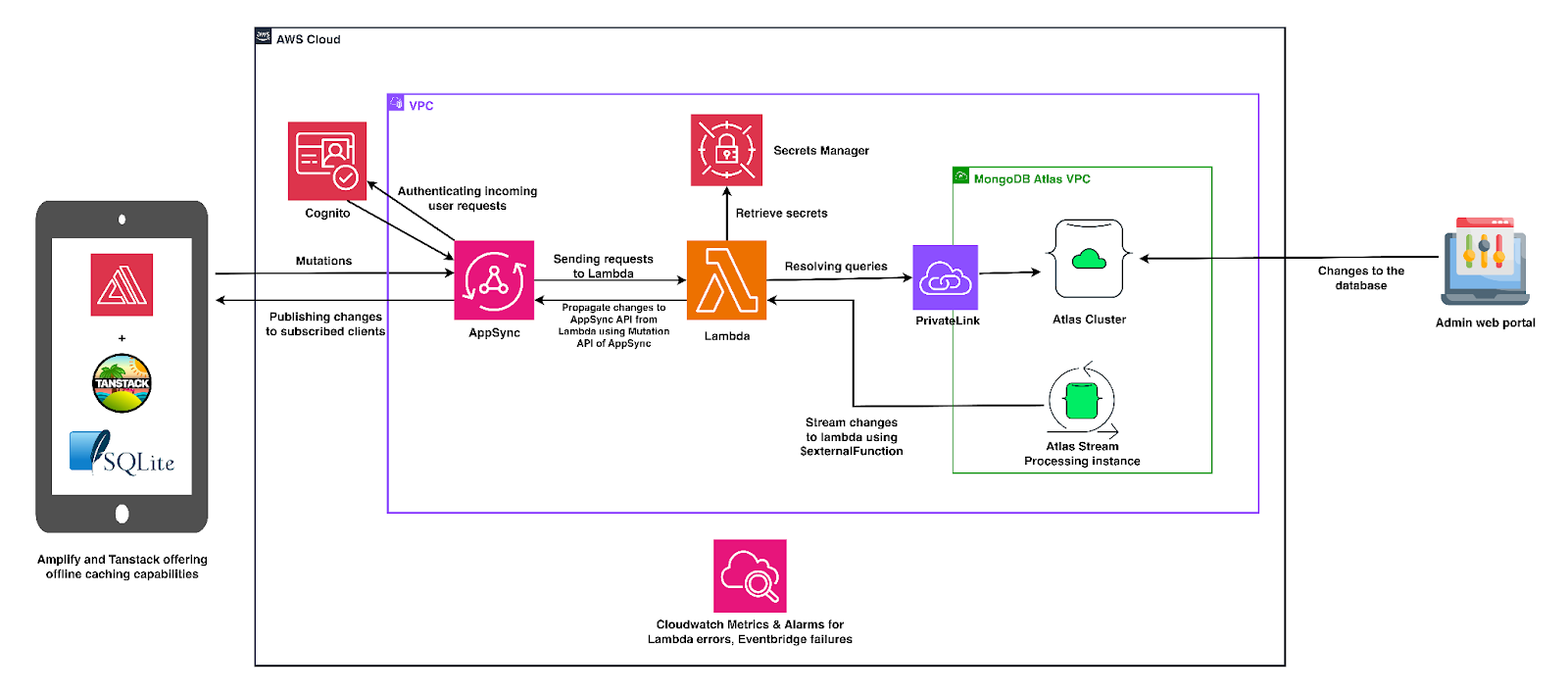
The application's information flow begins with user authentication via Amazon Cognito, with authenticated requests routed to AWS AppSync, serving as the GraphQL API layer. AppSync then directs these queries and mutations to AWS Lambda functions, which securely retrieve secrets from AWS Secrets Manager and interact with the MongoDB Atlas cluster through a PrivateLink.
For real-time updates and data synchronization, mutations from clients are propagated back via AppSync subscriptions, and MongoDB Atlas Stream Processing sends database change events to Lambda using the $externalFunction stage. AWS CloudWatch provides observability by monitoring Lambda errors and EventBridge failures, while an admin web portal can directly modify the MongoDB Atlas database, with changes syncing back to the client flow.
When the application is offline, data is stored locally using either Tanstack or SQLite, depending on the user's deployment choice. This data automatically syncs with the database once connectivity is re-established.
How to deploy?
A detailed deployment process is available in this GitHub repository.
However, for the offline caching feature, we have provided two options:
TanStack’s Query caching offers a viable solution for handling data storage during app connectivity loss, particularly for small to medium-sized applications with limited data. However, it's important to note that this method stores data primarily in JavaScript's runtime memory within the browser's RAM. Consequently, the cached data is not persistent and will be cleared once the page or application reloads.
Alternatively, SQLite presents a suitable option for large, enterprise-grade applications that mandate persistent storage for extensive data volumes.
Industrial use cases
This solution can power various use cases, including:
Oil & gas/mining sites: Remote shift logs, equipment checks, and incident reports can be managed with intermittent connectivity, ensuring critical data is captured regardless of network availability.
Retail POS & inventory (franchise or pop-up stores): Enable sales and stock counting even without a network connection, with automatic reconciliation to MongoDB Atlas when connectivity is restored.
Logistics & delivery operations: Drivers can access routes and scan parcels offline, facilitating customer notifications and proof-of-delivery (POD) workflows without constant internet access.
Field service & inspections (utilities, telco, construction): Technicians can capture forms, photos, and signatures offline, with automatic synchronization of data once they regain internet connectivity.
By integrating AWS Amplify, AWS AppSync, and MongoDB Atlas, developers can build robust, scalable, and truly offline-first applications capable of meeting the demands of various industries. This architecture provides a solid foundation, empowering you to create resilient applications that ensure seamless user experiences and critical data capture, even in challenging connectivity environments.
Next Steps
Ready to build your own offline-first application? Explore the detailed deployment process in our GitHub repository to get started today.