AI-powered shopping agents are becoming a real differentiator for e-commerce teams. A 2026 Stord report on AI in e-commerce revealed a 34% year-over-year increase in the number of consumers who reported using generative AI for online shopping. The trend is even more pronounced among younger consumers: 37% of Gen Z and 29% of Millennials actively use AI to shop online. After seeing how the agentic commerce journey actually works, it's not hard to understand why.
This tutorial shows you exactly how to build one on MongoDB Atlas with CrewAI. You’ll create a chat-based shopping assistant that understands natural-language queries, retrieves relevant products with MongoDB Vector Search and MongoDB Search, and uses Change Streams, Atlas Triggers, and Atlas Stream Processing to keep inventory, checkout, and post-purchase experiences in sync with real-time data.
By the end, you’ll be able to:
Build a CrewAI shopping agent that calls MongoDB Vector Search tools with structured filters (price, availability).
Model an e-commerce catalog on MongoDB and generate high-quality product embeddings for semantic search.
Use MongoDB Change Streams to make checkout flows inventory-aware at the moment of purchase.
Trigger post-purchase workflows and customer notifications with MongoDB Atlas Triggers.
Detect emerging delivery issues with MongoDB Atlas Stream Processing so agents can respond proactively.
This GitHub repository wires up the code samples in this post. The code will help you build a CrewAI shopping agent and use MongoDB Vector Search on Atlas to understand the semantic meaning of customer queries, implement atomic inventory checkout with Change Streams, and (as deploy-ready artifacts) create an Atlas Trigger and an Atlas Stream Processing pipeline for post-purchase intelligence.
What is the agentic commerce journey?
Here is how a fully agentic shopping experience (a.k.a zero-click buying) works in practice:
A customer asks a question: Via voice or text, they describe what he/she needs. The agent interprets the intent behind the query, not just the keywords.
The agent finds and curates the best options: It surfaces a short list of products with detailed specifications, pricing, deals, quality ratings, and reviews.
The customer makes a purchase decision: With curated options in the chat interface, the customer asks follow-up questions and then decides to purchase. What used to take hours of browsing now takes minutes.
The agent completes the transaction: For products that support instant checkout, the agent handles the entire payment process end-to-end (provided the customer’s payment information is on file). If not, the agent can safely ask the customer to provide payment information, encrypt it, and securely store it in the database for future use.
The agent handles everything post-purchase: It tracks the order, surfaces proactive updates when status changes, and manages returns or follow-ups if something goes wrong.
Each step in this journey places real technical demands on the underlying platform. The agent needs to understand natural language, retrieve semantically relevant products, evaluate quality and price across thousands of options, confirm inventory accuracy at the moment of purchase, and stay aware of order events without waiting to be asked. That's a lot of moving parts. Most teams choose to build them on a collection of separate systems, each adding its own overhead, latency, and points of failure. But what if a single platform could support these capabilities without requiring teams to stitch together multiple specialized systems?
That is where MongoDB comes in. By combining operational data, semantic search, real-time updates, and transactional capabilities into a single platform, MongoDB can support the different stages of the agentic commerce journey.
How do MongoDB capabilities fit into each step of the agentic commerce journey?
MongoDB is a strong candidate because it offers the native features required to power each step of the agentic commerce journey. Let's see how.
Step 1–3: How do MongoDB Vector Search on Atlas and MongoDB Search power agent discovery and decision-making?
When a customer types "lightweight running shoes under $100 with good arch support," they're describing an intent. The agent needs to understand the semantic meaning behind that query and match it to products that fit that intent. The agent needs to understand the user's intent, not just focus on keywords.
MongoDB Vector Search on Atlas handles this natively. Your product embeddings are stored alongside your product data in the same cluster. When a query comes in, the agent converts it to a vector using a best-in-class embedding model (Voyage AI), runs a search in your product catalog, and retrieves the most semantically relevant results, ranked by relevance rather than just keyword frequency. We can refer to this as a product-search tool. Let’s see exactly how to build it.
First, use the code below to create a Vector Search index that includes both the embedding field and the fields the agent will use as filters. For the query to work, the collection needs a Vector Search index that matches the fields used in the code. The embedding field is indexed as the vector field, with 2048 dimensions to match the Voyage AI embedding model. The price and in_stock fields are indexed as filter fields, which lets MongoDB apply those constraints before running the vector similarity search. That means the agent searches only for products under $100 and available to buy, rather than retrieving relevant products first and filtering them afterward.
With that index in place, the agent can run a semantic search and apply price and inventory constraints before performing similarity ranking. Here is the code for that:
Next, use the code below to create the CrewAI shopping agent that uses the product search tool. The agent is given a role, a goal, and a backstory so it understands how to behave during the shopping experience. By attaching search_product_catalog (defined next) as a tool, we give the agent access to MongoDB Vector Search in Atlas and the live product catalog. When a customer asks for a recommendation, the agent can call that tool, retrieve relevant in-stock products, and use the results to provide a helpful, context-aware answer.
The search_product_catalog function is the tool attached to the CrewAI shopping agent. When the agent needs to search the catalog, this tool connects to the product collection, uses Voyage AI to convert the customer’s request into a query embedding, and runs MongoDB Vector Search in Atlas against the embedding field using product_vector_index. The semantic part of the request, such as “lightweight running shoes with good arch support,” is handled by Vector Search, while the hard constraints, price <= 100 and in_stock: true, are applied as pre-filters. The result is a reusable CrewAI tool that returns products that are both semantically relevant and eligible for the customer to buy.
Alternative: Let Atlas generate embeddings automatically
The previous example shows manual embedding generation. If you want less application code, MongoDB Vector Search on Atlas can generate document and query embeddings automatically using an autoEmbed index. In that version, the app sends natural language query text directly to $vectorSearch. The code below explains how MongoDB Vector Search on Atlas generates document and query embeddings automatically.
For structured filtering, such as price ranges, brand filters, and in-stock flags, MongoDB Search layers on top of Vector Search. The agent can combine semantic similarity with exact filters in a single query, returning results that are both contextually relevant and within the customer's stated constraints.
Because your product catalog, inventory levels, reviews, and pricing (i.e., operational data) all reside in the same MongoDB database, the agent retrieves a complete, enriched product document in a single call.
Example output:
This is an example of the application's output in response to “Find in-stock products under $100 that semantically match the query.”
Optional: Connect your agent with the MongoDB MCP Server
The product-search tool above is one way to expose MongoDB to the agent. For more dynamic agent workflows, you can also connect the agent to MongoDB through the MongoDB MCP Server. MCP provides a standard tool interface that lets the agent discover MongoDB resources and issue structured database operations with the permissions you configure. In an e-commerce shopping flow, the agent could use MCP to look up product metadata, inspect inventory fields, retrieve customer order context, or run follow-up queries after Vector Search returns candidate products.
In the code below, the CrewAI agent is connected to MongoDB in two ways. The search_product_catalog tool handles the primary product discovery flow using Atlas Vector Search, while the MongoDB MCP Server provides the agent with a standard tool interface for follow-up database operations. The MCP server runs in read-only mode and exposes only selected tools, such as collection schema, find, and aggregate, so the agent can look up product details, inventory fields, or customer context without being given unrestricted database access.
Step 4: How do MongoDB Change Streams help with the checkout process?
This is where most teams don't anticipate the problem until they're already in production.
A customer has found the product, decided to buy it, and initiated checkout. At that exact moment, the agent needs to confirm that the item is still available.
During a high-traffic sale, inventory moves fast. The last unit of a limited-edition product can sell in the seconds between when a customer adds it to their cart and when the transaction is confirmed. If the agent is working with inventory data that doesn't reflect the final sale, the purchase goes through, the inventory system immediately rejects it, and the customer receives an "item not available" notification along with a refund. At scale, that failure pattern compounds quickly into frustrated customers, support overhead, and refund costs that add up fast.
MongoDB solves this in two parts: an atomic inventory update keeps checkout running smoothly, while Change Streams let the agent react immediately after inventory changes are committed. Change Streams is a cursor-based API that subscribes to document-level changes in a collection as soon as a write is committed to the database. There is no polling interval and therefore no sync gap. When inventory for a product drops to zero, the Change Stream fires instantly, and the agent receives the data instantly.
In the code below, checkout is protected by an atomic inventory update. The function looks for a product with the requested sku and enough remaining quantity, then decrements the quantity in the same database operation. If another customer has already purchased the last unit, the query no longer matches, and MongoDB returns None, so the checkout flow can stop before confirming the item is unavailable. Using ReturnDocument.AFTER returns the updated inventory document, giving the agent the freshest committed state after the reservation succeeds.
In the code below, Change Streams detect when a product's inventory drops to zero. That event kicks off a CrewAI workflow: an inventory recovery agent finds active carts that still contain the sold-out SKU, suggests alternatives, and notifies affected customers. MongoDB handles the real-time event stream, while CrewAI handles the agent’s reasoning and tool orchestration.
Step 5: How do Atlas Triggers and Atlas Stream Processing help with Post-purchase intelligence?
The post-purchase stage is where most shopping agents stop short. A customer who has paid expects to be kept informed without having to ask. That means the agent needs to respond when order data changes, especially when a shipment enters a state that matters to the customer.
Atlas Triggers: Reacting to individual order events
When an order’s status changes to "shipped", that update is a committed database event. Atlas Triggers are a fully managed way to react to that event: Atlas opens and maintains the underlying change stream, applies your trigger filter, and invokes a serverless function when a matching order update occurs.
In the code below, the Trigger is configured on the orders collection to run only when an order status changes to "shipped", with full-document lookup enabled for update events. The function receives the updated order document through changeEvent.fullDocument builds a JSON request body with API-friendly values, then sends it to the post-purchase agent endpoint.
From there, the agent can pull the customer’s order history, anticipate likely follow-up questions such as delivery window, return policy, and product setup, and prepare a personalized response so the next customer interaction feels informed and seamless.
Atlas Stream Processing: Detecting patterns before they become problems
Some post-purchase issues don't surface as a single event but emerge as a pattern. A carrier delay affecting multiple orders in the same region, such as due to an unexpected weather event, doesn't appear as a single document change. It shows up as a sustained pattern of delivery estimates shifting across an order cohort.
Atlas Stream Processing runs continuous aggregation pipelines over your order data and surfaces confirmed patterns before they reach customers. As illustrated in the code below, Atlas Stream Processing monitors delivery-estimate updates in the orders collection. Each update represents one order whose delivery date changed, but a single delayed order usually is not enough to involve an agent. The processor first filters for meaningful delays, such as orders whose estimated delivery time has moved by 30 minutes or more, then waits for a two-minute tumbling window to evaluate a batch of recent updates together.
Within each window, it groups delayed orders by carrier and shippingRegion. If at least 10 orders in the same carrier-region cohort are delayed, and the average delay across that group is at least 45 minutes, the processor writes one confirmed signal to agent_triggers.
A separate Change Stream can then watch that collection and invoke the demand-management agent. Then, the demand management agent can proactively draft customer communications, alert the logistics team, and flag the issue for resolution before customers start calling about missing orders. Imagine how many fewer calls your customer support team will receive if customers are proactively informed about shipping delays.
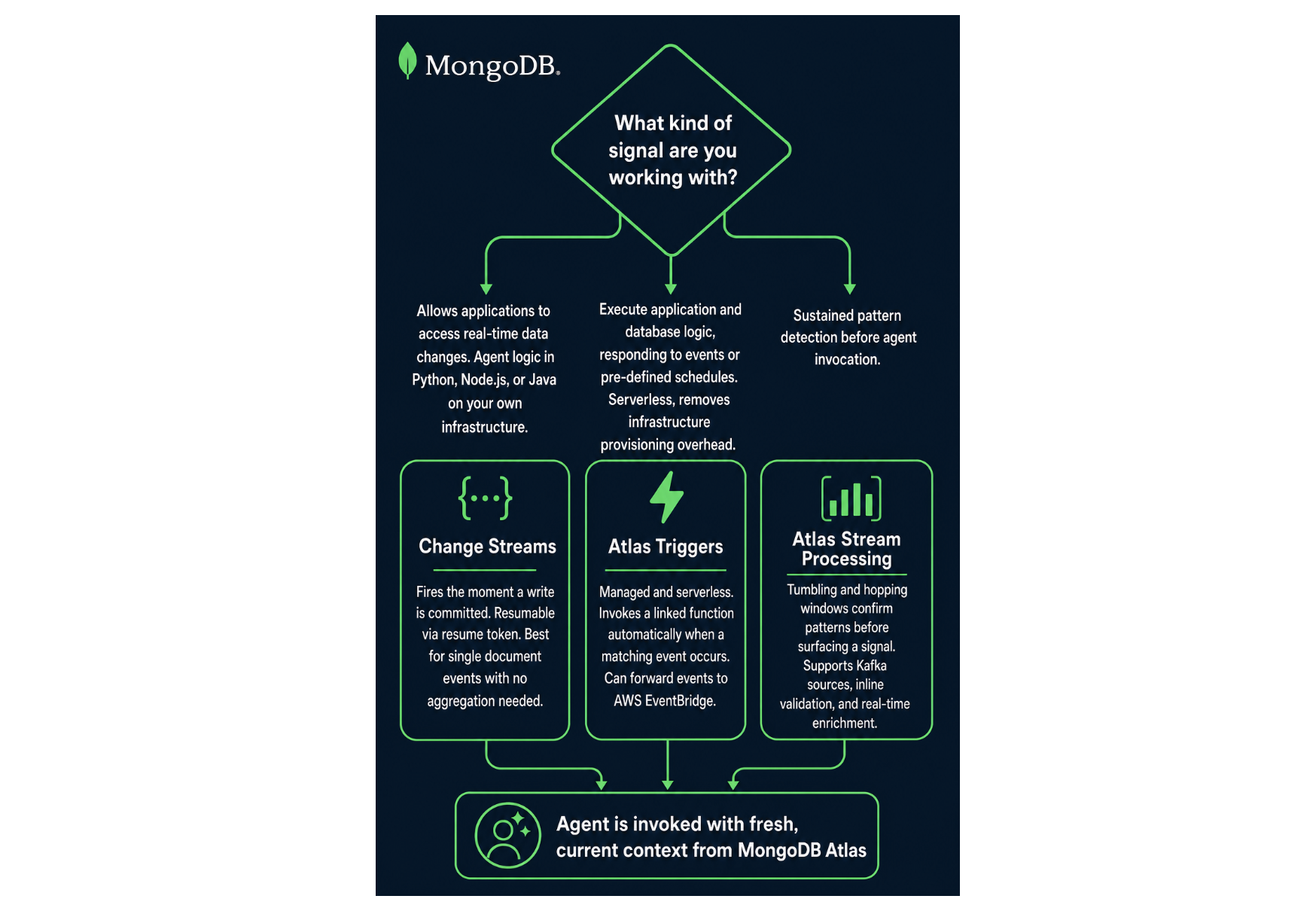
Decision framework: How to choose the right event-driven service?
The decision framework below helps you choose the right event-driven service for your use case:
Figure 1. Choosing between Change Streams, Atlas Triggers, and Atlas Stream Processing based on your agent's use case.
Conclusion
Building a fully agentic shopping experience requires more than a good model and a well-tuned prompt. Every step of the journey, from product discovery to post-purchase follow-up, places real demands on the underlying data platform. The agent needs to retrieve semantically relevant products, confirm inventory at the moment of purchase, and react to order events without waiting to be asked.
Most teams solve this by assembling a stack of specialized systems: a search service, a vector database, a message broker, event processing infrastructure, and an operational database underneath it all. That architecture can work, but every handoff adds latency, synchronization headaches, operational overhead, and another point where data can drift from reality. For an agent that needs to reason and act in the moment, those gaps mean the agent fails to provide customers with valuable information when needed. Not because there is anything wrong with the agent, but because the data it relied on was outdated.
MongoDB consolidates these into a single platform. Vector Search, MongoDB Search, Change Streams, Atlas Triggers, and Atlas Stream Processing are all native features of the same cluster that holds your operational data. The agent works with data that reflects the world as it actually is, and the architecture stays simple enough to debug when something inevitably needs attention.
Next Steps
Build your first agent with MongoDB and CrewAI
If you want to put this into practice, MongoDB has an official integration with CrewAI. Use this GitHub repository to start building your E-commerce AI agents on MongoDB.
If you are already running on MongoDB Atlas, you have everything you need to get started. If you're not registered yet, sign up for MongoDB Atlas and follow the CrewAI integration tutorial to deploy your first e-commerce agent today.