As natural language queries replace keyword searches and search systems embrace multimodal data, a single information retrieval strategy can no longer capture the full spectrum of user intent.
Consider searching through cooking videos: querying “onions caramelizing" requires visual understanding of color and texture, while “Gordon Ramsay's scrambled egg recipe” needs keyword matching on the chef’s name. No single search technique handles both query types well. As users increasingly expect systems to understand nuanced queries across rich media, such as images and video, we need search architectures that can adapt their retrieval strategy to match each query's requirements.
In this tutorial, you will build an agentic video search system using MongoDB’s search capabilities and Voyage AI’s latest multimodal embedding model, voyage-multimodal-3.5, that natively supports text, images, and videos. Specifically, you will:
learn how to process and embed videos for search.
implement multiple search strategies such as full-text, vector, and hybrid search.
implement the LLM-as-a-router agentic design pattern.
Architecture diagram
In this tutorial, we are building a system that allows users to search through cooking videos to quickly find key moments within them. An architecture diagram of the system we are building is as follows:
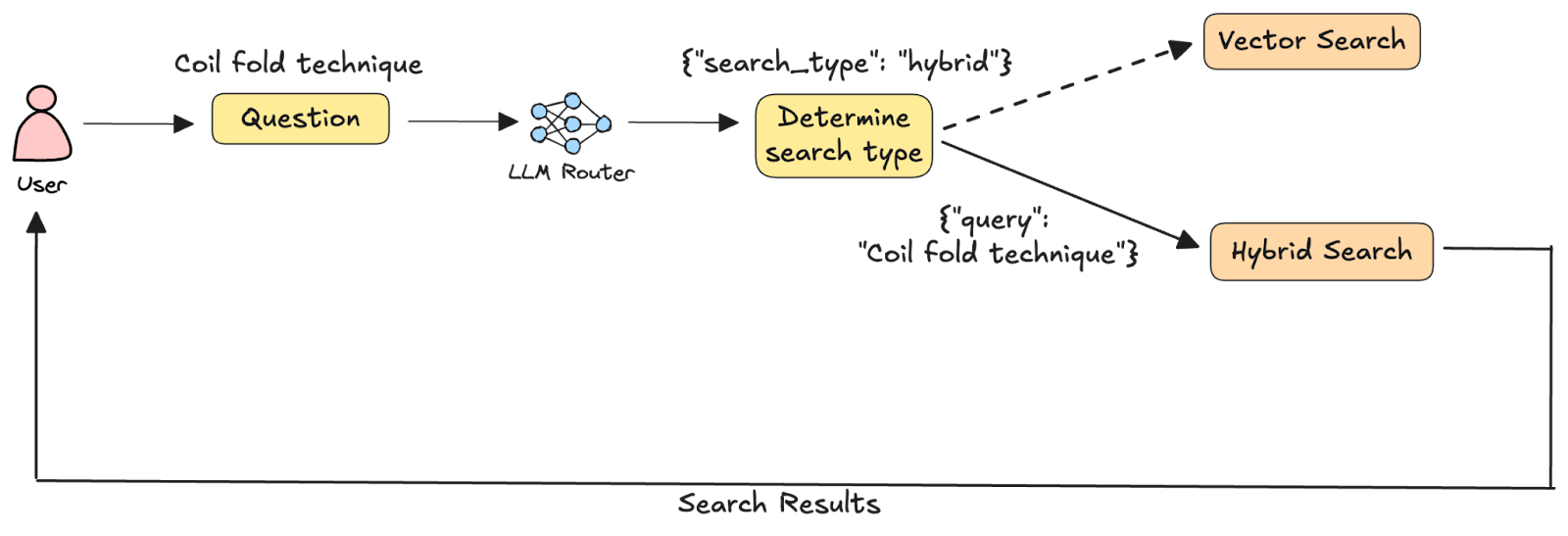
Given a user query, it is first analyzed by an LLM that decides which search methodology will retrieve the most relevant results. This design pattern, known as LLM-as-a-router, is a common approach in agentic systems where the model acts as an intelligent orchestrator rather than executing tools directly. Based on the LLM's decision, the query is routed to one of two search functions: 1) vector search on joint embeddings of video segments and their captions, and 2) hybrid search combining the vector search in (1) with full-text search on the captions alone. The chosen search is executed, and the results are returned to the user.
Get set up before starting
About the dataset
We will use a small collection of free-to-use cooking videos from pexels.com. This subset of videos is available in MongoDB’s Hugging Face repository.
Where’s the code?
The Jupyter Notebook for this tutorial is available on GitHub in our GenAI Showcase repository. To follow along, run the notebook in Google Colab (or a similar environment) and refer to this tutorial for explanations of key code blocks.
Step 1: Install the required libraries
Begin by installing the following libraries:
voyageai: Voyage AI's Python SDK
pymongo: MongoDB's Python driver
anthropic: Anthropic's Python SDK
huggingface_hub: Python library for interacting with the Hugging Face Hub
ffmpeg-python: Python wrapper for ffmpeg
tqdm: Python library to display progress bars for loops
You'll also need to install the ffmpeg binary itself. To do this, run the following commands from the terminal and note the path to the ffmpeg installation:
MacOS:
Linux:
Windows:
Download the executable from ffmpeg.org.
Extract the downloaded zip file.
Note the path to the bin folder.
Step 2: Setup prerequisites
We will use Voyage AI’s latest multimodal embedding model, voyage-multimodal-3.5, to embed video segments and their captions, MongoDB’s vector and hybrid search capabilities, and Claude 4.5 Sonnet as the LLM query router. But first, you will need to get Voyage AI and Anthropic API keys. You will also need a MongoDB Atlas database cluster and obtain its connection string. Follow these steps to get set up:
Register for a free MongoDB Atlas account.
Obtain the connection string for your database cluster.
Next, set the API keys as environment variables and initialize the respective API clients:
Voyage AI:
Anthropic:
Also set the MongoDB connection string and initialize the MongoDB client:
Finally, make sure the ffmpeg executable is accessible from your notebook:
Step 3: Download the dataset
Next, download our dataset of videos from Hugging Face:
The above code downloads the contents of the Hugging Face repository named MongoDB/cooking-videos-with-captions to a folder named videos in your working directory.
Step 4: Segment the videos using captions
Next, split each cooking video into smaller segments using the video captions. voyage-multimodal-3.5 has a 32k token limit or a 20 MB file size limit for video inputs. When working with large videos, split them into smaller segments prior to embedding to keep them within the model’s limits. Splitting videos at natural breaks in captions/transcripts ensures that related frames remain together, resulting in more focused embeddings.
First, create a folder to store the video segments:
Next, create the video segments:
The above code iterates through the downloaded videos and for each video:
Loads the caption file.
For each caption entry, uses the ffmpeg-python wrapper to build and run an ffmpeg command that creates a segment from the video.
The input method specifies the path to the video file (video_path), and the segment boundaries, derived from the caption entry. The ss parameter indicates the start timestamp, and to indicates the end timestamp.
The output method saves the segment to a new file, setting the codec (c) parameter to "copy" to retain the source video's encoding.
The overwrite_output method ensures existing files are replaced without prompting.
The run method executes the ffmpeg command silently (quiet=True).
For each video segment, constructs a dictionary containing the segment ID, video ID, caption text, and metadata such as the title, start, and end timestamps from the source video. These documents will later be inserted into MongoDB, with some additions.
Step 5: Embed the video segments
Now, generate embeddings for the video segments created in step 4.
The generate_embeddings helper function above uses the multimodal_embed method of the Voyage API to generate embeddings. The inputs parameter is a list of multimodal inputs, where each input is a list of texts, Image objects, Video objects, or any combination of the three. The input_type is either "document" or "query," depending on what you’re embedding.
Next, iterate through the MongoDB documents created in step 4 and add an embedding field to them:
In the above code, notice that each video segment first gets converted into a Video object using the utilities available in the voyageai library. We then jointly embed the Video object and the caption for that segment to create a single embedding that captures the semantics of the video and the caption text.
Step 6: Ingest documents into MongoDB
The documents are now ready to be ingested into MongoDB.
In the above code, we first access a database named video_search and a collection named segments within it. Then any existing documents get deleted from the collection using the delete_many method—the {} parameter indicates that all documents must be deleted. Then we bulk-insert the documents we previously created (docs) into the collection using the insert_many method.
A sample document inserted into MongoDB looks as follows:
Step 7: Create search indexes
To efficiently search through the documents we ingested into MongoDB, we need to create search indexes on the collection. Since our agentic search system supports vector search as well as hybrid search (combining vector and full-text search), we will create two indexes: a full-text search index and a vector search index.
We use PyMongo's SearchIndexModel class to define search indexes. The name parameter specifies the index name, definition contains the index configuration, and type specifies the index type: search (default) for full-text search or vectorSearch for vector search.
In the full-text search index definition, the mappings property defines which fields to index and how. Setting dynamic to False prevents automatic indexing of all fields; only fields explicitly listed in the fields property will be indexed. Here, we index only the caption field as a string for full-text search.
In the vector search index definition, the fields array contains field definition objects. For embedding fields, specify type as vector, the path to the embedding field, number of dimensions (numDimensions) in the embeddings (1024 for voyage-multimodal-3.5), and the similarity metric (one of cosine, dotProduct, or euclidean).
Now that we have created the index definitions, let’s actually create the indexes. To do this, we will use the create_search_indexes method, which allows us to create multiple indexes at once:
Step 8: Define search functions
With our search indexes created, let’s define the two search functions that our search systems can route between.
Vector search:
Given a search query, the vector_search function:
generates an embedding for it using the generate_embeddings helper function defined in step 5.
defines a MongoDB aggregation pipeline that has two stages:
$vectorSearch: Performs vector search. The queryVector field in this stage contains the embedded user query, the path refers to the path of the embedding field in the MongoDB documents, numCandidates denotes the number of nearest neighbors to consider in the vector space when performing vector search, and finally limit indicates the number of documents that will be returned from the vector search.
$project: includes only certain fields (set to the value 1) in the final results returned by the aggregation pipeline. In this case, only the video title, the segment's start and end timestamps, and the vector search score are included in the results.
uses the aggregate method to execute the aggregation pipeline against the segments collection.
displays the video title, start, and end timestamps of the segments most relevant to the search query
Hybrid search:
NOTE: $rankFusion is only available on deployments that use MongoDB 8.0 or higher.
Given a search query, the hybrid_search function:
generates an embedding for it using the generate_embeddings helper function defined in step 5.
defines a MongoDB aggregation pipeline that has the following stages:
$rankFusion: Uses the Reciprocal Rank Fusion (RRF) algorithm to combine the results of multiple search pipelines into a single ranked list. This stage has the following key fields:
input: defines the input pipelines to be combined. In this case, we have two pipelines: vector_pipeline, which consists of a $vectorSearch stage, and fts_pipeline, which consists of a $search stage that performs full-text search on the caption field.
combination: Specifies the weightage of each input pipeline in the final scoring. In this case, we’ve assigned equal weights to both pipelines.
scoreDetails: If set to True, this metadata field is added to each document. It contains information about the final ranking.
$project: includes only the video title, start and end timestamp of the segment, and the hybrid search score in the results.
$limit: sets a limit on the number of documents returned by the pipeline. Typically, you get a large number of documents from the individual pipelines and narrow down to a smaller final list. For example, here we get 10 documents each from vector and full-text search, and the top 3 from the combined hybrid search results.
executes the aggregation pipeline against the segments collection and displays the results to the user.
Step 9: Building the agentic search pipeline
In this final step, we will set up the LLM routing logic and run the end-to-end workflow of sending queries to our agentic search system and receiving results.
First, define the output schema for the LLM’s response. We want to constrain the LLM’s response to a specific schema so that we can reliably parse its outputs and use them for downstream processing.
The above JSON schema indicates that the LLM’s output should be an object with a single property, search, which must be either “vector” or “hybrid.” The search property is required, and no additional properties are allowed in the output.
The system prompt guides the LLM router by specifying what each search technique is best suited for, along with examples.
Next, define the function that makes the LLM call to identify the search technique:
The above function uses the create method of Anthropic’s Messages API to generate responses using Claude 4.5 Sonnet. Some things to note about the LLM call:
The number of output tokens (max_tokens) generated is limited to 50 since we expect short output responses.
The temperature parameter is set to 0 to maximize the chances of deterministic responses.
The beta header is added to the request using the betas parameter¹.
The messages list consists of a single message object with the role field set to "user," and the content field being a formatted string containing the search query.
The output_format parameter indicates that the output will be a JSON schema that follows the schema definition outlined by output_schema.
¹Structured outputs is currently a beta feature in the Claude API.
Finally, define the main function that orchestrates the end-to-end workflow:
Given a search query (query) as input, the search function first calls the get_search_type function to determine the search type (search_type) that is best suited for the query. If the search_type is “vector,” it calls the vector_search function with the search query as input. Instead, if the search_type is “hybrid,” it calls the hybrid search function.
Conclusion
In this tutorial, we built an agentic video search system that dynamically routes queries to the optimal search strategy. As systems go multimodal and natural language becomes the primary query interface, adaptive search architectures like this will become the standard. The LLM-as-a-router pattern we implemented extends beyond video search and can be applied to any AI system handling diverse user queries.
We also used Voyage AI’s latest multimodal embedding model, voyage-multimodal-3.5, which natively supports text, images, and videos.
Next Steps
To learn more about the model, visit our API documentation and follow us on X (Twitter) and LinkedIn for more updates.