Overview
在本指南中,您可以学习;了解如何创建使用Ruby on Rails 8 作为 Web框架的Ruby Web应用程序。Ruby on Rails 是一个适用于Ruby的全栈 Web应用程序框架,它遵循模型-视图-控制器 (MVC) 架构模式来构建应用程序。
本教程中的应用程序由以下各层组成:
数据库层:MongoDB提供数据存储和检索。
应用程序层:Rails 处理HTTP请求、路由和逻辑处理。
表示层:Embedded Ruby模板和 CSS 在网页上渲染餐厅数据。
提示
要学习;了解如何将 Mongoid 集成到现有应用程序中,请参阅 Add Mongoid to an Existing Application(将 Mongoid 添加到现有应用程序)指南。
为何将MongoDB与Ruby和 Rails 结合使用?
通过将MongoDB与Ruby和 Rails 集成,您可以使用 Mongoid 的对象文档映射器 (ODM) 与 MongoDB 灵活的文档模型进行交互。Mongoid 取代了 Rails默认的Active Record ORM,您可以利用 MongoDB 的模式灵活性,同时使用 Rails 轻松控制数据的建模和显示方式。
快速入门教程
本教程向您展示如何构建使用Ruby和 Rails 的 Web应用程序。该应用程序访问示例餐厅数据,查询数据,并在本地托管站点上显示结果。本教程还包括有关连接到MongoDB Atlas上托管的MongoDB 集群以及访问和显示数据库数据的说明。
提示
如果您希望使用Ruby驱动程序而不使用 Mongoid 连接到MongoDB ,请按照 Ruby驱动程序入门教程进行操作。
设置您的项目
按照本节中的步骤安装项目依赖项,创建Atlas集群,并设立应用程序结构。
验证先决条件。
在创建快速入门应用程序之前,请在开发环境中安装以下软件:
先决条件 | 注意 |
|---|---|
使用 3.1 或更高版本。 | |
这是Ruby的包管理器。 | |
代码编辑器 | 本教程使用Visual Studio Code带有Ruby扩展,但你也可以使用自己选择的编辑器。 |
终端应用和shell | 对于 MacOS 用户,请使用终端或类似应用程序。对于 Windows 用户,请使用 PowerShell。 |
创建 MongoDB Atlas 集群。
MongoDB Atlas是一项托管云数据库服务,用于托管您的MongoDB部署。如果您没有MongoDB 部署,可以通过完成MongoDB入门教程免费创建MongoDB 集群(无需信用)。MongoDB入门教程还演示了如何将示例数据集加载到集群中,包括本教程中使用的 sample_restaurants数据库。
要连接到MongoDB集群,您必须使用连接 URI。学习如何检索连接 URI,请参阅MongoDB入门教程的添加连接字符串部分。
重要
将连接string保存在安全位置。
配置后端
设置项目结构和依赖项后,请按照本节中的步骤连接到MongoDB并设立数据模型。
配置MongoDB连接。
导航到 config/mongoid.yml文件并将其内容替换为以下代码:
development: clients: default: uri: <connection_URI>
将 <connection_URI> 占位符替换为您在上一步中保存的连接 URI。确保 URI 包含 sample_restaurants数据库名称。
配置路由并添加自定义操作。
导航到 config/routes.rb文件并将其内容替换为以下代码:
Rails.application.routes.draw do resources :restaurants get "browse" => "restaurants#browse" # Defines the root path route ("/") root "restaurants#index" end
然后,将以下方法添加到 app/controllers/restaurants_controller.rb文件中:
# GET /browse def browse @restaurants = Restaurant .where(name: /Moon/i).and(borough: "Queens") end
此方法使用不区分大小写的正则表达式匹配查询皇后区名称中包含 "Moon" 的餐厅。
配置前端
设置数据层后,请按照本节中的步骤为用户界面创建模板和样式。
更新主布局。
导航到 app/views/layouts/application.html.erb文件并将其内容替换为以下代码:
<!DOCTYPE html> <html> <head> <title><%= content_for(:title) || "Restaurant Directory" %></title> <meta name="viewport" content="width=device-width,initial-scale=1"> <%= csrf_meta_tags %> <%= csp_meta_tag %> <%= stylesheet_link_tag :app, "data-turbo-track": "reload" %> <%= javascript_importmap_tags %> </head> <body> <div class="container"> <nav class="navigation"> <%= link_to "All Restaurants", root_path, class: "nav-link" %> <%= link_to "Browse Filtered", browse_path, class: "nav-link" %> </nav> <%= yield %> </div> </body> </html>
此文件是应用程序中所有页面的主模板包装器。它包括导航链接、页面标题以及安全和资产加载所需的 Rails 辅助标记。
创建餐厅列表视图。
导航到 app/views/restaurants/index.html.erb文件并将其内容替换为以下代码:
<% content_for :title, "Restaurant Directory" %> <header> <h1>Restaurant Directory</h1> </header> <div class="actions-header"> <h2>All Restaurants</h2> <%= link_to "New Restaurant", new_restaurant_path, class: "btn btn-success" %> </div> <div class="restaurants-grid"> <% @restaurants.each do |restaurant| %> <div class="restaurant-card"> <div class="restaurant-name"><%= restaurant.name %></div> <div class="restaurant-info"> <strong>Borough:</strong> <%= restaurant.borough %> </div> <div class="cuisine-tag"><%= restaurant.cuisine %></div> <div class="btn-group"> <%= link_to "View", restaurant, class: "btn" %> <%= link_to "Edit", edit_restaurant_path(restaurant), class: "btn btn-secondary" %> <%= link_to "Delete", restaurant_path(restaurant), method: :delete, confirm: "Are you sure?", class: "btn btn-danger" %> </div> </div> <% end %> </div>
此视图文件以网格布局显示所有餐厅,并包括用于查看、编辑和删除每家餐厅的动作按钮。
创建过滤后的视图。
创建一个名为 app/views/restaurants/browse.html.erb 的新文件并粘贴以下代码:
<% content_for :title, "Browse Restaurants" %> <header> <h1>Browse Restaurants</h1> <div class="subtitle">Restaurants in Queens with "Moon" in the name</div> </header> <div class="actions-header"> <h2>Filtered Results</h2> <div class="controls"> <%= link_to "New Restaurant", new_restaurant_path, class: "btn btn-success" %> <%= link_to "All Restaurants", root_path, class: "btn" %> </div> </div> <div class="restaurants-grid"> <% @restaurants.each do |restaurant| %> <div class="restaurant-card"> <div class="restaurant-name"><%= restaurant.name %></div> <div class="restaurant-info"> <strong>Borough:</strong> <%= restaurant.borough %> </div> <div class="cuisine-tag"><%= restaurant.cuisine %></div> <div class="btn-group"> <%= link_to "View", restaurant, class: "btn" %> <%= link_to "Edit", edit_restaurant_path(restaurant), class: "btn btn-secondary" %> <%= link_to "Delete", restaurant_path(restaurant), method: :delete, confirm: "Are you sure?", class: "btn btn-danger" %> </div> </div> <% end %> </div>
此视图文件显示过滤后的餐厅结果,仅显示来自自定义 browse 控制器动作的餐厅。
Add CSS styling.
将以下代码添加到 app/assets/stylesheets/application.css 文件:
* { margin: 0; padding: 0; box-sizing: border-box; } body { font-family: -apple-system, BlinkMacSystemFont, 'Segoe UI', Roboto, Oxygen, Ubuntu, Cantarell, sans-serif; line-height: 1.6; color: #333; background: rgb(198, 240, 209); min-height: 100vh; } .container { max-width: 1200px; margin: 0 auto; padding: 20px; } header { text-align: center; margin-bottom: 40px; color: rgb(0, 0, 0); } h1 { font-size: 3rem; margin-bottom: 10px; } .subtitle { font-size: 1.2rem; opacity: 0.9; } .controls { display: flex; justify-content: center; gap: 20px; margin-bottom: 30px; } .btn { background: white; color: #0d8958; border: none; padding: 12px 24px; border-radius: 25px; font-weight: 600; text-decoration: none; cursor: pointer; transition: all 0.3s ease; box-shadow: 0 4px 15px rgba(0,0,0,0.2); display: inline-block; } .btn:hover { transform: translateY(-2px); box-shadow: 0 6px 20px rgba(0,0,0,0.3); color: #0d8958; text-decoration: none; } .btn.btn-success { background: #0d8958; color: white; } .btn.btn-success:hover { background: #0a6b44; color: white; } .btn.btn-danger { background: #dc3545; color: white; } .btn.btn-danger:hover { background: #c82333; color: white; } .btn.btn-secondary { background: #6c757d; color: white; } .btn.btn-secondary:hover { background: #5a6268; color: white; } .restaurants-grid { display: grid; grid-template-columns: repeat(auto-fill, minmax(350px, 1fr)); gap: 20px; margin-top: 20px; } .restaurant-card { background: white; border-radius: 15px; padding: 20px; box-shadow: 0 8px 25px rgba(0,0,0,0.1); transition: transform 0.3s ease, box-shadow 0.3s ease; } .restaurant-card:hover { transform: translateY(-5px); box-shadow: 0 12px 35px rgba(0,0,0,0.15); } .restaurant-name { font-size: 1.4rem; font-weight: 700; color: #000000; margin-bottom: 10px; } .restaurant-info { margin-bottom: 8px; } .restaurant-info strong { color: #555; } .cuisine-tag { display: inline-block; background: #0d8958; color: white; padding: 4px 12px; border-radius: 15px; font-size: 0.85rem; font-weight: 600; margin-top: 10px; } .btn-group { display: flex; gap: 10px; margin-top: 15px; } .btn-group .btn { padding: 8px 16px; font-size: 0.9rem; } .notice { background: white; color: #0d8958; padding: 15px 20px; border-radius: 15px; margin-bottom: 20px; box-shadow: 0 4px 15px rgba(0,0,0,0.1); text-align: center; font-weight: 600; } .form-container { background: white; border-radius: 15px; padding: 30px; box-shadow: 0 8px 25px rgba(0,0,0,0.1); max-width: 600px; margin: 0 auto; } .form-group { margin-bottom: 20px; } .form-label { display: block; margin-bottom: 8px; font-weight: 600; color: #333; } .form-input { width: 100%; padding: 12px 16px; border: 2px solid #e9ecef; border-radius: 12px; font-size: 1rem; transition: border-color 0.3s ease; } .form-input:focus { outline: none; border-color: #0d8958; } .form-actions { display: flex; gap: 15px; justify-content: center; margin-top: 25px; } .page-header { text-align: center; margin-bottom: 30px; } .actions-header { display: flex; justify-content: space-between; align-items: center; margin-bottom: 30px; background: white; padding: 20px; border-radius: 15px; box-shadow: 0 4px 15px rgba(0,0,0,0.1); } .actions-header h1 { font-size: 2rem; color: #0d8958; margin: 0; } @media (max-width: 768px) { .container { padding: 10px; } h1 { font-size: 2rem; } .controls { flex-direction: column; align-items: center; } .restaurants-grid { grid-template-columns: 1fr; } .actions-header { flex-direction: column; gap: 15px; } .form-actions { flex-direction: column; } }
此 CSS文件为站点的网格布局添加样式。
运行应用程序
最后,按照本节中的步骤运行Web应用程序并使用浏览器界面探索餐厅数据。
启动 Rails应用程序。
导航到项目目录并运行以下命令:
bin/rails s
如果成功,命令输出将类似于以下示例:
=> Booting Puma => Rails 8.0.1 application starting in development => Run `bin/rails server --help` for more startup options Puma starting in single mode... * Puma version: 6.4.3 (ruby 3.2.5-p208) ("The Eagle of Durango") * Min threads: 3 * Max threads: 3 * Environment: development * PID: 66973 * Listening on http://127.0.0.1:3000 * Listening on http://[::1]:3000 * Listening on http://127.0.2.2:3000 * Listening on http://127.0.2.3:3000 Use Ctrl-C to stop
打开 Web应用程序。
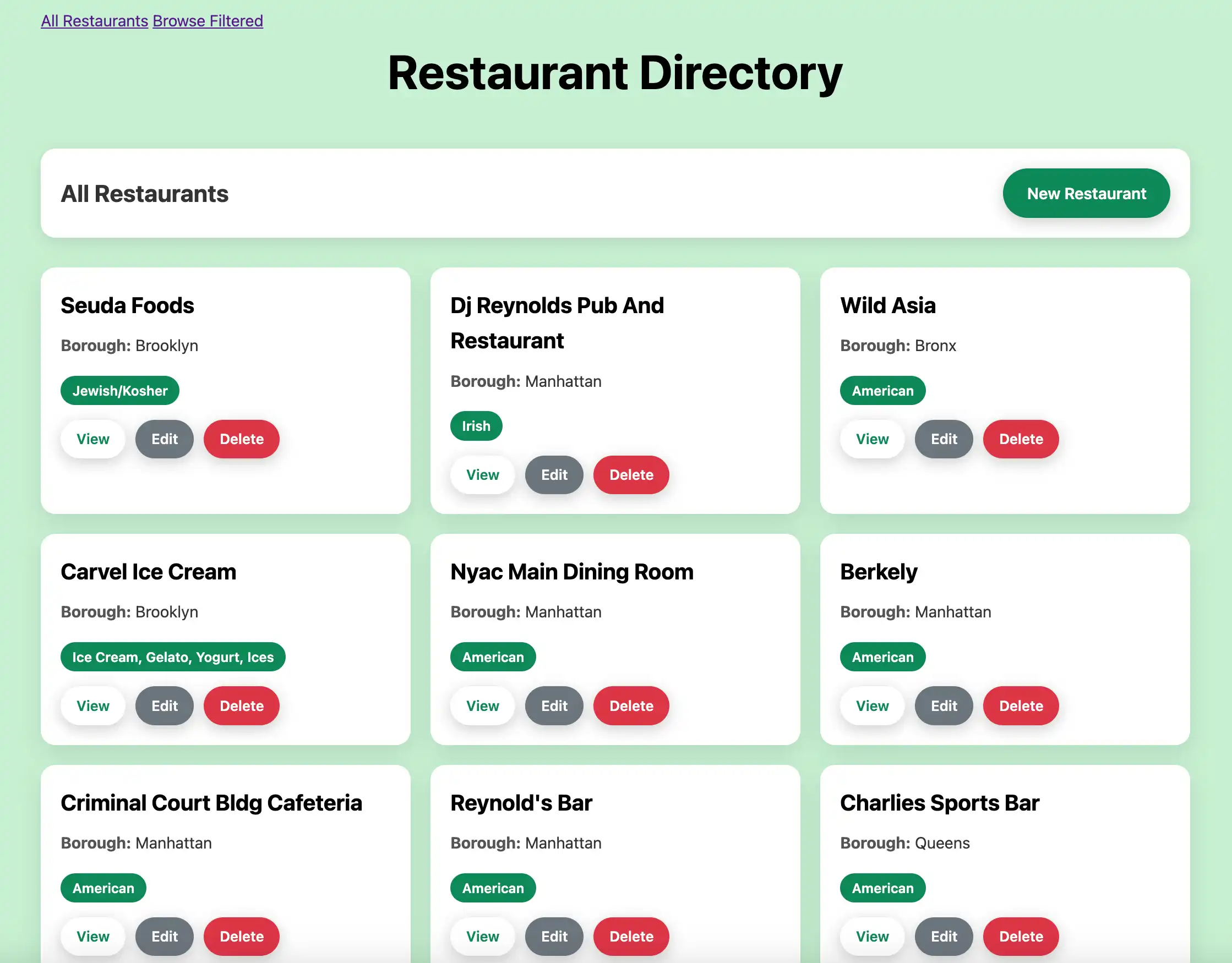
在网络浏览器中打开http://127.0.0.1:3000。初始登陆页面显示 sample_restaurants.restaurants集合中的所有餐厅:

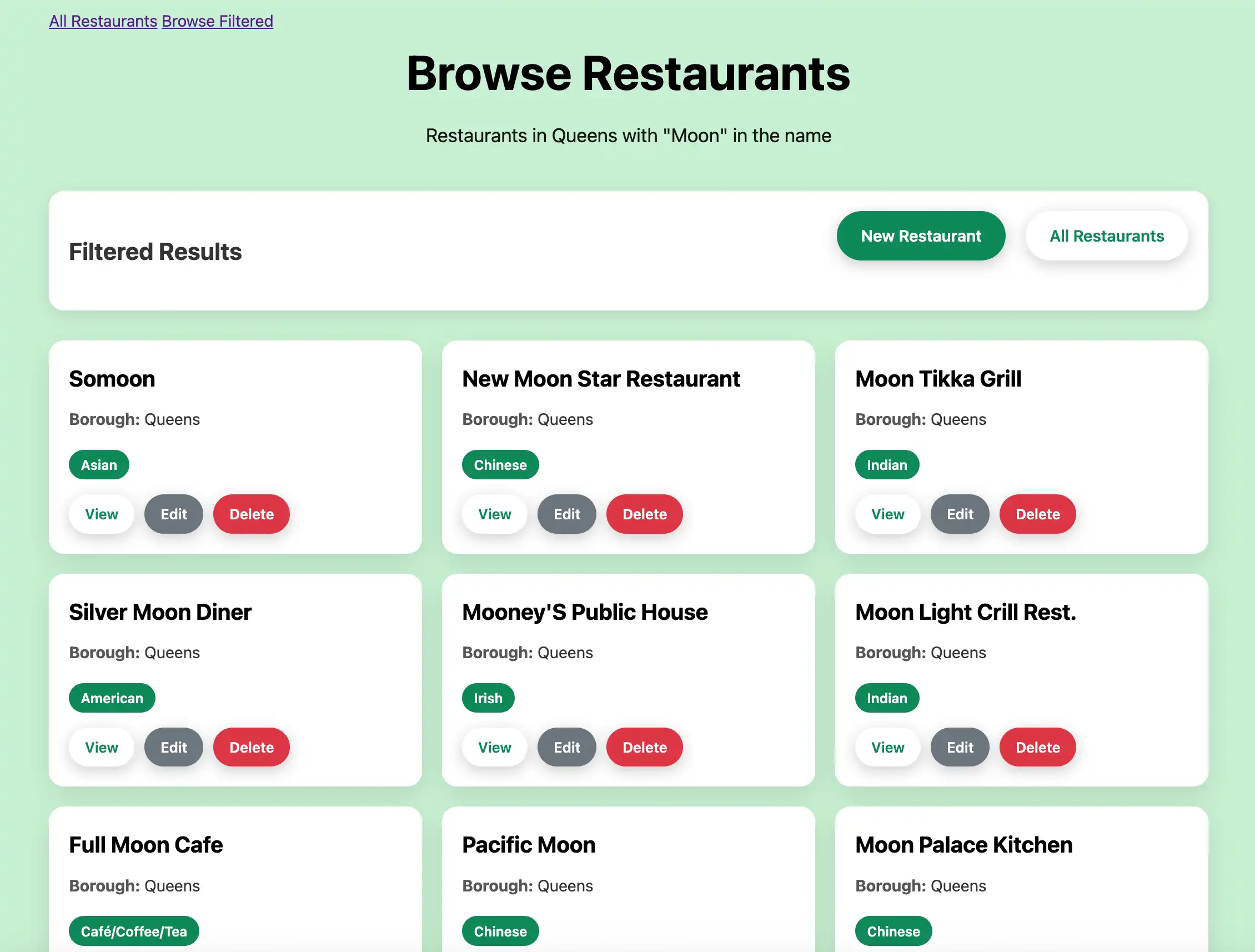
然后,单击 Browse Filtered 按钮查看皇后区名称中包含 "Moon" 的餐厅:

恭喜您完成快速入门教程!完成这些步骤后,您就拥有了一个Ruby和 Rails Web应用程序,它可以连接到MongoDB 部署,对示例餐厅数据运行查询,并在具有完整CRUD功能的本地托管 Web 界面上显示结果。
其他资源
要学习、了解有关Ruby、Rails、Mongoid 和MongoDB的更多信息,请查看以下资源:
Ruby语言文档