Overview
在本指南中,您可以学习如何创建使用 Rocket 作为 Web 框架的 Rust Web 应用程序。Rocket 是一个Rust框架,可让您创建安全、类型安全的 Web 应用程序。
本教程中的应用程序由以下各层组成:
数据库层:MongoDB提供数据存储和检索。
应用程序层:Rocket 处理 HTTP 请求、路由和逻辑处理。
表示层:HTML 模板在网页上渲染餐厅数据。
为何将MongoDB与Rust和Rocket 结合使用?
通过将MongoDB与Rust和Rocket 集成,您可以使用 Rust 的内存安全和性能特征以及 MongoDB 灵活的文档模型。Rocket 的类型系统确保API终结点的编译时ACID 一致性保证,MongoDB 的文档存储可与 Rust 的序列化库(例如 Serde)高效配合。
Rust、Rocket 和MongoDB的组合支持需要高性能、类型安全和可扩展性的应用程序。因此,该堆栈专为现实世界的应用程序精心设计,例如高吞吐量 API、微服务或需要严格性能ACID 一致性保证的系统。
快速入门教程
本教程向您展示如何使用Rust和Rocket构建应用程序。该应用程序访问示例餐厅数据,查询数据,并通过带样式的 HTML 模板显示数据。本教程还包括有关连接到MongoDB Atlas上托管的MongoDB 集群以及访问和显示数据库数据的说明。
提示
如果您更愿意使用Rust驱动程序而不使用 Rocket 连接到MongoDB ,请参阅 Rust驱动程序快速入门教程。
设置您的项目
按照本节中的步骤安装项目依赖项,创建Atlas集群,并设立应用程序结构。
验证先决条件
要创建快速入门应用程序,请在开发环境中安装以下软件:
先决条件 | 注意 |
|---|---|
使用 | |
代码编辑器 | 本教程使用带有 Rust 扩展的 Visual Studio Code,但你也可以使用自己选择的编辑器。 |
终端应用和shell | 对于 MacOS 用户,请使用终端或类似应用程序。对于 Windows 用户,请使用 PowerShell。 |
创建 MongoDB Atlas 集群
MongoDB Atlas是一项托管云数据库服务,用于托管您的MongoDB部署。如果您没有MongoDB 部署,可以通过完成MongoDB入门教程免费创建MongoDB 集群(无需信用)。MongoDB入门教程还演示了如何将示例数据集加载到集群中,包括本教程中使用的 sample_restaurants数据库。
要连接到MongoDB集群,您必须使用连接 URI。学习如何检索连接 URI,请参阅MongoDB入门教程的添加连接字符串部分。
重要
将连接string保存在安全位置。
配置项目依赖项
导航到 Cargo.toml文件并将其内容替换为以下代码:
[package] name = "rocket-quickstart" version = "0.1.0" edition = "2024" [dependencies] rocket = {version = "0.5.0", features = ["json"]} serde = "1.0.136" dotenv = "0.15.0" tokio = {version = "1.32.0", features = ["full"]} rocket_dyn_templates = { version = "0.1.0", features = ["handlebars"] } [dependencies.mongodb] version = "3.4.1"
从 rocket-quickstart目录运行以下命令来安装依赖项:
cargo build
此命令会安装以下依赖项:
Rocket,该项目的支持JSON的Web框架
Serde,用于数据序列化
MongoDB Rust驱动程序,用于MongoDB操作
Tokio,异步运行时
Rocket_dyn_templates,用于 Handlebars 模板渲染
创建项目结构
要为此应用程序创建必要的目录和文件,请从 rocket-quickstart目录运行以下命令:
mkdir -p src/models src/repository src/api templates static touch src/models/restaurant.rs src/repository/mongodb_repo.rs src/api/restaurant_api.rs touch src/models.rs src/repository.rs src/api.rs touch templates/index.hbs static/style.css
这些命令会按照 Rust 的模块化架构模式来构建您的项目,该模式会根据文件的用途将文件分组到不同的目录中。运行命令后,您将获得以下目录:
src/models:包含用于对餐厅数据进行建模的数据结构src/repository:包含数据库访问权限逻辑src/api:包含HTTP终结点处理程序templates:包含用于渲染数据的 Handlebars 模板文件static:包含用于设置样式的 CSS文件
这些命令还为每个 src/目录创建模块声明文件,其中列出了相应目录中的可用模块,并允许您在整个应用程序中访问权限它们。
配置后端
设置项目结构和依赖项后,请按照本节中的步骤连接到MongoDB并设立数据模型。
提供您的连接 URI
通过从 rocket-quickstart目录运行以下命令,将 MONGO_URI 环境变量设置为连接 URI:
export MONGO_URI="<connection URI>"
将 <connection URI> 占位符替换为您在上一个步骤。中保存的连接 URI。
创建数据模型
导航到 src/models/restaurant.rs文件并粘贴以下代码:
use serde::{Deserialize, Serialize}; use mongodb::bson::oid::ObjectId; pub struct Restaurant { pub id: Option<ObjectId>, pub name: Option<String>, pub borough: Option<String>, pub cuisine: Option<String>, pub address: Option<Address>, } pub struct Address { pub building: Option<String>, pub street: Option<String>, pub zipcode: Option<String>, }
此文件定义了 Restaurant 和 Address 模型,它们表示 sample_restaurants.restaurants示例集合中的数据。
要在项目文件中使用模型,必须注册 restaurant 模块,该模块对应于 restaurant.rs文件。导航到 src/models.rs文件并粘贴以下代码:
pub mod restaurant; pub use restaurant::*;
访问MongoDB示例集合
导航到 src/repository/mongodb_repo.rs文件并粘贴以下代码:
use std::env; use mongodb::{ bson::{extjson::de::Error, doc}, Client, Collection }; use crate::models::Restaurant; pub struct MongoRepo { col: Collection<Restaurant>, } impl MongoRepo { pub async fn init() -> Self { dotenv::dotenv().ok(); let uri = match env::var("MONGO_URI") { Ok(v) => v.to_string(), Err(_) => format!("Error loading env variable"), }; let client = Client::with_uri_str(uri).await.unwrap(); let db = client.database("sample_restaurants"); let col: Collection<Restaurant> = db.collection("restaurants"); MongoRepo { col } } pub async fn get_all_restaurants(&self) -> Result<Vec<Restaurant>, Error> { let mut cursor = self .col .find(doc! {}) .await .map_err(|e| Error::DeserializationError { message: e.to_string() })?; let mut restaurants: Vec<Restaurant> = Vec::new(); while cursor.advance().await.map_err(|e| Error::DeserializationError { message: e.to_string() })? { match cursor.deserialize_current() { Ok(restaurant) => restaurants.push(restaurant), Err(e) => { // Skips documents that can't be deserialized and logs the error eprintln!("Warning: Skipping document due to deserialization error: {}", e); continue; } } } Ok(restaurants) } pub async fn get_filtered_restaurants(&self) -> Result<Vec<Restaurant>, Error> { let filter = doc! { "borough": "Queens", "name": { "$regex": "Moon", "$options": "i" } }; let mut cursor = self .col .find(filter) .await .map_err(|e| Error::DeserializationError { message: e.to_string() })?; let mut restaurants: Vec<Restaurant> = Vec::new(); while cursor.advance().await.map_err(|e| Error::DeserializationError { message: e.to_string() })? { match cursor.deserialize_current() { Ok(restaurant) => restaurants.push(restaurant), Err(e) => { // Skips documents that can't be deserialized and logs the error eprintln!("Warning: Skipping document due to deserialization error: {}", e); continue; } } } Ok(restaurants) } }
该文件访问 sample_restaurants数据库中的 restaurants集合。然后,它定义了以下用于检索集合文档的查询方法:
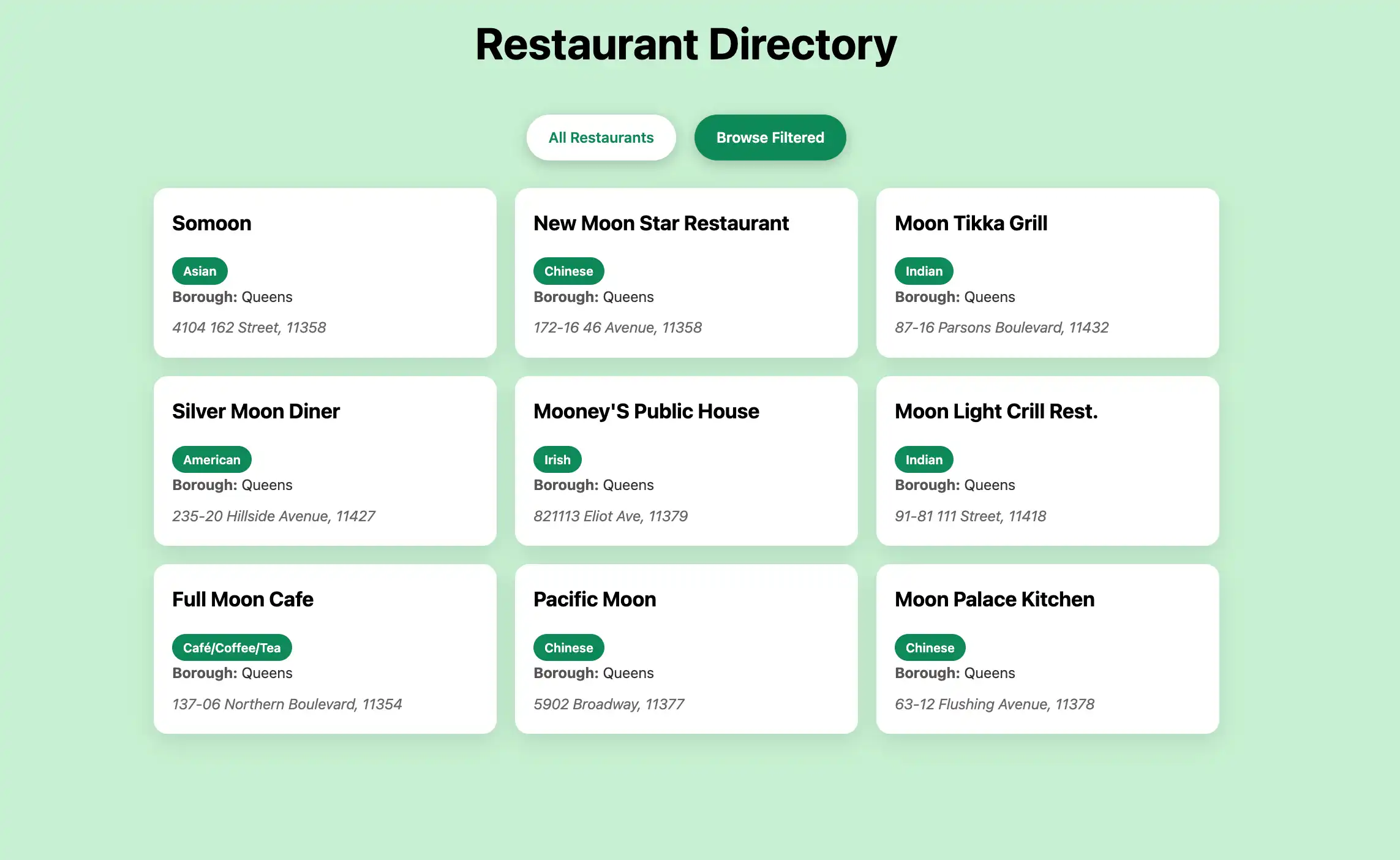
get_all_restaurants():检索restaurants集合中的所有文档get_filtered_restaurants():检索restaurants集合中borough值为"Queens"且name值包含"Moon"的文档。$options值指定此name查询不区分大小写。
此代码还包含跳过无法反序列化的文档的逻辑。这样可以避免在文档未包含 Restaurant 模型中定义的每个字段时出现错误。
然后,在 src/repository.rs 中注册该模块:
pub mod mongodb_repo; pub use mongodb_repo::*;
配置前端
设置数据层后,按照本节中的步骤为用户界面创建Rocket API处理程序和模板。
创建API处理程序
导航到 src/api/restaurant_api.rs文件并粘贴以下代码:
use rocket::{State, serde::json::Json, get, http::Status}; use crate::{models::Restaurant, repository::MongoRepo}; pub async fn get_all_restaurants(db: &State<MongoRepo>) -> Result<Json<Vec<Restaurant>>, Status> { let restaurants = db.get_all_restaurants().await; match restaurants { Ok(restaurants) => Ok(Json(restaurants)), Err(_) => Err(Status::InternalServerError), } } pub async fn get_filtered_restaurants(db: &State<MongoRepo>) -> Result<Json<Vec<Restaurant>>, Status> { let restaurants = db.get_filtered_restaurants().await; match restaurants { Ok(restaurants) => Ok(Json(restaurants)), Err(_) => Err(Status::InternalServerError), } }
此代码创建 /restaurants 和 /restaurants/browse 终结点。这些终结点通过查询方法提供JSON数据,前端JavaScript代码使用这些数据来动态加载和显示餐厅信息。
然后,在 src/api.rs 中注册API模块:
pub mod restaurant_api; pub use restaurant_api::*;
更新主应用程序文件
导航到 src/main.rs文件并粘贴以下代码:
mod api; mod models; mod repository; extern crate rocket; use rocket::{get, fs::FileServer, response::content::RawHtml}; use rocket_dyn_templates::Template; use api::restaurant_api::{get_all_restaurants, get_filtered_restaurants}; use repository::MongoRepo; async fn index() -> RawHtml<String> { let template_content = std::fs::read_to_string("templates/index.hbs").unwrap_or_else(|_| { r#"<!DOCTYPE html> <html><head><title>Error</title></head> <body><h1>Template not found</h1></body></html>"#.to_string() }); RawHtml(template_content) } async fn browse() -> RawHtml<String> { let template_content = std::fs::read_to_string("templates/index.hbs").unwrap_or_else(|_| { r#"<!DOCTYPE html> <html><head><title>Error</title></head> <body><h1>Template not found</h1></body></html>"#.to_string() }); RawHtml(template_content) } async fn rocket() -> _ { let db = MongoRepo::init().await; rocket::build() .manage(db) .mount("/", routes![index, browse, get_all_restaurants, get_filtered_restaurants]) .mount("/static", FileServer::from("static/")) .attach(Template::fairing()) }
此文件用于设置Rocket Web服务器并配置以下路由:
/:返回用于格式化主索引页面的 HTML 代码,该主索引页面显示所有餐厅/browse:返回用于格式过滤器的餐厅页面的 HTML 代码
创建 Handlebars 模板
导航到 templates/index.hbs文件并粘贴以下代码:
<!DOCTYPE html> <html lang="en"> <head> <meta charset="UTF-8"> <meta name="viewport" content="width=device-width, initial-scale=1.0"> <title>Restaurant Explorer</title> <link rel="stylesheet" href="/static/style.css"> </head> <body> <div class="container"> <header> <h1>Restaurant Directory</h1> </header> <div class="controls"> <a href="/" class="btn" id="all-btn">All Restaurants</a> <a href="/browse" class="btn" id="browse-btn">Browse Filtered</a> </div> <div id="restaurants-container"> <div class="loading">Loading restaurants...</div> </div> </div> <script> // Sets the active button based on the current path const path = window.location.pathname; if (path === '/browse') { document.getElementById('browse-btn').classList.add('active'); } else { document.getElementById('all-btn').classList.add('active'); } // Loads the restaurant documents async function loadRestaurants() { try { const apiEndpoint = path === '/browse' ? '/restaurants/browse' : '/restaurants'; const response = await fetch(apiEndpoint); const restaurants = await response.json(); displayRestaurants(restaurants); } catch (error) { document.getElementById('restaurants-container').innerHTML = '<div class="error">Error loading restaurants. Please try again later.</div>'; } } // Displays restaurants in a grid format function displayRestaurants(restaurants) { const container = document.getElementById('restaurants-container'); if (restaurants.length === 0) { container.innerHTML = '<div class="error">No restaurants found.</div>'; return; } const restaurantsHTML = restaurants.map(function(restaurant) { return '<div class="restaurant-card">' + '<div class="restaurant-name">' + (restaurant.name || 'Unknown Name') + '</div>' + (restaurant.cuisine ? '<div class="cuisine-tag">' + restaurant.cuisine + '</div>' : '') + (restaurant.borough ? '<div class="restaurant-info"><strong>Borough:</strong> ' + restaurant.borough + '</div>' : '') + (restaurant.restaurant_id ? '<div class="restaurant-info"><strong>ID:</strong> ' + restaurant.restaurant_id + '</div>' : '') + (restaurant.address ? '<div class="address">' + (restaurant.address.building ? restaurant.address.building + ' ' : '') + (restaurant.address.street ? restaurant.address.street : '') + (restaurant.address.zipcode ? ', ' + restaurant.address.zipcode : '') + '</div>' : '') + '</div>'; }).join(''); container.innerHTML = '<div class="restaurants-grid">' + restaurantsHTML + '</div>'; } loadRestaurants(); </script> </body> </html>
此 Handlebars 模板使用 JavaScript 创建响应式 Web 界面,该界面从 API 终结点动态加载餐厅数据,并以交互式网格布局显示餐厅。
Add CSS styling
将以下代码添加到 static/style.css:
/* Modern, clean styling for the restaurant app */ * { margin: 0; padding: 0; box-sizing: border-box; } body { font-family: -apple-system, BlinkMacSystemFont, 'Segoe UI', Roboto, Oxygen, Ubuntu, Cantarell, sans-serif; line-height: 1.6; color: #333; background: rgb(198, 240, 209); min-height: 100vh; } .container { max-width: 1200px; margin: 0 auto; padding: 20px; } header { text-align: center; margin-bottom: 40px; color: rgb(0, 0, 0); } h1 { font-size: 3rem; margin-bottom: 10px; } .subtitle { font-size: 1.2rem; opacity: 0.9; } .controls { display: flex; justify-content: center; gap: 20px; margin-bottom: 30px; } .btn { background: white; color: #0d8958; border: none; padding: 12px 24px; border-radius: 25px; font-weight: 600; text-decoration: none; cursor: pointer; transition: all 0.3s ease; box-shadow: 0 4px 15px rgba(0,0,0,0.2); } .btn:hover { transform: translateY(-2px); box-shadow: 0 6px 20px rgba(0,0,0,0.3); } .btn.active { background: #0d8958; color: white; } .restaurants-grid { display: grid; grid-template-columns: repeat(auto-fill, minmax(350px, 1fr)); gap: 20px; margin-top: 20px; } .restaurant-card { background: white; border-radius: 15px; padding: 20px; box-shadow: 0 8px 25px rgba(0,0,0,0.1); transition: transform 0.3s ease, box-shadow 0.3s ease; } .restaurant-card:hover { transform: translateY(-5px); box-shadow: 0 12px 35px rgba(0,0,0,0.15); } .restaurant-name { font-size: 1.4rem; font-weight: 700; color: #000000; margin-bottom: 10px; } .restaurant-info { margin-bottom: 8px; } .restaurant-info strong { color: #555; } .cuisine-tag { display: inline-block; background: #0d8958; color: white; padding: 4px 12px; border-radius: 15px; font-size: 0.85rem; font-weight: 600; margin-top: 10px; } .address { color: #666; font-style: italic; margin-top: 8px; } .loading { text-align: center; color: white; font-size: 1.2rem; margin: 40px 0; } .error { text-align: center; color: #ff6b6b; background: white; padding: 20px; border-radius: 10px; margin: 20px 0; } @media (max-width: 768px) { .container { padding: 10px; } h1 { font-size: 2rem; } .controls { flex-direction: column; align-items: center; } .restaurants-grid { grid-template-columns: 1fr; } }
此 CSS文件用于设置网页上显示的餐厅数据的样式。
运行应用程序
最后,按照本节中的步骤运行Web应用程序并使用浏览器界面探索餐厅数据。
启动Rocket应用程序
导航到项目目录并运行以下命令:
cargo run
如果成功,命令输出将类似于以下示例:
Configured for debug. >> address: 127.0.0.1 >> port: 8000 ... Routes: >> (index) GET / >> (browse) GET /browse >> (get_all_restaurants) GET /restaurants >> (get_filtered_restaurants) GET /restaurants/browse >> (FileServer: static/) GET /static/<path..> [10] Fairings: >> Templating (ignite, liftoff, request) >> Shield (liftoff, response, singleton) Shield: >> X-Frame-Options: SAMEORIGIN >> Permissions-Policy: interest-cohort=() >> X-Content-Type-Options: nosniff Templating: >> directory: templates >> engines: ["hbs"] Rocket has launched from http://127.0.0.1:8000
打开 Web应用程序
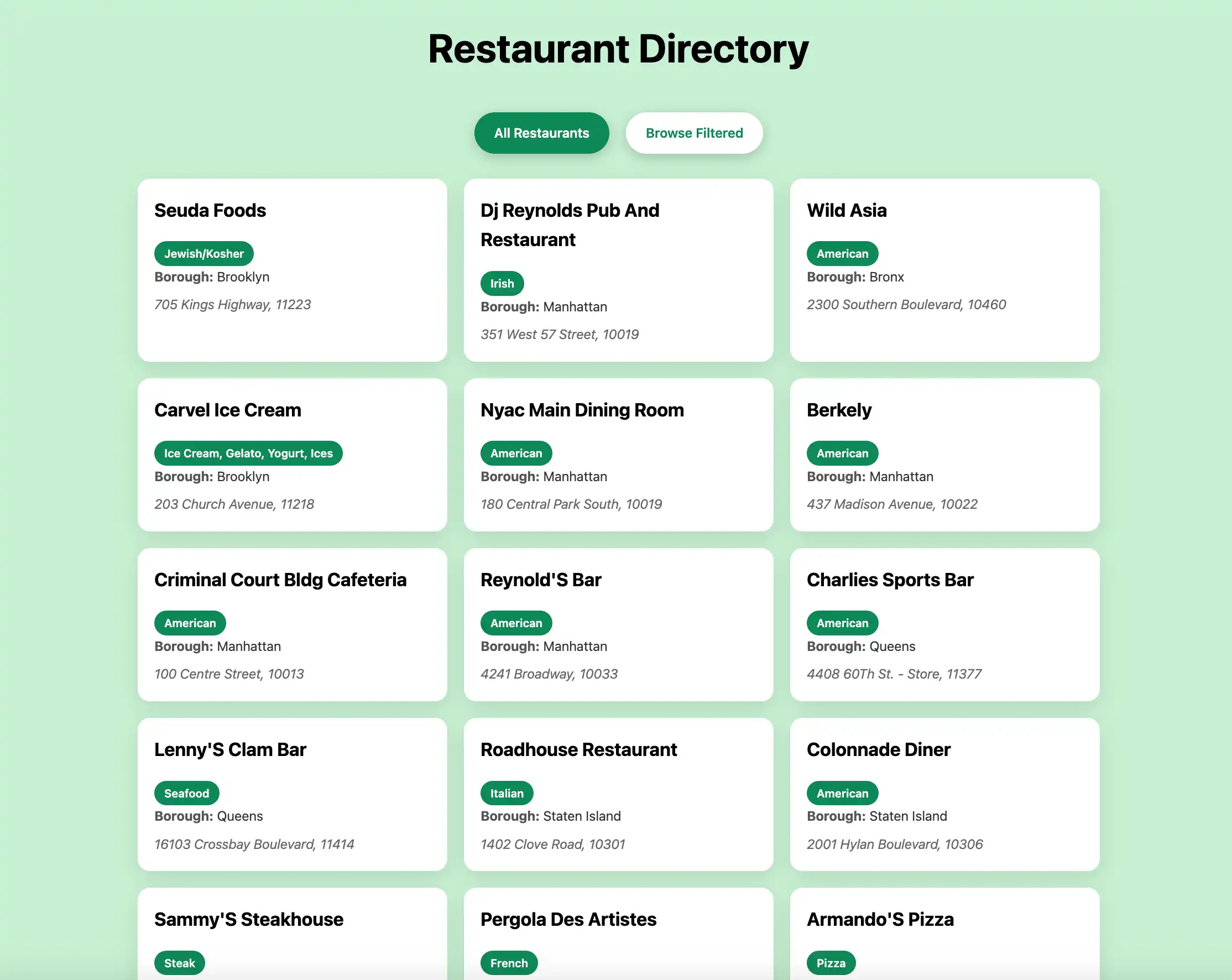
在网络浏览器中打开http://127.0.0.1:8000。初始登陆页面显示 sample_restaurants.restaurants集合中的所有餐厅:

然后,单击 Browse Filtered 按钮查看皇后区名称中包含 "Moon" 的餐厅:

恭喜您完成快速入门教程!完成这些步骤后,您将拥有一个Rust和Rocket应用程序,它连接到您的MongoDB部署,对示例餐厅数据运行查询,并在本地托管的Web界面上显示结果。
其他资源
要学习有关 Rust、Rocket 和 MongoDB 的更多信息,请参阅以下资源:
火箭文档
Serde 序列化框架
Handlebars 模板语言