Overview
本指南演示了如何使用 Actix Web 和MongoDB构建Web应用程序。Actix 是一个强大的Rust异步 Web框架,可以轻松构建快速、类型安全的HTTP服务。
本教程中的应用程序由以下各层组成:
数据库层: MongoDB (托管在MongoDB Atlas上)存储和检索数据。
服务器层:Actix Web 提供HTTP服务器、路由和API终结点,以将前端连接到MongoDB 数据库。
数据管理层:Rust 的类型系统和异步/await 提供安全的数据处理和编译时ACID 一致性保证。
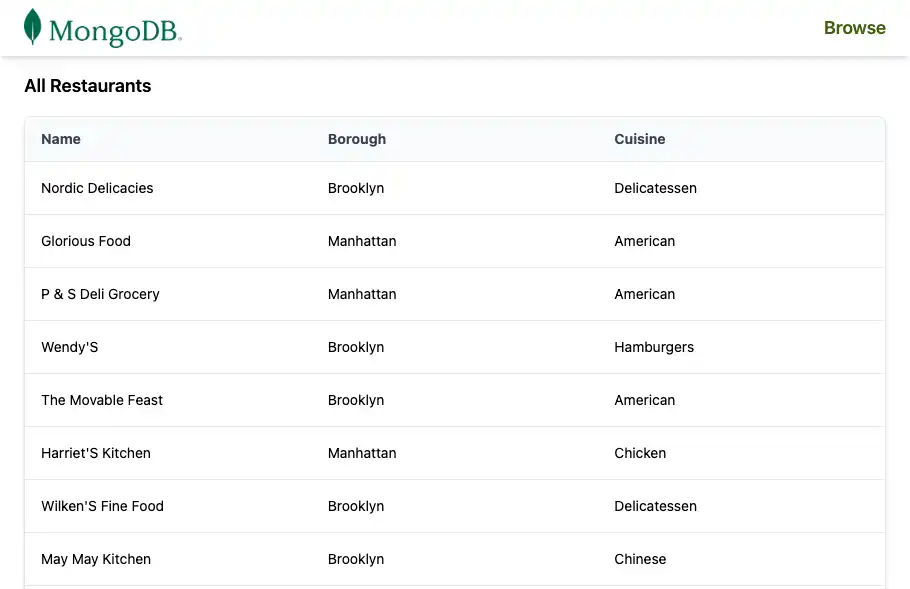
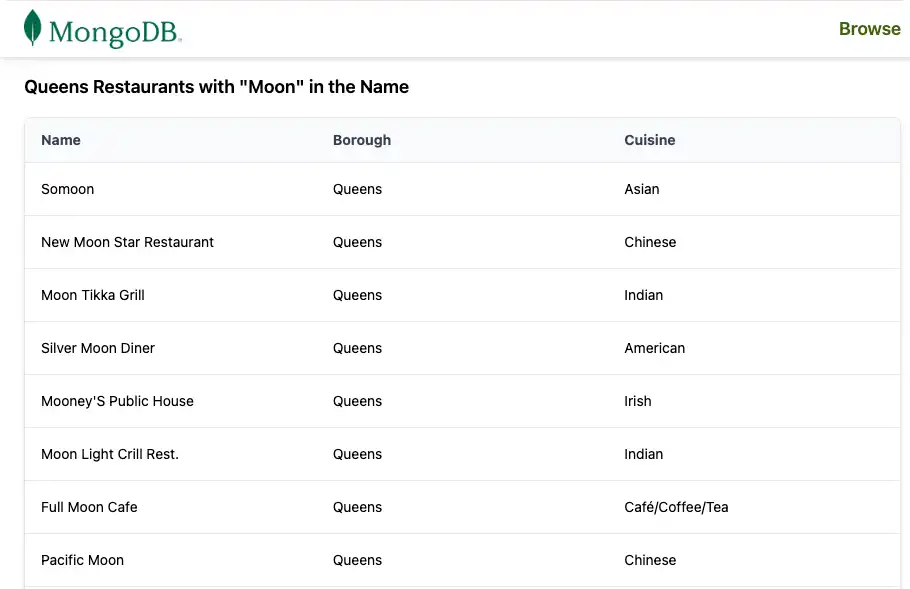
表示层:服务器呈现的 HTML 页面(使用 Tailwind CSS 进行样式设置)在表中显示示例餐厅数据。
您将构建一个小型应用程序:
连接到包含
sample_restaurants数据集的MongoDB Atlas 群集公开列出所有餐厅的
/restaurants终结点公开一个
/browse终结点,其中列出了皇后区名称中包含"Moon"的餐厅将结果渲染为具有共享导航栏的 HTML 表格
为何在 Actix 应用程序中使用MongoDB ?
MongoDB 灵活的文档模型将数据存储为类似BSON/ JSON 的文档。这自然适用于对数据进行建模的Rust结构体,无需复杂的 ORM 层或模式迁移。
当您将 Actix Web 和异步MongoDB Rust驱动程序结合使用时,该堆栈提供:
灵活数据结构,无需进行成本高昂的迁移即可演进
异步、非阻塞 I/O,实现高并发和高性能 API
从数据库层到处理程序和模型的强类型安全性
与 Web 视图简单集成(HTML 模板或手动构建字符串,如本教程所示)
此组合适用于需要以下功能的应用程序:
随着时间的推移不断发展的模式
高吞吐量和并发性
关于数据形状的强大编译时ACID 一致性保证
快速入门教程
本教程将指导您构建与MongoDB集成的 Actix Web应用程序。该应用程序访问MongoDB Atlas 群集中的示例餐厅数据,并在浏览器中显示结果。
提示
如果您希望使用Rust驱动程序而不使用 Actix Web 连接到MongoDB ,请参阅 Rust 驱动程序快速入门指南。
设置您的项目
按照本节中的步骤安装必备组件、创建MongoDB Atlas 群集并搭建Rust项目的脚手架。
验证先决条件
要创建快速入门应用程序,请确保已安装以下内容:
先决条件 | 注意 |
|---|---|
Rust | |
代码编辑器 | 本教程使用带有 Rust 扩展的 Visual Studio Code,但你也可以使用自己选择的编辑器。 |
终端 | 使用适用于 MacOS 的终端或类似应用。使用适用于Windows的 PowerShell。 |
创建 MongoDB Atlas 集群
MongoDB Atlas是一项完全托管云数据库服务,用于托管MongoDB部署。如果您没有MongoDB 部署,请完成MongoDB入门教程,免费创建MongoDB 集群(无需信用)。 MongoDB入门教程还演示了如何将示例数据集加载到集群中,包括本教程使用的sample_restaurants 数据库。
重要
在继续之前,确保您已将 sample_restaurants 数据集加载到集群中。缺失 sample_restaurants 数据集会导致示例页面上的餐厅列表为空。
要连接到MongoDB 集群,请使用连接 URI。要学习如何检索连接 URI,请参阅MongoDB入门教程的添加连接字符串部分。
提示
将连接 URI 保存在安全位置。稍后您会将其添加到 .env文件中。
配置项目依赖项
打开 Cargo.toml 并将 [dependencies] 部分替换为以下内容:
[package] name = "actix_quickstart" version = "0.1.0" edition = "2024" [dependencies] actix-web = "4" actix-files = "0.6" actix-cors = "0.7" mongodb = "3.4.1" tokio = { version = "1", features = ["rt-multi-thread", "macros"] } serde = { version = "1.0", features = ["derive"] } serde_json = "1.0" dotenv = "0.15" futures = "0.3"
通过在终端中运行以下命令来安装新的依赖项:
cargo build
这些依赖项提供:
actix-web: HTTP服务器、路由和请求/响应类型。mongodb:适用于Rust 的官方异步MongoDB驱动程序。tokio:Actix Web 和MongoDB驱动程序使用的异步运行时。serde/serde_json: JSON和BSON数据的序列化和反序列化。dotenv:从 .env文件加载环境变量以进行本地开发。futures:用于处理异步流的实用程序(用于MongoDB游标)。
配置后端
设立项目后,请按照本节中的步骤配置环境变量、设立MongoDB连接、定义数据模型并实现数据库查询服务。
创建数据库连接模块
在 src目录中创建名为 db.rs 的新文件来管理MongoDB连接。
在项目根目录中运行以下命令:
touch src/db.rs
打开 db.rs 并添加以下代码以设立MongoDB客户端和数据库连接:
use mongodb::{options::ClientOptions, Client, Database}; pub async fn init_db(mongo_uri: &str) -> Database { let mut client_options = ClientOptions::parse(mongo_uri) .await .expect("Failed to parse MongoDB connection string"); client_options.app_name = Some("actix_quickstart".to_string()); let client = Client::with_options(client_options) .expect("Failed to initialize MongoDB client"); client.database("sample_restaurants") }
该模块:
从您的环境中解析MongoDB连接字符串。
配置驱动程序的 app_name,以便于观察。
创建客户端并返回
sample_restaurants数据库的数据库处理。
定义餐厅数据模型
在 src目录中创建一个名为 models.rs 的新文件,以定义餐厅数据模型。
在项目根目录中运行以下命令:
touch src/models.rs
打开 models.rs 并添加以下代码以定义 Restaurant 结构体:
use mongodb::bson::oid::ObjectId; use serde::{Deserialize, Serialize}; pub struct RestaurantRow{ pub name: Option<String>, pub borough: Option<String>, pub cuisine: Option<String>, pub id: Option<ObjectId>, }
该结构体表示MongoDB集合中的一个餐厅文档。它使用 Serde 注释将BSON字段映射到Rust结构体字段。
创建餐厅查询服务
创建一个服务模块,将MongoDB查询逻辑与HTTP处理程序隔离开来。
在项目根目录中运行以下命令:
mkdir -p src/services touch src/services/restaurant_queries.rs
打开 restaurant_queries.rs 并添加以下代码:
use futures::stream::TryStreamExt; use mongodb::{ bson::doc, Collection, }; use crate::models::RestaurantRow; pub async fn fetch_all(restaurants: &Collection<RestaurantRow>) -> Result<Vec<RestaurantRow>, mongodb::error::Error> { let cursor = restaurants .find(doc! {}) .projection(doc! { "name": 1, "borough": 1, "cuisine": 1, "_id": 1, }) .await?; cursor.try_collect().await } pub async fn fetch_by_borough( restaurants: &Collection<RestaurantRow>, borough: &str, name: &str, ) -> Result<Vec<RestaurantRow>, mongodb::error::Error> { let filter = doc! { "borough": borough, "name": { "$regex": name, "$options": "i" } }; let cursor = restaurants .find(filter) .projection(doc! { "name": 1, "borough": 1, "cuisine": 1, "_id": 1, }) .await?; cursor.try_collect().await }
此文件包含两个异步函数:
fetch_all():使用字段投影返回所有餐厅。fetch_by_borough():返回按行政区和不区分大小写的名称正则表达式筛选的餐厅。
这两个函数都返回 Vec<RestaurantRow>,因此表示层不需要处理原始BSON。
配置前端
现在数据库和服务层都已就位,将 Actix Web 配置为:
初始化MongoDB连接
定义共享应用程序状态
公开
/restaurants和/browse端点使用 Tailwind CSS 渲染 HTML 页面
创建HTTP路由处理程序
创建一个模块来保存 Actix Web HTTP路由处理程序和 HTML 呈现逻辑。
从项目根目录运行以下命令:
touch src/pages.rs
打开 pages.rs 并添加以下代码:
use actix_web::{get, web, HttpResponse, Responder}; use crate::{ AppState, models::RestaurantRow, services::restaurant_queries, }; // Test endpoint to fetch all restaurants async fn get_restaurants(data: web::Data<AppState>) -> impl Responder { let result = restaurant_queries::fetch_all(&data.restaurants).await; match result { Ok(rows) => { let html = render_table_page("All Restaurants", &rows); HttpResponse::Ok() .content_type("text/html; charset=utf-8") .body(html) } Err(e) => HttpResponse::InternalServerError().body(format!("DB error: {e}")), } } // Endpoint to fetch restaurants by borough. Queens is used as an example. async fn get_restaurants_by_borough(data: web::Data<AppState>) -> impl Responder { let borough = "Queens"; // For demonstration, we use a fixed borough. This could be made dynamic. let name = "Moon"; // For demonstration, we use a fixed name filter. This could be made dynamic. let result = restaurant_queries::fetch_by_borough(&data.restaurants, borough, name).await; match result { Ok(rows) => { let title = format!(r#"{} Restaurants with "{}" in the Name"#, borough, name); let html = render_table_page(&title, &rows); HttpResponse::Ok() .content_type("text/html; charset=utf-8") .body(html) } Err(e) => HttpResponse::InternalServerError().body(format!("DB error: {e}")), } } // HTML Renderer fn render_table_page(title: &str, rows: &[RestaurantRow]) -> String { let mut html = String::new(); html.push_str(r#" <!DOCTYPE html> <html lang="en"> <head> <meta charset="UTF-8"> <meta name="viewport" content="width=device-width, initial-scale=1.0"> <script src="https://cdn.tailwindcss.com"></script> <title>"#); html.push_str(title); html.push_str(r#"</title> </head> <body class="w-full"> "#); // Navigation Bar html.push_str(r#" <nav class="bg-white px-6 py-2 shadow-md w-full"> <div class="flex justify-between items-center"> <a href="/restaurants"> <img alt="MongoDB Logo" class="h-10 inline" src="https://d3cy9zhslanhfa.cloudfront.net/media/3800C044-6298-4575-A05D5C6B7623EE37/4B45D0EC-3482-4759-82DA37D8EA07D229/webimage-8A27671A-8A53-45DC-89D7BF8537F15A0D.png" /> </a> <a href="/browse" class="text-lime-800 text-lg font-semibold hover:text-lime-700"> Browse </a> </div> </nav> "#); // Page Title html.push_str(r#"<h2 class="text-lg font-semibold px-6 py-4">"#); html.push_str(title); html.push_str("</h2>"); // Table Wrapper html.push_str( r#"<div class="border border-gray-200 shadow-md rounded-lg overflow-hidden mx-6 mb-6"> <div class="relative w-full overflow-auto"> <table class="w-full caption-bottom text-sm"> <thead class="[&_tr]:border-b bg-gray-50"> <tr class="border-b transition-colors hover:bg-muted/50"> <th class="px-4 py-3 text-left text-sm font-bold text-gray-700 w-1/3"> Name </th> <th class="px-4 py-3 text-left text-sm font-bold text-gray-700 w-1/3"> Borough </th> <th class="px-4 py-3 text-left text-sm font-bold text-gray-700 w-1/3"> Cuisine </th> </tr> </thead> <tbody class="[&_tr:last_child]:border-0"> "#, ); // Table Rows for row in rows { html.push_str(r#"<tr class="border-b transition-colors hover:bg-gray-50">"#); html.push_str(r#"<td class="p-4 align-middle">"#); html.push_str(row.name.as_deref().unwrap_or("")); html.push_str("</td>"); html.push_str(r#"<td class="p-4 align-middle">"#); html.push_str(row.borough.as_deref().unwrap_or("")); html.push_str("</td>"); html.push_str(r#"<td class="p-4 align-middle">"#); html.push_str(row.cuisine.as_deref().unwrap_or("")); html.push_str("</td>"); html.push_str("</tr>"); } // Closing tags html.push_str(r#" </tbody> </table> </div> </div> "#); html.push_str("</body></html>"); html }
该模块:
定义
/restaurants和/browse终结点。调用数据库查询服务
fetch_all和fetch_by_borough。使用 Tailwind CSS 和可重用的导航栏渲染完整的 HTML 页面。
更新主应用程序文件
将 main.rs 的内容替换为以下代码:
mod db; mod models; mod services; mod pages; use actix_web::{get, web, App, HttpResponse, HttpServer, Responder}; use dotenv::dotenv; use mongodb::bson::doc; use mongodb::Collection; use std::env; use crate::models::RestaurantRow; // Shared state to hold the MongoDB collection #[derive(Clone)] struct AppState { restaurants: Collection<RestaurantRow>, } #[get("/health")] async fn health_check() -> impl Responder { HttpResponse::Ok().body("Healthy") } #[actix_web::main] async fn main() -> std::io::Result<()> { dotenv().ok(); let mongo_uri = env::var("MONGO_URI").expect("MONGO_URI must be set in .env file"); let port: u16 = env::var("PORT") .unwrap_or_else(|_| "5050".to_string()) .parse() .expect("PORT must be a valid u16 number"); print!("Starting server on port {port}...\n"); let db = db::init_db(&mongo_uri).await; let restaurants: Collection<RestaurantRow> = db.collection::<RestaurantRow>("restaurants"); // Extra ping to be sure connection is working let ping_result = db.run_command(doc! {"ping": 1},).await; print!("MongoDB ping result: {ping_result:?}\n"); let state = AppState {restaurants}; HttpServer::new(move || { App::new() .app_data(web::Data::new(state.clone())) .service(health_check) .service(pages::get_restaurants) .service(pages::get_restaurants_by_borough) }) .bind(("127.0.0.1", port))? .run() .await }
此文件:
声明应用中使用的模块(
db、models、services、pages)。定义一个
AppState结构体,用于保存在各处理程序之间共享的餐厅集合。实现
/health终结点。从环境中读取
MONGO_URI和PORT。初始化MongoDB 数据库和
restaurants集合。对MongoDB 集群执行 ping 操作以验证连接。
启动 Actix Web HTTP服务器并注册路由:
/health/restaurants/browse
验证文件结构
在运行应用程序之前,请确保文件树的结构类似于以下内容:
actix-quickstart ├── Cargo.toml <-- Project config + dependencies> ├── .env <-- Environment variables> └── src ├── main.rs <-- Application entry point> ├── db.rs <-- MongoDB connection module> ├── models.rs <-- RestaurantRow model + BSON mapping> ├── pages.rs <-- HTTP route handlers + HTML rendering> └── services ├── mod.rs <-- Service module exports> └── restaurant_queries.rs <-- MongoDB query services>
当您构建时, Rust工具会创建其他文件,例如 target/。您可以安全地忽略这些文件。
运行应用程序
按照其余步骤启动服务器并查看呈现的餐厅数据。

恭喜您完成快速入门教程!
完成这些步骤后,您就拥有一个 Actix Web应用程序,它可以连接到MongoDB 部署、对示例餐厅数据运行查询并呈现结果。
其他资源
要学习有关 Actix Web、MongoDB和相关工具的更多信息,请参阅: