AI doesn’t necessarily need to get smarter to be more useful; it just needs to be connected. While ChatGPT and Claude can think and reason, they've been isolated from the tools where real work happens. Model Context Protocol (MCP) changes that, turning passive AI assistants into active participants in your workflows.
Introduced by Anthropic in November 2024, Model Context Protocol acts like a universal translator, letting AI agents seamlessly connect to databases, productivity tools, business apps, and other tools, without requiring custom integrations. Rather than building a custom integration for each tool, agents use an MCP client—which implements MCP’s shared JSON-RPC interface—to trigger real-world actions, like posting a Slack message or adding a Google Calendar event, with no custom code required.
In other words, it lets AI agents connect to different tools, like Slack, Google Calendar, a database, or a CRM, without needing a new integration every time. Once a tool supports MCP, any compatible AI agent can recognize what the tool can do and start using it right away.
This capability is a major step forward. Unlike traditional application programming interfaces (APIs), MCP gives agents a single, standardized way to interact with multiple tools. Instead of writing separate code to link Slack, Google Calendar, and Notion, an AI agent can access all three—automatically and at scale—through one protocol.
In this article, we’ll explain how MCP works, why it matters, and how it helps developers and platforms like ChatGPT, Gemini, Claude, and MongoDB streamline the way AI tools connect and collaborate.
Table of contents
- Why LLMs need AI agents to complete tasks
- Why MCP is different from traditional APIs
- A real-world example of MCP in action
- How MCP handles requests
- Why MCP is growing
- How MCP-powered AI systems work in real time
- Benefits and limitations of Model Context Protocol
- What's next for Model Context Protocol
- MongoDB's leadership in Model Context Protocol
- For organizations considering MCP
- Choosing tools that support MCP
- Getting started with MCP today
- FAQs
Why LLMs need AI agents to complete tasks
Large language models (LLMs) and LLM-based applications like Claude, ChatGPT, and Gemini can access data, generate content, analyze information, assist with decision-making, and even write code. What they can’t do, however, is instruct an external system to take action.
For example, ChatGPT can’t:
Post a message in Slack.
Assign a task in Asana.
Add an event to Google Calendar.
To bridge this gap, developers created AI agents. This capability was a big breakthrough for LLMs, but it wasn't plug-and-play. Each connection required a custom API integration, which made the process complex and hard to scale across multiple tools.
Why MCP is different from traditional APIs
MCP standardizes how AI agents connect to apps, making integration faster and easier to scale than with traditional APIs. In a typical setup, each app has its own unique API structure and logic, which means developers must build a custom integration for every new connection. With MCP, developers only need to make their app MCP-compatible once, with no additional custom integration required thereafter.
Often called the “USB-C for AI applications,” MCP provides a shared interface for apps, external tools, and AI assistants using standardized JSON-RPC for communication.
Here’s how MCP works:
A server developer sets up an MCP server for the app.
That server advertises what the app can do (e.g., send messages, schedule events, retrieve data).
Any AI assistant connected to an MCP-compatible LLM can use an MCP client to automatically discover the server and initiate interaction using standard JSON-RPC calls.
A real-world example of MCP in action
A product team at a finance app wants users to be able to schedule payment reminders in their app using natural language in an LLM—something like, “Remind me to pay my credit card on the 15th.” Normally, making this work would require a developer to build a separate API integration for each assistant. Instead, the team sets up an MCP server to communicate with Google Calendar or Google Reminders.
Now, any AI assistant that supports MCP can automatically discover the app’s reminder-scheduling capability and trigger it through a standardized JSON-RPC call with no extra work required.
Here’s how it works:
The developer adds an MCP server to the app.
The server advertises what the app can do, like scheduling a reminder or sending a payment notification.
Any agent or AI assistant connected to an MCP-compatible LLM can discover the MCP server and invoke its functions using a standard JSON-RPC request.
How MCP handles requests
Model Context Protocol uses a lightweight client-server architecture. The MCP client, which lives on the LLM and its AI agent, sends the request. The MPC server, connected to an app like Slack or Google Calendar, receives the request and responds.
MCP turns natural language into a structured JSON-RPC call that external apps can understand.
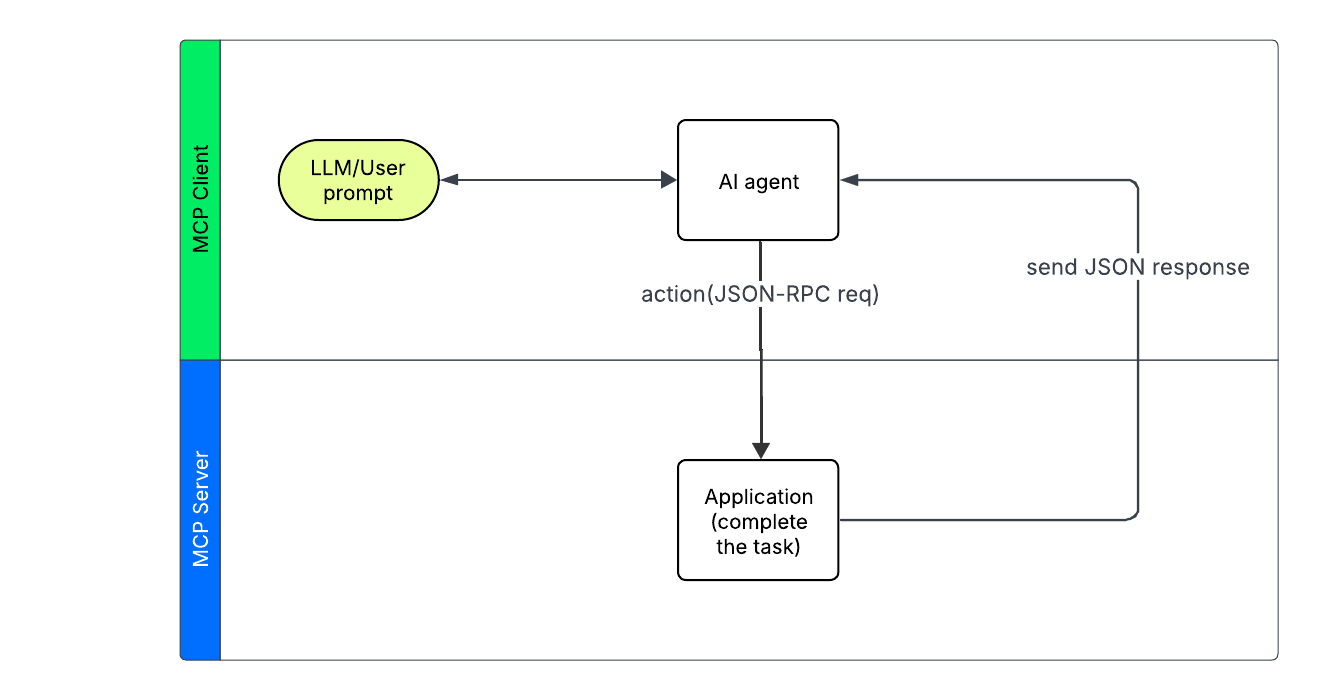
When a prompt tells an AI assistant to complete a task
The AI assistant reads the app’s MCP service description to see what actions are supported (like sendMessage, createEvent, or queryData).
It sends a JSON-RPC request to the MCP server describing the task it wants to complete.
The app completes the task and returns a JSON response, which may include a confirmation, data, or an error.
In short, MCP acts as a translator. It turns natural language requests into real-world actions through a structured, universal protocol.
What can AI agents do with MCP?
Thanks to seamless integration via the MCP ecosystem, agents can:
Share files and folders in Google Drive.
Manage code reviews and pull requests in GitHub.
Post updates or alerts to Slack channels.
Query databases like the MongoDB MCP Server using natural language.
These capabilities support context-rich AI applications that integrate with real-time workflows.
Why MCP is growing
MCP is still new, but momentum is building. For developers, using MCP means less time maintaining integrations. For teams, it means faster access to AI assistants that can actually do things.
Major technology companies, including OpenAI, Google DeepMind, and Microsoft, are starting to adopt MCP. Microsoft is partnering directly with Anthropic to create an official C# SDK. Platform providers across the ecosystem are implementing MCP as the standard method to streamline the connection between AI and real-world tools.
The rapid adoption of MCP across the industry demonstrates its potential as a universal standard:
November 2024: Anthropic open-sourced MCP, introducing a standardized protocol for connecting AI agents to external tools. Early support came from developers at Zed, Replit, Sourcegraph, Apollo, and Block, signaling early traction in the dev tooling ecosystem.
March 2025: OpenAI announced support for MCP across its products. MCP support became available in the OpenAI Agents SDK, with CEO Sam Altman confirming plans to add support for ChatGPT Desktop and the Responses API. However, specific timelines and beta phase details were not officially disclosed.
April 2025: Google DeepMind confirmed MCP support would be added to Gemini models and SDK but did not specify a timeline for implementation.
May 2025: MongoDB announced a public preview of its official MCP Server, making it easier for developers to interact with databases using natural language through AI tools.
This timeline shows how MCP evolved from an experimental protocol to an industry standard in just six months.
How MCP-powered AI systems work in real time
Let’s walk through how a single AI system can complete multiple real-world tasks, like sending a Slack message and scheduling a meeting, using Model Context Protocol.
Prompt:
“Send a Slack message to the #projects channel and schedule a team meeting next Tuesday.”
Here’s how that one natural language prompt becomes two completed actions:
Stage 1: The AI host processes your request
Your LLM (e.g., ChatGPT) receives the prompt and hands it off to the AI agent, which:
Parses the intent: Understands you want to post in Slack and schedule a meeting.
Identifies the tools needed: Slack and Calendar.
Breaks the request into actions: Creates specific function calls, like send_slack_message and create_calendar_event.
This planning happens entirely in the background. To you, it’s just one prompt.
Stage 2: The MCP client handles communication
The agent uses its MCP client to connect with both apps. It:
Discovers what each app can do through its MCP service description.
Queries available resources (e.g., calendar availability, Slack channels).
Sends action requests to the relevant MCP servers.
Processes responses, such as errors and confirmations.
Stage 3: The MCP servers execute the tasks
Each app (Slack and Calendar) has its own MCP server, which:
Translates the AI agent’s request into API calls the app understands.
Handles app-specific logic, like converting “next Tuesday” into a timestamp and formatting Slack messages.
Authenticates the action and completes it.
Returns a result—a calendar event, a Slack message ID, or an error message.
Stage 4: The apps carry out the tasks
With the requests translated and validated, the apps themselves take action:
The calendar app schedules the meeting.
Slack posts the message to the specified channel.
Each app sends a standard response (like a confirmation link or timestamp) back through the chain to the agent, and then to you.
Benefits and limitations of Model Context Protocol
From faster setup to streamlined maintenance, MCP offers real value. However, like any emerging standard, it comes with a few trade-offs that teams should keep in mind.
Benefits
Faster integration: Model Context Protocol dramatically reduces development time. Developers only need to make their tool MCP-compatible once. After that, it becomes discoverable by any AI agent that speaks the protocol. No custom integration is needed for each new pairing.
Easily scales: Unlike traditional point-to-point integrations, MCP uses a shared standard. If an app’s API changes, developers only need to update the MCP server, not every individual AI connection. That means less rework and fewer breakages.
Real-time context for LLMs: By connecting LLMs to live internal systems, Model Context Protocol enables AI to respond using real-time data, not just static prompts. Agents can take action or answer questions using up-to-date information from calendars, databases, or internal tools.
Solves the N×M problem: MCP replaces the need for building N×M custom integrations. One MPC server per tool can support many agents, making the architecture simpler, more sustainable, and easier to maintain as systems grow.
Limitations
Still in early development: Model Context Protocol is a fast-evolving standard that enhances the effectiveness of various AI tools. While adoption is growing, best practices and tooling are still catching up. Teams need to stay engaged with the ecosystem to follow updates and evolving guidance.
Security requires extra care: MCP enables agents to take real actions across systems, which introduces risk. Researchers have raised concerns about prompt injection, token leakage, and overly broad access permissions. Organizations should implement proper access controls, security auditing, and sandboxing of sensitive data before production deployment.
Setup still needs technical support: MCP is simpler than building custom APIs, but it’s not yet plug-and-play. Setting it up involves editing JSON files, running a lightweight server, and configuring permissions, which are tasks that typically require support from developers or IT teams.
Potential performance tradeoffs: Because MCP acts as a middle layer, it may introduce slight latency, especially in high-frequency workloads. With proper caching and request handling, these tradeoffs can be minimized, but they’re worth considering for real-time use cases.
What's next for Model Context Protocol
MCP adoption is accelerating, especially across enterprise tools, cloud platforms, and developer ecosystems. The open protocol is quickly evolving from an experimental idea into an essential infrastructure for AI-powered applications.
One protocol, thousands of tools
The real power of Model Context Protocol lies in its design. Once a server exists for a tool, any MCP-compatible AI agent can use it, with no custom code required. This means a single AI interface could soon tap into thousands of apps, platforms, and data sources through a standard protocol.
Recent and upcoming protocol updates include enhanced security frameworks already implemented in production deployments, Microsoft's C# SDK providing enterprise-grade tooling and governance controls; improved authentication and permission management systems; simplified setup processes that reduce technical barriers for non-developers; and native support in major AI platforms, including OpenAI's APIs and Google's development tools.
Future protocol updates are expected to bring:
Stronger security and authentication controls.
Easier configuration for non-technical users.
Enterprise-grade deployment support and governance tools.
MongoDB's leadership in Model Context Protocol
MongoDB announced its official MCP Server in May 2025, a major milestone for AI-driven database operations. This integration enables developers to query databases using natural language directly from AI-powered development environments like Windsurf, Cursor, VS Code, and Claude Desktop.
As one of the first major database platforms to offer an official MCP server, MongoDB is setting the standard for how developers interact with structured data in AI workflows. While community-built MongoDB MCP servers existed earlier, MongoDB's official implementation provides enterprise-grade features and support.
With MongoDB’s MCP Server, developers can:
Query complex data relationships using conversational language.
Receive real-time schema analysis and optimization suggestions.
Generate and run aggregation pipelines using natural language.
Perform maintenance tasks without leaving their development environment.
MongoDB's early adoption of MCP reflects broader industry recognition of the protocol's potential. Building on existing community MongoDB MPC servers, the official server provides enhanced security, enterprise support, and seamless integration with MongoDB Atlas, validating the protocol's enterprise readiness.
This capability removes long-standing barriers between coding and data management, making AI-powered development more accessible, efficient, and scalable.
For organizations considering MCP
If you're exploring how to integrate MCP into your AI strategy, start with the tools your team uses every day. Check the growing list of official and community-supported MCP servers; many popular platforms already have them.
For teams that rely heavily on databases, MongoDB’s MCP Server offers a straightforward starting point with seamless support for modern AI development environments. Many organizations begin by piloting a connection between an AI assistant and a core data source. MongoDB and PostgreSQL are two of the most popular starting points for database management systems.
Choosing tools that support MCP
As MCP adoption grows, AI platforms are starting to offer native support. When evaluating new tools or platforms, look for those that:
Offer built-in MCP support.
Can act as an MCP host or client.
Have a clear roadmap for continued protocol integration.
Leading options now include Claude Desktop, Cursor, Windsurf, VS Code with GitHub Copilot, Zed, Replit, and Codeium, all of which support or host MCP-based workflows today. OpenAI's models can now connect to MCP servers through their Responses API, while development platforms like Sourcegraph have integrated MCP for enhanced code intelligence.
Getting started with MCP today
For non-technical users: Start with Claude Desktop, which offers the most user-friendly MCP integration. Connect to pre-built servers, like Zapier MCP, for immediate access to thousands of applications, or use community-contributed servers for specific tools your team already uses.
For developers: Begin with the official SDKs; Python and TypeScript are the most mature, while Microsoft's C# SDK provides enterprise features. The MCP repository includes reference implementations for popular services, such as Google Drive, Slack, GitHub, and PostgreSQL.
For teams: Start with a single high-impact integration, such as connecting your AI assistant to your main database or project management tool. MongoDB's official MCP Server provides an excellent starting point for data-driven applications.
Enterprise adoption: Organizations should evaluate MCP alongside their existing API strategy. Thanks to vendor-neutral design, investments in MCP servers will work across multiple AI platforms as the ecosystem continues to expand.
Conclusion
Adopting MCP-compatible tools now gives you a head start in building smarter systems with new capabilities. MCP isn’t just another integration layer. It’s becoming the connective tissue between AI and the tools it needs to work with.
MCP is breaking down those silos at remarkable speed. With support from Microsoft, OpenAI, Google DeepMind, and hundreds of companies building MCP-compatible tools, the protocol is rapidly becoming the standard interface layer for AI applications.
Just as HTTP transformed isolated websites into the web, MCP is enabling AI to move beyond passive insight and become an active, connected participant in your workflows, data, and tools with the enterprise-grade reliability and vendor-neutral approach that modern businesses require.