Sometimes, we don’t need perfection — sometimes, “close enough” really is enough. This article will cover one of the most integral topics in search: fuzzy search. Fuzzy search is a way of sorting, searching, and understanding data to find those “close enoughs”. From not knowing the exact words in an email but needing to sift through messages, to finding a song when you know the genre but not the exact name, fuzzy search is a search technique that you most likely already use day to day.
Fuzzy Search Explained
What is meant by fuzzy match?
What differentiates fuzzy search from simple search? With exact matching, items must be identical to be considered a match. With fuzzy search, items can be varied with slight differences, but if they still fall into the same category, they’ll be considered a match.
Let’s say we are dealing with names and want to search Tim Cook (Timothy Cook), the CEO of Apple Inc. When searching, we have various options, such as “Tim Cook,” “Timothy Cook,” “T. Cook,” or even with a spelling error like “Yim Cook.” If these options are placed in an engine utilizing a fuzzy search algorithm, all variations would be recognized as being the exact same person. If placed into an engine using exact match, we may not find the Tim Cook we are looking for.
So, how exactly does fuzzy search work, and what is the technology behind this search function? These are questions that are answered below.
What is fuzzy match?
Now that we understand the basic concept of fuzzy search, let’s dive into understanding the incredibly closely related topic of fuzzy match. While the terms are sometimes used interchangeably, these two are slightly different processes. Fuzzy match is used in data management to find documents that are similar but have minor differences. The ultimate goal of fuzzy match is to link these slightly different documents together so that it’s apparent they refer to the same umbrella entity across either a single database or various linked databases. Fuzzy match is also referred to as approximate string matching as it uses an algorithm to navigate between data entries and provide a match score for the data at hand. Since this matching algorithm accounts for slight differences, spelling errors, and even missing words or letters, the match score will not be 100%, but the higher the score, the closer related the data is.
Example of fuzzy matching
The purpose of fuzzy matching is for results to be returned to the user while allowing for various possible options. An example of this can be seen in the diagram below:
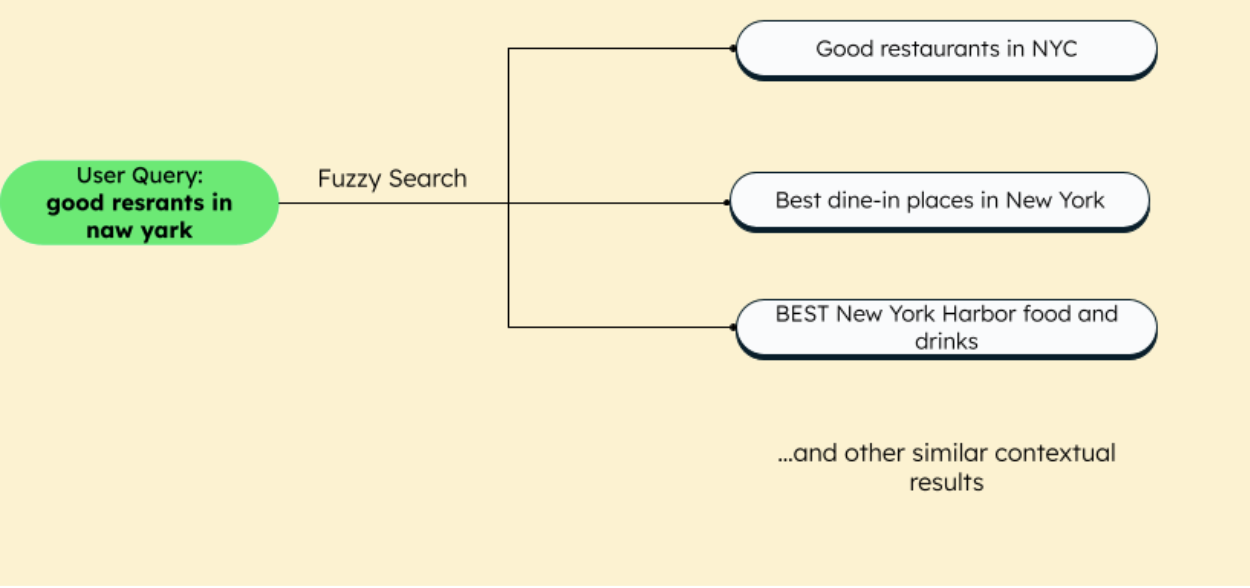
This example shows how even if you mess up a query while searching, such as “good restaurants in naw yark” instead of “good restaurants in New York,” the fuzzy match algorithm used in various search engines will automatically correct the search for you. Users will be able to find what they’re looking for even with spelling errors, wrong synonyms, case insensitivity, and intra-string matching. While it’s clear that not every result will be a perfect match, users will most likely still find a satisfactory outcome.
How does fuzzy match logic work?
Fuzzy matching works by actually calculating the similarity between two text strings. This is why fuzzy match is also known as approximate string matching. As defined above, the logic behind it helps identify terms that are more than likely the same despite potential minor differences like spelling or even word order variations. But how exactly does it work? Various algorithms can be used to calculate this similarity, but the one we are going to talk about in depth is called the Damerau-Levenshtein distance algorithm.
Damerau-Levenshtein distance
Before we can dive into the Damerau-Levenshtein algorithm, let’s first go over the basic Levenshtein distance algorithm so we have a solid foundation.
The Levenshtein algorithm measures the smallest number of insertions, deletions, and substitutions (also known as edits) to change one string into the other. An example of this can be done with the words “kitten” and “sitting”:
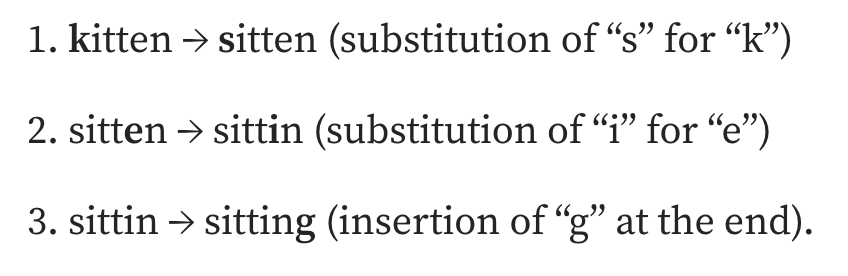
As you can see from the diagram above, three edits are necessary, at a minimum, to change the word “kitten” into the word “sitting.” Levenshtein only works with the edits of a single character. But what if we need to manipulate two adjacent characters? Damerau-Levenshtein comes into play. This transposition support, or the swapping of two adjacent characters, is what differentiates this algorithm from its basic foundation.
An example of this can be seen with the words “lead” and “deal.” With Damerau-Levenshtein, only one operation is necessary to take place, which is swapping, or transposing, “l” and “d.” A simple explanation of how this algorithm is calculated is that it’s done using a distance matrix that is populated with various values equal to the length of the strings, and you keep taking the minimum value until your matrix is filled out. MongoDB Atlas’ full-text search uses this algorithm for fuzzy search.
Features of fuzzy matching algorithms
A few common features of fuzzy matching algorithms are:
Typo tolerance
A good analyzer or fuzzy matching algorithm will have typo tolerance — i.e., tolerance toward typing mistakes done by the user. For example, if a user types in Naw Yark, and two mistakes are allowed, then the fuzzy logic will prefer results related to New York compared to Newark. Some other examples of typos can be missing letters, like Naw Yrk, extra letters, like Naew York, or mixed letters, like Nwe York.
Identify duplicates
Suppose a user purchases a membership card for a retail store, which their friends and family can also use. Each person refers to the same card using the ID and the name and gives a different spelling for the same name — let's say, “Eliza Adam,” “Elisa Adam,” “Elisha Adam,” “Aliza Adams,” and so on. A fuzzy matching algorithm consolidates these diverse variations to determine if they belong to the same entity, eliminating any duplicate entries.
Other search features that help in better user experience are:
- Synonyms: Words that have a similar meaning as that of the query text can be included as part of the search to provide a broader resultset. For example, a synonym of the word “Data science” could be “Machine learning,” so a user searching for data science may get results on machine learning too.
- Highlighting: The highlighted text in the result appears in bold and consists of keywords that match the search query terms in an exact or fuzzy manner.
- Faceting: Faceting organizes the search results under unique labels to improve viewing. For example, online retail shops often provide facets to filter data based on price, reviews, and other parameters.
MongoDB Atlas search for fuzzy match
With the traditional way of using fuzzy search in applications, it lends itself to a lot of infrastructure. An application utilizing this search method requires not only an operational database but a separate search engine as well, such as ElasticSearch.
In a traditional sense, if you were to use MongoDB as your database and a separate search engine for your queries, you would need two different setups for the same data. With MongoDB Atlas, all these features are integrated fully into Atlas itself, removing the need for extra infrastructure!
Atlas combines the capabilities of the transactional database with that of the search engine. So, with Atlas Search, you can perform the usual operational tasks plus the fuzzy matching search functionalities, all within a single system.

Having search and operational databases in a single system not only addresses the synchronization issues but also improves developer productivity — they just have to connect to Atlas and not worry about a new technology or stack! Also, the architecture is now much more simplified with the fully managed Atlas platform.
How does MongoDB Atlas Search work?
The Search feature is currently available exclusively on MongoDB Atlas. To enable search, you can simply create a search index on the selected data source and use the $search operator in the Atlas aggregation pipeline, with different options.
The incoming text data is first received by a query analyzer. MongoDB's built-in and custom analyzers process incoming data depending on the rules of a particular human language. MongoDB Atlas Search uses Lucene's standard analyzer by default. However, you can create a custom analyzer too. Analyzers perform the following tasks:
- Remove stop words like “and,” “if,” and “on” from the input text.
- Convert capitalized letters to lowercase.
- Remove punctuation.
- Analyze the input string.
During analysis, the analyzer gets to the root of a word by breaking it into several smaller tokens (stemming), so that its variations can also be considered for the result.
As of now, the various analyzers in MongoDB support about 40+ languages.
Features supported by MongoDB Atlas fuzzy search
Apart from fuzzy searching and typo tolerance, MongoDB Atlas Search supports the following features:
- Autocomplete and wild card (partial search): Text auto-completion and suggestions, for example, when you start typing “mo,” the search engine shows you all possible words starting with mo, like mongodb, moon, motor, movies, and so on.
- Case-insensitive text searching: As the analyzer lowercases the text, the search yields better results.
- Text highlighting: Usually, in search engine results, certain words are highlighted in bold. These highlighted terms may not precisely match the user's query. For instance, if you search for “Alan computer,” you might receive results related to Alan Turing or news/articles about him, with the original keywords “Alan” and “computer” being highlighted to insist upon the relevance of the results.
- Synonyms: Synonyms are words that have similar meanings — in our case, similar contextual meanings. For example, if you search “table,” the word might mean a piece of furniture, a yoga pose, an HTML tag, or a multiplication table depending on which domain you are using the word on. You can define domain-specific synonyms by creating synonym mappings for your application.
- Scoring and ranking: Scoring requires a lot of analysis of the query, based on the relevance, length of the words, and many other factors. Lucene, which comes as part of MongoDB Atlas Search, takes care of the scoring using the BM25 algorithm.
- Phrase searching: Unlike the individual terms, phrase searches for a particular phrase. For example, if you search for the movie title "Miss Bett," a $text or $regex search would also include other strings containing the words Miss and Bett, like “Miss Lulu Bett” or “Little Miss Marker.” The phrase operator will search for the exact order of words you are looking for — “Miss Bett,” “Miss Bett in the park,” or “Meeting Miss Bett.”
Why MongoDB Atlas Search
Using Atlas search provides many benefits. Since it is a part of the MongoDB Atlas data platform, you don't have to worry about reliability, data consistency, scalability, and future updates. You can use the powerful aggregation pipeline to customize search operations. Also, while database indexes improve read performance, there is a trade-off for write performance. However, creating a search index does not impact the cluster write performance. Lastly, as Atlas search uses inverted indexing (via Lucene), document retrieval is considerably faster than a regular search.
FAQs
Fuzzy matching is a technique that matches strings based on similarity rather than an exact match. A fuzzy matching algorithm ignores spelling errors, typos, and stop words and assigns similarity scores to strings to identify the proximity between them.
Exact search finds only exact matches of the user input query, whereas fuzzy searches consider similarity scoring to identify words similar to the query string. For example, if your query text is "Naw Yark," exact search would return nothing, while fuzzy search would return "New York," "New Year," or similar words.
Some examples of a fuzzy search are words that are misspelled, typing errors, or words without spaces, like "Restrants in New Yark," "Besst books of 2023," or "Howto plana weekend trip."
Get Started With MongoDB Atlas