A database is a system designed to store and organize data for quick retrieval. What started as a simple data storage solution has become the engine behind the applications, websites, and other systems we use every day. If you've tracked the delivery of an online purchase, received a digital receipt, streamed a movie, or updated your contact information in a mobile app, you were interacting with a database system.
Key takeaways
- A database stores and organizes data, making sure it’s quickly available to applications, websites, and users when requested.
- A database management system (DBMS) is a database software layer that manages the data in cloud databases or on-premises databases.
- Popular database categories include relational (SQL) and non-relational (NoSQL); the NoSQL category offers specialized types such as document, key-value, and vector databases
- The best type of database to use depends on what kind of data is stored—and why and how the data is retrieved.
Table of contents
- Why are databases important?
- What is a database used for?
- How does an app work with a database?
- What are the different types of databases?
- Conclusion: How to get started
- FAQs
- Related resources
Why are databases important?
Data management is critical to keeping data accurate and accessible. They are a source of truth for customer records, product catalogs, and transaction histories and control who can see, edit, or delete the data, and they allow multiple users to access data simultaneously. Cloud databases are especially popular because they allow teams to tap into existing infrastructure and scale without the overhead associated with an on-premises solution.
All databases are managed by a database management system (DBMS), the software that database administrators use to manage data in cloud databases, on-premises databases, or both. One of the most important features is how a DBMS protects data integrity through access rules, validation, and transaction controls, making sure the data stays accurate, consistent, and trustworthy.
What is a database used for?
Databases are used for various data processing operations, the most basic being the Create, Read, Update, and Delete (CRUD) operations.
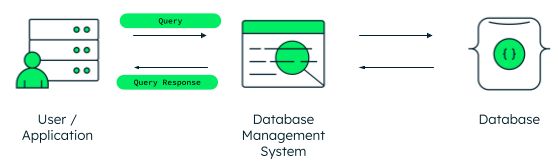
Applications use databases via programming language code to store or get the necessary data. For example, when you create an online profile on a social media platform, the data you provide is stored in a database for future use.
Some typical uses of a database are:
- Storing and retrieving different types of data.
- Performing aggregation, sorting, filtering, and other preprocessing operations for data analytics.
- Safely storing and persisting information for future use.
- Providing reliable and secure access to data.
- Defining the correlation between all the stored data.
How does an app work with a database?
To see what this looks like in practice, let's take a look at how Olivia interacts with her favorite shoe store's app.
When Olivia signs into the app on her tablet, she gets a customized experience that shows her profile, favorites, and past purchases. But her data does not live inside the app itself—it’s simply displayed there—pulled from a database.
Indexes offer quick access to specific data
When Olivia searches for "trail running shoes,” the results appear instantly even though the catalog in the database contains thousands of products. This quick retrieval is possible because the database searches an index instead of the entire database. An index is a small subset of data, similar to a table of contents in a book, that points to where the data is stored.
Learn more about indexes.
Access permissions control who can see the data
Olivia can update her own address and payment details in her app, but can't see another customer's account. A customer support agent can help Olivia with her order, but only if they have permission to do so. Access rules are enforced by the database itself, not the app—this helps prevent accidental or unauthorized changes. Access rules are a key part of data security. Database administrators set these access rules to control who can view, edit, or delete data.
Learn more about role-based access (RBAC).
Transaction rules protect each operation
When Olivia clicks "Order Now," the database treats payment, inventory update, and order confirmation as a single operation. If something fails mid-process, everything rolls back as if she never clicked the button. If Olivia’s transaction fails halfway through, the inventory is not touched and her payment is not processed. This all-or-nothing behavior is known as an ACID transaction.
Learn more about ACID properties.
Targeted requests deliver specific data
Olivia’s shipping status loads instantly when she taps "Track Package." Instead of searching through every order, the database knows exactly where to look based on her request and pulls only the information she asked for.
Learn more about database optimization.
What are the different types of databases?
Different types of databases use different data models, each emphasizing different strengths. Some are built for structure and accuracy, which is where relational databases excel. Others are built for flexibility, speed, or analyzing relationships. Even in Olivia's simple shopping journey, the app relies on more than one type of database to deliver a smooth experience.
Relational databases (SQL-based)
A relational database uses a data model that stores data in multiple connected tables. Each table contains one type of data and is connected to the others via shared fields.
For example:
- A products table holds the shoe name, price, and SKU.
- An inventory table tracks how many shoes are in stock.
- A shipping table stores regions and delivery rates.
- A tax table holds rates by state.
When Olivia places her order, an SQL-based database joins those tables together, matching her shipping address to the right tax rate, checking inventory for her size, and pulling the correct price. These joins are what makes the database relational.
TECH TIP
SQL (structured query language) is a programming language used by database administrators to manipulate data in relational databases. Users must follow its rigid rules to create tables, insert data, query records, update values, and delete data. It is the standard language for most relational database systems.
Learn more about relational databases.
Nonrelational databases (NoSQL databases)
Non-relational databases are sometimes referred to as “NoSQL,” which stands for Not Only SQL. Rather than relying on joins to bring related data together, data that’s used together is usually stored together in the same structure. Non-relational databases still use indexes for fast lookups. There are a few different types of non-relational databases and they vary slightly from one another.
For more information, read non-relational databases.
Document databases
Document databases are a type of non-relational (NoSQL) database and they store records in documents—there are no tables to connect data items like those found in relational databases. In Olivia’s experience, her record contains her address, size, color preferences, and purchase history. Her data can grow and change over time without adding or connecting tables or fields.
Olivia doesn't notice the difference between the types of databases used behind the scenes, but the development team building the app does:
- One record (document) contains all the needed data.
- New features—wishlists, loyalty programs, gift registries—can be added without redesigning the database.
- Each customer record stands alone—one customer can have one address, another four.
- Performance stays fast as the user base scales because it takes less time for the system to read one document than multiple joined tables.
TECH TIP
Document databases can store semi-structured data in JSON-like documents instead of the more rigid table and column schema relational databases require. MongoDB Atlas is a cloud database platform built on a document database designed to handle structured data, semi-structured data, and unstructured data.
Learn more about document databases.
Key-value databases
Key-value databases are often used to return small pieces of data instantly. They’re used when the task requires minimal, straightforward data. For example, Olivia adds three items to her cart, then closes the app. When she opens it later, her items are still in the cart.
Let’s take a closer look at how this works:
- Key: When Olivia re-opens her app, the app sends her user ID to the key-value database as a key.
- Value: The database matches that key to the stored value (the contents of her cart).
- Result: The cart is retrieved instantly because there were no tables, no joins, and no complex queries—just one simple request.
TECH TIP
Key-value databases are often used as the cache layer alongside the primary database, especially when speed matters more than real-time accuracy.
Learn more about key-value databases.
Vector databases
In vector databases, data gets converted into numerical codes, which are grouped according to meaning. Items with similar meanings have similar codes so when a user enters a query, the vector database finds the closest matches based on meaning—not exact keyword matches.
In Olivia’s experience:
- Query: She types in “cute hiking shoes for summer.”
- Vector match: Behind the scenes, this phrase is converted into one vector and the database compares that vector against vectors for all products that are semantically similar.
- Result: Even though Olivia didn’t get an exact match to her query, the vector database found relevant matches—lightweight trail runners, breathable hiking sneakers, summer-ready outdoor shoes—because it understood what she meant.
Vector search is semantic search because it’s based on meaning, not exact word matching.
TECH TIP
MongoDB Atlas includes vector search, which powers artificial intelligence (AI) features like retrieval-augmented generation (RAG), and it converts unstructured data like images, text, and audio, into searchable vectors.
Learn more about vector databases.
There are also specialized data models and legacy systems for specific needs. Hierarchical databases store data in parent-child tree structures. Network databases use flexible webs of connections rather than strict trees. Object oriented databases store data as objects, similar to object oriented programming. Distributed databases spread data across multiple physical locations for availability and performance. Other options include data warehouses for data analytics, in memory databases for ultra-fast access, and column-family stores for large-scale data processing.
For a full breakdown of the most common database types, explore our in-depth article on types of databases.
Conclusion: How to get started
Databases are where your data lives—and the apps, systems, and websites you access are just the vessel. But databases don’t just store data, they protect it, organize it, and serve it to multiple systems upon request. Databases are the engines that fuel the apps and convenient systems we rely on today. AI-powered features will continue to dominate how we search and interact with data—and databases—in the future.
If you're experimenting or learning, many platforms offer free databases suitable for prototypes and early-stage projects. Get started with a free MongoDB Atlas cluster—no credit card required.