Overview
El SDK de Realm permite múltiples Los usuarios deben iniciar sesión simultáneamente en una aplicación en un navegador determinado. Las aplicaciones cliente de Realm se ejecutan en el contexto de un solo usuario activo, incluso si varios usuarios inician sesión simultáneamente. Puede cambiar rápidamente entre usuarios autenticados sin necesidad de que vuelvan a iniciar sesión.
Importante
Any logged in user may become the active user without re-authenticating. Depending on your app, this may be a security vulnerability. For example, a user on a shared browser may switch to a coworker's logged in account without providing their credentials or requiring their explicit permission. If your application requires stricter authentication, avoid switching between users and prefer to explicitly log the active user out before authenticating another user.
User Account States
Cuando un usuario inicia sesión por primera vez a través de un SDK de Realm en un navegador, este guarda su información y registra su estado. Los datos del usuario permanecen en el almacenamiento local, incluso si cierra sesión, a menos que lo elimine activamente o borre los datos del navegador.
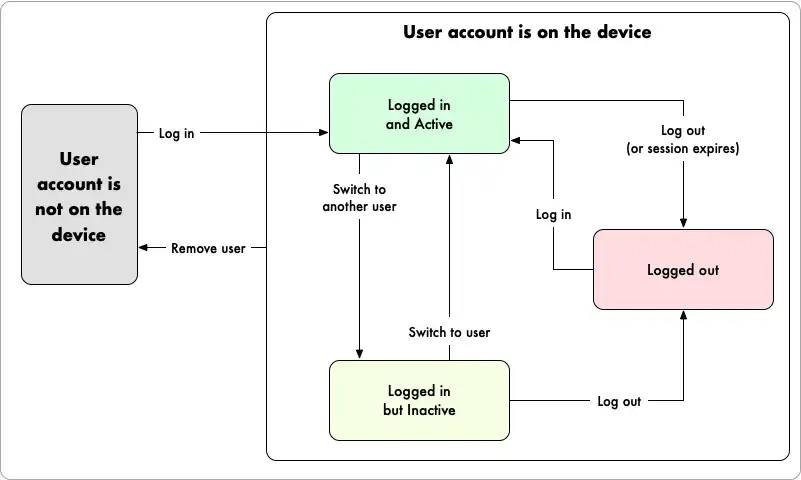
Los siguientes estados describen a un usuario rastreado en cualquier momento:
Autenticado: cualquier usuario que haya iniciado sesión en el navegador y no haya cerrado sesión o se le haya revocado la sesión.
Active: a single authenticated user that is currently using the app on a given browser. The SDK associates this user with outgoing requests and Atlas App Services evaluates data access permissions and runs functions in this user's context. See active user for more information.
Inactivo: todos los usuarios autenticados que no son el usuario activo actual. Puede cambiar el usuario activo a inactivo en cualquier momento.
Logged Out: any user that authenticated on the browser but has since logged out or had its session revoked.
The following diagram shows how users within a Realm client app transition between states when certain events occur:

Agregar un nuevo usuario a un dispositivo
El SDK de Realm guarda automáticamente los datos del usuario en el almacenamiento local del navegador cuando inicia sesión por primera vez en ese navegador. Cuando un usuario inicia sesión, inmediatamente se convierte en el usuario activode la aplicación.
// Register Joe const joeEmail = "joe@example.com"; const joePassword = "passw0rd"; await app.emailPasswordAuth.registerUser({ email: joeEmail, password: joePassword, }); // Log in as Joe const joeCredentials = Realm.Credentials.emailPassword( joeEmail, joePassword ); const joe = await app.logIn(joeCredentials); // The active user is now Joe console.assert(joe.id === app.currentUser.id); // Register Emma const emmaEmail = "emma@example.com"; const emmaPassword = "passw0rd"; await app.emailPasswordAuth.registerUser({ email: emmaEmail, password: emmaPassword, }); // Log in as Emma const emmaCredentials = Realm.Credentials.emailPassword( emmaEmail, emmaPassword ); const emma = await app.logIn(emmaCredentials); // The active user is now Emma, but Joe is still logged in console.assert(emma.id === app.currentUser.id);
List All On-Device Users
Puede acceder a una lista de todas las cuentas de usuario asociadas con el navegador. Esta lista incluye todos los usuarios que han iniciado sesión en la aplicación del cliente, independientemente de si están actualmente autenticados.
// Get an object with all Users, where the keys are the User IDs for (const userId in app.allUsers) { const user = app.allUsers[userId]; console.log( `User with id ${user.id} is ${ user.isLoggedIn ? "logged in" : "logged out" }` ); }
Switch the Active User
Puedes cambiar rápidamente usuario activo de la aplicación a otro usuario con sesión iniciada en cualquier momento.
// Get some logged-in users const authenticatedUsers = Object.values(app.allUsers).filter( (user) => user.isLoggedIn ); const user1 = authenticatedUsers[0]; const user2 = authenticatedUsers[1]; // Switch to user1 app.switchUser(user1); // The active user is now user1 console.assert(app.currentUser.id === user1.id); // Switch to user2 app.switchUser(user2); // The active user is now user2 console.assert(app.currentUser.id === user2.id);
Remove a User from the Device
You can remove all information about a user from the browser and automatically log the user out.
// Remove the current user from the device const user = app.currentUser; await app.removeUser(user); // The user is no longer the active user if (app.currentUser) { // The active user is now the logged in user (if there still is one) that was // most recently active console.assert(user.id !== app.currentUser.id); } // The user is no longer on the device console.assert( Object.values(app.allUsers).find(({ id }) => id === user.id) === undefined );