Overview
Atlas Device SDK for Swift enables you to build iOS, macOS, tvOS, and watchOS applications using either the Swift or Objective-C programming languages. This page details how to install the SDK in your project and get started.
Requisitos previos
Before getting started, ensure your development environment meets the following prerequisites:
Su proyecto utiliza una versión de Xcode y una versión mínima del sistema operativo que figuran en la Sección desoporte del sistema operativo de esta página.
La reflexión está habilitada en tu proyecto. El SDK de Swift utiliza la reflexión para determinar las propiedades de tu modelo. Tu proyecto no debe configurar
SWIFT_REFLECTION_METADATA_LEVEL = none, o el SDK no puede ver las propiedades de su modelo. Reflection está habilitado de forma predeterminada si su proyecto no define específicamente un nivel para esta configuración.
Instalación
You can use SwiftPM, CocoaPods, or Carthage to add the Swift SDK to your project.
Tip
Atlas Device SDK and Realm
The SDK uses Realm Core database for device data persistence. When you install the Swift SDK, the package names reflect Realm naming.
Especificar opciones
En las opciones del realm-swift paquete, recomendamos configurar Dependency Rule Up to Next Major Versionen e ingresar la versión actual del SDK de Realm Swift. Luego, haga clic Add Package en.
(Opcional) compilar RealmSwift como un framework dinámico
Para usar el Manifiesto de Privacidad proporcionado por el SDK, cree RealmSwift como un marco dinámico. Si crea RealmSwift como un marco estático, debe proporcionar su propio Manifiesto de Privacidad.
Para construir RealmSwift como un marco dinámico:
En tu proyecto Targets, seleccione su objetivo de compilación.
Vaya a la pestaña General.
Expand the Frameworks and Libraries element.
Para el marco
RealmSwift, cambie la opción Embed de "No incrustar" a "Incrustar y firmar".
Now, Xcode builds RealmSwift dynamically, and can provide the SDK-supplied Privacy Manifest.
If you are installing with CocoaPods, you need CocoaPods 1.10.1 or later.
Agrega el SDK como dependencia en tu Podfile
Add the line pod 'Realm', '~>10' to your main and test targets.
Add the line use_frameworks! as well if it is not already there.
When done, your Podfile should look something like this:
# Uncomment the next line to define a global platform for your project # platform :ios, '11.0' target 'MyDeviceSDKProject' do # Comment the next line if you don't want to use dynamic frameworks use_frameworks! # Pods for MyDeviceSDKProject pod 'Realm', '~>10' target 'MyRealmProjectTests' do inherit! :search_paths # Pods for testing pod 'Realm', '~>10' end end
Agrega la línea use_frameworks! si aún no está allí.
Add the line pod 'RealmSwift', '~>10' to your main and test targets.
When done, your Podfile should look something like this:
platform :ios, '12.0' target 'MyDeviceSDKProject' do # Comment the next line if you don't want to use dynamic frameworks use_frameworks! # Pods for MyDeviceSDKProject pod 'RealmSwift', '~>10' end
If you are installing with Carthage, you need Carthage 0.33 or later.
Agregue el SDK como una dependencia en su Cartfile
Add the SDK as a dependency by appending the line github
"realm/realm-swift" to your Cartfile.
Puedes crear un Cartfile o añadirlo a uno existente ejecutando el siguiente comando en el directorio de tu proyecto:
echo 'github "realm/realm-swift"' >> Cartfile
Agrega los marcos a tu proyecto
Carthage places the built dependencies in the Carthage/Build directory.
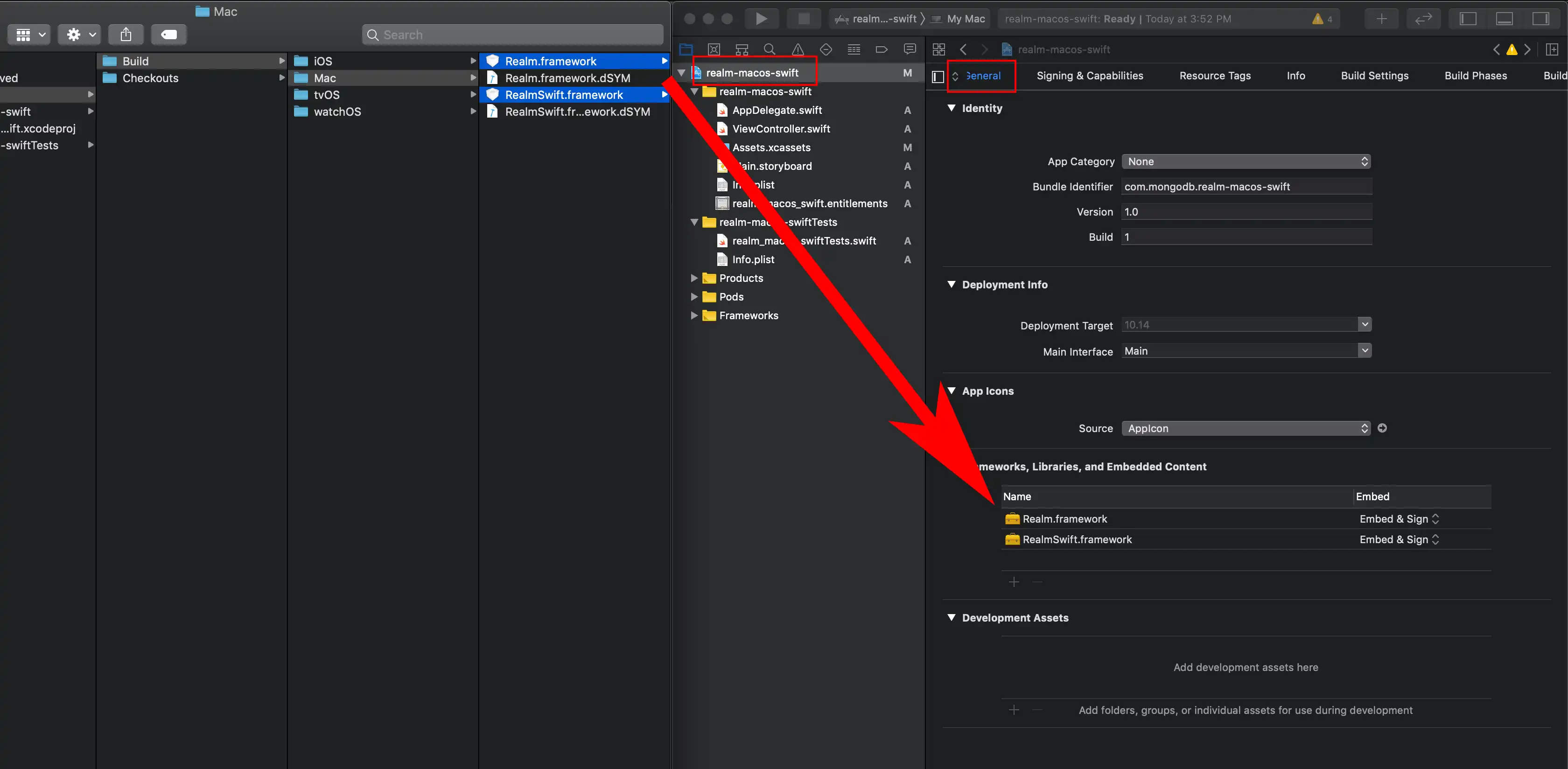
Abre el archivo xcodeproj de tu proyecto en Xcode. Ve al panel Panel de navegación de proyectos y haz clic en el nombre de tu aplicación para abrir el editor de configuración del proyecto. Selecciona la pestaña General.
In Finder, open the Carthage/Build/ directory. Drag the RealmSwift.xcframework and Realm.xcframework files found in that directory to the Frameworks,
Libraries, and Embedded Content section of your project's General settings.

Download and Extract the Framework
Download the latest release of the Swift SDK and extract the zip.
Tip
If using the Objective-C API within a Swift project, we recommend you include both Realm Swift and Realm Objective-C in your project. Within your Swift files, you can access the Swift API and all required wrappers. Using the RealmSwift API in mixed Swift/Objective-C projects is possible because the vast majority of RealmSwift types are directly aliased from their Objective-C counterparts.
Import the SDK
Tip
Atlas Device SDK and Realm
The SDK uses Realm Core database for device data persistence. When you import the Swift SDK, the package names reflect Realm naming.
Agrega la siguiente línea en la parte superior de los archivos fuente para utilizar el SDK:
import RealmSwift
Tamaño del archivo de descarga de la aplicación
The SDK should only add around 5 to 8 MB to your app's download size. The releases we distribute are significantly larger because they include support for the iOS, watchOS and tvOS simulators, some debug symbols, and bitcode, all of which are stripped by the App Store automatically when apps are downloaded.
Solución de problemas
If you have build issues after using one of these methods to install the SDK, see our troubleshooting guidelines for information about resolving those issues.
Soporte del sistema operativo
Importante
There are special considerations when using the SDK with tvOS. See Build for tvOS for more information.
Xcode 15
Changed in version 10.50.0: Minimum required Xcode version is 15.1
Supported OS | Realm | Atlas App Services |
|---|---|---|
iOS 12.0+ | X | X |
macOS 10.14+ | X | X |
tvOS 12.0+ | X | X |
watchOS 4.0+ | X | |
visionOS 1.0+ | X | X |
Xcode 14
Cambiado en la 10.50.0 versión: Se eliminó el soporte para Xcode.14
Versión del SDK de Swift 10.50.0 descarta el soporte para Xcode 14. Para la versión10.49.3 y anteriores, se aplican estos requisitos de Xcode 14:
Xcode version 14.1 or higher.
When using Xcode 14, a target of iOS 11.0 or higher, macOS 10.13 or higher, tvOS 11.0 or higher, or watchOS 4.0 or higher.
Swift Concurrency Support
El SDK de Swift es compatible con las funciones de concurrencia del lenguaje Swift. Para conocer las prácticas recomendadas sobre el uso de las funciones de concurrencia del SDK de Swift, consulte la documentación a continuación.
Soporte asíncrono/Await
Starting with Realm Swift SDK Versions 10.15.0 and 10.16.0, many of the Realm APIs support the Swift async/await syntax. Projects must meet these requirements:
Versión del SDK de Swift | Swift Version Requirement | Supported OS |
|---|---|---|
10.25.0 | Swift 5.6 | iOS 13.x |
10.15.0 o 10.16.0 | Swift 5.5 | iOS 15.x |
If your app accesses Realm in an async/await context, mark the code with @MainActor to avoid threading-related crashes.
For more information about async/await support in the Swift SDK, refer to Swift Concurrency: Async/Await APIs.
Soporte de actor
El Swift SDK soporta instancias Realm aisladas por actor. Para obtener más información, consulta Usar Realm con Actores - Swift SDK.
Apple Privacy Manifest
Cambiado en la versión 10.49.3: Compile RealmSwift como un marco dinámico para incluir el Manifiesto de privacidad.
Apple requiere que las aplicaciones que utilizan RealmSwift proporcionen un manifiesto de privacidad que contenga detalles sobre las prácticas de colección y uso de datos del SDK. El archivo de manifiesto incluido debe incluirse al enviar nuevas aplicaciones o actualizaciones de aplicaciones a la App Store. Para obtener más detalles sobre los requisitos de Apple, consulta Próximos requisitos para SDKs de terceros en el sitio web de Apple Developer.
Starting in Swift SDK version 10.46.0, the SDK ships with privacy manifests for Realm and RealmSwift. Each package contains its own privacy manifest with Apple's required API disclosures and the reasons for using those APIs.
Puedes ver los manifiestos de privacidad en cada paquete o en el repositorio de GitHub realm-swift:
Realm: https://github.com/realm/realm-swift/blob/master/Realm/PrivacyInfo.xcprivacyRealmSwift: https://github.com/realm/realm-swift/blob/master/RealmSwift/PrivacyInfo.xcprivacy
To include these manifests in a build target that uses RealmSwift, you must build RealmSwift as a dynamic framework. For details, refer to the Swift Package Manager Installation instructions step (Optional) Build RealmSwift as a Dynamic Framework.
The Swift SDK does not include analytics code in builds for the App Store. The SDK does not log into Atlas on its own behalf.
Si escribes una aplicación que use cualquier función de App Services, como inicializar un cliente de App para:
Es posible que deba agregar declaraciones adicionales al manifiesto de privacidad de su aplicación detallando sus prácticas de colección y uso de datos al utilizar estas API.
For more information, refer to Apple's Privacy manifest files documentation.