This page describes how to manage multiple Atlas App Services users within a single device using the Kotlin SDK. To learn how to authenticate and log in users to a client app, refer to Create and Authenticate Users - Kotlin SDK.
Realm allows multiple users to be logged in to an app simultaneously on a given device. Realm client applications run in the context of a single active user even if multiple users are logged in simultaneously. There can only be one active user at a time, and the active user is is associated with all outgoing requests.
Cuentas de usuario
Una cuenta de usuario representa un usuario único y distinto de su aplicación. App Services crea una cuenta única asociada. User objeto cuando un usuario se autentica e inicia sesión correctamente en una aplicación en un dispositivo. Tras el inicio de sesión, el SDK guarda la información del usuario y realiza un seguimiento de su estado en el dispositivo. Estos datos permanecen en el dispositivo, incluso si el usuario cierra sesión, a menos que lo elimine activamente del dispositivo. Para obtener más información sobre los usuarios y las cuentas de usuario de App Services, consulte Cuentas de usuario en la documentación de App Services.
Estados de usuario
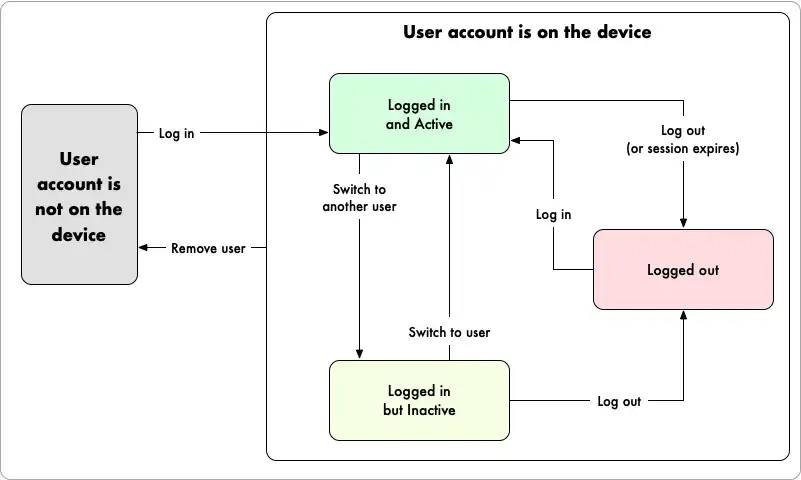
El posible estado de un usuario en un dispositivo determinado se representa en el SDK de Kotlin mediante el enum user.state. Una cuenta de usuario puede estar LOGGED_OUT, LOGGED_IN o REMOVED. A continuación se describe cómo estos estados se corresponden con un usuario en el dispositivo en cualquier momento:
Logged In: any authenticated user that has logged in on the device and has not logged out or had its session revoked. The
user.stateisLOGGED_IN. A logged-in user can be either:Active: a single authenticated user that is currently using the app on a given device. The SDK associates this user with outgoing requests, and Atlas App Services evaluates data access permissions and runs functions in this user's context.
Inactive: all authenticated users that are not the current active user.
Logged Out: any user that authenticated on the device but has since logged out or had its session revoked. The
user.stateisLOGGED_OUT.Removed: any user that has been actively removed from the device. The SDK logs the user out of the app and removes all information about the user from the device. The user must re-authenticate to use the app again. The
user.stateisREMOVED.

Agregar un nuevo usuario al dispositivo
The Realm SDK automatically adds users to a device when they log in for the first time on that device. After a user successfully logs in, they immediately become the application's active user.
In the following example, Joe logs in to the app and becomes the active user. Then, Emma logs in and replaces Joe as the active user:
val app = App.create(YOUR_APP_ID) // Replace with your App ID runBlocking { // Log in as Joe val joeCredentials = Credentials.emailPassword(joeEmail, joePassword) try { val joe = app.login(joeCredentials) // The active user is now Joe val user = app.currentUser Log.v("Successfully logged in. User state: ${joe.state}. Current user is now: ${user?.id}") assertEquals(joe, user) } catch (e: Exception) { Log.e("Failed to log in: ${e.message}") } // Log in as Emma val emmaCredentials = Credentials.emailPassword(emmaEmail, emmaPassword) try { val emma = app.login(emmaCredentials) // The active user is now Emma val user = app.currentUser Log.v("Successfully logged in. User state: ${emma.state}. Current user is now: ${user?.id}") assertEquals(emma, user) } catch (e: Exception) { Log.e("Failed to log in: ${e.message}") } }
Successfully logged in. User state: LOGGED_IN. Current user is now: 65133e130075a51f12a9e635 Successfully logged in. User state: LOGGED_IN. Current user is now: 65133e1357aaf22529343c1b
Retrieve Active User
You can retrieve the current active user using App.currentUser. If multiple users are logged in, this returns the last valid user that logged in to the device. This method returns null if there are no logged-in users.
val user = app.currentUser
Para obtener más información, consulta Recupera el usuario actual.
Listar todos los usuarios del dispositivo
You can access a map of all known user accounts that are stored on the device using the app.allUsers() method. This method returns all users that have logged in to the client app on a given device regardless of whether they are currently authenticated (the user.state is LOGGED_IN or LOGGED_OUT).
In the following example, the SDK returns both Emma and Joe's user.id:
// Get all known users on device val allUsers = app.allUsers() for ((key) in allUsers) { Log.v("User on Device $device: $key") }
User on Device 651330cebe1d42b24b8d510f: 65133e1357aaf22529343c1b User on Device 651330cebe1d42b24b8d510f: 65133e130075a51f12a9e635
Log a User Out
You can log a logged-in user out of an app using the user.logOut() method. Once logged out, the user is still stored on the device but must log back in to use the app.
In the following example, Joe is currently logged-in as the current user. After we log Joe out of the app, we confirm that he is still stored on the device as a user and that Emma is now the current user:
try { joe.logOut() Log.v("Successfully logged out user. User state: ${joe.state}. Current user is now: ${app.currentUser?.id}") } catch (e: Exception) { Log.e("Failed to log out: ${e.message}") } val joeIsAUser = app.allUsers().containsKey(joe.id) assertTrue(joeIsAUser)
Successfully logged out user. User state: LOGGED_OUT. Current user is now: 65133e1357aaf22529343c1b
For more information on logging a user in and out of an app, refer to Create and Authenticate Users - Kotlin SDK.
Remove a User from the Device
You can actively remove a user, and all information about that user, from a device using user.remove(). Once removed, the user must re-authenticate to use the app again. This does not delete the User object from the App Services App.
En el siguiente ejemplo, Emma es la usuaria actualmente (y la única) con sesión iniciada en el dispositivo. Después de removerla, confirmamos que Emma ha sido removida del dispositivo y que no hay un usuario actual, ya que Joe sigue con la sesión cerrada:
assertEquals(emma, app.currentUser) try { emma.remove() Log.v("Successfully removed user. User state: ${emma.state}. Current user is now: ${app.currentUser?.id}") } catch (e: Exception) { Log.e("Failed to remove user: ${e.message}") } val emmaIsAUser = app.allUsers().containsKey(emma.id) assertFalse(emmaIsAUser)
Successfully removed user. User state: REMOVED. Current user is now: null
For more information on removing and deleting users, refer to Remove a User.