New in version 1.11.0.
Geospatial data, or "geodata", specifies points and geometric objects on the Earth's surface.
Kotlin SDK version 1.11.0 and later adds experimental geospatial APIs that support querying with geospatial data. These queries can check whether a given point is contained within a shape. For example, you can find all coffee shops within 15 km of a specified point.
Changed in version 1.13.0: Geospatial data supported in Atlas Device Sync
Kotlin SDK version 1.13.0 and later adds support for geospatial data in Atlas Device Sync. This allows you to subscribe to geospatial queries in a synced realm. If you try to subscribe to a geospatial query with an older version of the SDK, you will receive a server error with a compensating write.
For more information about managing your Sync subscriptions, refer to Manage Sync Subscriptions - Kotlin SDK.
Para obtener más información sobre cómo consultar datos geoespaciales con Device Sync, consulte Datos geoespaciales en la documentación de App Services.
Geospatial Data Types
The Kotlin SDK supports geospatial queries using the following data types:
GeoPoint
GeoCírculo
GeoBox
GeoPolígono
El SDK proporciona estos tipos de datos geoespaciales para simplificar la consulta de datos geoespaciales. No se pueden guardar estos tipos de datos directamente.
For information on how to persist geospatial data, refer to the Persist Geospatial Data section on this page.
GeoPoint
Un GeoPunto define una ubicación específica en la superficie terrestre. Todos los tipos de datos geoespaciales utilizan GeoPoints
para definir su ubicación.
GeoCírculo
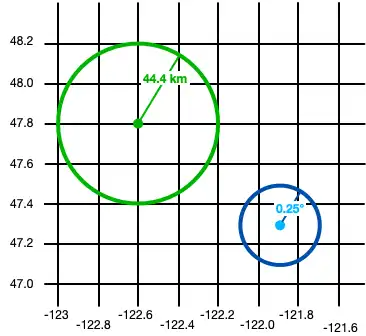
Un GeoCircle define un círculo en la superficie de la Tierra. Defines un GeoCircle proporcionando un GeoPoint para el centro del círculo y un objeto Distance para especificar el radio del círculo.
Nota
You can define the radius in kilometers, miles, degrees, or radians.
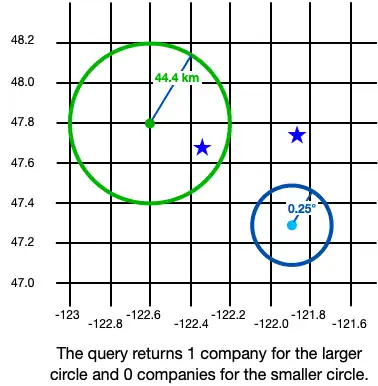
El siguiente ejemplo crea 2 círculos:
val circle1 = GeoCircle.create( center = GeoPoint.create(47.8, -122.6), radius = Distance.fromKilometers(44.4) ) val circle2 = GeoCircle.create( center = GeoPoint.create(47.3, -121.9), radius = Distance.fromDegrees(0.25) )

GeoBox
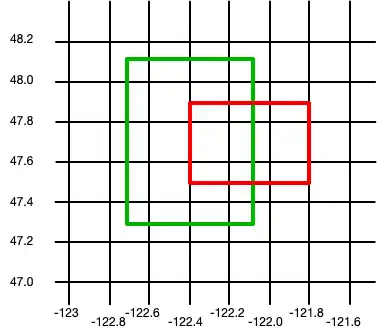
Un GeoBox define un rectángulo sobre la superficie terrestre. Definis el rectángulo especificando la esquina inferior izquierda (sudoeste) y la esquina superior derecha (noreste).
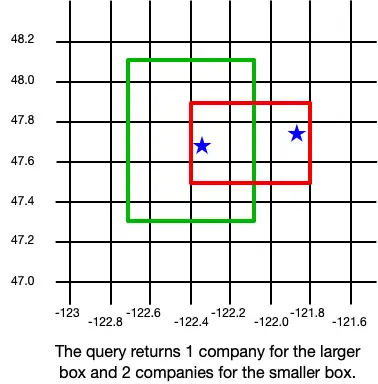
El siguiente ejemplo crea 2 cajas:
val box1 = GeoBox.create( bottomLeft = GeoPoint.create(47.3, -122.7), topRight = GeoPoint.create(48.1, -122.1) ) val box2 = GeoBox.create( bottomLeft = GeoPoint.create(47.5, -122.4), topRight = GeoPoint.create(47.9, -121.8) )

GeoPolígono
Un GeoPolígono define un polígono en la superficie de la Tierra.
Because a polygon is a closed shape, you must provide a minimum of 4 points: 3 points to define the polygon's shape and a fourth to close the shape.
Importante
The fourth point in a polygon must be the same as the first point.
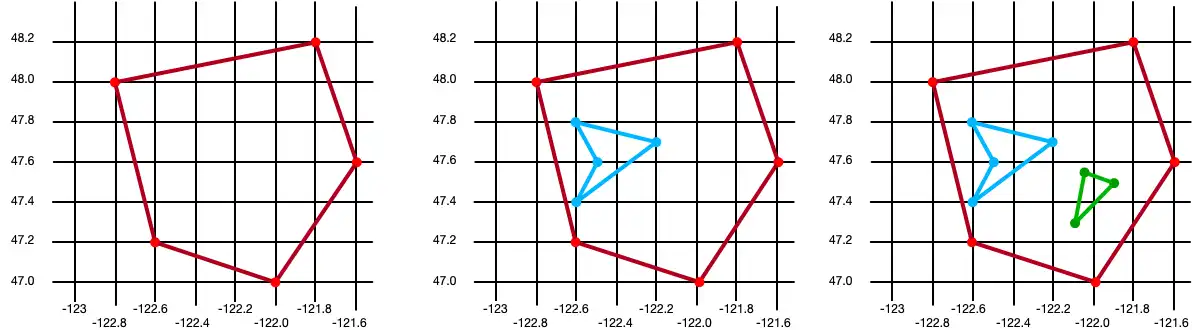
También puedes excluir áreas dentro de un polígono definiendo uno o más «agujeros». Un agujero es otro polígono cuyas fronteras encajan completamente dentro del polígono exterior. Los agujeros también pueden anidarse unos dentro de otros. Una ubicación se considera dentro del polígono si está incluida en un número impar de anillos.
The following example creates 3 polygons:
A basic polygon with 5 points
The same polygon with a single hole
The same polygon with two holes
// Create a basic polygon val basicPolygon = GeoPolygon.create( listOf( GeoPoint.create(48.0, -122.8), GeoPoint.create(48.2, -121.8), GeoPoint.create(47.6, -121.6), GeoPoint.create(47.0, -122.0), GeoPoint.create(47.2, -122.6), GeoPoint.create(48.0, -122.8) ) ) // Create a polygon with a single hole val outerRing = listOf( GeoPoint.create(48.0, -122.8), GeoPoint.create(48.2, -121.8), GeoPoint.create(47.6, -121.6), GeoPoint.create(47.0, -122.0), GeoPoint.create(47.2, -122.6), GeoPoint.create(48.0, -122.8) ) val hole1 = listOf( GeoPoint.create(47.8, -122.6), GeoPoint.create(47.7, -122.2), GeoPoint.create(47.4, -122.6), GeoPoint.create(47.6, -122.5), GeoPoint.create(47.8, -122.6) ) val polygonWithOneHole = GeoPolygon.create(outerRing, hole1) // Add a second hole to the polygon val hole2 = listOf( GeoPoint.create(47.55, -122.05), GeoPoint.create(47.5, -121.9), GeoPoint.create(47.3, -122.1), GeoPoint.create(47.55, -122.05) ) val polygonWithTwoHoles = GeoPolygon.create(outerRing, hole1, hole2)

Persist Geospatial Data
Importante
Cannot Persist Geospatial Data Types
Actualmente, solo se pueden persistir datos geoespaciales. Los tipos de datos geoespaciales no pueden persistirse directamente. Por ejemplo, no se puede declarar una propiedad que sea del tipo GeoBox.
Estos tipos solo pueden utilizarse como argumentos para consultas geoespaciales.
Si desea conservar datos geoespaciales, deben cumplir con la especificación GeoJSON.
To do this with the Kotlin SDK, you can create a GeoJSON-compatible embedded class that you can then use in your data model.
Create a GeoJSON-Compatible Class
To create a class that conforms to the GeoJSON spec, you:
Crea un objeto de reino incrustado (una clase que hereda de EmbeddedRealmObject).
At a minimum, add the two fields required by the GeoJSON spec:
Un campo de tipo
Stringpropiedad que se asigna a una propiedadtypecon el valor de"Point":var type: String = "Point"A field of type
RealmList<Double>that maps to acoordinatesproperty in the realm schema containing a latitude/longitude pair:var coordinates: RealmList<Double> = realmListOf()
The following example shows an embedded class named CustomGeoPoint that is used to persist geospatial data:
class CustomGeoPoint : EmbeddedRealmObject { constructor(latitude: Double, longitude: Double) { coordinates.apply { add(longitude) add(latitude) } } // Empty constructor required by Realm constructor() : this(0.0, 0.0) // Name and type required by Realm var coordinates: RealmList<Double> = realmListOf() // Name, type, and value required by Realm private var type: String = "Point" var latitude: Double get() = coordinates[1] set(value) { coordinates[1] = value } var longitude: Double get() = coordinates[0] set(value) { coordinates[0] = value } }
Use the Embedded Class
Use the customGeoPoint class in your realm model, as shown in the following example:
class Company : RealmObject { var _id: ObjectId = ObjectId() var location: CustomGeoPoint? = null }
You can then add instances of your class to the realm:
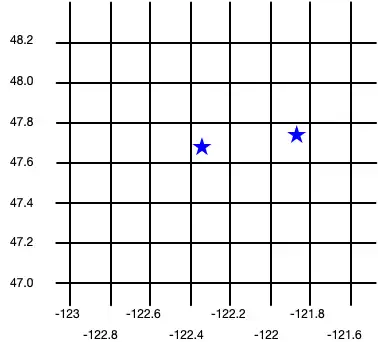
realm.writeBlocking { copyToRealm( Company().apply { location = CustomGeoPoint(47.68, -122.35) } ) copyToRealm( Company().apply { location = CustomGeoPoint(47.9, -121.85) } ) }
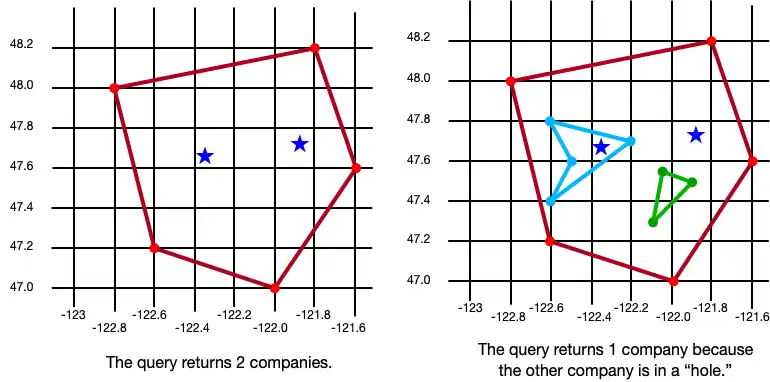
La siguiente imagen muestra los resultados de crear estos dos objetos Company :

Query datos geoespaciales
To query against geospatial data, you can use the GEOWITHIN operator with RQL. This method takes the coordinates property of an embedded object and checks if that point is contained within the geospatial shape for that object.
The format for querying geospatial data is the same, regardless of the shape of the geodata region.
Importante
You cannot use parameterized queries with geospatial data.
The following examples show querying against various shapes to return a list of companies within the shape.
GeoCírculo
val companiesInLargeCircle = realm.query<Company>("location GEOWITHIN $circle1").find() println("Companies in large circle: ${companiesInLargeCircle.size}") val companiesInSmallCircle = realm.query<Company>("location GEOWITHIN $circle2").find() println("Companies in small circle: ${companiesInSmallCircle.size}")
Companies in large circle: 1 Companies in small circle: 0

GeoBox
val companiesInLargeBox = realm.query<Company>("location GEOWITHIN $box1").find() println("Companies in large box: ${companiesInLargeBox.size}") val companiesInSmallBox = realm.query<Company>("location GEOWITHIN $box2").find() println("Companies in small box: ${companiesInSmallBox.size}")
Companies in large box: 1 Companies in small box: 2

GeoPolígono
val companiesInBasicPolygon = realm.query<Company>("location GEOWITHIN $basicPolygon").find() println("Companies in basic polygon: ${companiesInBasicPolygon.size}") val companiesInPolygonWithHoles = realm.query<Company>("location GEOWITHIN $polygonWithTwoHoles").find() println("Companies in polygon with holes: ${companiesInPolygonWithHoles.size}")
Companies in basic polygon: 2 Companies in polygon with holes: 1