This page describes how to query and lazily read objects persisted in a database with the Atlas Device SDK for Kotlin. This lazy evaluation enables code efficiency and performance when handling large data sets and complex queries.
Operaciones de lectura
Una operación de lectura consiste en consultar objetos de la base de datos y luego ejecutar la consulta cuando esté listo para acceder a los resultados. La sintaxis de las operaciones de lectura es la misma para bases de datos sincronizadas y no sincronizadas.
All queries are based on object type. You can query any object, including embedded objects, that persist to the database and whose type is included in your database schema.
Construya consultas utilizando el generador de consultas del SDK
RealmQuery, pasando el tipo de objeto como parámetro de tipo. Puede consultar objetos en un
Realm o instancia MutableRealm, una colección RealmResults o una colección RealmList.
A basic RealmQuery returns all objects of the specified type:
// Finds all objects of type <T> .query<T>()
Se puede refinar tu query con filtros y condiciones adicionales (por ejemplo, ordenando, agregando o limitando resultados). Puedes refinar los resultados por una o más propiedades utilizando el Lenguaje de consultas de Realm (RQL), un languaje del query basado en cadenas, en combinación con funciones de extensión de Kotlin incorporadas y métodos auxiliares proporcionados por el SDK.
// Finds all objects of type <T> that meet the filter conditions // and returns them in the specified sort order .query<T>(filter).sort(sort)
You can also chain queries together using additional query() methods. Each appended query() acts as an AND query condition. And because of the SDK's lazy evaluation, successive queries do not require separate trips to the database.
// Finds all objects of type <T> that meet the first filter conditions // AND the subsequent filter conditions .query<T>(filter).query(filter)
When you're ready to access the data and work with the returned results, run the query:
Utilice find() para realizar una consulta síncrona. El SDK devuelve de forma diferida una colección RealmResults, que representa todos los objetos de la base de datos que cumplen las condiciones de la consulta. En general, puede trabajar con una colección de resultados como con cualquier otra colección de Kotlin.
Utilice asFlow() para realizar una consulta asíncrona. El SDK se suscribe perezosamente a un Kotlin Coroutine Flow que puedes obtener e iterar o escuchar los cambios. No puedes llamar a
asFlow()en unMutableRealm.query.
Note that any retrieved results don't actually hold matching database objects in memory. Instead, the database uses direct references, or pointers. Database objects in a results collection or flow reference the matched objects, which map directly to data in the database file. This also means that you can traverse your graph of an object's relationships directly through the results of a query.
Ejemplo
Run the Query
val queryAllFrogs = realm.query<Frog>() val queryAllLiveFrogs = this.query<Frog>() // this: MutableRealm // Calling 'find()' on the query returns a RealmResults collection // Can be called on a `Realm.query()` or `MutableRealm.query()` val allFrogs: RealmResults<Frog> = queryAllFrogs.find() val allLiveFrogs: RealmResults<Frog> = queryAllLiveFrogs.find() // Calling 'asFlow()' on the query returns a ResultsChange Flow // Can ONLY be called on a `Realm.query()` val allFrogsFlow: Flow<ResultsChange<Frog>> = queryAllFrogs.asFlow()
Resultados congelados y en vivo
A diferencia de otros SDK de dispositivos Atlas, que siempre devuelven resultados en tiempo real, los resultados con el SDK de Kotlin pueden estar congelados o en tiempo real. Para obtener más información sobre la arquitectura congelada del SDK de Kotlin, consulte Arquitectura congelada - SDK de Kotlin.
To access frozen results, run a query on a Realm. Frozen results cannot be modified and do not reflect the latest changes to the database. A Realm.query() does not require a write transaction.
Para acceder a resultados en vivo, ejecuta una query en una instancia MutableRealm en una transacción de escritura. Un MutableRealm representa un estado escribible de una base de datos y solo es accesible a través de una transacción de escritura. Los resultados de una MutableRealm.query son en vivo, pero solo son válidos en el hilo que los llama y quedan congelados una vez que la transacción de escritura se completa. Para obtener más información sobre las transacciones de escritura y el acceso a un MutableRealm, consulte Transacciones de escritura.
También puede acceder a objetos activos desde resultados congelados llamando a MutableRealm.findLatest(). Para más información, consulte la sección "Buscar la última versión de un objeto" en esta página.
Ejemplo
Access Live Results
// 'Realm.query()' results are always frozen val frozenResults = realm.query<Frog>("age > $0", 50).find() // 'MutableRealm.query()' results are live within the current write transaction realm.write { // this: MutableRealm val liveResults = this.query<Frog>("age > $0", 50).find()
Find Database Objects
Para encontrar objetos almacenados dentro de una base de datos:
Pase el tipo de objeto como parámetro de tipo a query(). El tipo de objeto ya debe estar incluido en el esquema de la base de datos.
Optionally, pass any query conditions to further refine the results:
Specify a filter to only return objects that meet the condition. If you don't specify a filter, the SDK returns all objects of the specified type.
Puedes encadenar filtros añadiendo más métodos query() al
RealmQuery.Specify the sort order for the results. Because the database is unordered, if you don't include a sort order, the SDK cannot guarantee the query returns objects in any specific order.
Ejecute la consulta utilizando:
find() para consultas síncronas. Devuelve una colección de resultados.
asFlow() para consultas asincrónicas. Se suscribe a
Flowcambios en los resultados.
Tip
Prefiera asFlow() para conjuntos de datos grandes
find()Ejecuta una consulta síncrona en el hilo desde el que se llama. Por lo tanto, evite usarfind()para conjuntos de datos grandes en el hilo de interfaz de usuario o en lógica que pueda retrasarlo.Prefiera
asFlow()para evitar un impacto negativo en el rendimiento o la interfaz de usuario.Work with the results. Objects may be frozen or live, depending on the type of query you ran.
Ejemplo
Read Operation
// Pass the object type as <T> parameter and filter by property val findFrogs = realm.query<Frog>("age > 1") // Chain another query filter .query("owner == $0 AND name CONTAINS $1", "Jim Henson", "K") // Sort results by property .sort("age", Sort.ASCENDING) // Run the query .find() // ... work with the results
Find Latest Version of an Object
Debido a la arquitectura congelada del SDK, no siempre estás trabajando con la última versión de un objeto o colección.
Para obtener una versión de un objeto o colección que refleje los últimos cambios en la base de datos, puede llamar a findLatest() desde una MutableRealm instancia. Al igual que con una MutableRealm.query() instancia, los resultados están activos,pero solo son válidos en el hilo que los llama y se congelan una vez completada la transacción de escritura.
En el siguiente ejemplo, pasamos el RealmResults de una consulta frozenFrogs existente a findLatest() para obtener la última copia activa de la colección. A continuación, modificamos los objetos ya activos dentro de la transacción de escritura:
// Open a write transaction to access the MutableRealm realm.write { // this: MutableRealm for (frog in frozenFrogs) { // Call 'findLatest()' on an earlier query's frozen results // to return the latest live objects that you can modify // within the current write transaction findLatest(frog)?.also { liveFrog -> copyToRealm(liveFrog.apply { age += 1 }) println(liveFrog.name + " is now " + liveFrog.age + " years old") } } }
Tip
You can check if an object is frozen with the isFrozen() method.
val isFrozen = frog.isFrozen()
Query todos los objetos de un tipo
Para consultar todos los objetos de un tipo específico, pase el RealmObject EmbeddedRealmObject tipo de objeto o como parámetro de tipo a query() sin ningún argumento de consulta. El SDK devuelve todos los objetos del tipo especificado.
Nota
Cannot Read Asymmetric Objects
You cannot read asymmetric objects because they are special write-only objects that do not persist to the database. For information on how to use asymmetric objects in your application, refer to Stream Data to Atlas - Kotlin SDK.
In the following example, we query all RealmObject objects of type Frog:
// Query all Frog objects in the database val queryAllFrogs = realm.query<Frog>() val allFrogs = queryAllFrogs.find()
In the following example, we query all EmbeddedRealmObject objects of type EmbeddedAddress:
val queryAllEmbeddedAddresses = realm.query<EmbeddedAddress>() val allEmbeddedAddresses = queryAllEmbeddedAddresses.find()
You can also query an embedded object through its parent object. For more information, refer to the Filter By Embedded Object Property section on this page.
Tip
Una vez que encuentre un objeto incrustado, puede usar el método EmbeddedRealmObject.parent() para acceder a su padre:
val getParent = embeddedObject.parent<Contact>()
Query un objeto individual
To find a single object of a specific object type, call first() on the query. When you run the query, the SDK returns the first object that matches the conditions or null.
En el siguiente ejemplo, consultamos un tipo de objeto Frog y devolvemos el primer objeto:
val querySingleFrog = realm.query<Frog>().first() val singleFrog = querySingleFrog.find() if (singleFrog != null) { println("${singleFrog.name} is a frog.") } else { println("No frogs found.") }
Filter By Property
You can filter a query by any property in the object type that persists in the database. This includes child properties, which you can refer to using dot notation.
Para filtrar por propiedad, puede usar filtros y operadores de Realm Query Language (RQL), utilizar los métodos de extensión incorporados de Kotlin o los métodos de conveniencia del SDK, o una combinación. Para información sobre todos los operadores y sintaxis RQL actualmente admitidos, consulta la documentación de referencia del Realm Query Language.
In the following example, we query a Frog object type and filter by the name property:
val filterByProperty = realm.query<Frog>("name == $0", "Kermit") val frogsNamedKermit = filterByProperty.find()
Filtrar por clave principal
Primary keys are unique identifiers for objects in a database, which makes them useful for querying specific objects.
To filter by a specific primary key, pass the object type as a type parameter and query the primary key field for the desired value.
In the following example, we query a Frog object and filter by the primary key property _id:
val filterByPrimaryKey = realm.query<Frog>("_id == $0", PRIMARY_KEY_VALUE) val findPrimaryKey = filterByPrimaryKey.find().first()
Tip
Device Sync Always Uses _id as Primary Key
If you use Atlas Device Sync, you can always query by the primary key field _id. This is because the Device Sync data model requires objects have a primary key named _id. For more information, refer to Model Data with Device Sync - Kotlin SDK.
Filtrar por propiedad de objeto incrustado
Los objetos incrustados actúan como datos anidados dentro de un único objeto principal específico. Puede consultar un objeto incrustado directamente o como una propiedad de su objeto principal. Para obtener información sobre cómo consultar un objeto incrustado directamente, consulte la sección "Consultar todos los objetos de un tipo" en esta página.
Para encontrar un objeto incrustado a través de su objeto padre, pasa el tipo de objeto Realm del padre como un parámetro de tipo y filtra por la propiedad del objeto incrustado usando la notación de puntos.
In the following example, we have a Contact parent object that contains an embedded object property called address. We query the Contact object type against the embedded object's address.street property:
// Use dot notation to access the embedded object properties as if it // were in a regular nested object val filterEmbeddedObjectProperty = realm.query<Contact>("address.street == '123 Pond St'") // You can also access properties nested within the embedded object val queryNestedProperty = realm.query<Contact>() .query("address.propertyOwner.name == $0", "Mr. Frog")
Filter By RealmAny (Mixed) Property
A RealmAny (Mixed) property represents a polymorphic value that can hold any one of its supported data types at a particular moment. You can query a RealmAny property the same way you would any property.
In the following example, we query a RealmAny property called favoriteThing for a frog with a favorite thing of type Int:
val filterByRealmAnyInt = realm.query<Frog>("favoriteThing.@type == 'int'") val findFrog = filterByRealmAnyInt.find().first()
A diferencia de otras propiedades, debe extraer el valor almacenado de una propiedad RealmAny antes de poder trabajar con ella. Para extraer el valor, utilice el método getter del SDK para el tipo almacenado. Si utiliza un getter incorrecto para el tipo, el SDK generará una excepción.
A best practice is to use a conditional expression to get the currently stored type with RealmAny.type(), then extract the value based on the type. For a full list of getter methods, refer to the RealmAny API reference.
In the following example, we extract the value using RealmAny.asInt() since we know the returned frog's favorite thing is an Int type value:
val frogsFavoriteThing = findFrog.favoriteThing // Int // Using the correct getter method returns the value val frogsFavoriteNumber = frogsFavoriteThing?.asInt() println("${findFrog.name} likes the number $frogsFavoriteNumber")
Tip
Handle Polymorphism with Conditional Expressions
Use a conditional when expression to handle the possible inner value class of a given RealmAny property:
// Handle possible types with a 'when' statement frogsFavoriteThings.forEach { realmAny -> if (realmAny != null) { when (realmAny.type) { RealmAny.Type.INT -> { val intValue = realmAny.asInt() // Do something with intValue ... } RealmAny.Type.STRING -> { val stringValue = realmAny.asString() // Do something with stringValue ... } RealmAny.Type.OBJECT -> { val objectValue = realmAny.asRealmObject(Frog::class) // Do something with objectValue ... } // Handle other possible types... else -> { // Debug or perform a default action for unhandled types Log.d("Unhandled type: ${realmAny.type}") } } } }
Once you have the currently stored value, you can work with it the same way you would another value of that type.
Nota
Byte, Char, Int, Long, and Short values are converted internally to int64_t values. Keep this in mind when comparing, sorting, or aggregating RealmAny values of these types.
Filter By Remapped Property
Si su modelo de datos incluye nombres de propiedades reasignados, puede filtrar tanto por el nombre de propiedad Kotlin utilizado en su código como por el nombre de propiedad reasignado que persiste en la base de datos.
In the following example, the Frog object has a property named species in the code that is remapped to latin_name in the database:
var species: String? = null // Remapped property
In the database, we can filter by either property name and return the same results:
val filterByKotlinName = realm.query<Frog>("species == $0", "Muppetarium Amphibius") val findSpecies = filterByKotlinName.find().first() val filterByRemappedName = realm.query<Frog>("latin_name == $0", "Muppetarium Amphibius") val find_latin_name = filterByRemappedName.find().first() // Both queries return the same object assertEquals(findSpecies, find_latin_name)
Filter By Full-Text Search (FTS) Property
Changed in version 1.11.0: Support for prefix wildcard searches
Si tu modelo de datos incluye una propiedad de índice Full-Text Search (FTS), puedes filtrar por la propiedad con el predicado TEXT. Las palabras en la query se convierten a tokens mediante un tokenizador que utiliza las siguientes reglas:
Tokens can only consist of characters from ASCII and the Latin-1 supplement (western languages). All other characters are considered whitespace.
Las palabras separadas por un guion (
-) se dividen en dos tokens. Por ejemplo,full-textse divide enfullytext.Tokens are diacritics- and case-insensitive.
You can search for an entire word or phrase, or limit your results with the following characters:
Exclude results for a word by placing the
-character in front of the word. For example,fiction -sciencewould include all search results forfictionand exclude those that include the wordscience.In Kotlin SDK version 1.11.0 and later, you can specify prefixes by placing the
*character at the end of a word. For example,fict*would include all search results forfictionandfictitious. (The Kotlin SDK does not currently support suffix searches.)
El SDK devuelve una coincidencia booleana para la query especificada, en lugar de una coincidencia basada en relevancia.
En el siguiente ejemplo, el tipo de objeto Realm Frog tiene una propiedad de índice FTS llamada physicalDescription que podemos filtrar para encontrar diferentes tipos de ranas:
// Filter by FTS property value using 'TEXT' // Find all frogs with "green" in the physical description val onlyGreenFrogs = realm.query<Frog>("physicalDescription TEXT $0", "green").find() // Find all frogs with "green" but not "small" in the physical description val onlyBigGreenFrogs = realm.query<Frog>("physicalDescription TEXT $0", "green -small").find() // Find all frogs with "muppet-" and "rain-" in the physical description val muppetsInTheRain = realm.query<Frog>("physicalDescription TEXT $0", "muppet* rain*").find()
Filter By Collection (List, Set, Dictionary) Property
Depending on how you define your object type, you might have properties that are defined as one of the following supported Collection Types:
RealmListRealmSetRealmDictionary
Puedes query estas propiedades de colección igual que con cualquier otra propiedad usando RQL. También puedes usar las funciones de colección incorporadas de Kotlin para filtrar, ordenar e iterar sobre los resultados.
RealmList
Puedes consultar e iterar a través de una propiedad RealmList como lo harías con una Lista de Kotlin
En el siguiente ejemplo consultamos una propiedad RealmList llamada favoritePonds:
// Find frogs with a favorite pond val allFrogs = query<Frog>().find() val frogsWithFavoritePond = allFrogs.query("favoritePonds.@size > $0", 0).find() // Check if the list contains a value for (frog in frogsWithFavoritePond) { val likesBigPond = frog.favoritePonds.any { pond -> pond.name == "Big Pond" } if (likesBigPond) { Log.v("${frog.name} likes Big Pond") } else { Log.v("${frog.name} does not like Big Pond") } }
RealmSet
You can query and iterate through a RealmSet property as you would a Kotlin Set.
En el siguiente ejemplo consultamos una propiedad RealmSet llamada favoriteSnacks:
// Find frogs with flies and crickets as a favorite snack val filterBySnackSet = query<RealmSet_Frog>("favoriteSnacks.name CONTAINS $0 AND favoriteSnacks.name CONTAINS $1", "Flies", "Crickets") val potentialFrogs = filterBySnackSet.find() // Check if the set contains a value val frogsThatLikeWorms = potentialFrogs.filter { frog -> val requiredSnacks = query<RealmSet_Snack>("name == $0", "Worms") frog.favoriteSnacks.contains(requiredSnacks.find().first()) } for (frog in frogsThatLikeWorms) { Log.v("${frog.name} likes both Flies, Worms, and Crickets") }
RealmDictionary
You can query and iterate through a RealmDictionary property as you would a Kotlin Map.
In the following example, we query a RealmDictionary property called favoritePondsByForest, which maps a String key (forest) to a String value (pond):
// Find frogs who have forests with favorite ponds val frogs = realm.query<Frog>().find() val frogsWithFavoritePonds = frogs.query("favoritePondsByForest.@count > $0", 1).find() val thisFrog = frogsWithFavoritePonds.first() // Iterate through the map and log each key-value pair for (forestName in thisFrog.favoritePondsByForest.keys) { val pondName = thisFrog.favoritePondsByForest[forestName] Log.v("Forest: $forestName, Pond: $pondName") } // Check if the dictionary contains a key if (thisFrog.favoritePondsByForest.containsKey("Hundred Acre Wood")) { Log.v("${thisFrog.name}'s favorite pond in Hundred Acre Wood is ${thisFrog.favoritePondsByForest["Hundred Acre Wood"]}") } // Check if the dictionary contains a value if (thisFrog.favoritePondsByForest.containsValue("Picnic Pond")) { Log.v("${thisFrog.name} lists Picnic Pond as a favorite pond") }
Filtrar por propiedad de relación
Dependiendo de cómo defina su tipo de objeto, podría tener propiedades que hagan referencia a otro objeto de la base de datos. Esta puede ser una relación de uno a muchos o inversa.
For information on filtering by relationship properties that reference an embedded object, refer to the Filter By Embedded Object Property section on this page.
To-One Relationships
A to-one relationship property maps to a single instance of another object type. You can filter by the relationship property using dot notation, the same way you would a nested object.
In the following example, the Frog object type has a property called favoritePond of type Pond:
// Find frogs who have a favorite pond val allFrogs = query<Frog>().find() val frogsWithFavoritePond = allFrogs.query("favoritePond.@count == $0", 1).find() // Iterate through the results for (frog in frogsWithFavoritePond) { Log.v("${frog.name} likes ${frog.favoritePond?.name}") }
To-Many Relationships
To-many relationships properties are collections (a RealmList or RealmSet) of another object type. You can filter by and iterate through the relationship property the same way you would any other collection property.
En el siguiente ejemplo, el tipo de objeto Forest tiene una propiedad llamada nearbyPonds que es un RealmList de tipo Pond:
// Find all forests with at least one nearby pond val allForests = query<Forest>().find() val forestsWithPonds = allForests.query("nearbyPonds.@count > $0", 0).find() // Iterate through the results for (forest in forestsWithPonds) { val bigPond = query<Pond>("name == $0", "Big Pond").find().first() if (forest.nearbyPonds.contains(bigPond)) { Log.v("${forest.name} has a nearby pond named ${bigPond.name}") } else { Log.v("${forest.name} does not have a big pond nearby") } }
Relaciones inversas
A diferencia de las relaciones uno-a-uno y uno-a-muchos, una relación inversa crea automáticamente un vínculo inverso entre los objetos padre e hijo. Esto significa que siempre puedes consultar tanto contra el padre como contra el hijo. También puedes utilizar la sintaxis específica de RQL para consultar el vínculo inverso (para más información, consulta Consultas de vínculo inverso).
In the following example, a parent object of type User has an inverse relationship to a child object of type Post. We can query the parent object's User.posts relationship ("User has many Posts") as well as the inverse Post.user relationship ("Post belongs to User"):
// Query the parent object val filterByUserName = query<User>("name == $0", "Kermit") val kermit = filterByUserName.find().first() // Use dot notation to access child objects val myFirstPost = kermit.posts[0] // Iterate through the backlink collection property kermit.posts.forEach { post -> Log.v("${kermit.name}'s Post: ${post.date} - ${post.title}") } // Filter posts through the parent's backlink property // using `@links.<ObjectType>.<PropertyName>` syntax val oldPostsByKermit = realm.query<Post>("date < $0", today) .query("@links.User.posts.name == $0", "Kermit") .find() // Query the child object to access the parent val post1 = query<Post>("title == $0", "Forest Life").find().first() val post2 = query<Post>("title == $0", "Top Ponds of the Year!").find().first() val parent = post1.user.first()
Importante
Consulta de relaciones inversas mediante nombres de clases reasignados
If the inverse relationship property is an object type with a remapped (persisted) class name, you must use the remapped class name in the raw RQL query.
class User : RealmObject { var _id: ObjectId = ObjectId() var name: String = "" var posts: RealmList<Post> = realmListOf() }
// Filter by the remapped object type name // using `@links.<RemappedObjectType>.<PropertyName>` syntax val postsByKermit = realm.query<Post>() .query("@links.Blog_Author.posts.name == $0", "Kermit") .find()
Query datos geoespaciales
Novedades en la versión 1.11.0.
La versión 1.11.0 y posteriores del SDK de Kotlin agregan API geoespaciales experimentales que admiten consultas con datos geoespaciales.
Nota
Para persistir datos geoespaciales, deberás definir una clase anidada personalizada compatible con GeoJSON en tu modelo de datos. Para más información sobre los requisitos, consulta Persistencia de datos geoespaciales.
Geospatial data is persisted as latitude/longitude pair in a custom embedded object's coordinates property. A geospatial query checks whether the point defined by the coordinates property is contained within the boundary of a defined geospatial shape.
El SDK es compatible con las siguientes formas geoespaciales:
GeoCircle: defined by a centerGeoPointand a radiusDistanceGeoBox: defined by twoGeoPointcoordinates that represent the southwest and northeast corners of the boxGeoPolygon: defined by a set of at least 4GeoPointcoordinates that represent a closed shape. This shape can contain holes that represent exclusive boundaries within the confines of the defined polygon.
For more information on geospatial shapes and how to define them, refer to Geospatial Data - Kotlin SDK.
Para query datos geoespaciales:
Create an object containing the embedded geospatial data.
Define la forma geoespacial para establecer el límite de la query.
Query using the
GEOWITHINRQL operator. This method takes thecoordinatesproperty of your GeoJSON-compatible embedded object and checks if that point is contained within the boundary of a defined shape. The syntax is the same, regardless of the geospatial shape.
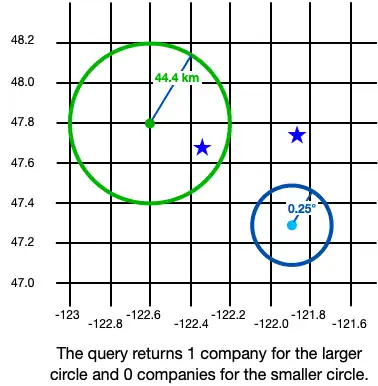
En el siguiente ejemplo, se desea hacer una query para datos geoespaciales almacenados en un objeto Company a través de su propiedad incrustada location. Creamos dos objetos GeoCircle para establecer nuestro límite de query:
val circle1 = GeoCircle.create( center = GeoPoint.create(47.8, -122.6), radius = Distance.fromKilometers(44.4) ) val circle2 = GeoCircle.create( center = GeoPoint.create(47.3, -121.9), radius = Distance.fromDegrees(0.25) )
Luego consultamos cualquier objeto Company con un location contenido dentro de los límites GeoCircle definidos:
val companiesInLargeCircle = realm.query<Company>("location GEOWITHIN $circle1").find() println("Companies in large circle: ${companiesInLargeCircle.size}") val companiesInSmallCircle = realm.query<Company>("location GEOWITHIN $circle2").find() println("Companies in small circle: ${companiesInSmallCircle.size}")
Companies in large circle: 1 Companies in small circle: 0

Sort and Limit Results
Para asegurar que los resultados se devuelvan como se espera, se puede especificar un orden de ordenamiento y condiciones de límite usando RQL Sort, Limit y Distinct operadores, uno de los siguientes métodos de conveniencia SDK o una combinación de ambos:
Importante
El orden importa
Independientemente de si usas RQL o métodos de conveniencia, el SDK ejecuta cada solicitud en el orden en que se agrega a la query. Esto puede tener un impacto en los resultados devueltos. Por ejemplo, ordenar una query antes de limitarla puede dar resultados muy diferentes que ordenar después de limitarla.
In the following example, we sort and limit using convenience methods only, RQL only, and then a combination of both to return the same results:
// Query for all frogs owned by Jim Henson, then: // 1. Sort results by age in descending order // 2. Limit results to only distinct names // 3. Limit results to only the first 2 objects val organizedWithMethods = realm.query<Frog>("owner == $0", "Jim Henson") .sort("age", Sort.DESCENDING) .distinct("name") .limit(2) .find() organizedWithMethods.forEach { frog -> Log.v("Method sort: ${frog.name} is ${frog.age}") } val organizedWithRql = realm.query<Frog>() .query("owner == $0 SORT(age DESC) DISTINCT(name) LIMIT(2)", "Jim Henson") .find() organizedWithRql.forEach { frog -> Log.v("RQL sort: ${frog.name} is ${frog.age}") } val organizedWithBoth = realm.query<Frog>() .query("owner == $0 SORT(age DESC)", "Jim Henson") .distinct("name") .limit(2) .find() organizedWithBoth.forEach { frog -> Log.v("Combined sort: ${frog.name} is ${frog.age}") }
Method sort: Kermit, Sr. is 100 Method sort: Kermit is 42 RQL sort: Kermit, Sr. is 100 RQL sort: Kermit is 42 Combined sort: Kermit, Sr. is 100 Combined sort: Kermit is 42
Nota
String sorting and case-insensitive queries are only supported for character sets in 'Latin Basic', 'Latin Supplement', 'Latin Extended A', and 'Latin Extended B' (UTF-8 range 0-591).
Aggregate Results
También puedes agregar los resultados, lo que disminuye los resultados a un único valor según una propiedad numérica específica o colección. Puede utilizar operadores agregados RQL, uno de los siguientes métodos convenientes, o una combinación de ambos:
In the following example, we aggregate the age property of a Frog object type:
val jimHensonsFrogs = realm.query<Frog>("owner == $0", "Jim Henson") // Find the total number of frogs owned by Jim Henson val numberOfJimsFrogs = jimHensonsFrogs.count().find() // Find the oldest frog owned by Jim Henson val maxAge = jimHensonsFrogs.max<Int>("age").find() val oldestFrog = jimHensonsFrogs.query("age == $0", maxAge).find().first()
Iterar resultados usando Flow
You can iterate through results using a Kotlin Coroutine Flow.
To convert query results into an asynchronous Flow, call asFlow() on the query. The SDK returns a ResultsChange Flow that you can iterate through with flow.collect().
In the following example, we iterate through a Flow of Frog objects:
// Get a Flow of all frogs in the database val allFrogsQuery = realm.query<Frog>() val frogsFlow: Flow<ResultsChange<Frog>> = allFrogsQuery.asFlow() // Iterate through the Flow with 'collect()' val frogsObserver: Deferred<Unit> = async { frogsFlow.collect { results -> when (results) { is InitialResults<Frog> -> { for (frog in results.list) { Log.v("Frog: $frog") } } else -> { /* no-op */ } } } } // ... Later, cancel the Flow, so you can safely close the database frogsObserver.cancel() realm.close()
Tip
Suscríbete a los flujos para escuchar los cambios
Tras generar un a Flow partir de una consulta, puedes registrar un controlador de notificaciones para detectar cambios en ResultsChanges el. Para más información, consulta React to Changes - Kotlin SDK.