Novedad en la versión 1.6.0.
Geospatial data, or "geodata", specifies points and geometric objects on the Earth's surface. With the geodata types, you can create queries that check whether a given point is contained within a shape. For example, you can find all coffee shops within 15 km of a specified point.
Flutter SDK v1.6.1 and later adds support for geospatial data in Atlas Device Sync. This allows you to subscribe to geospatial queries in a synced database. If you try to subscribe to a geospatial query with an older version of the SDK, you will receive a server error with a compensating write. For more information about managing your Sync subscriptions, refer to Manage Sync Subscriptions - Flutter SDK.
Para obtener más información sobre cómo consultar datos geoespaciales con Device Sync, consulte Datos geoespaciales en la documentación de App Services.
Geospatial Data Types
El SDK de Flutter admite consultas geoespaciales utilizando los siguientes tipos de datos:
GeoPointGeoCircleGeoBox
El SDK proporciona estos tipos de datos geoespaciales para simplificar la consulta de datos geoespaciales. No se pueden guardar estos tipos de datos directamente.
For information on how to persist geospatial data, refer to the Persist Geospatial Data section on this page.
GeoPoint
Un(a) GeoPoint es un objeto con dos propiedades obligatorias:
lat: un valor doublelon: un valor double
A GeoPoint is used only as a building block of the other shapes: GeoCircle and GeoBox. These shapes, and the GeoPoint type, are used in queries, not for persistance.
Para guardar datos geoespaciales en la base de datos, consulte Persistir datos geoespaciales.
GeoCírculo
A GeoCircle defines a circle on the Earth's surface. You define a GeoCircle by providing:
Un
GeoPointpara el centro del círculoA
GeoDistancefor the distance (radius) of the circle
La distancia radial utiliza radianes como unidad de medida, implementados como un doble en el SDK. El SDK proporciona métodos prácticos para crear un GeoDistance a partir de otras unidades de medida:
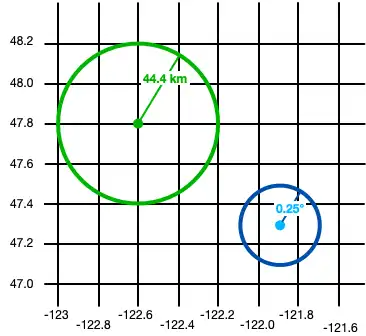
El siguiente código muestra dos ejemplos de cómo crear un círculo:
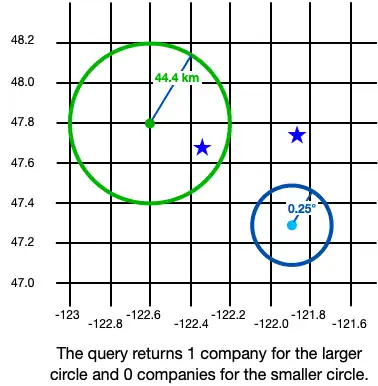
final smallCircle = GeoCircle(GeoPoint(lon: -121.9, lat: 47.3), 0.25.degrees); final largeCircleCenter = GeoPoint(lon: -122.6, lat: 47.8); // The SDK provides convenience methods to convert measurements to radians. final radiusFromKm = GeoDistance.fromKilometers(44.4); final largeCircle = GeoCircle(largeCircleCenter, radiusFromKm);

GeoBox
A GeoBox defines a rectangle on the Earth's surface. You define the rectangle by specifying the bottom left (southwest) corner and the top right (northeast) corner.
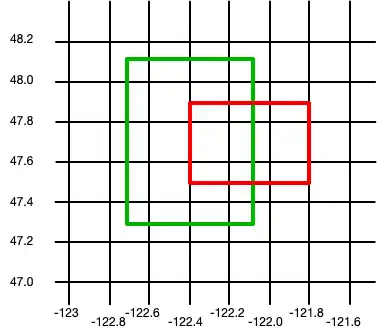
El siguiente ejemplo crea 2 cajas:
final largeBox = GeoBox( GeoPoint(lon: -122.7, lat: 47.3), GeoPoint(lon: -122.1, lat: 48.1)); final smallBoxSouthWest = GeoPoint(lon: -122.4, lat: 47.5); final smallBoxNorthEast = GeoPoint(lon: -121.8, lat: 47.9); final smallBox = GeoBox(smallBoxSouthWest, smallBoxNorthEast);

Persist Geospatial Data
Importante
Cannot Persist Geospatial Data Types
Actualmente, solo se pueden persistir datos geoespaciales. Los tipos de datos geoespaciales no pueden persistirse directamente. Por ejemplo, no se puede declarar una propiedad que sea del tipo GeoBox.
Estos tipos solo pueden utilizarse como argumentos para consultas geoespaciales.
If you want to persist geospatial data, it must conform to the GeoJSON spec.
Create a GeoJSON-Compatible Class
Para crear una clase que se ajuste a la especificación GeoJSON, debes:
Create an embedded object. For more information about embedded objects, refer to Embedded Objects.
Como mínimo, agregue los dos campos requeridos por la especificación GeoJSON:
A field of type
double[]that maps to a "coordinates" (case sensitive) property in the schema.Un campo de tipo
stringque se asigna a una propiedad "tipo". El valor de este campo debe ser "punto".
The following example shows an embedded class named MyGeoPoint that is used to persist geospatial data:
// To store geospatial data, create an embedded object with this structure. // Name it whatever is most convenient for your application. (ObjectType.embeddedObject) class _MyGeoPoint { // These two properties are required to persist geo data. final String type = 'Point'; final List<double> coordinates = const []; // You can optionally implement convenience methods to simplify // creating and working with geospatial data. double get lon => coordinates[0]; set lon(double value) => coordinates[0] = value; double get lat => coordinates[1]; set lat(double value) => coordinates[1] = value; GeoPoint toGeoPoint() => GeoPoint(lon: lon, lat: lat); }
Use the Embedded Class
Luego, utiliza la clase personalizada MyGeoPoint en tu modelo de datos, como se muestra en el siguiente ejemplo:
// Use the GeoJSON-compatible class as a property in your model. () class _Company { () late ObjectId id; _MyGeoPoint? location; }
Añade instancias de tu clase a la base de datos como cualquier otro modelo.
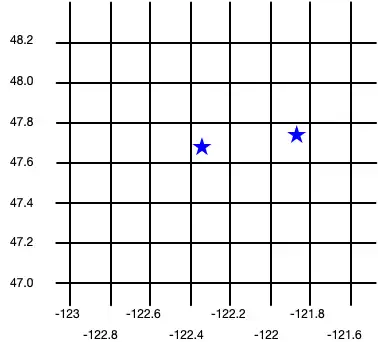
final realm = Realm(Configuration.local([MyGeoPoint.schema, Company.schema])); realm.write(() { realm.addAll([ Company( firstCompanyID, location: MyGeoPoint(coordinates: [-122.35, 47.68]), ), Company( secondCompanyID, location: MyGeoPoint(coordinates: [-121.85, 47.9]), ) ]); });
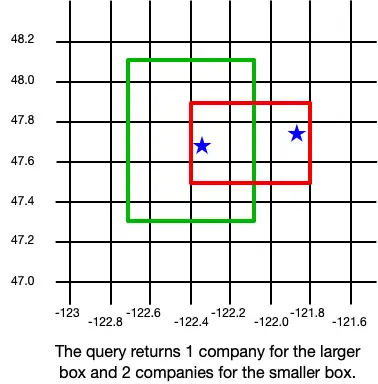
The following image shows the results of creating these two company objects.

Query datos geoespaciales
Para consultar datos geoespaciales, puede usar el geoWithin operador con RQL. El geoWithin operador toma la propiedad "coordenadas" de un objeto incrustado que define el punto consultado y una de las formas geoespaciales para comprobar si dicho punto está contenido en la forma.
Nota
El formato para consultar datos geoespaciales es el mismo, independientemente de la forma de la región de geodatos.
The following examples show querying against various shapes to return a list of companies within the shape:
GeoCírculo
final companiesInSmallCircle = realm.query<Company>("location geoWithin \$0", [smallCircle]); final companiesInLargeCircle = realm.query<Company>("location geoWithin \$0", [largeCircle]);

GeoBox
final companiesInLargeBox = realm.query<Company>("location geoWithin \$0", [largeBox]); final companiesInSmallBox = realm.query<Company>("location geoWithin \$0", [smallBox]);