To create performant apps, developers must write thread-safe and maintainable multithreaded code that avoids issues like deadlocking and race conditions. Realm provides tools specifically designed for performant multithreaded apps.
Three Rules to Follow
Before exploring Realm's tools for multithreaded apps, you need to understand and follow these three rules:
- No bloquees para leer:
- Del reino La arquitectura de Control de Concurrencia Multiversión (MVCC) elimina la necesidad de bloqueos para las operaciones de lectura. Los valores leídos nunca se corromperán ni se modificarán parcialmente. Se puede leer libremente desde el mismo archivo Realm en cualquier hilo sin necesidad de bloqueos ni mutex. Un bloqueo innecesario supondría un cuello de botella en el rendimiento, ya que cada hilo podría tener que esperar su turno antes de leer.
- Avoid synchronous writes on the UI thread if you write on a background thread:
- Puedes escribir en un archivo Realm desde cualquier hilo, pero solo puede haber un escritor a la vez. Por lo tanto, las transacciones de escritura síncrona se bloquean entre sí. Una escritura síncrona en el hilo de la interfaz de usuario puede provocar que tu aplicación parezca no responder mientras espera a que se complete una escritura en un hilo en segundo plano. Device Sync escribe en un hilo en segundo plano, por lo que debes evitar las escrituras síncronas en el hilo de la interfaz de usuario con reinos sincronizados.
- Don't pass live objects, collections, or realms to other threads:
- Live objects, collections, and realm instances are thread-confined: that is, they are only valid on the thread on which they were created. Practically speaking, this means you cannot pass live instances to other threads. However, Realm offers several mechanisms for sharing objects across threads.
Communication Across Threads
Para acceder al mismo archivo Realm desde diferentes hilos, se debe instanciar una instancia Realm en cada hilo que requiera acceso. Siempre que especifiques la misma configuración, todas las instancias realm se asignarán al mismo archivo en el disco.
Una de las reglas clave al trabajar con Realm en un entorno multihilo es que los objetos están confinados a un hilo: no puedes acceder a las instancias de un realm, colección u objeto que se originaron en otros hilos. La arquitectura de Control de concurrencia multiversión (MVCC) de Realm significa que podría haber muchas versiones activas de un objeto en cualquier momento. El confinamiento por hilo asegura que todas las instancias en ese hilo sean de la misma versión interna.
When you need to communicate across threads, you have several options depending on your use case:
To modify an object on two threads, query for the object on both threads.
To react to changes made on any thread, use Realm's notifications.
To see changes that happened on another thread in the current thread's realm instance, refresh your realm instance.
Para compartir una instancia de un reino o un objeto específico con otro hilo, comparta una thread_safe_reference con la instancia del reino o el objeto.
Para enviar una vista rápida y de solo lectura del objeto a otros subprocesos, "congele" el objeto.
Pasar instancias a través de subprocesos
Instancias de realm::realm, realm::results y realm::object están restringidos al subproceso. Esto significa que solo puedes usarlos en el subproceso donde los creaste.
You can copy thread-confined instances to another thread as follows:
Inicialice una thread_safe_reference con el objeto confinado al hilo.
Pass the reference to the target thread.
Resuelve la referencia en el hilo de destino. Si el objeto al que se hace referencia es una instancia Realm, resuélvalo llamando a
.resolve(); de lo contrario, traslada la referencia arealm.resolve(). El objeto devuelto ahora está confinado a la hebra objetivo, como si se hubiera creado en la hebra de destino en lugar de en la hebra original.
Importante
You must resolve a thread_safe_reference exactly once. Otherwise, the source realm will remain pinned until the reference gets deallocated. For this reason, thread_safe_reference should be short-lived.
// Put a managed object into a thread safe reference auto threadSafeItem = realm::thread_safe_reference<realm::Item>{managedItem}; // Move the thread safe reference to a background thread auto thread = std::thread([threadSafeItem = std::move(threadSafeItem), path]() mutable { // Open the database again on the background thread auto backgroundConfig = realm::db_config(); backgroundConfig.set_path(path); auto backgroundRealm = realm::db(std::move(backgroundConfig)); // Resolve the Item instance via the thread safe // reference auto item = backgroundRealm.resolve(std::move(threadSafeItem)); // ... use item ... }); // Wait for thread to complete thread.join();
Another way to work with an object on another thread is to query for it again on that thread. But if the object does not have a primary key, it is not trivial to query for it. You can use thread_safe_reference on any object, regardless of whether it has a primary key.
Use the Same Realm Across Threads
You cannot share realm instances across threads.
Para usar el mismo archivo de Realm en varios subprocesos, abra una instancia de Realm diferente en cada subproceso. Siempre que use la misma configuración, todas las instancias de Realm se asignarán al mismo archivo en el disco.
Transferir copias inmutables entre subprocesos
Live, thread-confined objects work fine in most cases. However, some apps -- those based on reactive, event stream-based architectures, for example -- need to send immutable copies around to many threads for processing before ultimately ending up on the UI thread. Making a deep copy every time would be expensive, and Realm does not allow live instances to be shared across threads. In this case, you can freeze and thaw objects, collections, and realms.
Freezing creates an immutable view of a specific object, collection, or realm. The frozen object, collection, or realm still exists on disk, and does not need to be deeply copied when passed around to other threads. You can freely share the frozen object across threads without concern for thread issues. When you freeze a realm, its child objects also become frozen.
Frozen objects are not live and do not automatically update. They are effectively snapshots of the object state at the time of freezing. Thawing an object returns a live version of the frozen object.
To freeze a realm, collection, or object, call the .freeze() method:
auto realm = realm::db(std::move(config)); // Get an immutable copy of the database that can be passed across threads. auto frozenRealm = realm.freeze(); if (frozenRealm.is_frozen()) { // Do something with the frozen database. // You may pass a frozen realm, collection, or objects // across threads. Or you may need to `.thaw()` // to make it mutable again. } // You can freeze collections. auto managedItems = realm.objects<realm::Item>(); auto frozenItems = managedItems.freeze(); CHECK(frozenItems.is_frozen()); // You can read from frozen databases. auto itemsFromFrozenRealm = frozenRealm.objects<realm::Item>(); CHECK(itemsFromFrozenRealm.is_frozen()); // You can freeze objects. auto managedItem = managedItems[0]; auto frozenItem = managedItem.freeze(); CHECK(frozenItem.is_frozen()); // Frozen objects have a reference to a frozen realm. CHECK(frozenItem.get_realm().is_frozen());
Al trabajar con objetos congelados, cualquier intento de realizar cualquiera de las siguientes acciones genera una excepción:
Opening a write transaction on a frozen realm.
Modifying a frozen object.
Adding a change listener to a frozen realm, collection, or object.
You can use .is_frozen() to check if the object is frozen. This is always thread-safe.
if (frozenRealm.is_frozen()) { // Do something with the frozen database. // You may pass a frozen realm, collection, or objects // across threads. Or you may need to `.thaw()` // to make it mutable again. }
Los objetos congelados siguen siendo válidos mientras el reino activo que los generó permanezca abierto. Por lo tanto, evite cerrar el reino activo hasta que todos los hilos hayan terminado con los objetos congelados. Puede cerrar un reino congelado antes de que se cierre el reino activo.
Importante
Sobre el almacenamiento en caché de objetos congelados
Almacenar en caché demasiados objetos congelados puede tener un impacto negativo en el tamaño del archivo Realm. "Demasiados" depende de tu dispositivo objetivo específico y el tamaño de tus objetos Realm. Si necesitas almacenar en caché un gran número de versiones, considera copiar lo que necesitas fuera de realm.
Modify a Frozen Object
To modify a frozen object, you must thaw the object. Alternately, you can query for it on an unfrozen realm, then modify it. Calling .thaw() on a live object, collection, or realm returns itself.
Thawing an object or collection also thaws the realm it references.
// Read from a frozen database. auto frozenItems = frozenRealm.objects<realm::Item>(); // The collection that we pull from the frozen database is also frozen. CHECK(frozenItems.is_frozen()); // Get an individual item from the collection. auto frozenItem = frozenItems[0]; // To modify the item, you must first thaw it. // You can also thaw collections and realms. auto thawedItem = frozenItem.thaw(); // Check to make sure the item is valid. An object is // invalidated when it is deleted from its managing database, // or when its managing realm has invalidate() called on it. REQUIRE(thawedItem.is_invalidated() == false); // Thawing the item also thaws the frozen database it references. auto thawedRealm = thawedItem.get_realm(); REQUIRE(thawedRealm.is_frozen() == false); // With both the object and its managing database thawed, you // can safely modify the object. thawedRealm.write([&] { thawedItem.name = "Save the world"; });
Append to a Frozen Collection
When you append to a frozen collection, you must thaw both the object containing the collection and the object that you want to append.
The same rule applies when passing frozen objects across threads. A common case might be calling a function on a background thread to do some work instead of blocking the UI.
En este ejemplo, query para dos objetos en un Realm congelado:
A
Projectobject that has a list property ofItemobjectsAn
Itemobject
Se deben descongelar ambos objetos antes de poder agregar el Item a la colección de listas items en el/la Project. Si descongelamos solo el objeto Project pero no el Item, Realm arroja un error.
// Get frozen objects. // Here, we're getting them from a frozen database, // but you might also be passing them across threads. auto frozenItems = frozenRealm.objects<realm::Item>(); // The collection that we pull from the frozen database is also frozen. CHECK(frozenItems.is_frozen()); // Get the individual objects we want to work with. auto specificFrozenItems = frozenItems.where( [](auto const& item) { return item.name == "Save the cheerleader"; }); auto frozenProjects = frozenRealm.objects<realm::Project>().where( [](auto const& project) { return project.name == "Heroes: Genesis"; }); ; auto frozenItem = specificFrozenItems[0]; auto frozenProject = frozenProjects[0]; // Thaw the frozen objects. You must thaw both the object // you want to append and the object whose collection // property you want to append to. auto thawedItem = frozenItem.thaw(); auto thawedProject = frozenProject.thaw(); auto managingRealm = thawedProject.get_realm(); managingRealm.write([&] { thawedProject.items.push_back(thawedItem); });
struct Item { std::string name; }; REALM_SCHEMA(Item, name)
struct Project { std::string name; std::vector<realm::Item*> items; }; REALM_SCHEMA(Project, name, items)
Schedulers (Run Loops)
Some platforms or frameworks automatically set up a scheduler (or run loop), which continuously processes events during the lifetime of your app. The Realm C++ SDK detects and uses schedulers on the following platforms or frameworks:
macOS, iOS, tvOS, watchOS
Android
Qt
Realm uses the scheduler to schedule work such as Device Sync upload and download.
Si su plataforma no tiene un programador compatible o si desea usar uno personalizado, puede implementar realm::scheduler y pasar la instancia al realm::db_config que usa para configurar el dominio. Realm usará el programador que le pase.
struct MyScheduler : realm::scheduler { MyScheduler() { // ... Kick off task processor thread(s) and run until the scheduler // goes out of scope ... } ~MyScheduler() override { // ... Call in the processor thread(s) and block until return ... } void invoke(std::function<void()>&& task) override { // ... Add the task to the (lock-free) processor queue ... } [[nodiscard]] bool is_on_thread() const noexcept override { // ... Return true if the caller is on the same thread as a processor // thread ... } bool is_same_as(const realm::scheduler* other) const noexcept override { // ... Compare scheduler instances ... } [[nodiscard]] bool can_invoke() const noexcept override { // ... Return true if the scheduler can accept tasks ... } // ... }; int main() { // Set up a custom scheduler. auto scheduler = std::make_shared<MyScheduler>(); // Pass the scheduler instance to the realm configuration. auto config = realm::db_config{path, scheduler}; // Start the program main loop. auto done = false; while (!done) { // This assumes the scheduler is implemented so that it // continues processing tasks on background threads until // the scheduler goes out of scope. // Handle input here. // ... if (shouldQuitProgram) { done = true; } } }
Refreshing Realms
On any thread controlled by a scheduler or run loop, Realm automatically refreshes objects at the start of every run loop iteration. Between run loop iterations, you will be working on the snapshot, so individual methods always see a consistent view and never have to worry about what happens on other threads.
Al abrir un dominio en un hilo, su estado será la última confirmación de escritura correcta y permanecerá en esa versión hasta que se actualice. Si un hilo no está controlado por un bucle de ejecución, se debe llamar manualmente al método realm.refresh() para avanzar la transacción al estado más reciente.
realm.refresh();
Nota
Si no se actualizan los reinos regularmente, es posible que algunas versiones de transacciones queden "fijadas", lo que impide que Realm reutilice el espacio en disco utilizado por esa versión y genera tamaños de archivo más grandes.
Realm's Threading Model in Depth
Realm proporciona acceso seguro, rápido, sin bloqueos y simultáneo entre subprocesos con su Control de concurrencia multiversión (MVCC) arquitectura.
Compared and Contrasted with Git
If you are familiar with a distributed version control system like Git, you may already have an intuitive understanding of MVCC. Two fundamental elements of Git are:
Commits, which are atomic writes.
Branches, which are different versions of the commit history.
Similarly, Realm has atomically-committed writes in the form of transactions. Realm also has many different versions of the history at any given time, like branches.
Unlike Git, which actively supports distribution and divergence through forking, a realm only has one true latest version at any given time and always writes to the head of that latest version. Realm cannot write to a previous version. This means your data converges on one latest version of the truth.
Estructura interna
A realm is implemented using a B+ tree data structure. The top-level node represents a version of the realm; child nodes are objects in that version of the realm. The realm has a pointer to its latest version, much like how Git has a pointer to its HEAD commit.
Realm uses a copy-on-write technique to ensure isolation and durability. When you make changes, Realm copies the relevant part of the tree for writing. Realm then commits the changes in two phases:
Realm writes changes to disk and verifies success.
Realm then sets its latest version pointer to point to the newly-written version.
This two-step commit process guarantees that even if the write failed partway, the original version is not corrupted in any way because the changes were made to a copy of the relevant part of the tree. Likewise, the realm's root pointer will point to the original version until the new version is guaranteed to be valid.
Ejemplo
The following diagram illustrates the commit process:

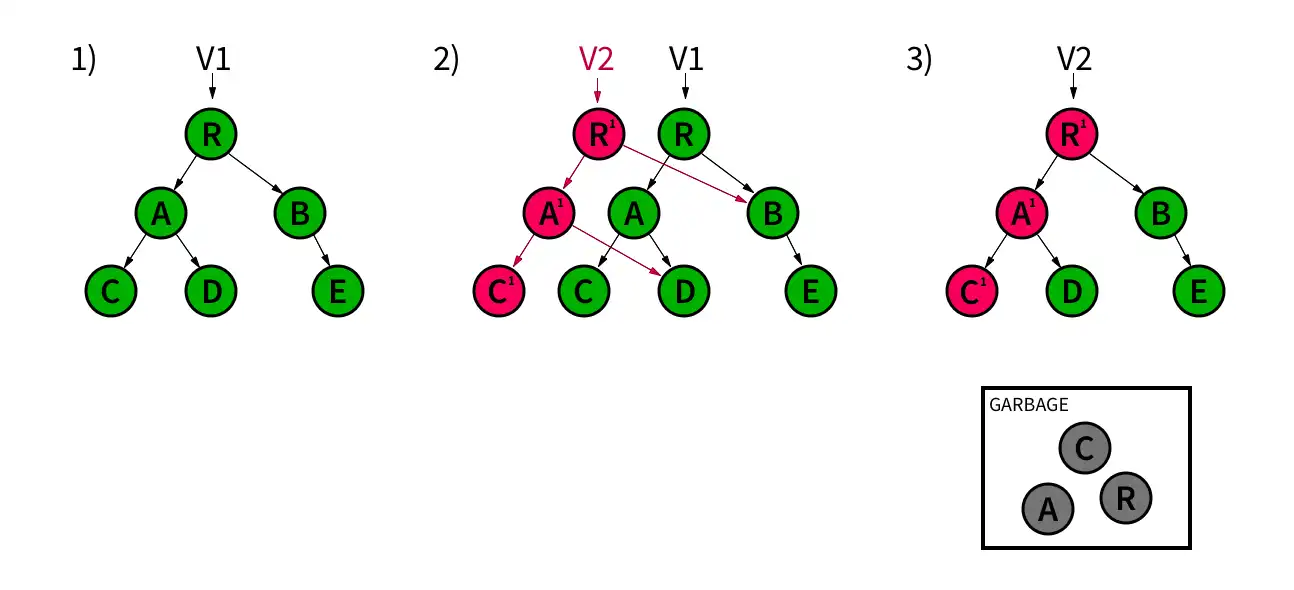
The realm is structured as a tree. The realm has a pointer to its latest version, V1.
Cuando se realiza una escritura, Realm crea una nueva versión V2 basada en V1. Realm crea copias de objetos para su modificación (A 1, C 1), mientras que los enlaces a objetos no modificados siguen apuntando a las versiones originales (B, D).
Después de validar la confirmación, Realm actualiza el puntero a la nueva versión más reciente, V2. A continuación, Realm descarta los nodos antiguos que ya no están conectados al árbol.
Realm utiliza técnicas de copia cero como el mapeo de memoria para gestionar datos. Cuando lees un valor del realm, en realidad estás viendo el valor en el disco físico, no una copia de él. Esta es la base de objetos activos. Esta es también la razón por la que un puntero principal de realm puede configurarse para apuntar a la nueva versión después de que la escritura en disco haya sido validada.