Overview
In this guide, you can learn how to use the Rust driver to update
documents in a MongoDB collection by using the update_one() and
update_many() methods.
Update operations change the fields that you specify while leaving other fields and values unchanged.
Update Document Pattern
In MongoDB, update methods follow the same pattern:

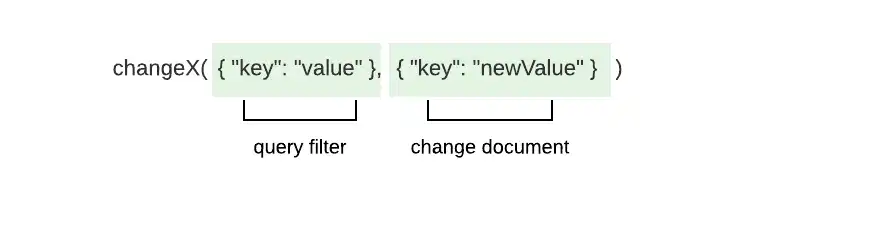
These methods take the following parameters:
Query filter to match one or more documents to update
Update document that specifies the field and value changes
Tip
You can retrieve and modify data in one action by using compound operations. To learn more, see the guide on Compound Operations.
The _id Field
Each document in a MongoDB collection has a unique and immutable _id
field. If you attempt to change the _id field through an update
operation, the driver raises a WriteError and performs no updates.
Update Operations
You can perform update operations by using the following methods:
update_one(), which updates the first document that matches the search criteriaupdate_many(), which updates all documents that match the search criteria
You can also chain option builder methods to these update operation methods. To learn about modifying the behavior of the update methods, see the Modify Update Behavior section of this guide.
Parameters
Each method takes a query filter and an update document that includes at least one update operator. The update operator specifies the type of update to perform and includes the fields and values that describe the change. Update documents use the following format:
doc! { "<update operator>": doc! { "<field>": <value> } }
To specify multiple updates in one update document, use the following format:
doc! { "<update operator>": doc!{"<field>": <value>}, "<update operator>": doc!{"<field>": <value>}, ... }
See the MongoDB MongoDB Server manual for a complete list of update operators and descriptions.
Note
Aggregation Pipelines in Update Operations
You can use aggregation pipelines to perform update operations. To learn more about the aggregation stages MongoDB supports, see the updates with aggregation pipelines tutorial in the MongoDB Server manual.
Return Value
The update_one() and update_many() methods return an
UpdateResult type if the operation is successful. The
UpdateResult type contains the following properties that describe
the operation:
Property | Description |
|---|---|
| The number of documents matched by the filter |
| The number of documents modified by the operation |
| The |
If multiple documents match the query filter you pass to update_one(),
the method selects and updates the first matched document. If no
documents match the query filter, the update operation makes no
changes.
Examples
This section provides quick reference and full file examples of the
update_one() and update_many() methods.
Update Example
The following documents describe employees of a company:
{ "_id": ObjectId('4337'), "name": "Shelley Olson", "department": "Marketing", "role": "Director", "bonus": 3000 }, { "_id": ObjectId('4902'), "name": "Remi Ibrahim", "department": "Marketing", "role": "Consultant", "bonus": 1800 }
This example performs an update operation by using the update_many() method.
The update_many() method takes the following parameters:
Query filter to match documents where the value of the
departmentfield is"Marketing"Update document that contains the following updates:
A
$setoperator to change the value ofdepartmentto"Business Operations"androleto"Analytics Specialist"An
$incoperator to increase the value ofbonusby500
let update_doc = doc! { "$set": doc! { "department": "Business Operations", "role": "Analytics Specialist" }, "$inc": doc! { "bonus": 500 } }; let res = my_coll .update_many(doc! { "department": "Marketing" }, update_doc) .await?; println!("Modified documents: {}", res.modified_count);
Modified documents: 2
The following documents reflect the changes resulting from the preceding update operation:
{ "_id": ObjectId('4337'), "name": "Shelley Olson", "department": "Business Operations", "role": "Analytics Specialist", "bonus": 3500 }, { "_id": ObjectId('4902'), "name": "Remi Ibrahim", "department": "Business Operations", "role": "Analytics Specialist", "bonus": 2300 }
Update by ObjectId Example
The following document describes an employee of a company:
{ "_id": ObjectId('4274'), "name": "Jill Millerton", "department": "Marketing", "role": "Consultant" }
This example queries for the preceding document by specifying a query filter to match the
document's unique _id value. Then, the code performs an update operation with the
update_one() method. The update_one() method takes the following parameters:
Query filter that matches a document in which the value of the
_idfield isObjectId('4274')Update document that creates instructions to set the value of
nameto"Jill Gillison"
let id = ObjectId::from_str("4274").expect("Could not convert to ObjectId"); let filter_doc = doc! { "_id": id }; let update_doc = doc! { "$set": doc! { "name": "Jill Gillison" } }; let res = my_coll .update_one(filter_doc, update_doc) .await?; println!("Modified documents: {}", res.modified_count);
Modified documents: 1
The following document reflects the changes resulting from the preceding update operation:
{ "_id": ObjectId('4274'), "name": "Jill Gillison", "department": "Marketing", "role": "Consultant" }
Tip
To learn more about the _id field, see the _id Field
section of this page or the ObjectId()
method documentation in the MongoDB Server manual.
Full File Example: Update a Document
This example updates a document in the restaurants collection of
the sample_restaurants database. The update_one() method adds
the price field to the first document in which the value of the name
field is "Spice Market".
You can access the documents in the restaurants collection as instances
of the Document type or a custom data type. To specify which data type represents
the collection's data, replace the <T> type parameter on the highlighted
line with one of the following values:
<Document>: Accesses collection documents as BSON documents<Restaurant>: Accesses collection documents as instances of theRestaurantstruct, defined at the top of the code
Select the Asynchronous or Synchronous tab to see the corresponding code for each runtime:
use std::env; use mongodb::{ bson::{ Document, doc }, Client, Collection }; use serde::{ Deserialize, Serialize }; struct Restaurant { name: String, price: String, } async fn main() -> mongodb::error::Result<()> { let uri = "<connection string>"; let client = Client::with_uri_str(uri).await?; // Replace <T> with the <Document> or <Restaurant> type parameter let my_coll: Collection<T> = client .database("sample_restaurants") .collection("restaurants"); let filter = doc! { "name": "Spice Market" }; let update = doc! { "$set": doc! {"price": "$$$"} }; let res = my_coll.update_one(filter, update).await?; println!("Updated documents: {}", res.modified_count); Ok(()) }
Updated documents: 1
use std::env; use mongodb::{ bson::{ Document, doc }, sync::{ Client, Collection } }; use serde::{ Deserialize, Serialize }; struct Restaurant { name: String, price: String, } fn main() -> mongodb::error::Result<()> { let uri = "<connection string>"; let client = Client::with_uri_str(uri)?; // Replace <T> with the <Document> or <Restaurant> type parameter let my_coll: Collection<T> = client .database("sample_restaurants") .collection("restaurants"); let filter = doc! { "name": "Spice Market" }; let update = doc! { "$set": doc! {"price": "$$$"} }; let res = my_coll.update_one(filter, update).run()?; println!("Updated documents: {}", res.modified_count); Ok(()) }
Updated documents: 1
Full File Example: Update Multiple Documents
This example updates a document in the restaurants collection of
the sample_restaurants database. The update_many() method adds
the near_me field to documents in which the value of the address.street
field is "Sullivan Street" and the borough field is "Manhattan".
You can access the documents in the restaurants collection as instances
of the Document type or a custom data type. To specify which data type represents
the collection's data, replace the <T> type parameter on the highlighted
line with one of the following values:
<Document>: Accesses collection documents as BSON documents.<Restaurant>: Accesses collection documents as instances of theRestaurantstruct, defined at the top of the code
Select the Asynchronous or Synchronous tab to see the corresponding code for each runtime:
use std::env; use mongodb::{ bson::doc, Client, Collection }; use bson::Document; use serde::{ Deserialize, Serialize }; struct Address { street: String, city: String, } struct Restaurant { name: String, borough: String, address: Address, } async fn main() -> mongodb::error::Result<()> { let uri = "<connection string>"; let client = Client::with_uri_str(uri).await?; // Replace <T> with the <Document> or <Restaurant> type parameter let my_coll: Collection<T> = client .database("sample_restaurants") .collection("restaurants"); let filter = doc! { "address.street": "Sullivan Street", "borough": "Manhattan" }; let update = doc! { "$set": doc! { "near_me": true } }; let res = my_coll.update_many(filter, update).await?; println!("Updated documents: {}", res.modified_count); Ok(()) }
// Your values might differ Updated documents: 22
use std::env; use mongodb::{ bson::{ Document, doc }, sync::{ Client, Collection } }; use serde::{ Deserialize, Serialize }; struct Address { street: String, city: String, } struct Restaurant { name: String, borough: String, address: Address, } fn main() -> mongodb::error::Result<()> { let uri = "<connection string>"; let client = Client::with_uri_str(uri)?; // Replace <T> with the <Document> or <Restaurant> type parameter let my_coll: Collection<T> = client .database("sample_restaurants") .collection("restaurants"); let filter = doc! { "address.street": "Sullivan Street", "borough": "Manhattan" }; let update = doc! { "$set": doc! { "near_me": true } }; let res = my_coll.update_many(filter, update).run()?; println!("Updated documents: {}", res.modified_count); Ok(()) }
// Your values might differ Updated documents: 22
Modify Update Behavior
You can modify the behavior of the update_one() and update_many()
methods by calling options methods that set
UpdateOptions struct fields.
Note
Setting Options
You can set UpdateOptions fields by chaining option builder methods directly
to the update method call. If you're using an earlier version of the driver,
you must construct an UpdateOptions instance by chaining option builder methods
to the builder() method. Then, pass your options instance as a parameter to
update_one() or update_many().
The following table describes the options available in UpdateOptions:
Option | Description |
|---|---|
| The set of filters specifying the array elements to which the
update applies. Type: Vec<Document> |
| If true, allows the driver to perform a write that violates
document-level validation. To learn more about validation, see
the guide on Schema Validation.Type: boolDefault: false |
| If true, the operation inserts a document if no documents match
the query filter.Type: bool |
| The collation to use when sorting results. To learn more about collations,
see the Collations guide. Type: CollationDefault: None |
| The index to use for the operation. Type: HintDefault: None |
| The write concern for the operation. If you don't set this
option, the operation inherits the write concern set for
the collection. To learn more about write concerns, see
Write Concern in the
MongoDB Server manual. Type: WriteConcern |
| A map of parameters and values. These parameters can be accessed
as variables in aggregation expressions. This option is available
only when connecting to MongoDB Server versions 5.0 and later. Type: Document |
| An arbitrary Bson value tied to the operation to trace
it through the database profiler, currentOp, and
logs. This option is available only when connecting to
MongoDB Server versions 4.4 and later.Type: BsonDefault: None |
The following code shows how to set the upsert field by chaining
the upsert() method to the update_one() method:
let res = my_coll .update_one(filter_doc, update_doc) .upsert(true) .await?;
Additional Information
For more information about the concepts in this guide, see the following documentation:
Specify a Query guide
Compound Operations guide
Replace Documents guide
To learn more about the update operators, see Update Operators in the MongoDB Server manual.
API Documentation
To learn more about the methods and types mentioned in this guide, see the following API documentation: