Overview
In this guide, you can learn how to create a Rust web application that uses Rocket as the web framework. Rocket is a framework for Rust that allows you to create secure, type-safe web applications.
The application in this tutorial consists of the following layers:
Database layer: MongoDB provides data storage and retrieval.
Application layer: Rocket handles HTTP requests, routing, and logic processing.
Presentation layer: HTML templates render restaurant data on web pages.
Why Use MongoDB with Rust and Rocket?
By integrating MongoDB with Rust and Rocket, you can use Rust's memory safety and performance characteristics alongside MongoDB's flexible document model. Rocket's type system ensures compile-time guarantees for your API endpoints, and MongoDB's document storage works efficiently with Rust's serialization libraries, such as Serde.
The combination of Rust, Rocket, and MongoDB supports applications that require high performance, type safety, and scalability. As a result, this stack is well-designed for real world applications such as high-throughput APIs, microservices, or systems that require strict performance guarantees.
Quick Start Tutorial
This tutorial shows you how to build a web application that uses Rust and Rocket. The application accesses sample restaurant data, queries the data, and displays it through HTML templates with styling. The tutorial also includes instructions for connecting to a MongoDB cluster hosted on MongoDB Atlas and accessing and displaying data from your database.
Tip
If you prefer to connect to MongoDB by using the Rust driver without Rocket, see the Rust Driver Quick Start tutorial.
Set Up Your Project
Follow the steps in this section to install the project dependencies, create an Atlas cluster, and set up the application structure.
Verify the prerequisites
To create the Quick Start application, install the following software in your development environment:
Prerequisite | Notes |
|---|---|
Install the latest stable version by using | |
Code editor | This tutorial uses Visual Studio Code with the Rust extension, but you can use the editor of your choice. |
Terminal app and shell | For MacOS users, use Terminal or a similar app. For Windows users, use PowerShell. |
Create a MongoDB Atlas cluster
MongoDB Atlas is a fully managed cloud database service that hosts your
MongoDB deployments. If you do not have a MongoDB deployment, you can create a MongoDB
cluster for free (no credit card required) by completing the
MongoDB Get Started
tutorial. The MongoDB Get Started tutorial also demonstrates how to load sample
datasets into your cluster, including the sample_restaurants database
that is used in this tutorial.
To connect to your MongoDB cluster, you must use a connection URI. To learn how to retrieve your connection URI, see the Add your connection string section of the MongoDB Get Started tutorial.
Important
Save your connection string in a secure location.
Configure your project dependencies
Navigate to the Cargo.toml file and replace its contents with
the following code:
[package] name = "rocket-quickstart" version = "0.1.0" edition = "2024" [dependencies] rocket = {version = "0.5.0", features = ["json"]} serde = "1.0.136" dotenv = "0.15.0" tokio = {version = "1.32.0", features = ["full"]} rocket_dyn_templates = { version = "0.1.0", features = ["handlebars"] } [dependencies.mongodb] version = "3.4.1"
Install the dependencies by running the following command from your rocket-quickstart
directory:
cargo build
This command installs the following dependencies:
Rocket, the project's web framework with JSON support
Serde, for data serialization
MongoDB Rust driver, for MongoDB operations
Tokio, the asynchronous runtime
rocket_dyn_templates, for Handlebars template rendering
Create the project structure
To create the necessary directories and files for this application,
run the following commands from your rocket-quickstart directory:
mkdir -p src/models src/repository src/api templates static touch src/models/restaurant.rs src/repository/mongodb_repo.rs src/api/restaurant_api.rs touch src/models.rs src/repository.rs src/api.rs touch templates/index.hbs static/style.css
These commands structure your project to follow Rust's modular architecture pattern, which groups files into different directories according to their purpose. After running the commands, you have the following directories:
src/models: Contains data structures to model restaurant datasrc/repository: Contains database access logicsrc/api: Contains HTTP endpoint handlerstemplates: Contains a Handlebars template file for rendering datastatic: Contains a CSS file for styling
The commands also create module declaration
files for each src/ directory, which list the modules
available in their corresponding directories and allow you
to access them throughout the application.
Configure the Back End
After setting up the project structure and dependencies, follow the steps in this section to connect to MongoDB and set up your data models.
Provide your connection URI
Set the MONGO_URI environment variable to your connection URI
by running the following command from the rocket-quickstart directory:
export MONGO_URI="<connection URI>"
Replace the <connection URI> placeholder with the connection URI
that you saved in a previous step.
Create your data models
Navigate to the src/models/restaurant.rs file and paste the following code:
use serde::{Deserialize, Serialize}; use mongodb::bson::oid::ObjectId; pub struct Restaurant { pub id: Option<ObjectId>, pub name: Option<String>, pub borough: Option<String>, pub cuisine: Option<String>, pub address: Option<Address>, } pub struct Address { pub building: Option<String>, pub street: Option<String>, pub zipcode: Option<String>, }
This file defines the Restaurant and Address models, which represent
the data in the sample_restaurants.restaurants sample collection.
To use your models in your project files, you must register the restaurant module,
which corresponds to the restaurant.rs file. Navigate to the src/models.rs file
and paste the following code:
pub mod restaurant; pub use restaurant::*;
Access the MongoDB sample collection
Navigate to the src/repository/mongodb_repo.rs file and paste the following
code:
use std::env; use mongodb::{ bson::{extjson::de::Error, doc}, Client, Collection }; use crate::models::Restaurant; pub struct MongoRepo { col: Collection<Restaurant>, } impl MongoRepo { pub async fn init() -> Self { dotenv::dotenv().ok(); let uri = match env::var("MONGO_URI") { Ok(v) => v.to_string(), Err(_) => format!("Error loading env variable"), }; let client = Client::with_uri_str(uri).await.unwrap(); let db = client.database("sample_restaurants"); let col: Collection<Restaurant> = db.collection("restaurants"); MongoRepo { col } } pub async fn get_all_restaurants(&self) -> Result<Vec<Restaurant>, Error> { let mut cursor = self .col .find(doc! {}) .await .map_err(|e| Error::DeserializationError { message: e.to_string() })?; let mut restaurants: Vec<Restaurant> = Vec::new(); while cursor.advance().await.map_err(|e| Error::DeserializationError { message: e.to_string() })? { match cursor.deserialize_current() { Ok(restaurant) => restaurants.push(restaurant), Err(e) => { // Skips documents that can't be deserialized and logs the error eprintln!("Warning: Skipping document due to deserialization error: {}", e); continue; } } } Ok(restaurants) } pub async fn get_filtered_restaurants(&self) -> Result<Vec<Restaurant>, Error> { let filter = doc! { "borough": "Queens", "name": { "$regex": "Moon", "$options": "i" } }; let mut cursor = self .col .find(filter) .await .map_err(|e| Error::DeserializationError { message: e.to_string() })?; let mut restaurants: Vec<Restaurant> = Vec::new(); while cursor.advance().await.map_err(|e| Error::DeserializationError { message: e.to_string() })? { match cursor.deserialize_current() { Ok(restaurant) => restaurants.push(restaurant), Err(e) => { // Skips documents that can't be deserialized and logs the error eprintln!("Warning: Skipping document due to deserialization error: {}", e); continue; } } } Ok(restaurants) } }
This file accesses the restaurants collection in the sample_restaurants database.
Then, it defines the following query methods that retrieve collection documents:
get_all_restaurants(): Retrieves all documents in therestaurantscollectionget_filtered_restaurants(): Retrieves documents in therestaurantscollection that have aboroughvalue of"Queens"and anamevalue containing"Moon". The$optionsvalue specifies that thisnamequery is case-insensitive.
This code also includes logic for skipping documents that
cannot be deserialized. This avoids errors when documents
don't contain each field defined in the Restaurant model.
Then, register the module in src/repository.rs:
pub mod mongodb_repo; pub use mongodb_repo::*;
Configure the Front End
After setting up the data layer, follow the steps in this section to create Rocket API handlers and templates for the user interface.
Create the API handlers
Navigate to the src/api/restaurant_api.rs file and paste the following code:
use rocket::{State, serde::json::Json, get, http::Status}; use crate::{models::Restaurant, repository::MongoRepo}; pub async fn get_all_restaurants(db: &State<MongoRepo>) -> Result<Json<Vec<Restaurant>>, Status> { let restaurants = db.get_all_restaurants().await; match restaurants { Ok(restaurants) => Ok(Json(restaurants)), Err(_) => Err(Status::InternalServerError), } } pub async fn get_filtered_restaurants(db: &State<MongoRepo>) -> Result<Json<Vec<Restaurant>>, Status> { let restaurants = db.get_filtered_restaurants().await; match restaurants { Ok(restaurants) => Ok(Json(restaurants)), Err(_) => Err(Status::InternalServerError), } }
This code creates the /restaurants and /restaurants/browse endpoints.
These endpoints provide JSON data from your query methods that will be consumed
by the frontend JavaScript code to dynamically load and display restaurant information.
Then, register the API module in src/api.rs:
pub mod restaurant_api; pub use restaurant_api::*;
Update the main application file
Navigate to the src/main.rs file and paste the following code:
mod api; mod models; mod repository; extern crate rocket; use rocket::{get, fs::FileServer, response::content::RawHtml}; use rocket_dyn_templates::Template; use api::restaurant_api::{get_all_restaurants, get_filtered_restaurants}; use repository::MongoRepo; async fn index() -> RawHtml<String> { let template_content = std::fs::read_to_string("templates/index.hbs").unwrap_or_else(|_| { r#"<!DOCTYPE html> <html><head><title>Error</title></head> <body><h1>Template not found</h1></body></html>"#.to_string() }); RawHtml(template_content) } async fn browse() -> RawHtml<String> { let template_content = std::fs::read_to_string("templates/index.hbs").unwrap_or_else(|_| { r#"<!DOCTYPE html> <html><head><title>Error</title></head> <body><h1>Template not found</h1></body></html>"#.to_string() }); RawHtml(template_content) } async fn rocket() -> _ { let db = MongoRepo::init().await; rocket::build() .manage(db) .mount("/", routes![index, browse, get_all_restaurants, get_filtered_restaurants]) .mount("/static", FileServer::from("static/")) .attach(Template::fairing()) }
This file sets up the Rocket web server and configures the following routes:
/: Returns HTML code that formats the main index page, which shows all restaurants/browse: Returns HTML code that formats the filtered restaurants page
Create the Handlebars template
Navigate to the templates/index.hbs file and paste the following code:
<!DOCTYPE html> <html lang="en"> <head> <meta charset="UTF-8"> <meta name="viewport" content="width=device-width, initial-scale=1.0"> <title>Restaurant Explorer</title> <link rel="stylesheet" href="/static/style.css"> </head> <body> <div class="container"> <header> <h1>Restaurant Directory</h1> </header> <div class="controls"> <a href="/" class="btn" id="all-btn">All Restaurants</a> <a href="/browse" class="btn" id="browse-btn">Browse Filtered</a> </div> <div id="restaurants-container"> <div class="loading">Loading restaurants...</div> </div> </div> <script> // Sets the active button based on the current path const path = window.location.pathname; if (path === '/browse') { document.getElementById('browse-btn').classList.add('active'); } else { document.getElementById('all-btn').classList.add('active'); } // Loads the restaurant documents async function loadRestaurants() { try { const apiEndpoint = path === '/browse' ? '/restaurants/browse' : '/restaurants'; const response = await fetch(apiEndpoint); const restaurants = await response.json(); displayRestaurants(restaurants); } catch (error) { document.getElementById('restaurants-container').innerHTML = '<div class="error">Error loading restaurants. Please try again later.</div>'; } } // Displays restaurants in a grid format function displayRestaurants(restaurants) { const container = document.getElementById('restaurants-container'); if (restaurants.length === 0) { container.innerHTML = '<div class="error">No restaurants found.</div>'; return; } const restaurantsHTML = restaurants.map(function(restaurant) { return '<div class="restaurant-card">' + '<div class="restaurant-name">' + (restaurant.name || 'Unknown Name') + '</div>' + (restaurant.cuisine ? '<div class="cuisine-tag">' + restaurant.cuisine + '</div>' : '') + (restaurant.borough ? '<div class="restaurant-info"><strong>Borough:</strong> ' + restaurant.borough + '</div>' : '') + (restaurant.restaurant_id ? '<div class="restaurant-info"><strong>ID:</strong> ' + restaurant.restaurant_id + '</div>' : '') + (restaurant.address ? '<div class="address">' + (restaurant.address.building ? restaurant.address.building + ' ' : '') + (restaurant.address.street ? restaurant.address.street : '') + (restaurant.address.zipcode ? ', ' + restaurant.address.zipcode : '') + '</div>' : '') + '</div>'; }).join(''); container.innerHTML = '<div class="restaurants-grid">' + restaurantsHTML + '</div>'; } loadRestaurants(); </script> </body> </html>
This Handlebars template uses JavaScript to create a responsive web interface that dynamically loads restaurant data from your API endpoints and displays the restaurants in an interactive grid layout.
Add CSS styling
Add the following code to static/style.css:
/* Modern, clean styling for the restaurant app */ * { margin: 0; padding: 0; box-sizing: border-box; } body { font-family: -apple-system, BlinkMacSystemFont, 'Segoe UI', Roboto, Oxygen, Ubuntu, Cantarell, sans-serif; line-height: 1.6; color: #333; background: rgb(198, 240, 209); min-height: 100vh; } .container { max-width: 1200px; margin: 0 auto; padding: 20px; } header { text-align: center; margin-bottom: 40px; color: rgb(0, 0, 0); } h1 { font-size: 3rem; margin-bottom: 10px; } .subtitle { font-size: 1.2rem; opacity: 0.9; } .controls { display: flex; justify-content: center; gap: 20px; margin-bottom: 30px; } .btn { background: white; color: #0d8958; border: none; padding: 12px 24px; border-radius: 25px; font-weight: 600; text-decoration: none; cursor: pointer; transition: all 0.3s ease; box-shadow: 0 4px 15px rgba(0,0,0,0.2); } .btn:hover { transform: translateY(-2px); box-shadow: 0 6px 20px rgba(0,0,0,0.3); } .btn.active { background: #0d8958; color: white; } .restaurants-grid { display: grid; grid-template-columns: repeat(auto-fill, minmax(350px, 1fr)); gap: 20px; margin-top: 20px; } .restaurant-card { background: white; border-radius: 15px; padding: 20px; box-shadow: 0 8px 25px rgba(0,0,0,0.1); transition: transform 0.3s ease, box-shadow 0.3s ease; } .restaurant-card:hover { transform: translateY(-5px); box-shadow: 0 12px 35px rgba(0,0,0,0.15); } .restaurant-name { font-size: 1.4rem; font-weight: 700; color: #000000; margin-bottom: 10px; } .restaurant-info { margin-bottom: 8px; } .restaurant-info strong { color: #555; } .cuisine-tag { display: inline-block; background: #0d8958; color: white; padding: 4px 12px; border-radius: 15px; font-size: 0.85rem; font-weight: 600; margin-top: 10px; } .address { color: #666; font-style: italic; margin-top: 8px; } .loading { text-align: center; color: white; font-size: 1.2rem; margin: 40px 0; } .error { text-align: center; color: #ff6b6b; background: white; padding: 20px; border-radius: 10px; margin: 20px 0; } @media (max-width: 768px) { .container { padding: 10px; } h1 { font-size: 2rem; } .controls { flex-direction: column; align-items: center; } .restaurants-grid { grid-template-columns: 1fr; } }
This CSS file styles the restaurant data displayed on the web pages.
Run Your Application
Finally, follow the steps in this section to run your web application and explore the restaurant data by using the browser interface.
Start the Rocket application
Navigate to your project directory and run the following command:
cargo run
If successful, the command output resembles the following example:
Configured for debug. >> address: 127.0.0.1 >> port: 8000 ... Routes: >> (index) GET / >> (browse) GET /browse >> (get_all_restaurants) GET /restaurants >> (get_filtered_restaurants) GET /restaurants/browse >> (FileServer: static/) GET /static/<path..> [10] Fairings: >> Templating (ignite, liftoff, request) >> Shield (liftoff, response, singleton) Shield: >> X-Frame-Options: SAMEORIGIN >> Permissions-Policy: interest-cohort=() >> X-Content-Type-Options: nosniff Templating: >> directory: templates >> engines: ["hbs"] Rocket has launched from http://127.0.0.1:8000
Open the web application
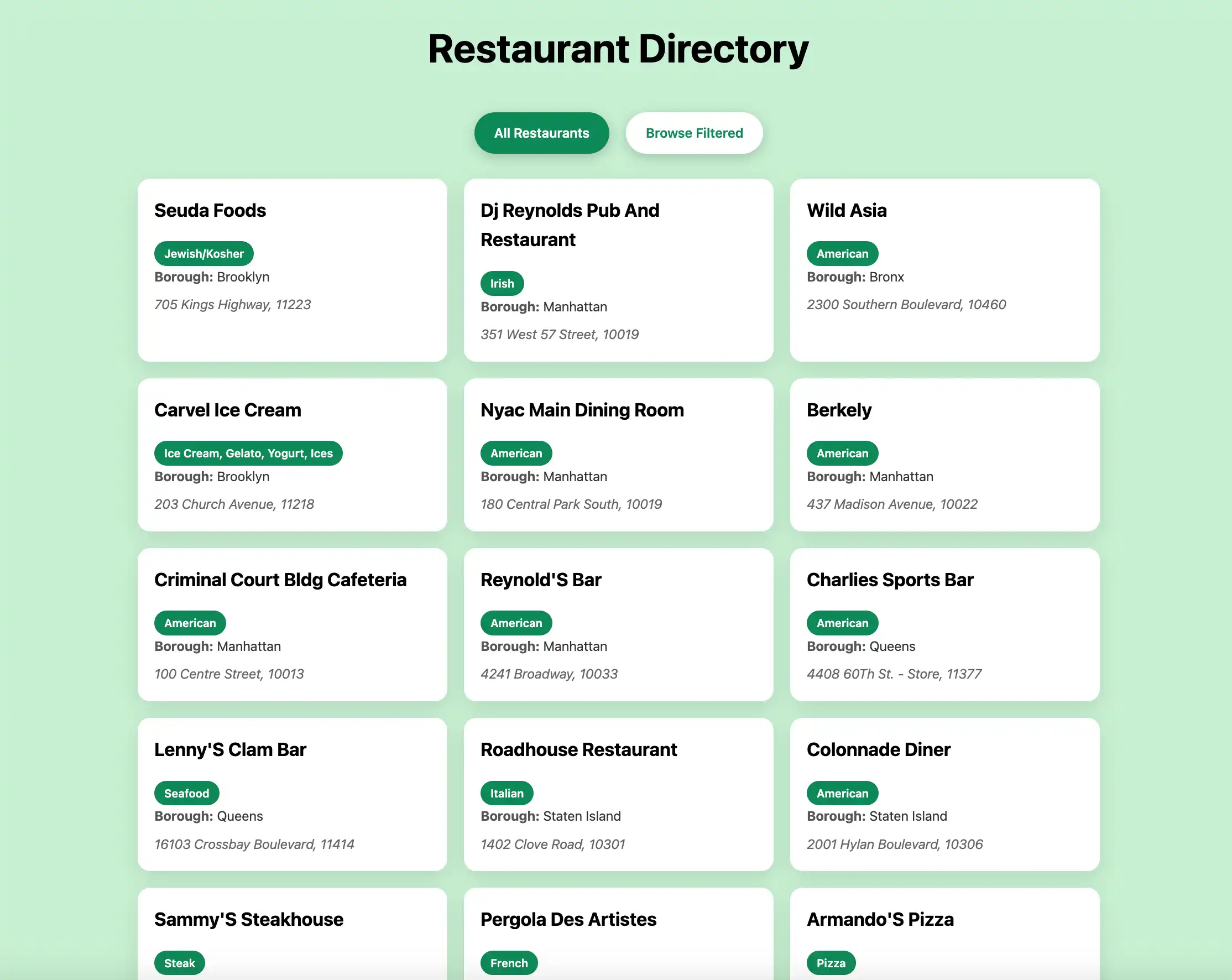
Open http://127.0.0.1:8000 in your web browser. The initial
landing page displays all restaurants in the sample_restaurants.restaurants
collection:

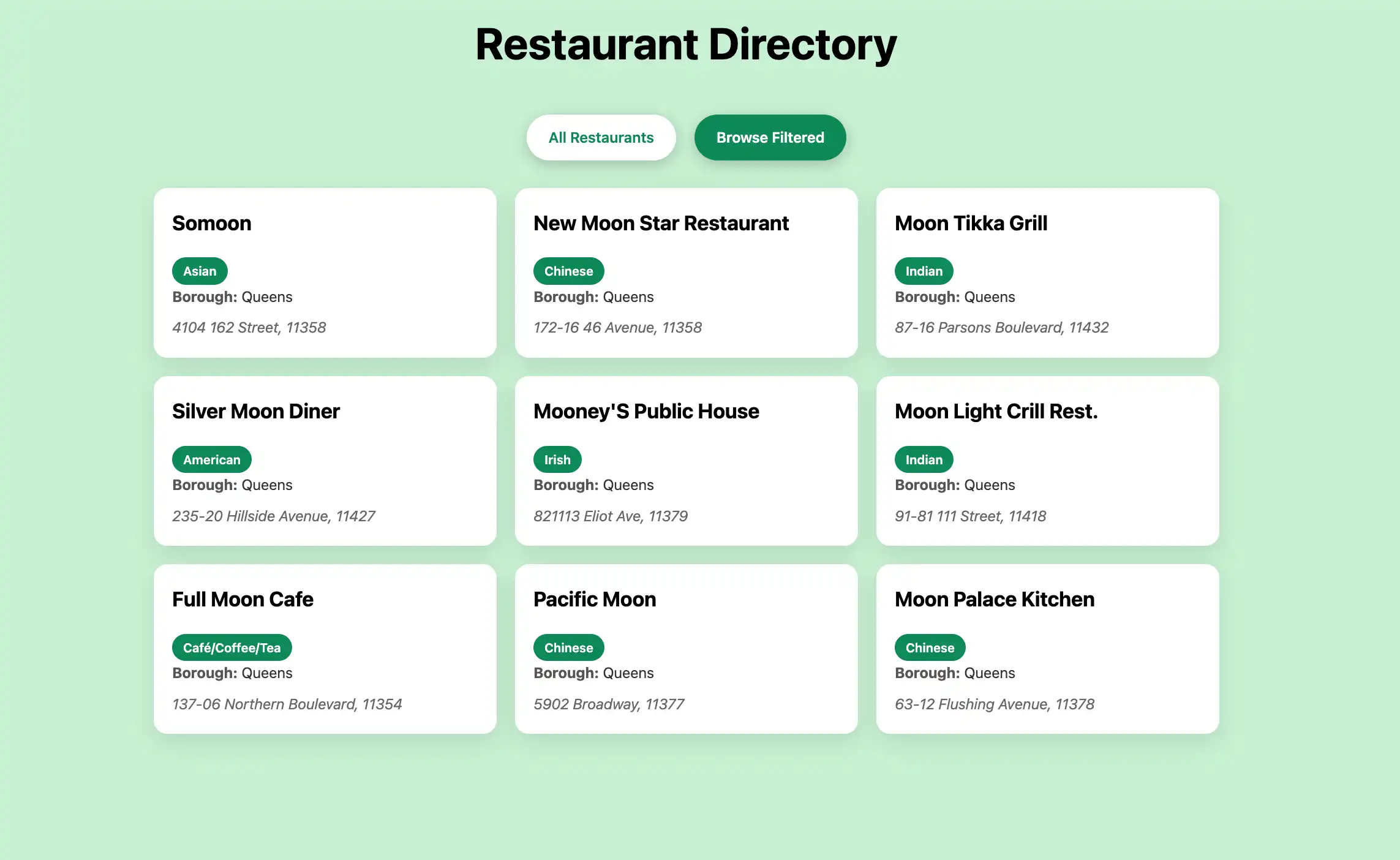
Then, click the Browse Filtered button to view restaurants in Queens that
have "Moon" in their name:

Test the API endpoints
You can also test the underlying API endpoints directly by running the following commands from your terminal:
curl http://127.0.0.1:8000/restaurants curl http://127.0.0.1:8000/restaurants/browse
These endpoints return the same data displayed in the web interface, formatted as JSON documents.
Congratulations on completing the Quick Start tutorial! After you complete these steps, you have a Rust and Rocket web application that connects to your MongoDB deployment, runs queries on sample restaurant data, and displays the results on a locally hosted web interface.
Additional Resources
To learn more about Rust, Rocket, and MongoDB, see the following resources:
Rocket documentation
MongoDB Rust Driver documentation
Serde serialization framework
Handlebars templating language