Develop an automotive diagnostics app. Combine MongoDB Atlas with Voyage Embedding models to solve complex vehicle faults and reduce warranty costs.
Use cases: Artificial Intelligence, Intelligent Search
Industries: Manufacturing
Products: MongoDB Voyage AI, MongoDB Atlas
Solution Overview
Part 1: Context-Aware RAG solved the problem of retrieving static text from car manuals. However, modern automotive after-sales support involves increasingly complex requirements. Vehicles today are sophisticated systems with extensive software integration.
The After-Sales Opportunity
Dealership service bays face growing demands as vehicle complexity increases. Unplanned service downtime represents a significant cost to the industry annually. Technicians might spend considerable time, up to 30% in some cases, searching for information rather than focusing on repairs. A common challenge involves linking software codes, Diagnostic Trouble Codes (DTCs), to physical hardware issues, which can be time-consuming without the right tools.
The No Fault Found (NFF) Challenge
NFF events account for nearly 30% of warranty costs. These occur when a component is replaced based on incomplete or unclear diagnostic information, even though the part was functioning correctly. Standard search tools might not fully address this challenge, as they can lack the contextual reasoning needed to connect symptoms such as a screen flicker to underlying causes such as a loose ground wire.
The Intelligent Diagnostics App
This solution helps you build a Diagnostic Assistant app on MongoDB Atlas. It uses Voyage AI models to enhance how technicians approach problem-solving:
Automate Fault Trees (GraphRAG): Move beyond keyword search. Use MongoDB’s
$graphLookupto model vehicle dependencies. Traverse from Symptom to System to Root Cause to identify the true failure path.Enable Visual Search (Multimodal): Identifying specific part variants can be challenging, especially for technicians who are still building their expertise. Integrate Voyage AI's voyage-multimodal-3.5 to enable the app to accept a photo of a part and return the correct replacement SKU, making part identification faster and more accurate for everyone.
Prioritize Precision (Reranking): Use Voyage AI’s rerank-2.5 to reorder results. Help ensure safety warnings and verified fixes appear prominently in the results.
Reference Architectures
Build a Symptom-to-Fix engine. Consolidate your app data, vector embeddings, and diagnostic graphs in MongoDB Atlas. This unifies the technician's workflow into a single app backend.
System Components
Ingestion Service
Text: Process OEM service manuals into chunks. Preserve the
breadcrumb_trail(for example,Model Y>Powertrain>High Voltage).Graph Construction: Extract logical links from service bulletins. Store "If X, then Check Y" logic as edge definitions.
Visual Assets: Embed schematics and component photos using Voyage AI. Store binaries in MongoDB GridFS.
Data Layer (MongoDB Atlas)
App Database: Store manual chunks, fault trees, and user sessions in the
diagnostics_db.Vector Store: Maintain dual vector indexes. Use Matryoshka Representation Learning (MRL) from Voyage AI to optimize mobile app latency.
Graph Store: Implicitly model the vehicle topology via document references.
App Workflow
Input: Mechanic scans a VIN and types a symptom ("AC blowing warm") or uploads a photo.
Identification: App retrieves specific vehicle context (Trim, Year) and relevant manual sections.
Reasoning: App uses
$graphLookupto check related subsystems (for example, "Check Compressor Relay").Verification: App displays the top three likely fixes, ranked by the Voyage AI Reranker, along with visual verification aids.
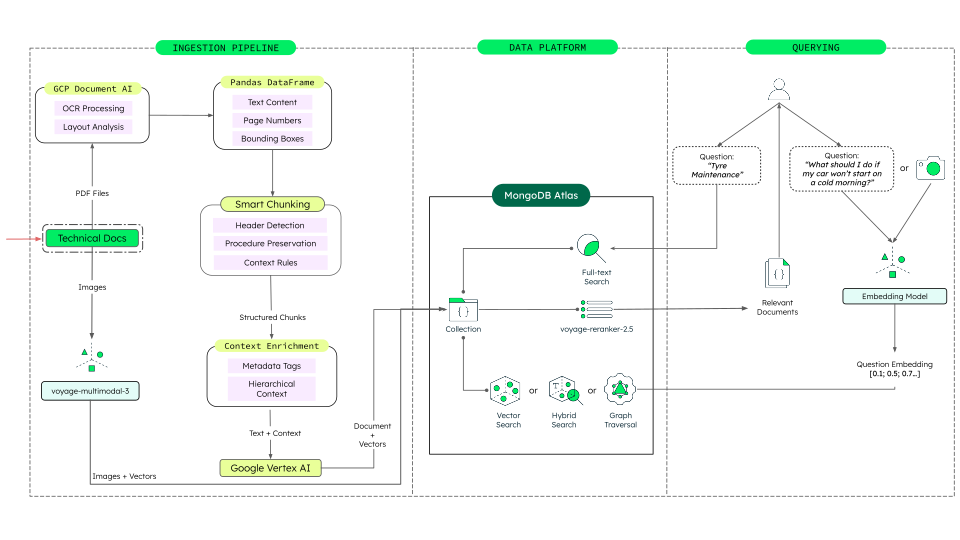
Figure 1. Unified Vector, Graph and Multimodal Architecture for Automotive Diagnostics on MongoDB Atlas
Data Model Approach
Design your schema for GraphRAG. Use a pre-materialized edge pattern to link symptoms to fixes directly in the document model.
Diagnostic Collection (manual_chunks)
Add a relationships array to your manual chunks. This enables the
app to simulate the reasoning of a master technician.
{ "_id": ObjectId("..."), "chunk_id": "chunk_4059", "text": "Inspect the AC Compressor Clutch for engagement...", // Domain-specific embedding (voyage-context-3) "text_embedding": [0.02, -0.5, ...], // NEW: Diagnostic Logic Edges "relationships": [ { "type": "SEQUENTIAL_TO", "target_id": "chunk_4060", "description": "Next Step: Check Refrigerant Pressure" }, { "type": "CAUSES", "target_id": "dtc_b1000", "description": "Clutch failure triggers Code B1000" }, { "type": "APPLIES_TO", "target_id": "trim_performance", "description": "Only for Performance Trims" } ], "metadata": { "system": "HVAC", "component": "Compressor", "breadcrumb_trail": "HVAC > COOLING > DIAGNOSTICS" } }
Visual Parts Collection (manual_images)
Link embeddings to GridFS to serve images directly to the app UI.
{ "_id": ObjectId("..."), "image_id": "img_001", "gridfs_id": ObjectId("..."), // Link to binary image "description": "Connector View: AC Compressor C1", // 1024-dim Voyage AI Multimodal embedding "multimodal_embedding": [-0.1, 0.8, ...], "associated_chunks": ["chunk_4059"], "metadata": { "view_type": "connector_pinout", "model_year": "2024" } }
Build the Solution
Implement three core app features. Access the full source code in the GitHub repository.
Intelligent Symptom Search (GraphRAG)
Build the Diagnose button. Use vector search to find the manual
section and $graphLookup to suggest the next logical step.
// MongoDB Aggregation: Find Symptom -> Suggest Fix [ // Step 1: Find the relevant manual section { "$vectorSearch": { "index": "vector_index_text", "path": "text_embedding", "queryVector": <embedding_of_symptom>, "numCandidates": 100, "limit": 5 } }, // Step 2: Traverse the Fault Tree { "$graphLookup": { "from": "manual_chunks", "startWith": "$relationships.target_id", "connectFromField": "relationships.target_id", "connectToField": "chunk_id", "as": "suggested_path", "maxDepth": 1 } } ]
Snap to Identify (Multimodal)
Build the Parts Camera feature. Use Voyage AI to embed the image and query the parts database.
# Python / FastAPI snippet from voyageai import Client vo = Client(api_key="VOYAGE_API_KEY") # Feature: User takes a picture of a corroded connector query_emb = vo.multimodal_embed( inputs=[{"image": user_image_bytes}], model="voyage-multimodal-3.5" ).embeddings[0] # Search for the part results = collection.aggregate([ { "$vectorSearch": { "index": "vector_index_images", "path": "multimodal_embedding", "queryVector": query_emb, "limit": 5 } } ])
Key Learnings
Use Multimodal embeddings: Traditional multimodal models process text and images through separate networks, leading to retrieval biases with mixed content. Voyage AI's voyage-multimodal-3.5 uses a unified transformer architecture that processes both modalities through the same backbone, eliminating the modality gap. This architecture enables seamless retrieval across document screenshots, PDFs, and diagrams without complex parsing pipelines.
Structure beats keywords: Mechanics think in systems, not keywords. A dead battery might be caused by a trunk latch (parasitic draw). Standard search misses this connection. GraphRAG captures this causal link. It enables the app to suggest checking the trunk latch when the user queries about the battery.
Unified backend simplifies development: Building separate backends for vectors, graphs, and images slows down development. MongoDB Atlas unifies these. You manage one database connection for your entire diagnostic app stack. This unification accelerates feature velocity and simplifies maintenance.
Authors
Mehar Grewal, MongoDB
Humza Akhtar, MongoDB
Daniel Jamir, MongoDB