MongoDB’s accelerator for mirroring enables customers to bring operational data from MongoDB Atlas to Microsoft Fabric in near real-time for big data analytics, AI, and business intelligence (BI), combining it with the rest of the data estate of the enterprise. Open mirroring in Fabric provides a unique way to import data from operational data stores to the uniform data layer of OneLake in Fabric. Once mirroring is enabled for a MongoDB Atlas collection, the corresponding table in OneLake stays in sync with the changes in the source MongoDB Atlas collection, unlocking opportunities for various analytics and for AI and BI in near real-time.
Using MongoDB Atlas in the Microsoft Fabric ecosystem
Today, there are multiple ways for data from MongoDB Atlas to be brought into OneLake in Fabric. The MongoDB Connectors for “Data Pipeline” and “Dataflow Gen2” are easy mechanisms to bring data from MongoDB Atlas to OneLake in batches or microbatches. The MongoDB Atlas Data Pipeline connector provides an easy experience via the copy-data assistant, which enables users to choose MongoDB Atlas as a source and OneLake as a target to push the operational data to OneLake. It also supports MongoDB Atlas as a target, so users can ingest the analytics and enriched data back to MongoDB Atlas for persistence.
Meanwhile, the MongoDB Atlas Dataflow Gen2 connector is a MongoDB Atlas SQL-based connector and enables users to pull data from MongoDB Atlas to OneLake, do transformations (such as filtering and flattening of data), and run power queries to create rich Power BI visualizations. Additionally, the MongoDB Connector for Spark can be used to create Apache Spark Notebooks in Microsoft Fabric that pull/push data from MongoDB Atlas in batch and streaming modes as well. Copy activity in Data Pipeline, Power query in Dataflow Gen2, and Spark Notebooks can leverage the respective MongoDB Atlas connectors to build enterprise workflows with MongoDB as a key source or destination.
Mirroring MongoDB Atlas to Microsoft Fabric OneLake
Mirroring, however, facilitates Spark-based analytics, SQL-based warehousing capabilities, SynapseML-based AI / machine learning (ML) predictions, or Kusto Query Language (KQL)–based near real-time intelligence on the current and up-to-date data in MongoDB Atlas.
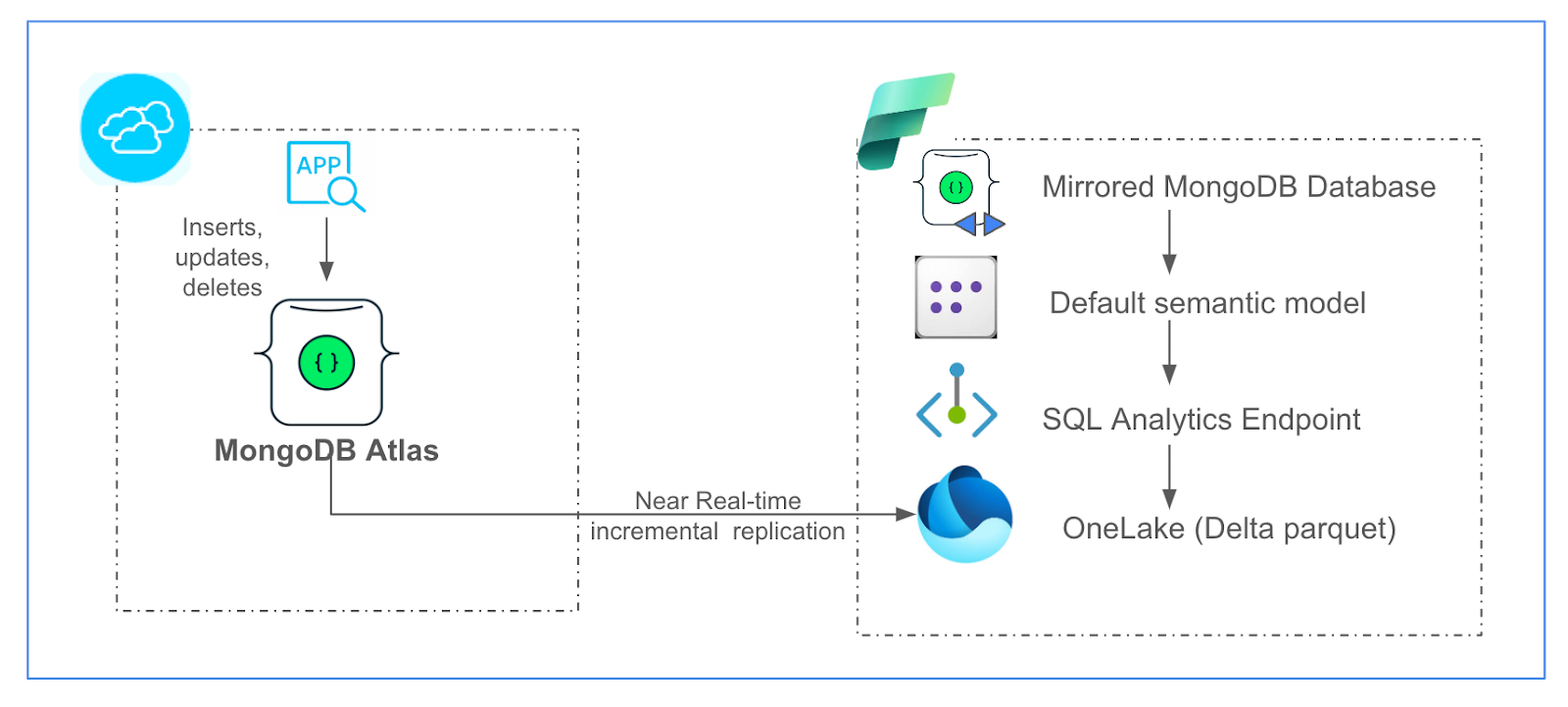
The insert, update, and delete events occurring on the source MongoDB Atlas collection will be mirrored to the target OneLake table right after they occur in the source collection. Mirroring handles the conversion of the format to Apache Delta Parquet, the data-type conversions, and the handling of schema changes. Additionally, mirroring generates a SQL analytics endpoint to enable SQL analytics using T-SQL on the mirrored data tables in a read-only fashion. It also generates a default semantic model to build Power BI reports and dashboards out of the mirrored OneLake tables.
The following diagram depicts the mirroring integration architecture.
Figure 1. MongoDB Atlas mirroring in Microsoft Fabric.
Using the MongoDB Atlas mirroring accelerator
The MongoDB Atlas mirroring accelerator uses the open mirroring in Fabric. Open Mirroring provides a seamless user experience and an API, either of which can be used to create a new open-mirrored database in Fabric. Once a user has created a landing zone within the mirrored database in Fabric OneLake, all the Parquet files pushed to the landing zone are converted to delta parquet format and replicated into the corresponding tables in the mirrored database.
To deploy the solution:
Step 1: Create an open-mirrored database via public API or via the Fabric portal, and obtain a landing zone URL in OneLake, where you can land MongoDB Atlas change data per the open-mirroring specification.
Step 2: Once you have created the landing zone in the mirrored database, just click the “Deploy to Azure” button, available at the bottom in the provided GitHub repo, as shown below.

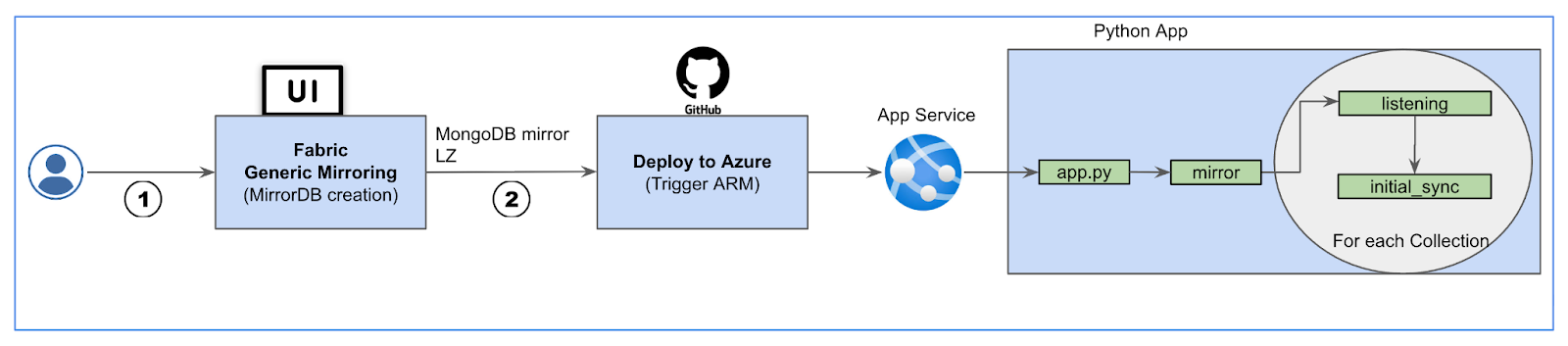
Step 3: This will take you to an ARM template configuration screen in your Azure tenant. Input the required details and select the “Create” button, then the solution will create an App service, deploy the Python app, and start the mirroring application. The application will trigger Initial Sync (for the one-time historical data ingestion into OneLake) and Listening (to keep replicating changes from the source MongoDB Atlas collections to the target tables in the mirrored database).
You can also deploy the solution in a virtual machine (VM) in your Azure tenant or any bare metal server. If it’s deployed in a VM, you can peer or private link the VM’s Azure Virtual Network with MongoDB Atlas for secure communication.
The following diagram depicts how an Azure App service, powered by Python script, enables mirroring for MongoDB Atlas.
Figure 3. MongoDB Atlas mirroring solution.
Refer to this short video for an explanation of the MongoDB Atlas to OneLake mirroring solution.
Deploying the solution using Terraform
In addition to the ARM template deployment process presented above, we have also provided an automated deployment process using infrastructure as code (IaC) with Terraform. The IaC code, along with instructions for setting up the deployment variable values, is available at the solution’s GitHub repository, and you can find a video showing the process here.
Observing MongoDB Atlas mirroring use cases
Mirroring will benefit multiple industries in use cases that require near real-time analytics. The mirrored MongoDB database in OneLake comes with a SQL analytics endpoint that simplifies data warehousing experience by using T-SQL or the visual query editor. This can be used to combine data from other Fabric lakehouses and warehouses for a holistic enterprise data-estate analysis. The semantic model can help build reports and dashboards in Power BI using the mirrored data. These near real-time reports and outputs can help businesses take responsive actions in near real-time, especially in highly regulated industries.
The mirrored data can be used in near real-time ML based analytics, like credit scoring and fraud detection in the financial services industry, for dynamic pricing and inventory management in the retail industry, or for predictive maintenance in the manufacturing industry.
Conclusion
Mirroring for MongoDB Atlas will enable you to copy your data from MongoDB Atlas collections to OneLake without any complex setup or extract, transform, and load (ETL) process involved. This near real-time data synchronization into the Delta parquet format enables the mirrored data to be used by a variety of Fabric tools, helping you gather accurate and meaningful insights.
Get started with mirroring for your MongoDB Atlas data by following the steps on Github.