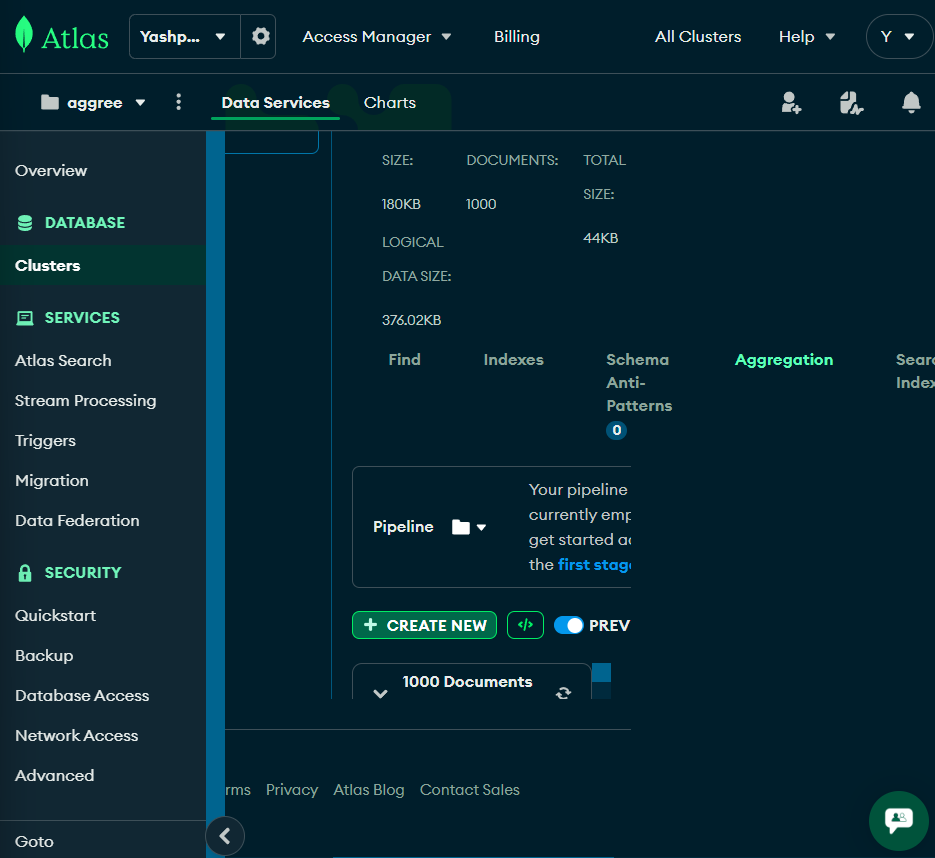
When using MongoDB Atlas in split-screen mode on Brave Browser, the UI layout breaks across several tabs in the Data Services panel — including Find, Indexes, Aggregation, and others. The UI does not adapt responsively, resulting in clipped content, misaligned elements, and overlapping text or buttons.
Steps to Reproduce:
- Open https://cloud.mongodb.com in Brave Browser.
- Go to your project → Clusters → Data Services.
- Navigate through tabs like Find, Indexes, Aggregation.
- Resize the browser window to split-screen .
- Observe layout issues such as:
- Buttons partially cut off
- Content not reflowing correctly
- Layout overlap and broken alignment
Expected Behavior:
The UI should be responsive and adjust gracefully for smaller screen widths, using scrollbars or reflow techniques.
Environment:
Browser: Brave
OS: Windows
Screen Size (at bug): 768 × 836(Split screen )
Issue Reproduced On: Multiple tabs — Find, Indexes, Aggregation, etc.
Atlas UI Version: (current cloud interface, May 2025)