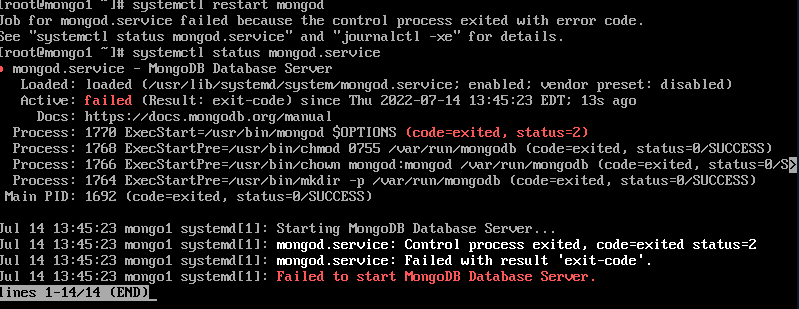
did you match the spaces correctly?
what error it gives when try systemctl restart mongod, and what you see with systemctl status mongod?
did you match the spaces correctly?
what error it gives when try systemctl restart mongod, and what you see with systemctl status mongod?
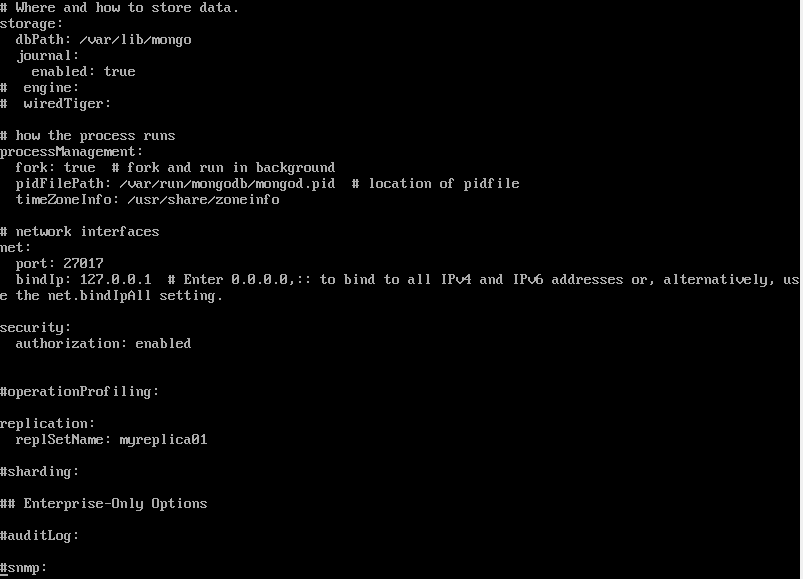
I wish you had shown your config long before this.
you are trying to enable the security from start, but that is not allowed until you create an admin user first while authorization is “disabled”. and to do that, you need to first initialize the replica set and its members.
either comment it out back or set the security value to “disabled” until you successfully complete the replica set.
of course, when all your nodes work, you will find a few other obstacles relating to mongodb 4.4, but they are not this annoying. check these links when you come to that point:
PS:when you change to net.bindIp: 10.0.15.21, you will no longer be able to connect to localhost without host name or address: mongo --host mongo1
nope, you are still deviating from the order of the procedure. you seem you have added a user and activated security “before” you set up (init/add) the replica set.
by the way, once you correctly activate the replica set and then the security you will also need to connect as admin if you want to do any more improvements. check the options by mongo --help to connect with a user and password.
Hi Durmaz, I was able to fixed the errors after some efforts. Now its get replicated. Many thanks for your timely responses and really appreciated.!! As you said, security should enabled once replica is configured ONLY. but beforehand admin user must be created initially. 1-admin user 2-replica 3-authorization enable
currently, I am not sure on which version you have achieved that, but it is good to hear you have success at last 
my current test, for example, got so crappy that it just refuses to run with “systemctl” after changes, manual run seems fine inside the cluster, an outside machine gives read preference error connecting to this replica set, etc. But all these are just a matter of more testing and debugging to correct.
You have at least one seemingly running set. This alone opens a lot to move on. I suggest you test it with different users on different databases, from different levels of network (local,cluster,global) etc.
By the way, from start to end, you can now make a short story on where was the problem and how you fixed it, make a new answer with detailed steps as much possible, and mark it as the accepted answer post so others can come in and see a TL:DR.
Good Luck
Hi,
I just created a txt file with what I did in order to create a replicaset with 3 nodes in Oracle VirtualBox.
replication steps.txt (4.3 KB)
Hi @Yilmaz_Durmaz Can we have both secondary and Arbiter run on the same node? (due to some cost fact , we are in search of this). thanks in advance.
they can share the same LAN/WAN IP but on different ports, then you can connect them to your cluster by those “IP:port” pairs. Do not forget you cannot use “localhost” or “127.0.0.1” in your config files and you have to connect to them with the same “IP:port” from the shell.