Hi,
Today I looked for a new cofiguration strategy based on a document here in the community. However, unfortunately I still observe the same scenario.
Configuring replication
about the configurationin docker-compose.yml
    image: mongo:5.0
    restart: unless-stopped
    container_name: mongodb1
    hostname: mongodb1
    command: --replSet mongors
    environment:
      DB: mongodb
    networks:
      mongodb_network:
              ipv4_address: 172.20.0.2
    volumes:
      - mgodb_data_1:/data/db
      - mgodb_logs_1:/data/logs
    expose:
      - 27017
    ports:
      - 28017:27017

  mongodbsvr02:
  ...
    networks:
      mongodb_network:
              ipv4_address: 172.20.0.3
...
    expose:
      - 27017
    ports:
      - 28018:27017
.....

 mongodbsvr03:
...
    networks:
      mongodb_network:
              ipv4_address: 172.20.0.4
...
    expose:
      - 27017
    ports:
      - 28019:27017

networks:
  mongodb_network:
    # driver: bridge
        ipam:
          driver: default
          config:
              - subnet: 172.20.0.0/24`

**TPC Listen Tests**
% lsof -iTCP -sTCP:LISTEN -P -n
COMMAND PID USER FD TYPE DEVICE SIZE/OFF NODE NAME
ControlCe 396 houseadm 20u IPv4 0x33f499f53a953481 0t0 TCP *:7000 (LISTEN)
ControlCe 396 houseadm 21u IPv6 0x33f499f0726cc421 0t0 TCP *:7000 (LISTEN)
ControlCe 396 houseadm 22u IPv4 0x33f499f53a9529d9 0t0 TCP *:5000 (LISTEN)
ControlCe 396 houseadm 23u IPv6 0x33f499f0726ccb21 0t0 TCP *:5000 (LISTEN)
rapportd 401 houseadm 4u IPv4 0x33f499f52fee19d9 0t0 TCP *:62025 (LISTEN)
rapportd 401 houseadm 7u IPv6 0x33f499f0726cfc21 0t0 TCP *:62025 (LISTEN)
com.docke 61040 houseadm 195u IPv6 0x33f499f075eb9121 0t0 TCP *:28018 (LISTEN)
com.docke 61040 houseadm 196u IPv6 0x33f499f075eb9f21 0t0 TCP *:28017 (LISTEN)
com.docke 61040 houseadm 198u IPv6 0x33f499f075eb9821 0t0 TCP *:28019 (LISTEN)`
Inspect Network
docker network inspect testcompose_mongodb_network
[
    {
        "Name": "testcompose_mongodb_network",
        "Id": "c0623efc620722a892ff2b8b57c6a16ff2cfa81a16dad60645b6c90f35ebe482",
        "Created": "2023-07-19T23:19:04.671723761Z",
        "Scope": "local",
        "Driver": "bridge",
        "EnableIPv6": false,
        "IPAM": {
            "Driver": "default",
            "Options": null,
            "Config": [
                {
                    "Subnet": "172.20.0.0/24"
                }
            ]
        },
        "Internal": false,
        "Attachable": false,
        "Ingress": false,
        "ConfigFrom": {
            "Network": ""
        },
        "ConfigOnly": false,
        "Containers": {
            "2d6708254ee69c1c154510cf107bfd7145fbdf53f7a989c0ff79c235eb67451c": {
                "Name": "mongodb2",
                "EndpointID": "3f98e00fe6b6513981c1f325fcaea307875b59bb7cf8655e888cf086258d47e0",
                "MacAddress": "02:42:ac:14:00:03",
                "IPv4Address": "172.20.0.3/24",
                "IPv6Address": ""
            },
            "910c8d8e143f4b9178ddc1d7b7d4fd9c653a26eb8b546869fa32ee5b94e52144": {
                "Name": "mongodb1",
                "EndpointID": "534df4471b4b29bf723e80792231be3ad7ddc510819b8d73efbbd98eeca9eff7",
                "MacAddress": "02:42:ac:14:00:02",
                "IPv4Address": "172.20.0.2/24",
                "IPv6Address": ""
            },
            "b1973fba7e2bd2374eddd2b22594b8dd84211259c3ab3f9606ecc11b3142559d": {
                "Name": "mongodb3",
                "EndpointID": "5ac7be6b1fdea003651d89e62f421abaf21f5ed8976a7ecdd6bc869e91d68b98",
                "MacAddress": "02:42:ac:14:00:04",
                "IPv4Address": "172.20.0.4/24",
                "IPv6Address": ""
            }
        },
        "Options": {},
        "Labels": {
            "com.docker.compose.network": "mongodb_network",
            "com.docker.compose.project": "testcompose",
            "com.docker.compose.version": "2.19.1"
        }
    }
]`

**Connect using docker exe**

<ins>cluster </ins><ins>health </ins>
docker exec mongodb1 bash -c ‘mongo --eval “rs.status()”’
MongoDB shell version v5.0.19
connecting to: mongodb://127.0.0.1:27017/?compressors=disabled&gssapiServiceName=mongodb
Implicit session: session { “id” : UUID(“daa166f0-f8f3-4a83-b9e7-af6fdcb214ce”) }
MongoDB server version: 5.0.19
{
“set” : “mongors”,
“date” : ISODate(“2023-07-20T00:18:17.793Z”),
“myState” : 1,
“term” : NumberLong(1),
“syncSourceHost” : “”,
“syncSourceId” : -1,
“heartbeatIntervalMillis” : NumberLong(2000),
“majorityVoteCount” : 2,
“writeMajorityCount” : 2,
“votingMembersCount” : 3,
“writableVotingMembersCount” : 3,
“optimes” : {
“lastCommittedOpTime” : {
“ts” : Timestamp(1689812287, 1),
“t” : NumberLong(1)
},
“lastCommittedWallTime” : ISODate(“2023-07-20T00:18:07.887Z”),
“readConcernMajorityOpTime” : {
“ts” : Timestamp(1689812287, 1),
“t” : NumberLong(1)
},
“appliedOpTime” : {
“ts” : Timestamp(1689812287, 1),
“t” : NumberLong(1)
},
“durableOpTime” : {
“ts” : Timestamp(1689812287, 1),
“t” : NumberLong(1)
},
“lastAppliedWallTime” : ISODate(“2023-07-20T00:18:07.887Z”),
“lastDurableWallTime” : ISODate(“2023-07-20T00:18:07.887Z”)
},
“lastStableRecoveryTimestamp” : Timestamp(1689812287, 1),
“electionCandidateMetrics” : {
“lastElectionReason” : “electionTimeout”,
“lastElectionDate” : ISODate(“2023-07-19T23:19:32.484Z”),
“electionTerm” : NumberLong(1),
“lastCommittedOpTimeAtElection” : {
“ts” : Timestamp(1689808761, 1),
“t” : NumberLong(-1)
},
“lastSeenOpTimeAtElection” : {
“ts” : Timestamp(1689808761, 1),
“t” : NumberLong(-1)
},
“numVotesNeeded” : 2,
“priorityAtElection” : 2,
“electionTimeoutMillis” : NumberLong(10000),
“numCatchUpOps” : NumberLong(0),
“newTermStartDate” : ISODate(“2023-07-19T23:19:32.526Z”),
“wMajorityWriteAvailabilityDate” : ISODate(“2023-07-19T23:19:33.852Z”)
},
“members” : [
{
“_id” : 0,
“name” : “mongodb1:27017”,
“health” : 1,
“state” : 1,
“stateStr” : “PRIMARY”,
“uptime” : 3552,
“optime” : {
“ts” : Timestamp(1689812287, 1),
“t” : NumberLong(1)
},
“optimeDate” : ISODate(“2023-07-20T00:18:07Z”),
“lastAppliedWallTime” : ISODate(“2023-07-20T00:18:07.887Z”),
“lastDurableWallTime” : ISODate(“2023-07-20T00:18:07.887Z”),
“syncSourceHost” : “”,
“syncSourceId” : -1,
“infoMessage” : “”,
“electionTime” : Timestamp(1689808772, 1),
“electionDate” : ISODate(“2023-07-19T23:19:32Z”),
“configVersion” : 79652,
“configTerm” : -1,
“self” : true,
“lastHeartbeatMessage” : “”
},
{
“_id” : 1,
“name” : “mongodb2:27017”,
“health” : 1,
“state” : 2,
“stateStr” : “SECONDARY”,
“uptime” : 3536,
“optime” : {
“ts” : Timestamp(1689812287, 1),
“t” : NumberLong(1)
},
“optimeDurable” : {
“ts” : Timestamp(1689812287, 1),
“t” : NumberLong(1)
},
“optimeDate” : ISODate(“2023-07-20T00:18:07Z”),
“optimeDurableDate” : ISODate(“2023-07-20T00:18:07Z”),
“lastAppliedWallTime” : ISODate(“2023-07-20T00:18:07.887Z”),
“lastDurableWallTime” : ISODate(“2023-07-20T00:18:07.887Z”),
“lastHeartbeat” : ISODate(“2023-07-20T00:18:16.417Z”),
“lastHeartbeatRecv” : ISODate(“2023-07-20T00:18:16.241Z”),
“pingMs” : NumberLong(0),
“lastHeartbeatMessage” : “”,
“syncSourceHost” : “mongodb1:27017”,
“syncSourceId” : 0,
“infoMessage” : “”,
“configVersion” : 79652,
“configTerm” : -1
},
{
“_id” : 2,
“name” : “mongodb3:27017”,
“health” : 1,
“state” : 2,
“stateStr” : “SECONDARY”,
“uptime” : 3536,
“optime” : {
“ts” : Timestamp(1689812287, 1),
“t” : NumberLong(1)
},
“optimeDurable” : {
“ts” : Timestamp(1689812287, 1),
“t” : NumberLong(1)
},
“optimeDate” : ISODate(“2023-07-20T00:18:07Z”),
“optimeDurableDate” : ISODate(“2023-07-20T00:18:07Z”),
“lastAppliedWallTime” : ISODate(“2023-07-20T00:18:07.887Z”),
“lastDurableWallTime” : ISODate(“2023-07-20T00:18:07.887Z”),
“lastHeartbeat” : ISODate(“2023-07-20T00:18:16.417Z”),
“lastHeartbeatRecv” : ISODate(“2023-07-20T00:18:16.240Z”),
“pingMs” : NumberLong(0),
“lastHeartbeatMessage” : “”,
“syncSourceHost” : “mongodb1:27017”,
“syncSourceId” : 0,
“infoMessage” : “”,
“configVersion” : 79652,
“configTerm” : -1
}
],
“ok” : 1,
“$clusterTime” : {
“clusterTime” : Timestamp(1689812287, 1),
“signature” : {
“hash” : BinData(0,“AAAAAAAAAAAAAAAAAAAAAAAAAAA=”),
“keyId” : NumberLong(0)
}
},
“operationTime” : Timestamp(1689812287, 1)`
bash connections
houseadm@houseadms-iMac testcompose % docker exec -it mongodb1 bash root@mongodb1:/#
mongosh connections with docker exe
`
docker exec -it mongodb1 mongosh
Current Mongosh Log ID: 64b8828b52c0d5d3ac3d4e57
Connecting to: mongodb://127.0.0.1:27017/?directConnection=true&serverSelectionTimeoutMS=2000&appName=mongosh+1.10.1
Using MongoDB: 5.0.19
Using Mongosh: 1.10.1
For mongosh info see: https://docs.mongodb.com/mongodb-shell/
The server generated these startup warnings when booting
2023-07-19T23:19:05.873+00:00: Using the XFS filesystem is strongly recommended with the WiredTiger storage engine. See http://dochub.mongodb.org/core/prodnotes-filesystem
2023-07-19T23:19:06.916+00:00: Access control is not enabled for the database. Read and write access to data and configuration is unrestricted
mongors [direct: primary] test `
by mongosh
the same result = refused
mongosh --version 1.10.1
Configuring replication
about the configuration
**outside container"
in my mac
`mongosh --host \
“mongors/172.20.0.2:27017,172.20.0.3:27017,172.20.0.4:27017” mongodb
Current Mongosh Log ID: 64b885daf9a9c77f5a038e2f
Connecting to: mongodb://172.20.0.2:27017,172.20.0.3:27017,172.20.0.4:27017/mongodb?replicaSet=mongors&appName=mongosh+1.10.1
MongoServerSelectionError: connection timed out`
**inside the container"
`root@mongodb1:/# mongosh --host \
"mongors/172.20.0.2:27017,172.20.0.3:27017,172.20.0.4:27017" mongodb
Current Mongosh Log ID: 64b8870cb701fb873415832e
Connecting to: mongodb://172.20.0.2:27017,172.20.0.3:27017,172.20.0.4:27017/mongodb?replicaSet=mongors&appName=mongosh+1.10.1
Using MongoDB: 5.0.19
Using Mongosh: 1.10.1
mongors [primary] mongodb`
`
root@mongodb1:/# mongo --host mongodb://172.20.0.2:27017,172.20.0.3:27017,172.20.0.4:27017/test?replicaSet=mongors
MongoDB shell version v5.0.19
connecting to: mongodb://172.20.0.2:27017,172.20.0.3:27017,172.20.0.4:27017/test?compressors=disabled&gssapiServiceName=mongodb&replicaSet=mongors
Implicit session: session { “id” : UUID(“9aaa4e0d-deaf-4e97-a2aa-6dfc69ca3dda”) }
MongoDB server version: 5.0.19
Warning: the “mongo” shell has been superseded by “mongosh”
which delivers improved usability and compatibility.The “mongo” shell has been deprecated and will be removed in
an upcoming release.
For installation instructions, see
Welcome to the MongoDB shell.
For interactive help, type “help”.
For more comprehensive documentation, see
https://docs.mongodb.com/
Questions? Try the MongoDB Developer Community Forums
https://community.mongodb.com
The server generated these startup warnings when booting:
2023-07-19T23:19:05.873+00:00: Using the XFS filesystem is strongly recommended with the WiredTiger storage engine. See http://dochub.mongodb.org/core/prodnotes-filesystem
2023-07-19T23:19:06.916+00:00: Access control is not enabled for the database. Read and write access to data and configuration is unrestricted
mongors:PRIMARY> show dbs
admin 0.000GB
config 0.000GB
local 0.000GB`
The other two new variables in relation to the tests performed yesterday
houseadm@houseadms-iMac testcompose % cat /etc/hosts

127.0.0.1       localhost
255.255.255.255 broadcasthost
::1             localhost
#example
#127.0.10.1       mongo-0-a
#127.0.10.2       mongo-0-b
#127.0.10.3       mongo-0-c
#
172.21.0.2        mongodb1
172.21.0.3        mongodb2
172.21.0.4        mongodb3

172.21.0.2      mongodbsvr01
172.21.0.3      mongodbsvr02
172.21.0.4      mongodbsvr03`
houseadm@houseadms-iMac testcompose %
telnet mongodb1 27017
Trying 172.21.0.2
houseadm@houseadms-iMac testcompose %
telnet mongodbsvr01 27017
Trying 172.21.0.2
Another was possible to access from Studio 3T, using the 0.0.0.0 Port. Not anymore today, yesterday it was possible using de first confuguartion.
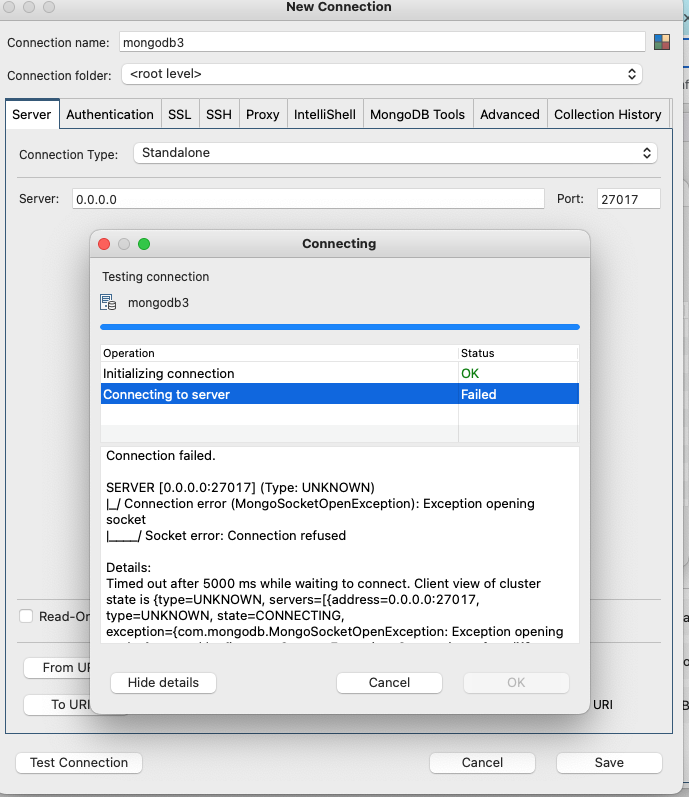
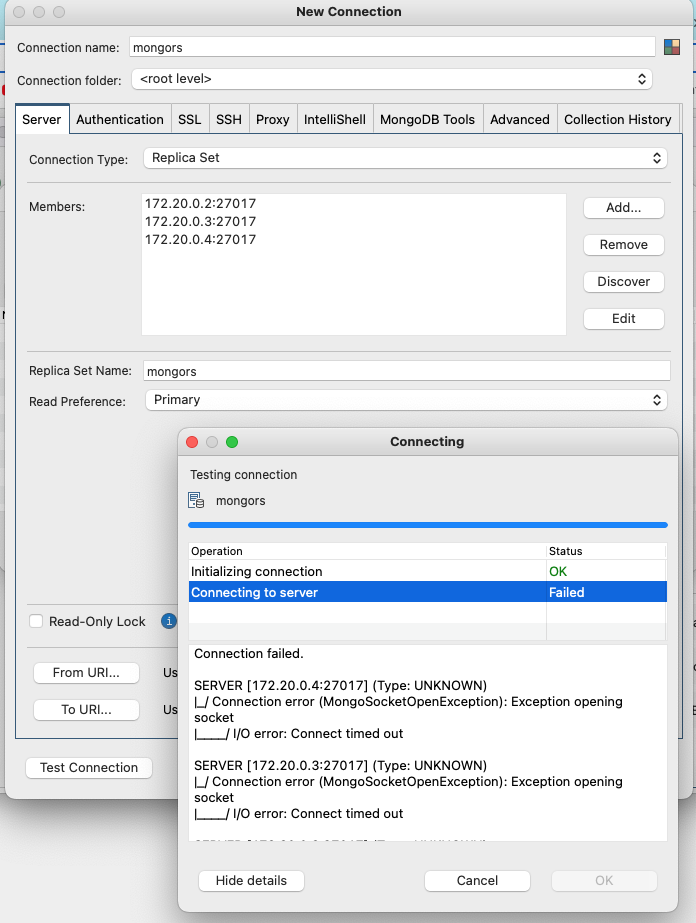
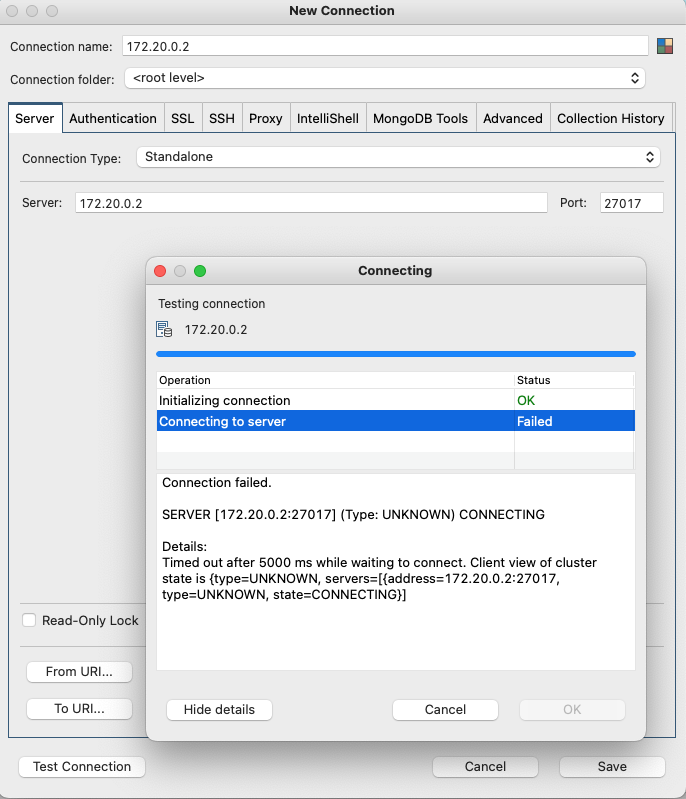
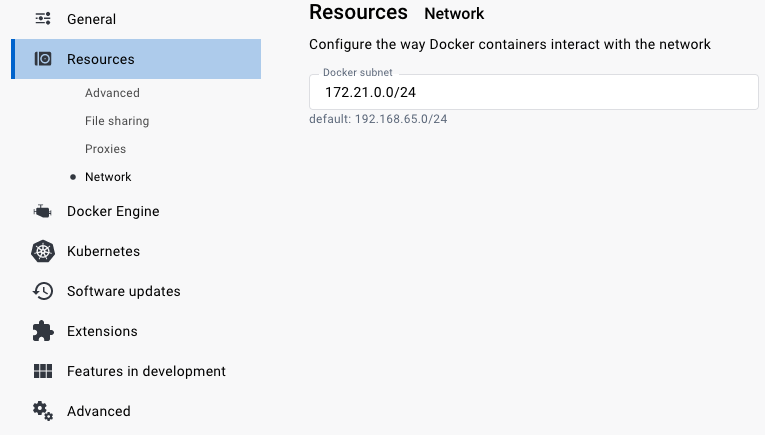
And finally I changed the default IP address on to or new 172.21.0.0/24 used by replica set in Docker Desktop
Regards,
Carlos