Hi,
Could you provide step by step how you set the variable to zero(0).
Thanks.
Hi,
Could you provide step by step how you set the variable to zero(0).
Thanks.
Hi Travis,
I am facing the same problem now.
Could you provide like a step-by-step process of how you achieved this?
Thanks in anticipation.
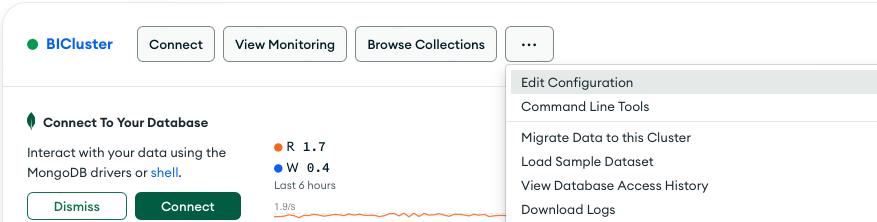
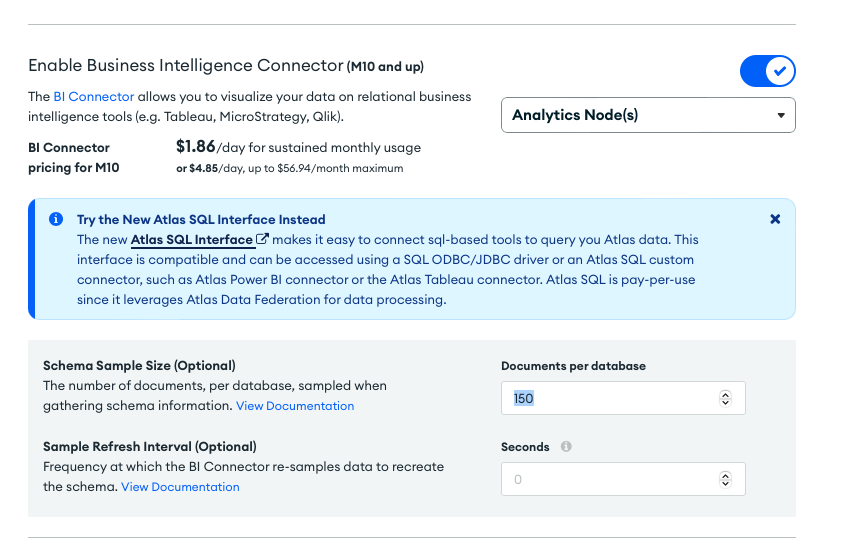
@Tunde_Morakinyo - they just set the sample to 0, which would sample through all docs to then build out the normalized view for the BI Connector. Here are the steps:
Within Atlas, from the cluster card, select the 3 dots button, then select “edit configuration”, then go to the Additional Settings section. Find the BI Connector section, and change the sample size to 0. Then review changes and save. This will take a bit of time to scan (depends on how large your cluster is) and while this is happening you/your users can’t use the BI Connector.
As suggested by Thomas_Russell this can be coming from the sampling size.
For those who do not use Atlas but use the self-managed MongoDB BI connector with an on-prem MongoDB install, the reason why some columns are not loaded could come from how the MongoDB BI connector builds a schema (columns) based on your data. By default (as of version 2.14.12), it only uses 1000 documents of each collection to identify columns. Meaning that if documents other than these 1000 documents have extra columns, they would be missing in your Power BI report!
This default value of 1000 can be changed when you start mongosqld using the argument “–sampleSize”. By setting its value to 0, it uses ALL documents of the collection when building the schema, so all your columns will be identified and loaded!
This is the command to run when you start mongosqld (first you might have to stop it from the Task Manager services if it’s already running!):
mongosqld.exe --sampleSize 0
By default mongosqld.exe should be on that folder: C:\Program Files\MongoDB\Connector for BI\2.14\bin\
See more info on the command in the link below. Note that you can specify a DB and collection for the sampleSize. If you don’t specify it, it will be applied on all collections. Note that if you want the schema to be refreshed if it is likely that new keys/columns would be added to your mongodb DB, you can also set --schemaRefreshIntervalSecs, see the doc below.
Same problem – but not Mongo, not Power BI.
Opened the same table using LINUX ODBC and the same columns Power BI omits are also omitted in Linux, testing with the UNICODE iusql command.
Of note, /etc/mongo_odbc.log does not show an error.
I repeated the ODBC test on Windows using a simple C# query. Same results; near identical log.