I can’t connect to MongoDB by MongoDB For VSCode. I already research the solutions, Those are not working. I’m sure i added the ip address. And when i use another computer of Mac m4 in same Wifi, it’s ok. I have no ideas right now, please help me.
Device infomations:
Mac Pro 2020 Intel Core i5
MongoDB for vscode
Free plan
There is error information:
Unable to load connection: MongoServerSelectionError: Client network socket disconnected before secure TLS connection was established. It looks like this is a MongoDB Atlas cluster. Please ensure that your Network Access List allows connections from your IP.
Hello, I know you said that its on the same wifi, but just to double check:
Could you verify the ip address on both? Your Intel Mac might have a different IP address than your M4 Mac. Double-check your current IP (you can use a service like https://whatismyipaddress.com/) and ensure it’s added to MongoDB Atlas Network Access list.
make sure that the mongodb for vscode extension is up to date
Have you checked your mac’s security settings? (for example the firewall might be blocking the secure connection).
is your system time correct on that mac? sometimes tls fails if its not the correct time.
when you tried on the other mac thats on the same wifi did you use the same vscode extension? curious if you maybe used a different format in one over the other.
in atlas how i connected was by copying the compass connection string and using that one.
Format and connecttion ways are same.
About system time is good point. I don’t enable date automatically, but it seems to be correct. Maybe i need to try again enabling date automatically. I’ll feedback again after I try it again.
the other thing that i was thinking about is a mismatch in the CA certificates.
this is less likely but thought it would help:
When your computer connects to MongoDB Atlas, MongoDB presents a digital certificate as proof of identity. Your computer checks this certificate against a local database of trusted certificate authorities (CAs).
If your Intel Mac is missing the specific CA certificate that vouches for MongoDB’s identity, the connection is rejected as untrusted. This happens before any data is exchanged this does lead to “before secure TLS connection was established.”
Your M4 Mac could have this certificate in its trusted store, while your Intel Mac doesn’t. This single missing certificate can be the entire reason one machine works and the other doesn’t, even on the same network.
I was able to reproduce your issue by using the latest version on the extension on my mac.
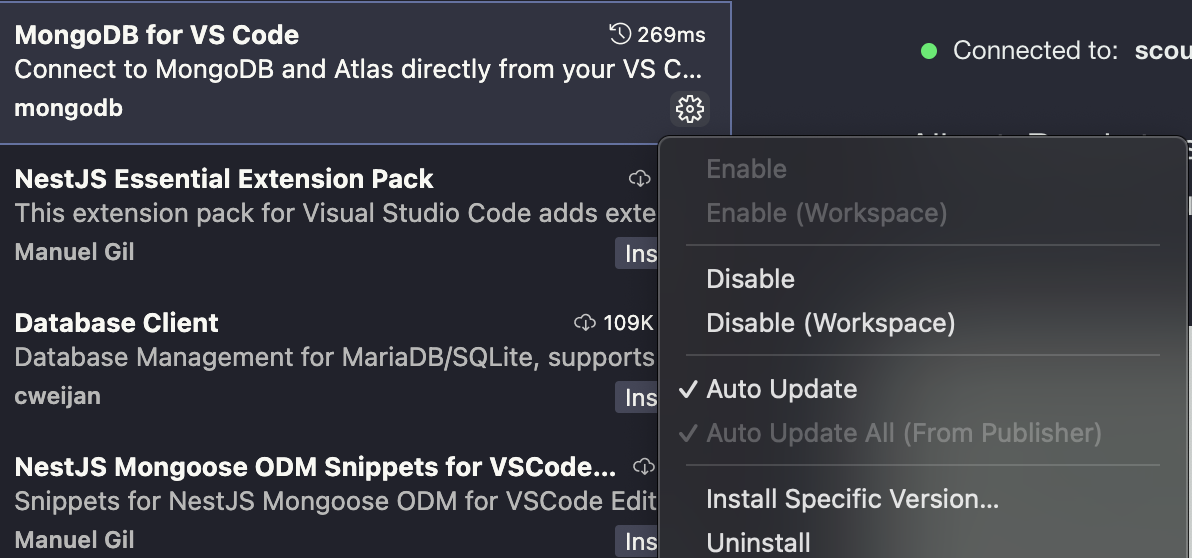
To fix it I downgraded to the version prior by clicking on the gear: