I want to apply the following MongoDB command to my collection
db.runCommand ( { collMod: "myCollection", changeStreamPreAndPostImages: { enabled: true } } );
Is it possible to configure it in Mongo Altas, if not, how I can do it using Mongoose?
I want to apply the following MongoDB command to my collection
db.runCommand ( { collMod: "myCollection", changeStreamPreAndPostImages: { enabled: true } } );
Is it possible to configure it in Mongo Altas, if not, how I can do it using Mongoose?
Hi @WONG_TUNG_TUNG and welcome to MongoDB community forums!!
You can use the command to changeStreamPreAndPostImages both using Atlas and Mongoose.
You can try the below command on the database selected.
Atlas atlas-cihc7e-shard-0 [primary] test> db.runCommand({ collMod: "server", changeStreamPreAndPostImages: { enabled: true } })
{
  ok: 1,
  '$clusterTime': {
    clusterTime: Timestamp({ t: 1698305510, i: 20 }),
    signature: {
      hash: Binary.createFromBase64("KfJBkq3wufdRsjRbPtLilFExH4g=", 0),
      keyId: Long("7262404739617259522")
    }
  },
  operationTime: Timestamp({ t: 1698305510, i: 20 })
}
const addressSchema = new mongoose.Schema({
    city: String,
    street: String,
},
  {
  changeStreamPreAndPostImages: { enabled: true }
}
);
Please feel free to reach out in case of further queries.
Warm Regards
Aasawari
Hi, thank you for the reply. After I add
{changeStreamPreAndPostImages: { enabled: true }}
to my schema and set
fullDocumentBeforeChange: "whenAvailable",
in my change stream. I still get
fullDocumentBeforeChange: null
in my delete operation like:
 {
_id: {
 _data: '82653A3F35000000012B022C0100296E5A1004613AD22AB6A74AAA9A5B8FBE59C0F49846645F69640064653A3E14941006D98CD7AA380004'
},
operationType: 'delete',
clusterTime: new Timestamp({ t: 1698316085, i: 1 }),
wallTime: 2023-10-26T10:28:05.397Z,
ns: { db: 'football', coll: 'maps' },
documentKey: { _id: new ObjectId("653a3e14941006d98cd7aa38") },
fullDocumentBeforeChange: null
}
May I ask why?
Hi @WONG_TUNG_TUNG
Thank you for writing back
As mentioned in the Change Stream documentation, you have the ability to manage the size of the config.system.preimages collection and set an expireAfterSeconds time for the pre-images.
This is a crucial strategy to prevent the config.system.preimages collection from becoming excessively large. When you set an expiration time for pre-images, MongoDB will automatically remove them in the background process, helping to keep your database’s size under control.
Can you verify if you are applying any timer values for the expireAfterSeconds field?
I tried the steps mentioned in documentation for change stream and I am able to see the fullDocumentBeforeChange in the change stream output.
{
  _id: {
    _data: '82653B9548000000202B022C0100296E5A1004B4153884939F4B80B8AED56EB36FE12A461E5F696400290004'
  },
  operationType: 'delete',
  clusterTime: Timestamp({ t: 1698403656, i: 32 }),
  wallTime: ISODate("2023-10-27T10:47:36.200Z"),
  ns: {
    db: 'test',
    coll: 'temperatureSensor'
  },
  documentKey: {
    _id: 0
  },
  fullDocumentBeforeChange: {
    _id: 0,
    reading: 26.1
  }
}
using the simple delete command as:
db.temperatureSensor.deleteOne( { "_id": 0})
Can you help with some reproducible code snippet which I can use and understand further.
Regards
Aasawari
Hi Aasawari,
I wrote a full demo code:
import mongoose from "mongoose";
import pkg from "mongoose";

const { Schema, model, models } = pkg;

mongoose.set("strictQuery", true);

await mongoose.connect(
  "mongodb+srv://tung:12345@blackbox.fgbtzus.mongodb.net/?retryWrites=true&w=majority",
  {
    dbName: "test",
  }
);

const testingSchema = new Schema(
  {
    apple: {
      type: String,
    },
  },
  {
    changeStreamPreAndPostImages: { enabled: true },
  }
);

const db = models.testing || model("testing", testingSchema);

db.watch([], {
  fullDocument: "updateLookup",
  fullDocumentBeforeChange: "whenAvailable",
}).on("change", (data) => {
  console.log(data);
});
By doing this, I receive null in fullDocumentBeforeChange:
{
  _id: {
    _data: '82653F568E000000012B022C0100296E5A1004D2EEBD4CC0094B1788300C910A41B32946645F69640064653F568428856F6B2D5B44670004'
  },
  operationType: 'delete',
  clusterTime: new Timestamp({ t: 1698649742, i: 1 }),
  wallTime: 2023-10-30T07:09:02.825Z,
  ns: { db: 'test', coll: 'testings' },
  documentKey: { _id: new ObjectId("653f568428856f6b2d5b4467") },
  fullDocumentBeforeChange: null
}
May I ask why? Thank you.
Hi @WONG_TUNG_TUNG
Thank you for your patience.
It seems
{
  changeStreamPreAndPostImages: { enabled: true }
}
is not taking the effect and because of which fullDocumentBeforeChange is displayed as null in your case.
In order to get the deleted document in fullDocumentBeforeChange, you can run the command:
Atlas atlas-cihc7e-shard-0 [primary] test> db.runCommand({ collMod: "blogs", changeStreamPreAndPostImages: { enabled: true } })
{
  ok: 1,
  '$clusterTime': {
    clusterTime: Timestamp({ t: 1698749692, i: 5 }),
    signature: {
      hash: Binary.createFromBase64("Xe7WL9XzdjMJhlT1jFKGD6YeNPs=", 0),
      keyId: Long("7262404739617259522")
    }
  },
  operationTime: Timestamp({ t: 1698749692, i: 3 })
}
Please ensure you run this command in the MongoDB shell within your Atlas environment, and then perform the delete operation.
For your reference, here’s is the code snippet, which has been tested on Atlas with version 6.0.11 and Mongoose version 7.6.4:.4
const blogChangeStream = Blog.watch({fullDocumentBeforeChange: 'whenAvailable'});

blogChangeStream.on('change', async (change) => {
  console.log('Change detected:', change);
  // Handle the change as needed
});
where Blogs is the name of the collection in my test example.
Let us know if the above solution works for you.
Regards
Aasawari
Hi Aasawari,
Thank you for your reply, after running the command, I got:
MongoServerError: not authorized on test to execute command { collMod: "maps",
changeStreamPreAndPostImages: { enabled: true }, apiVersion: "1",
lsid: { id: UUID("228de218-d5d6-4c71-b883-227c306429c6") },
$clusterTime: { clusterTime: Timestamp(1698755045, 2),
signature: { hash: BinData(0, 91F644F7D966DC66A3A62FD40102DC734127D568),
keyId: 7265277218039791620 } }, $db: "foodball" }
May I ask why and how can I solve it? Thank you so much.
I see that you have not received response from a long time. I hope that you have been able to resolve the issue.
However, if you are still facing the issue, the error message occurs if the right permissions are not set in the cluster.
Before using the command to set changeStreamPreAndPostImages to enable, please ensure that you have granted the admin access on the cluster and then execute the command from the same database where you wish to enable the flag.
Let us know if the issue still persists.
Regards
Aasawari
Hi Aasawari,
Thank you for your kind reply. I am still facing the issue, after watching the document of admin access, I am still confused on how to set granted the admin access on the cluster, can you tell me which code should I follow?
I tried atlas customDbRoles list, but got:
SyntaxError: Missing semicolon. (1:5)

> 1 | atlas customDbRoles createt
    |      ^
  2 |
What command should I type in order to grant the access? Thank you.
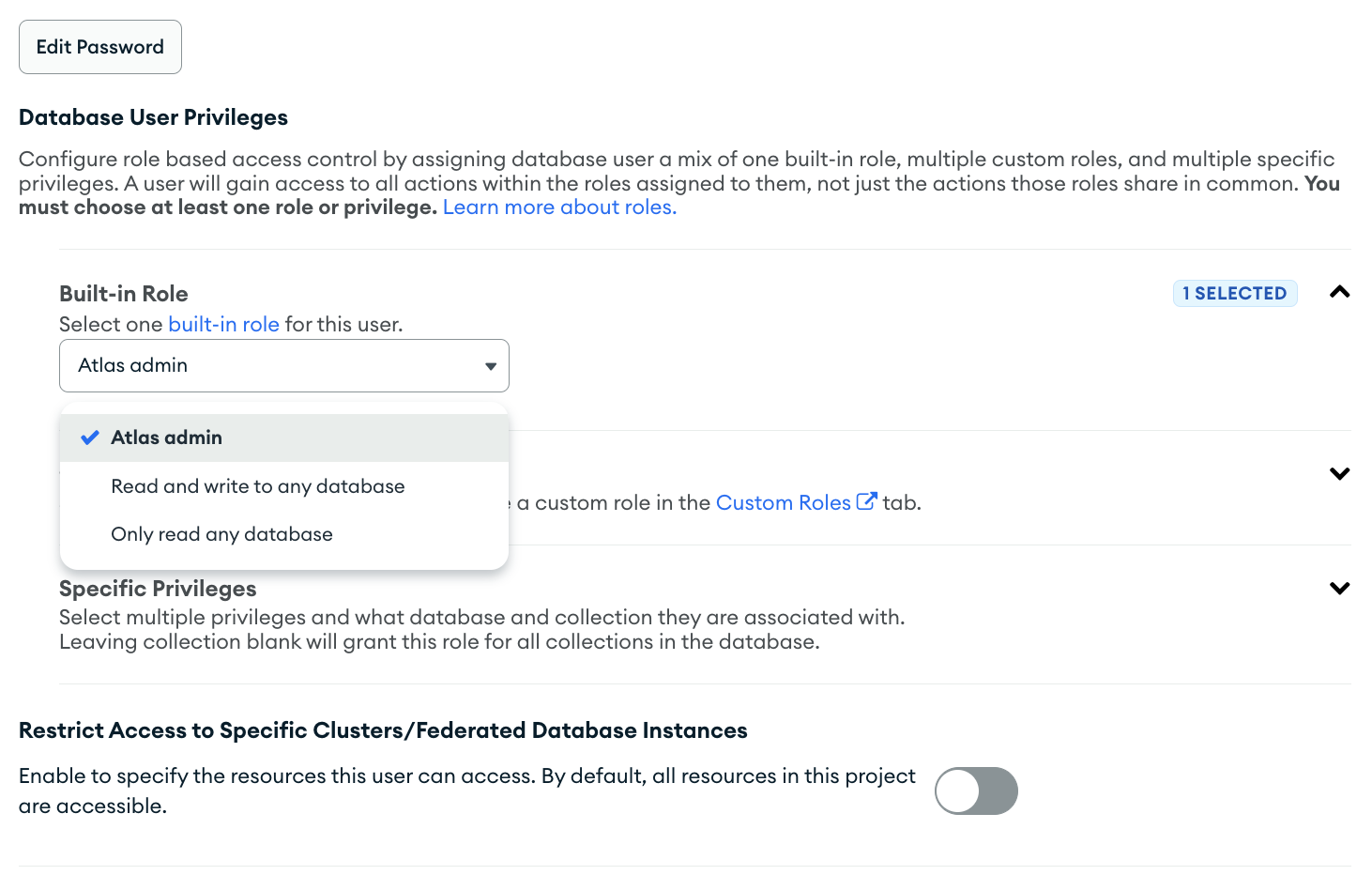
Have you tried setting up using the Atlas UI?
attaching screenshot for reference:
Regards
Aasawari
reading all these comments, i beleive that mongoose is not calling the create collection with that collection option while creating the collection or this option has no effect while creating the collection. I have spent my whole day in digging the reason behind this and not able to figure out the reason behind the same. … I also have a simple schema, which recieves the option as
const message = new mongoose.Schema({
    text: String,
    status: String,
}, {
  collectionOptions: {
    changeStreamPreAndPostImages: { enabled: true }
  }
});
but when i watch the collection for changes with those options fullDocumentBeforeChange: "whenAvailable", I am also not getting the pre image. I have to run the collmod command manually to make that working. I think there is either some issue with how mongoose pass on the collectionOptions to the underlaying mongodb driver, or there is somthing else happeing behind the scene, where the collection creation is not honoring the request to set that option to the collection while creating.
Please help me here. i don’t want to manually run the commnd everytime i need to watch a collection where I am interested in pre-image document.
Regards,
Anant Anand Gupta