➤ 使用右上角的 Select your language(选择语言)下拉菜单,设置以下示例的语言或选择 MongoDB Compass。
本页提供 MongoDB 中插入操作的示例。
您可以使用以下方法在 MongoDB 中插入文档:
您的编程语言的驱动程序。
MongoDB Atlas 用户界面。要了解更多信息,请参阅在 MongoDB Atlas 用户界面中插入文档。
注意
创建集合
如果该集合当前不存在,则插入操作将创建该集合。
在 MongoDB Atlas 用户界面中插入文档
要在 MongoDB Atlas 用户界面中插入文档,请完成以下步骤。要了解在 MongoDB Atlas 用户界面中处理文档的更多信息,请参阅创建、查看、更新和删除文档。
在MongoDB Atlas用户界面中,转到项目的 Clusters 页面。
如果尚未显示,请从导航栏上的 Organizations 菜单中选择包含所需项目的组织。
如果尚未显示,请从导航栏的 Projects 菜单中选择您的项目。
在侧边栏中,单击 Database 标题下的 Clusters。
会显示集群页面。
插入单一文档
db.collection.insertOne() 将单个文档插入集合。
以下示例将新文档插入 inventory 集合。如果文档未指定 _id 字段,MongoDB 会将具有 ObjectId 值的 _id 字段添加到新文档中。请参阅插入行为。
要使用 MongoDB Compass 插入单个文档,请执行以下操作:
导航到要插入文档的集合:
在左侧 MongoDB Compass 导航窗格中,单击包含目标集合的数据库。
在数据库视图中,点击目标集合的名称。
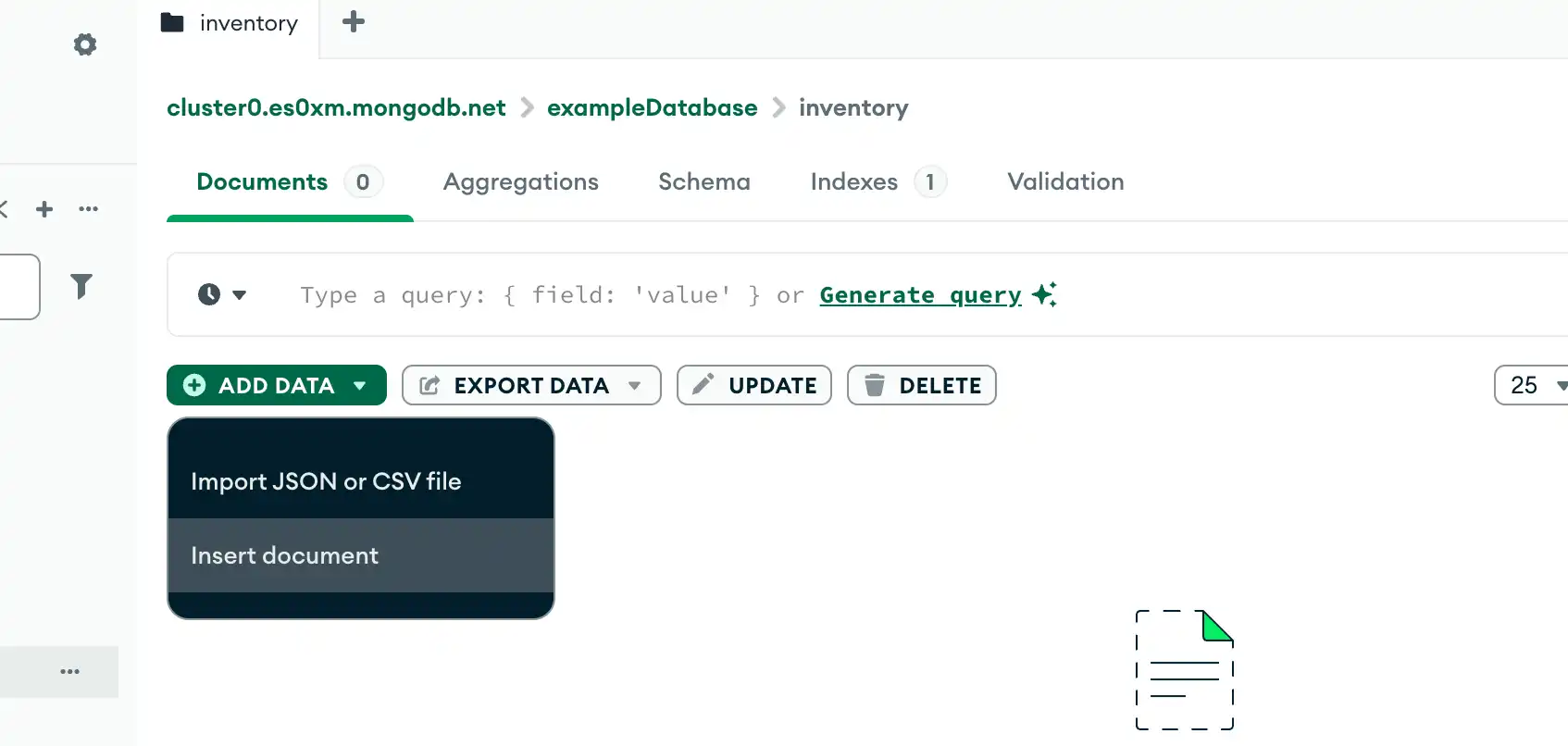
单击 Add Data 按钮,然后单击 Insert document:
![Compass 插入按钮]()
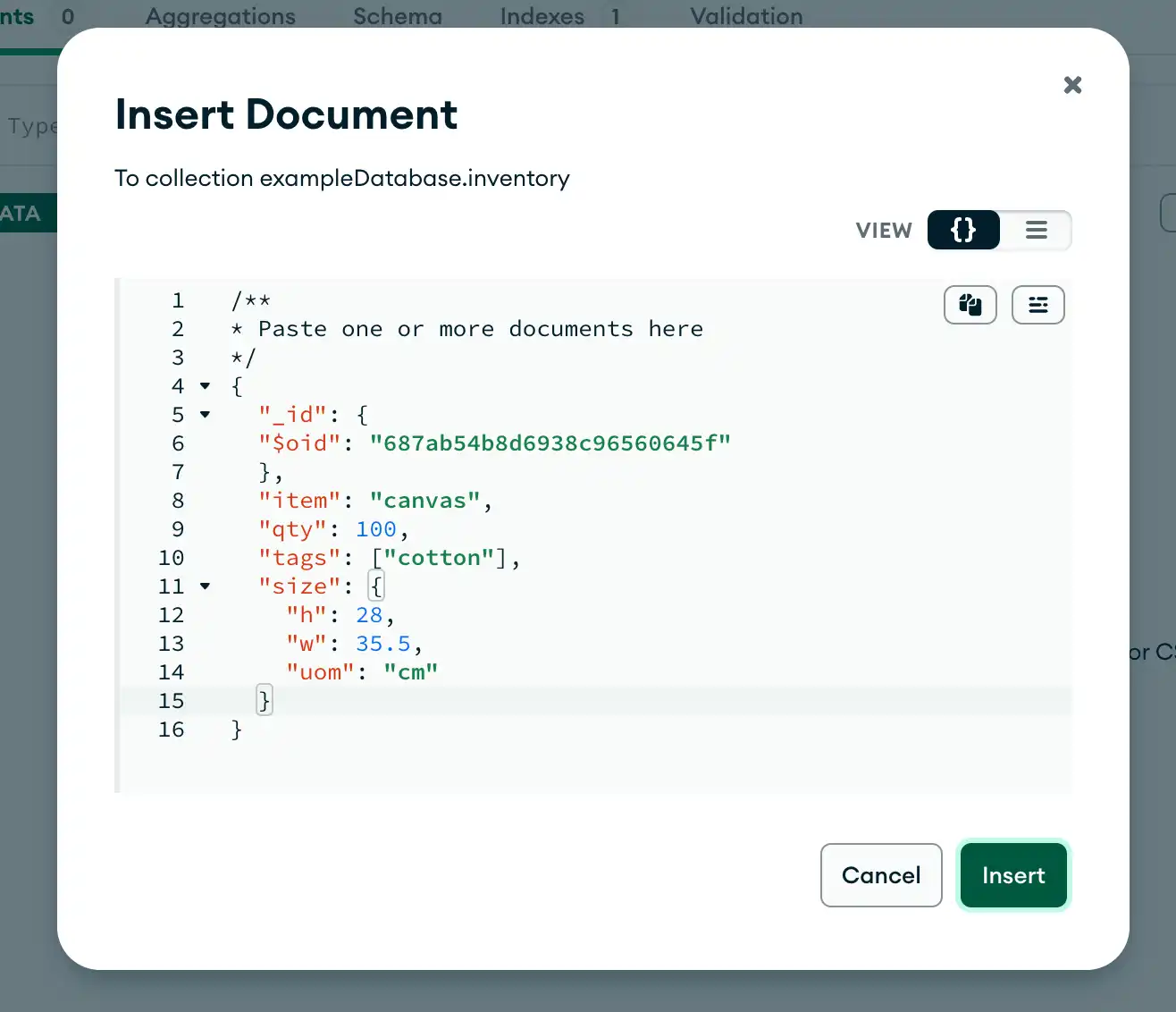
将文档粘贴到您的文档中。例如,您可以将以下代码粘贴到 Compass 中,以将
canvas文档插入到inventory集合中:{ "item": "canvas", "qty": 100, "tags": ["cotton"], "size": { "h": 28, "w": 35.5, "uom": "cm" } } 单击 Insert(连接)。

以下示例将新文档插入 test.inventory 集合中:
以下示例将新文档插入 inventory集合。如果文档未指定 _id字段, C驱动程序会将具有 ObjectId 值的 _id字段添加到新文档中。有关详细信息,请参阅插入行为。
IMongoCollection.InsertOne() 将单个文档插入到集合中。
以下示例将新文档插入 inventory 集合。如果文档未指定 _id 字段,C# 驱动程序会将具有 ObjectId 值的 _id 字段添加到新文档中。请参阅插入行为。
Collection.InsertOne 将单个文档插入到集合中。
以下示例将新文档插入inventory集合。 如果文档未指定_id字段,驱动程序会将具有 ObjectId 值的_id字段添加到新文档中。 请参阅插入行为。
com.mongodb.reactivestreams.client.MongoCollection.insertOne 使用 Java Reactive Streams 驱动程序 将 单个 文档 插入到集合中:
{ item: "canvas", qty: 100, tags: ["cotton"], size: { h: 28, w: 35.5, uom: "cm" } }
以下示例将上述文档插入 inventory 集合。如果文档未指定 _id 字段,驱动程序会将具有 ObjectId 值的 _id 字段添加到新文档中。请参阅插入行为。
com.mongodb。 客户端.MongoCollection.insertOne 将单个文档插入到集合中。
以下示例将新文档插入inventory集合。 如果文档未指定_id字段,驱动程序会将具有 ObjectId 值的_id字段添加到新文档中。 请参阅插入行为。
MongoCollection.insertOne 将单个文档插入到集合中。
以下示例将新文档插入inventory集合。 如果文档未指定_id字段,驱动程序会将具有 ObjectId 值的_id字段添加到新文档中。 请参阅插入行为。
motor.motor_asyncio.AsyncIOMotorCollection.insert_one 将单个文档插入到集合中。
以下示例将新文档插入 inventory 集合。如果文档未指定 _id 字段,Motor 驱动程序会将具有 ObjectId 值的 _id 字段添加到新文档中。请参阅插入行为。
Collection.insertOne() 将单个文档插入到集合中。
以下示例将新文档插入 inventory 集合。如果文档未指定 _id 字段,Node.js 驱动程序会将具有 ObjectId 值的 _id 字段添加到新文档中。请参阅插入行为。
MongoDB\\Collection::insertOne() 将 单个文档插入集合。
以下示例将新文档插入 inventory 集合。如果文档未指定 _id 字段,PHP 驱动程序会将具有 ObjectId 值的 _id 字段添加到新文档中。请参阅插入行为。
pymongo.collection.Collection.insert_one 将单个文档插入到集合中。
以下示例将新文档插入 inventory 集合。如果文档未指定 _id 字段,PyMongo 驱动程序会将具有 ObjectId 值的 _id 字段添加到新文档中。请参阅插入行为。
Mongo:: Collection #insert_one () 将单个文档插入集合。
以下示例将新文档插入 inventory 集合。如果文档未指定 _id 字段,Ruby 驱动程序会将具有 ObjectId 值的 _id 字段添加到新文档中。请参阅插入行为。
db.inventory.insertOne( { item: "canvas", qty: 100, tags: ["cotton"], size: { h: 28, w: 35.5, uom: "cm" } } )

mongoc_collection_t *collection; bson_t *doc; bool r; bson_error_t error; collection = mongoc_database_get_collection (db, "inventory"); doc = BCON_NEW ( "item", BCON_UTF8 ("canvas"), "qty", BCON_INT64 (100), "tags", "[", BCON_UTF8 ("cotton"), "]", "size", "{", "h", BCON_DOUBLE (28), "w", BCON_DOUBLE (35.5), "uom", BCON_UTF8 ("cm"), "}"); r = mongoc_collection_insert_one (collection, doc, NULL, NULL, &error); bson_destroy (doc); if (!r) { MONGOC_ERROR ("%s\n", error.message); goto done; }
var document = new BsonDocument { { "item", "canvas" }, { "qty", 100 }, { "tags", new BsonArray { "cotton" } }, { "size", new BsonDocument { { "h", 28 }, { "w", 35.5 }, { "uom", "cm" } } } }; collection.InsertOne(document);
result, err := coll.InsertOne( context.TODO(), bson.D{ {"item", "canvas"}, {"qty", 100}, {"tags", bson.A{"cotton"}}, {"size", bson.D{ {"h", 28}, {"w", 35.5}, {"uom", "cm"}, }}, })
Document canvas = new Document("item", "canvas") .append("qty", 100) .append("tags", singletonList("cotton")); Document size = new Document("h", 28) .append("w", 35.5) .append("uom", "cm"); canvas.put("size", size); Publisher<Success> insertOnePublisher = collection.insertOne(canvas);
Document canvas = new Document("item", "canvas") .append("qty", 100) .append("tags", singletonList("cotton")); Document size = new Document("h", 28) .append("w", 35.5) .append("uom", "cm"); canvas.put("size", size); collection.insertOne(canvas);
result = collection.insertOne( Document("item", "canvas") .append("qty", 100) .append("tags", listOf("cotton")) .append("size", Document("h", 28) .append("w", 35.5) .append("uom", "cm") )
await db.inventory.insert_one( { "item": "canvas", "qty": 100, "tags": ["cotton"], "size": {"h": 28, "w": 35.5, "uom": "cm"}, } )
await db.collection('inventory').insertOne({ item: 'canvas', qty: 100, tags: ['cotton'], size: { h: 28, w: 35.5, uom: 'cm' } });
$insertOneResult = $db->inventory->insertOne([ 'item' => 'canvas', 'qty' => 100, 'tags' => ['cotton'], 'size' => ['h' => 28, 'w' => 35.5, 'uom' => 'cm'], ]);
db.inventory.insert_one( { "item": "canvas", "qty": 100, "tags": ["cotton"], "size": {"h": 28, "w": 35.5, "uom": "cm"}, } )
client[:inventory].insert_one({ item: 'canvas', qty: 100, tags: [ 'cotton' ], size: { h: 28, w: 35.5, uom: 'cm' } })
collection.insertOne( Document("item" -> "canvas", "qty" -> 100, "tags" -> Seq("cotton"), "size" -> Document("h" -> 28, "w" -> 35.5, "uom" -> "cm")) ).execute()
insertOne() 将返回一个文档,其中包含新插入的文档的 _id 字段值。有关返回文档的示例,请参阅 db.collection.insertOne() 引用。
如果成功, mongoc_collection_insert_one 返回truefalse ;如果参数无效或者服务器或网络错误,则返回 并设置错误。
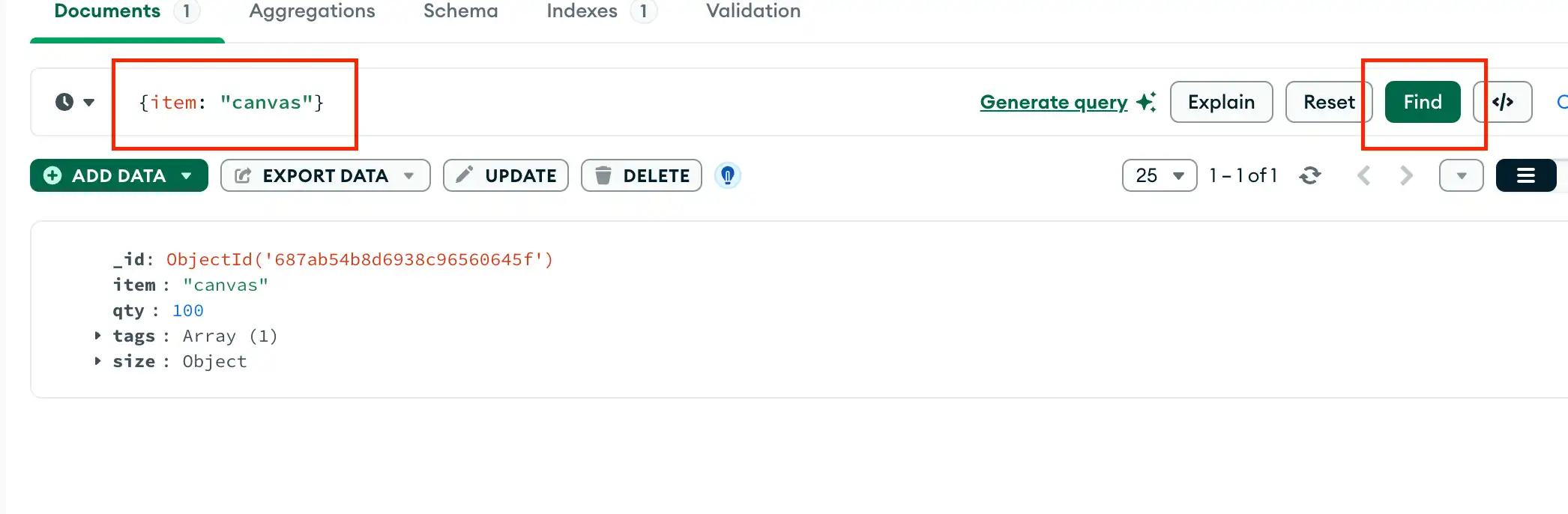
要检索刚刚插入的文档,请查询该集合:
要检索刚刚插入的文档,请查询该集合:
Collection.InsertOne 函数返回 InsertOneResult 的一个实例,其 InsertedID 属性包含新插入文档的 _id。
要检索刚刚插入的文档,请查询该集合:
com.mongodb.reactivestreams。 客户端返回一个 Publisher对象。当订阅者请求数据时,Publisher 会将文档插入到集合中。
要检索刚刚插入的文档,请查询该集合:
com.mongodb。 客户端.MongoCollection.insertOne 返回 InsertOneResult 的实例。您可以通过对结果调用 getInsertedId() 方法来访问权限插入文档的 _id字段。
要检索刚刚插入的文档,请查询该集合:
MongoCollection.insertOne 返回 InsertOneResult 的实例。您可以通过访问结果的 insertedId字段来访问权限插入文档的 _id字段。
要检索刚刚插入的文档,请查询该集合:
insert_one返回 pymongo.results.InsertOneResult 的一个实例,其 inserted_id 字段包含新插入文档的 _id 字段。
要检索刚刚插入的文档,请查询该集合:
insertOne() 返回一个提供 result 的 Promise。result.insertedId Promise 包含新插入文档的 _id。
要检索刚刚插入的文档,请查询该集合:
成功插入后,insertOne() 方法会返回一个 MongoDB\\InsertOneResult 实例,其 getInsertedId() 方法返回新插入文档的 _id。
要检索刚刚插入的文档,请查询该集合:
insert_one返回 pymongo.results.InsertOneResult 的一个实例,其 inserted_id 字段包含新插入文档的 _id 字段。
要检索刚刚插入的文档,请查询该集合:
成功插入后,insert_one () 方法返回 Mongo::Operation::Result 的实例,其 inserted_id 属性包含新插入文档的 _id。
要检索刚刚插入的文档,请查询该集合:
成功插入后,collection.insertOne() 方法会返回一个 collection.insertOne().results(); 实例其 inserted_id 属性包含新插入文档的 _id。
要检索刚刚插入的文档,请查询该集合:
db.inventory.find( { item: "canvas" } )

mongoc_collection_t *collection; bson_t *filter; mongoc_cursor_t *cursor; collection = mongoc_database_get_collection (db, "inventory"); filter = BCON_NEW ("item", BCON_UTF8 ("canvas")); cursor = mongoc_collection_find_with_opts (collection, filter, NULL, NULL);
var filter = Builders<BsonDocument>.Filter.Eq("item", "canvas"); var result = collection.Find(filter).ToList();
cursor, err := coll.Find( context.TODO(), bson.D{{"item", "canvas"}}, )
FindPublisher<Document> findPublisher = collection.find(eq("item", "canvas"));
FindIterable<Document> findIterable = collection.find(eq("item", "canvas"));
val flowInsertOne = collection .find(eq("item", "canvas")) .firstOrNull()
cursor = db.inventory.find({"item": "canvas"})
const cursor = db.collection('inventory').find({ item: 'canvas' });
$cursor = $db->inventory->find(['item' => 'canvas']);
cursor = db.inventory.find({"item": "canvas"})
client[:inventory].find(item: 'canvas')
val observable = collection.find(equal("item", "canvas"))
插入多个文档
db.collection.insertMany() 可以将多个文档插入到一个集合中。将一组文档传递给该方法。
以下示例将三个新文档插入到 inventory 集合中。如果文档未指定 _id 字段,MongoDB 会将具有 ObjectId 值的 _id 字段添加到每个文档中。请参阅插入行为。
有关使用 MongoDB Compass 插入文档的说明,请参阅插入文档。您可以将以下文档粘贴到 Compass 的 Insert Document 对话框中,以将多个 item 文档插入 inventory 集合中:
mongoc_bulk_operation_insert_with_opts 将多个文档插入到一个集合中。您必须将文档的可迭代对象传递给该方法。
以下示例将三个新文档插入 inventory集合。如果文档未指定 _id字段, C驱动程序会将具有 ObjectId 值的 _id字段添加到每个文档中。请参阅插入行为。
IMongoCollection.InsertMany() 可以将多个文档插入到集合中。将可枚举文档集合传递给该方法。
以下示例将三个新文档插入到 inventory 集合中。如果文档未指定 _id 字段,驱动程序会将带有 ObjectId 值的 _id 字段添加到每个文档。请参阅插入行为。
Collection.InsertMany 可以将多个文档插入到一个集合中。
以下示例将三个新文档插入到 inventory 集合中。如果文档未指定 _id 字段,驱动程序会将带有 ObjectId 值的 _id 字段添加到每个文档。请参阅插入行为。
com.mongodb.reactivestreams.client.MongoCollection.html.insertMany 使用Java Reactive Streams 驱动程序插入以下文档:
{ item: "journal", qty: 25, tags: ["blank", "red"], size: { h: 14, w: 21, uom: "cm" } } { item: "mat", qty: 85, tags: ["gray"], size: { h: 27.9, w: 35.5, uom: "cm" } } { item: "mousepad", qty: 25, tags: ["gel", "blue"], size: { h: 19, w: 22.85, uom: "cm" } }
以下示例将三个新文档插入到 inventory 集合中。如果文档未指定 _id 字段,驱动程序会将带有 ObjectId 值的 _id 字段添加到每个文档。请参阅插入行为。
com.mongodb。客户端.MongoCollection.insertMany 可以将多个文档插入到一个集合中。将文档列表传递给该方法。
以下示例将三个新文档插入到 inventory 集合中。如果文档未指定 _id 字段,驱动程序会将带有 ObjectId 值的 _id 字段添加到每个文档。请参阅插入行为。
MongoCollection.insertMany 将多个文档插入到一个集合中。将文档列表作为参数传递给该方法。
以下示例将三个新文档插入 inventory集合。如果文档未指定 _id字段,驱动程序则会向每个文档添加一个 ObjectId 值。请参阅插入行为。
motor.motor_asyncio.AsyncIOMotorCollection.insert_many可以将多个 文档插入到一个集合中。将可迭代的文档传递给该方法。
以下示例将三个新文档插入 inventory 集合。如果文档未指定 _id 字段,PyMongo 驱动程序会将带有 ObjectId 值的 _id 字段添加到每个文档。请参阅插入行为。
Collection.insertMany() 可以在一个集合中插入多个 文档。将文档数组传递给该方法。
以下示例将三个新文档插入 inventory 集合。如果文档未指定 _id 字段,Node.js 驱动程序会将带有 ObjectId 值的 _id 字段添加到每个文档。请参阅 插入行为。
MongoDB\\Collection::insertMany() 可以将多个文档插入到一个集合中。将文档数组传递给该方法。
以下示例将三个新文档插入 inventory 集合。如果文档未指定 _id 字段,PHP 驱动程序会将带有 ObjectId 值的 _id 字段添加到每个文档。请参阅插入行为。
pymongo.collection.Collection.insert_many可以将多个 文档插入到一个集合中。将可迭代的文档传递给该方法。
以下示例将三个新文档插入 inventory 集合。如果文档未指定 _id 字段,PyMongo 驱动程序会将带有 ObjectId 值的 _id 字段添加到每个文档。请参阅插入行为。
Mongo::Collection#insert_many() 可将多个文档插入到集合。将文档数组传递给该方法。
以下示例将三个新文档插入 inventory 集合。如果文档未指定 _id 字段,Ruby 驱动程序会将带有 ObjectId 值的 _id 字段添加到每个文档。请参阅插入行为。
Collection.insertMany() 可以在一个集合中插入多个 文档。
以下示例将三个新文档插入到 inventory 集合中。如果文档未指定 _id 字段,Scala 驱动程序会将带有 ObjectId 值的 _id 字段添加到每个文档中。请参阅插入行为。
db.inventory.insertMany([ { item: "journal", qty: 25, tags: ["blank", "red"], size: { h: 14, w: 21, uom: "cm" } }, { item: "mat", qty: 85, tags: ["gray"], size: { h: 27.9, w: 35.5, uom: "cm" } }, { item: "mousepad", qty: 25, tags: ["gel", "blue"], size: { h: 19, w: 22.85, uom: "cm" } } ])
[ { "item": "canvas", "qty": 100, "size": { "h": 28, "w": 35.5, "uom": "cm" }, "status": "A" }, { "item": "journal", "qty": 25, "size": { "h": 14, "w": 21, "uom": "cm" }, "status": "A" }, { "item": "mat", "qty": 85, "size": { "h": 27.9, "w": 35.5, "uom": "cm" }, "status": "A" }, { "item": "mousepad", "qty": 25, "size": { "h": 19, "w": 22.85, "uom": "cm" }, "status": "P" }, { "item": "notebook", "qty": 50, "size": { "h": 8.5, "w": 11, "uom": "in" }, "status": "P" }, { "item": "paper", "qty": 100, "size": { "h": 8.5, "w": 11, "uom": "in" }, "status": "D" }, { "item": "planner", "qty": 75, "size": { "h": 22.85, "w": 30, "uom": "cm" }, "status": "D" }, { "item": "postcard", "qty": 45, "size": { "h": 10, "w": 15.25, "uom": "cm" }, "status": "A" }, { "item": "sketchbook", "qty": 80, "size": { "h": 14, "w": 21, "uom": "cm" }, "status": "A" }, { "item": "sketch pad", "qty": 95, "size": { "h": 22.85, "w": 30.5, "uom": "cm" }, "status": "A" } ]
mongoc_collection_t *collection; mongoc_bulk_operation_t *bulk; bson_t *doc; bool r; bson_error_t error; bson_t reply; collection = mongoc_database_get_collection (db, "inventory"); bulk = mongoc_collection_create_bulk_operation_with_opts (collection, NULL); doc = BCON_NEW ( "item", BCON_UTF8 ("journal"), "qty", BCON_INT64 (25), "tags", "[", BCON_UTF8 ("blank"), BCON_UTF8 ("red"), "]", "size", "{", "h", BCON_DOUBLE (14), "w", BCON_DOUBLE (21), "uom", BCON_UTF8 ("cm"), "}"); r = mongoc_bulk_operation_insert_with_opts (bulk, doc, NULL, &error); bson_destroy (doc); if (!r) { MONGOC_ERROR ("%s\n", error.message); goto done; } doc = BCON_NEW ( "item", BCON_UTF8 ("mat"), "qty", BCON_INT64 (85), "tags", "[", BCON_UTF8 ("gray"), "]", "size", "{", "h", BCON_DOUBLE (27.9), "w", BCON_DOUBLE (35.5), "uom", BCON_UTF8 ("cm"), "}"); r = mongoc_bulk_operation_insert_with_opts (bulk, doc, NULL, &error); bson_destroy (doc); if (!r) { MONGOC_ERROR ("%s\n", error.message); goto done; } doc = BCON_NEW ( "item", BCON_UTF8 ("mousepad"), "qty", BCON_INT64 (25), "tags", "[", BCON_UTF8 ("gel"), BCON_UTF8 ("blue"), "]", "size", "{", "h", BCON_DOUBLE (19), "w", BCON_DOUBLE (22.85), "uom", BCON_UTF8 ("cm"), "}"); r = mongoc_bulk_operation_insert_with_opts (bulk, doc, NULL, &error); bson_destroy (doc); if (!r) { MONGOC_ERROR ("%s\n", error.message); goto done; } /* "reply" is initialized on success or error */ r = (bool) mongoc_bulk_operation_execute (bulk, &reply, &error); if (!r) { MONGOC_ERROR ("%s\n", error.message); }
var documents = new BsonDocument[] { new BsonDocument { { "item", "journal" }, { "qty", 25 }, { "tags", new BsonArray { "blank", "red" } }, { "size", new BsonDocument { { "h", 14 }, { "w", 21 }, { "uom", "cm"} } } }, new BsonDocument { { "item", "mat" }, { "qty", 85 }, { "tags", new BsonArray { "gray" } }, { "size", new BsonDocument { { "h", 27.9 }, { "w", 35.5 }, { "uom", "cm"} } } }, new BsonDocument { { "item", "mousepad" }, { "qty", 25 }, { "tags", new BsonArray { "gel", "blue" } }, { "size", new BsonDocument { { "h", 19 }, { "w", 22.85 }, { "uom", "cm"} } } }, }; collection.InsertMany(documents);
result, err := coll.InsertMany( context.TODO(), []any{ bson.D{ {"item", "journal"}, {"qty", int32(25)}, {"tags", bson.A{"blank", "red"}}, {"size", bson.D{ {"h", 14}, {"w", 21}, {"uom", "cm"}, }}, }, bson.D{ {"item", "mat"}, {"qty", int32(25)}, {"tags", bson.A{"gray"}}, {"size", bson.D{ {"h", 27.9}, {"w", 35.5}, {"uom", "cm"}, }}, }, bson.D{ {"item", "mousepad"}, {"qty", 25}, {"tags", bson.A{"gel", "blue"}}, {"size", bson.D{ {"h", 19}, {"w", 22.85}, {"uom", "cm"}, }}, }, })
Document journal = new Document("item", "journal") .append("qty", 25) .append("tags", asList("blank", "red")); Document journalSize = new Document("h", 14) .append("w", 21) .append("uom", "cm"); journal.put("size", journalSize); Document mat = new Document("item", "mat") .append("qty", 85) .append("tags", singletonList("gray")); Document matSize = new Document("h", 27.9) .append("w", 35.5) .append("uom", "cm"); mat.put("size", matSize); Document mousePad = new Document("item", "mousePad") .append("qty", 25) .append("tags", asList("gel", "blue")); Document mousePadSize = new Document("h", 19) .append("w", 22.85) .append("uom", "cm"); mousePad.put("size", mousePadSize); Publisher<Success> insertManyPublisher = collection.insertMany(asList(journal, mat, mousePad));
Document journal = new Document("item", "journal") .append("qty", 25) .append("tags", asList("blank", "red")); Document journalSize = new Document("h", 14) .append("w", 21) .append("uom", "cm"); journal.put("size", journalSize); Document mat = new Document("item", "mat") .append("qty", 85) .append("tags", singletonList("gray")); Document matSize = new Document("h", 27.9) .append("w", 35.5) .append("uom", "cm"); mat.put("size", matSize); Document mousePad = new Document("item", "mousePad") .append("qty", 25) .append("tags", asList("gel", "blue")); Document mousePadSize = new Document("h", 19) .append("w", 22.85) .append("uom", "cm"); mousePad.put("size", mousePadSize); collection.insertMany(asList(journal, mat, mousePad));
results = collection.insertMany( listOf( Document("item", "journal") .append("qty", 25) .append("tags", listOf("blank", "red")) .append("size", Document("h", 14) .append("w", 21) .append("uom", "cm") ), Document("item", "mat") .append("qty", 25) .append("tags", listOf("gray")) .append("size", Document("h", 27.9) .append("w", 35.5) .append("uom", "cm") ), Document("item", "mousepad") .append("qty", 25) .append("tags", listOf("gel", "blue")) .append("size", Document("h", 19) .append("w", 22.85) .append("uom", "cm") ) )
await db.inventory.insert_many( [ { "item": "journal", "qty": 25, "tags": ["blank", "red"], "size": {"h": 14, "w": 21, "uom": "cm"}, }, { "item": "mat", "qty": 85, "tags": ["gray"], "size": {"h": 27.9, "w": 35.5, "uom": "cm"}, }, { "item": "mousepad", "qty": 25, "tags": ["gel", "blue"], "size": {"h": 19, "w": 22.85, "uom": "cm"}, }, ] )
await db.collection('inventory').insertMany([ { item: 'journal', qty: 25, tags: ['blank', 'red'], size: { h: 14, w: 21, uom: 'cm' } }, { item: 'mat', qty: 85, tags: ['gray'], size: { h: 27.9, w: 35.5, uom: 'cm' } }, { item: 'mousepad', qty: 25, tags: ['gel', 'blue'], size: { h: 19, w: 22.85, uom: 'cm' } } ]);
$insertManyResult = $db->inventory->insertMany([ [ 'item' => 'journal', 'qty' => 25, 'tags' => ['blank', 'red'], 'size' => ['h' => 14, 'w' => 21, 'uom' => 'cm'], ], [ 'item' => 'mat', 'qty' => 85, 'tags' => ['gray'], 'size' => ['h' => 27.9, 'w' => 35.5, 'uom' => 'cm'], ], [ 'item' => 'mousepad', 'qty' => 25, 'tags' => ['gel', 'blue'], 'size' => ['h' => 19, 'w' => 22.85, 'uom' => 'cm'], ], ]);
db.inventory.insert_many( [ { "item": "journal", "qty": 25, "tags": ["blank", "red"], "size": {"h": 14, "w": 21, "uom": "cm"}, }, { "item": "mat", "qty": 85, "tags": ["gray"], "size": {"h": 27.9, "w": 35.5, "uom": "cm"}, }, { "item": "mousepad", "qty": 25, "tags": ["gel", "blue"], "size": {"h": 19, "w": 22.85, "uom": "cm"}, }, ] )
client[:inventory].insert_many([ { item: 'journal', qty: 25, tags: %w[blank red], size: { h: 14, w: 21, uom: 'cm' } }, { item: 'mat', qty: 85, tags: [ 'gray' ], size: { h: 27.9, w: 35.5, uom: 'cm' } }, { item: 'mousepad', qty: 25, tags: %w[gel blue], size: { h: 19, w: 22.85, uom: 'cm' } } ])
collection.insertMany(Seq( Document("item" -> "journal", "qty" -> 25, "tags" -> Seq("blank", "red"), "size" -> Document("h" -> 14, "w" -> 21, "uom" -> "cm")), Document("item" -> "mat", "qty" -> 85, "tags" -> Seq("gray"), "size" -> Document("h" -> 27.9, "w" -> 35.5, "uom" -> "cm")), Document("item" -> "mousepad", "qty" -> 25, "tags" -> Seq("gel", "blue"), "size" -> Document("h" -> 19, "w" -> 22.85, "uom" -> "cm")) )).execute()
insertMany() 返回一个包含新插入文档的 _id 字段值的文档。有关示例,请参阅参考资料。
要检索插入的文档,请查询集合:
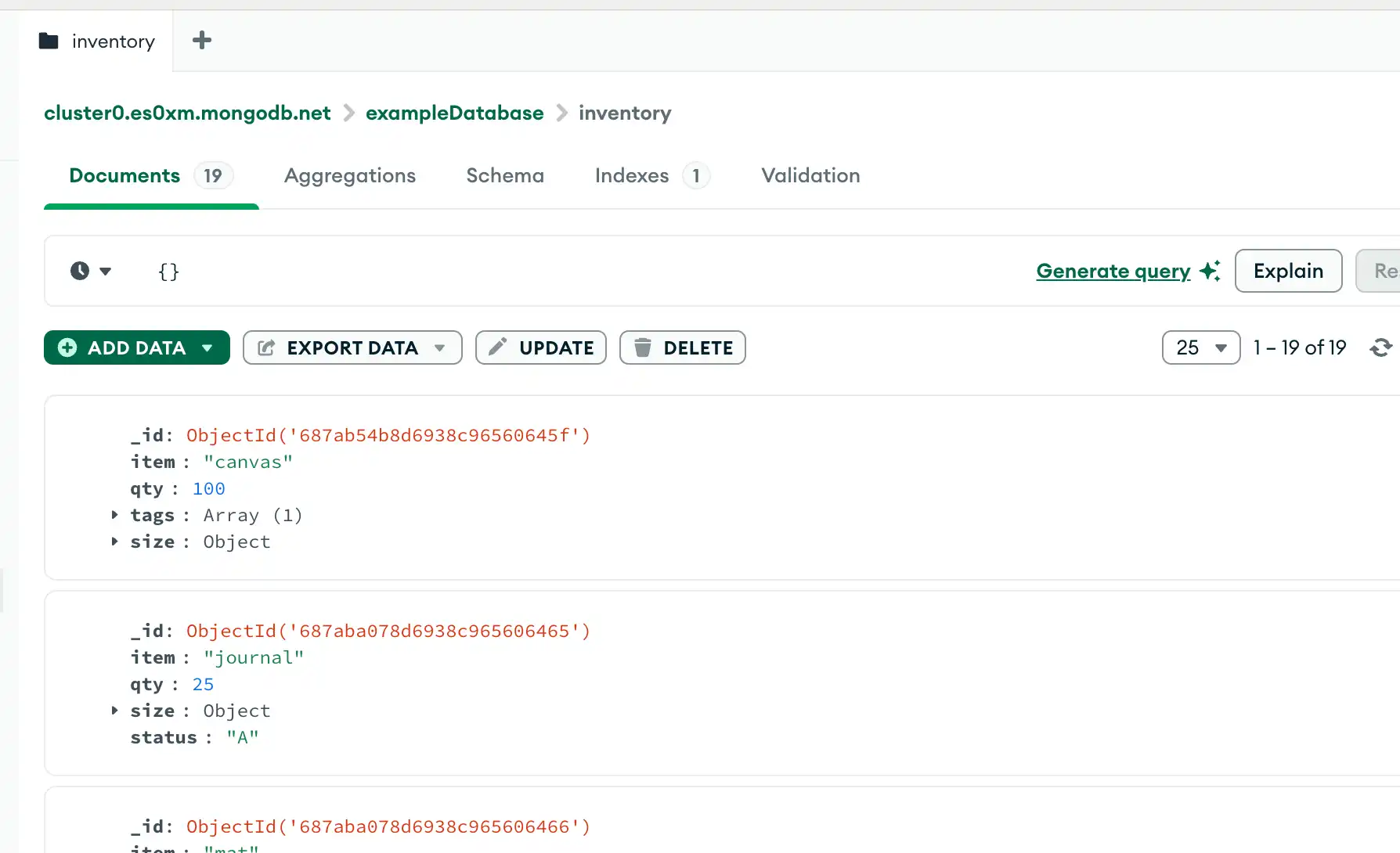
要查看新插入的文档,请在 MongoDB Compass 查询栏中指定过滤器 {},然后单击 Find 查看您的文档。
mongoc_bulk_operation_insert_with_opts 在成功时返回 true ,如果传递的参数无效,则返回 false 。
要检索插入的文档,请使用 mongoc_collection_find_with_opts查询集合:
要检索插入的文档,请查询集合:
要检索插入的文档,请查询集合:
com.mongodb.reactivestreams.client.MongoCollection.html.insertMany返回Publisher对象。当订阅者请求数据时,Publisher 会将文档插入到集合中。
要检索插入的文档,请查询集合:
要检索插入的文档,请查询集合:
MongoCollection.insertMany() 返回一个 InsertManyResult实例。InsertManyResult 的 insertedIds字段包含插入文档的 _id 值。
要检索插入的文档,请查询集合:
insert_many 返回一个 pymongo.results.InsertManyResult实例,其 inserted_ids字段是一个列表,其中包含每个新插入文档的 _id。
要检索插入的文档,请查询集合:
insertMany() 返回一个提供 result 的 Promise。result.insertedIds字段包含一个大量,其中包含每个新插入文档的 _id。
要检索插入的文档,请查询集合:
成功插入后,insertMany() 方法会返回一个 MongoDB\\InsertManyResult 实例,其 getInsertedIds() 方法会返回每个新插入的文档的 _id。
要检索插入的文档,请查询集合:
insert_many 返回一个 pymongo.results.InsertManyResult实例,其 inserted_ids字段是一个列表,其中包含每个新插入文档的 _id。
要检索插入的文档,请查询集合:
成功插入后,insert_many() 方法会返回一个 Mongo::BulkWrite::Result 实例,其 inserted_ids 属性是一个包含每个新插入文档的 _id 的列表。
要检索插入的文档,请查询集合:
插入成功后,insertMany() 方法会返回一个 Observable,其中带有一个类型参数,指示操作何时完成,或带有 com.mongodb.DuplicateKeyException 或 com.mongodb.MongoException。
要检索插入的文档,请查询集合:
db.inventory.find( {} )

mongoc_collection_t *collection; bson_t *filter; mongoc_cursor_t *cursor; collection = mongoc_database_get_collection (db, "inventory"); filter = BCON_NEW (NULL); cursor = mongoc_collection_find_with_opts (collection, filter, NULL, NULL);
var filter = Builders<BsonDocument>.Filter.Empty; var result = collection.Find(filter).ToList();
cursor, err := coll.Find( context.TODO(), bson.D{}, )
FindPublisher<Document> findPublisher = collection.find(new Document());
FindIterable<Document> findIterable = collection.find(new Document());
val flowInsertMany = collection .find(empty())
cursor = db.inventory.find({})
const cursor = db.collection('inventory').find({});
$cursor = $db->inventory->find([]);
cursor = db.inventory.find({})
client[:inventory].find({})
var findObservable = collection.find(Document())
插入行为
创建集合
如果集合当前不存在,则插入操作会创建集合。
_id 字段
在MongoDB中,存储在标准集合中的每个文档都需要一个唯一的_id字段作为主键。如果插入的文档省略了 _id字段,则MongoDB驱动程序会自动为 _id字段生成 ObjectId。
这也适用于通过执行 upsert: true 的更新操作插入的文档。
原子性(Atomicity)
MongoDB 中的所有写入操作在单个文档级别上都是原子性的。有关 MongoDB 和原子性的更多信息,请参阅原子性和事务。
写确认
对于写关注,您可以指定 MongoDB 请求的写操作确认级别。如需了解更多信息,请参阅写关注。