Grove's code example testing infrastructure validates code examples used in MongoDB documentation. Use the pages in this section for detailed instructions on how to:
Set up a local environment
Create example files
Add tests for examples
Run tests locally
Format and snip tested examples for inclusion in documentation
For guidance on writing tests that prove what your example actually teaches, see Writing Meaningful Tests.
Why Test Code Examples
Consider what happens without tested examples:
A writer copies a code snippet into a docs page.
Six months later, a driver release changes a default behavior.
The code now returns different output, or errors entirely.
Nobody notices until a reader files a bug.
Grove surfaces these issues before a reader encounters them. When we bump the driver version in Grove, the test fails, and you know to update the example.
Grove also validates the original example and verifies that the output is what the writer expects. For example, Grove checks that there are no hallucinated or deprecated APIs and no invalid options.
Important
Not all code examples are considered tested. Only examples that you create using Grove are considered tested code examples.
How Grove Tests Work
The following diagram shows how the files you write map to the files that Grove produces:

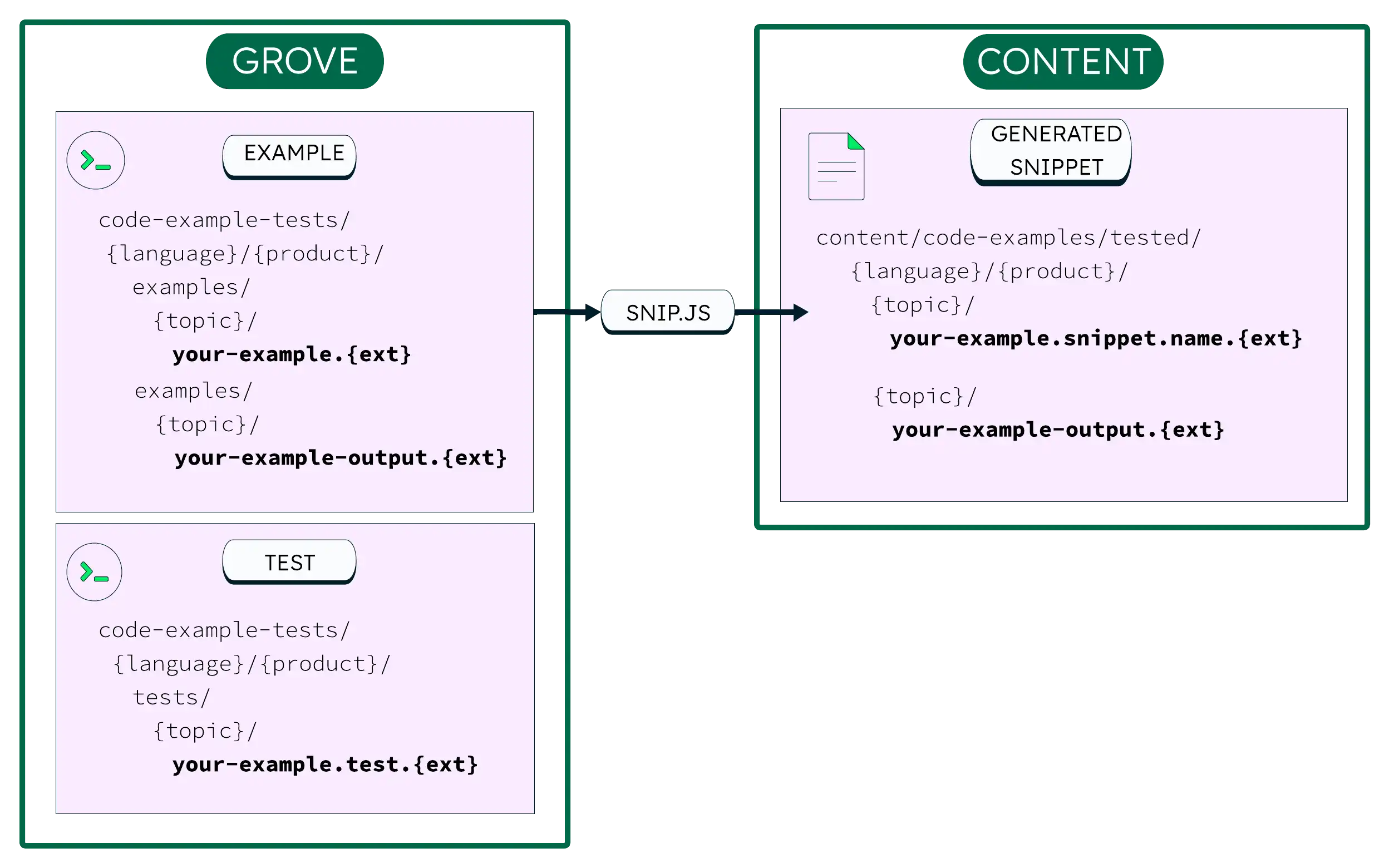
Each code example has three files that serve three roles:
File | Description | Location in Grove |
|---|---|---|
Example file | Code readers see in the docs. |
|
Expected output file | File that the example produces when it runs. |
|
Test file | File that runs the example and verifies the output. |
|
You provide the example file and optional output file.
The test file validates them. The snip.js script
extracts doc-ready snippets from the source files into
content/code-examples/tested/{language}/{driver}/.
Supported MongoDB Products
Grove's code example testing infrastructure currently supports the following MongoDB products:
Drivers
C#/.NET
Go
Java Sync
JavaScript
PyMongo
MongoDB Shell
Each language has its own directory in
code-example-tests/. The Expect API has the same
semantics in every language; only the casing and syntax
change:
Suite | Framework | Expect API Style | Module Style | Run Tests |
|---|---|---|---|---|
JavaScript | Jest |
| ES modules ( |
|
Python | unittest |
| Python imports |
|
Go | go test |
| Go packages |
|
Java | JUnit 5 |
| Maven/Java imports |
|
C# | NUnit 3 |
| .NET/NuGet |
|
mongosh | Jest |
| CommonJS ( |
|
What a Test File Looks Like
The test structure varies by framework, but the following pattern usually applies:
Set up: Connect and prepare any needed state.
Run: Call the example and capture its return value.
Assert: Compare the result to expected output.
Clean up: Revert any database changes.
Select your interface and language for an example test file:
For detailed instructions on adding tests in each language, see Add Tests for Examples. For guidance on writing tests that prove something, see Writing Meaningful Tests.