#Day76 of #100DaysOfCode
Today was a good day, I made some progress in the restaurants. I have to thank these wonderful two people  to help me with the concepts I was stuck at, @Josman_Perez_Exposit who is a gem of a person I worked with in my previous team, helped me understand Cloud functions and triggers and how implementation will work from within the app
  and another one is my friend Oya from Android Community
  who helped me figure out the error with margins.
I made some good progress in Restaurant App. The error in the setting up margins was the linear layout type I used in the XML code. I was using LinearLayoutCompat on which the code was not working. Changing it to LinearLayout and using the same code fixed it.
    private fun setUpUI(location: String) {

        // create the layout params that will be used to define how your
        // button will be displayed
        val params: ViewGroup.MarginLayoutParams= ViewGroup.MarginLayoutParams(
            ViewGroup.MarginLayoutParams.MATCH_PARENT, ViewGroup.MarginLayoutParams.WRAP_CONTENT
        )

        params.setMargins(30,15,30,15) //left, top, right, bottom

        val button = Button(this)
        button.text = location
        button.layoutParams = params
        button.setBackgroundColor(ContextCompat.getColor(this, R.color.colorAccent))

        linearLayout.addView(button)
        button.setOnClickListener{
            openPartition(location)
        }

    }

XML code (New):
    <LinearLayout
        android:id="@+id/linearLayout"
        android:layout_width="match_parent"
        android:layout_height="wrap_content"
        android:orientation="vertical"
        android:gravity="center"/>

XML Code (Old):
    <androidx.appcompat.widget.LinearLayoutCompat
        android:id="@+id/linearLayout"
        android:layout_width="match_parent"
        android:layout_height="wrap_content"
        android:orientation="vertical"
        android:gravity="center"/>
The UI screen now looks like this:
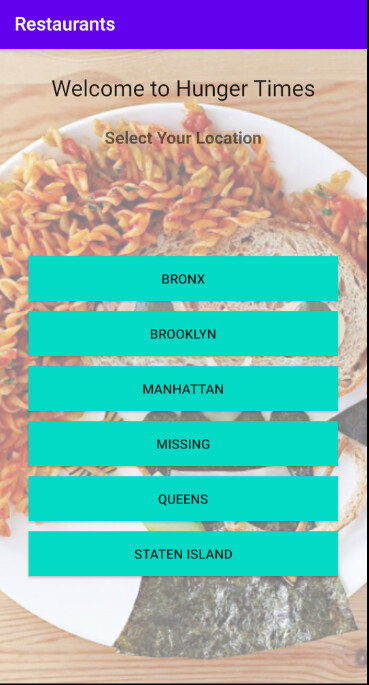
I am not able to fix the Map screen yet, I am getting the correct values of both Longitude and Latitude but the marker is not getting displayed on the Map. It can be one of the below or some unfound error
- gms dependency is not happening,
- map key needs to be added to manifest file
- data-binding needs to be added to whole app or removed from Maps Activity
I also implemented Auth Trigger in the app, This fires a function when a new user sign-ups in the app. This will store the data of the user in the new User collection I added.
The POJO class code for User Collection looks like:
open class User (
    @PrimaryKey var _id: String = "",

    var borough: String? = "",

    var email: String = "",

    var friends: RealmList<Friend> = RealmList(),

    var sharedRestaurantId: RealmList<ObjectId> = RealmList(),

    var name: String = ""
): RealmObject() {}
My Function code looks like the below:
exports = async function addNewUser({user}) {
  console.log(JSON.stringify(user));
  const dbName = context.values.get('db_name');
  const users = context.services.get('mongodb-atlas').db(dbName).collection("User");
  const email = user.data.email == undefined ? "" : user.data.email;
  const name = user.data.name == undefined ? "" : user.data.name;
  console.log(`id: ${user.id} name: ${name}`);

  try{

    users.insertOne({
    _id: user.id,
    borough: `user=${user.id}`,
    email: email,
    name: name,

  });
  } catch(error){
    console.error(error.toString());
    return
  }
};
The borough here is the partition key that is defined for sync. Although it does not make any sense, but at this time, I want to have a functional app before I make any such changes.
My function gives the following error and I don’t know why and how to fix it, I will look at this tomorrow
Error:

db: string required

Logs:
[
  "{\"id\":\"62646c31c76b8cc188123638\",\"type\":\"normal\",\"custom_data\"
:{},\"data\":{\"email\":\"Mary\"},\"identities\"
[{\"id\":\"62646c3175608ee40e94d276\",\"provider_type\":\"local-userpass\"}]}"
]
Until Tomorrow 